
1. Introduction
This manual provides detailed instructions for the installation, operation, and maintenance of your Fanbulous 42-inch Low Profile Ceiling Fan with LED Light and Remote. Please read this manual thoroughly before installation and use to ensure safe and efficient operation. Keep this manual for future reference.

Image 1.1: The Fanbulous 42-inch Low Profile Ceiling Fan, showcasing its design, remote control, and reversible blade options (black and walnut).
2. Safety Information
Always follow basic safety precautions when installing and operating electrical appliances to reduce the risk of fire, electric shock, and personal injury.
- Electrical Safety: Ensure the power supply is disconnected at the circuit breaker before installation or servicing. All wiring must be in accordance with national and local electrical codes.
- Qualified Electrician: If you are unfamiliar with electrical wiring, consult a qualified, licensed electrician.
- Mounting: The ceiling fan must be mounted to a structure capable of supporting the fan's weight (approximately 9.19 lbs).
- Blade Clearance: Ensure there is adequate clearance between the fan blades and any obstacles.
- Water Exposure: This fan is rated for indoor and outdoor use, but avoid direct exposure to water spray or submersion.
- Children and Pets: Keep children and pets away from the fan during operation and installation.
3. Package Contents
Verify that all components are present and undamaged before beginning installation. If any parts are missing or damaged, contact Fanbulous customer service.
- Ceiling Fan Motor Housing
- Fan Blades (5 reversible blades, black/walnut finish)
- LED Light Kit
- Remote Control with Wall Mount Cradle
- AAA Batteries (2 for remote control)
- Mounting Hardware (screws, wire nuts, etc.)
- Instruction Manual
4. Specifications
| Feature | Specification |
|---|---|
| Model | XS42 |
| Size | 42 inches |
| Mounting Type | Flush Mount / Semi Flush Mount |
| Blades | 5 Reversible (Black / Walnut) |
| Motor Type | DC Motor |
| Fan Speeds | 6 |
| Light Type | Integrated LED |
| Color Temperature (CCT) | 3000K (Warm), 4000K (Neutral), 6000K (Cool) |
| Brightness | 1800 Lumens |
| Wattage | 18 Watts (Light) |
| Voltage | 120 Volts (AC) |
| Control Method | Remote Control |
| Timer Settings | 1H, 2H, 4H |
| Noise Level | Approximately 35dB |
| Recommended Room Size | Height: 7-10 ft, Length & Width: 16 ft x 16 ft |
| Item Weight | 9.19 pounds |
| Batteries for Remote | 2 AAA (included) |
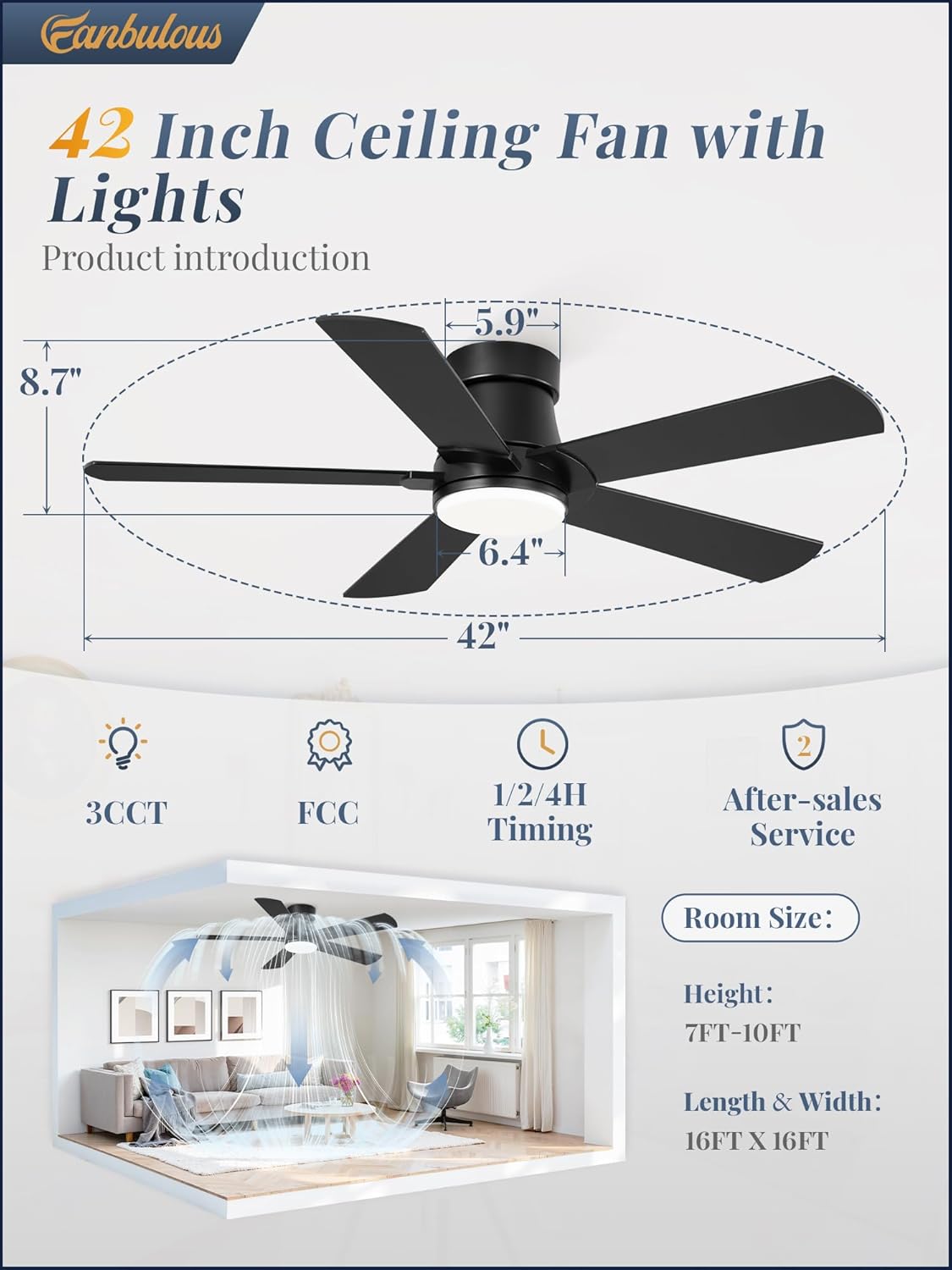
Image 4.1: Fan dimensions and recommended room specifications.
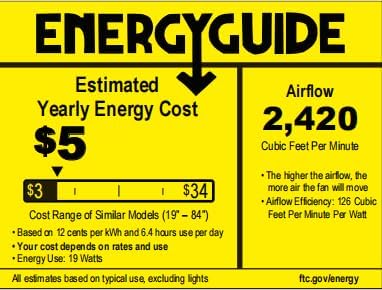
Image 4.2: Energy Guide information for the Fanbulous ceiling fan.
5. Installation
Installation typically takes approximately 30 minutes. Follow these steps carefully. It is recommended to have two people for installation.
- Prepare for Installation: Turn off power at the main circuit breaker. Clear the work area.
- Mounting Bracket: Secure the mounting bracket to the ceiling junction box. Ensure the junction box is securely fastened to the building structure and can support the fan's weight.
- Assemble Blades: Attach the fan blades to the motor housing. The blades are reversible, offering a black finish on one side and a walnut wood finish on the other. Choose the desired finish before assembly.
- Wiring: Connect the fan's electrical wires to the household wiring according to the wiring diagram provided in the full printed manual. Ensure all connections are secure with wire nuts.
- Attach Fan to Bracket: Carefully lift the fan assembly and attach it to the mounting bracket. Secure all screws.
- Install Light Kit: Connect the LED light kit wiring and secure the light kit to the fan housing.
- Restore Power: Once installation is complete and all connections are checked, restore power at the circuit breaker.

Image 5.1: Visual representation of the fan installation process.

Image 5.2: Reversible fan blades, offering both modern black and farmhouse-style walnut wood options.
6. Operation
Your Fanbulous ceiling fan is controlled by the included remote. Ensure the two AAA batteries are correctly installed in the remote control.
6.1 Remote Control Functions

Image 6.1: Remote control layout and functions.
- Light ON/OFF: Press the light button to turn the LED light on or off.
- Fan ON/OFF: Press the fan button to turn the fan on or off.
- Fan Speed (1-6): Use the numbered buttons (1-6) to select your desired fan speed. Speed 1-2 provides a soft wind, 3-4 for natural wind, and 5-6 for cool wind.
- Color Temperature (3CCT): Press the CCT button to cycle through 3000K (Warm Light), 4000K (Neutral Light), and 6000K (Cool Light).
- Timer (1H/2H/4H): Press the timer button to set the fan to automatically turn off after 1, 2, or 4 hours.
- Reverse Function: Press the reverse button to change the direction of the fan blades. This is useful for seasonal air circulation.
6.2 Reversible DC Motor
The fan features a reversible DC motor for year-round comfort.
- Summer Mode (Forward): Blades rotate counter-clockwise, pushing air downwards to create a cooling breeze.
- Winter Mode (Reverse): Blades rotate clockwise, drawing air upwards to circulate warm air trapped near the ceiling, helping to distribute heat more evenly.

Image 6.2: Reversible DC motor operation for summer and winter.
6.3 Memory Function
The fan includes a memory function. After setting your preferred color temperature, wind speed, and fan steering, turn off the fan for at least 10 seconds. The fan will remember these settings and resume them when turned back on.
6.4 Quiet Operation
The Fanbulous ceiling fan operates at approximately 35dB, ensuring a quiet environment suitable for bedrooms, living rooms, and home offices.

Image 6.3: Noise level comparison for quiet operation.
7. Maintenance
Regular maintenance helps ensure the longevity and optimal performance of your ceiling fan.
- Cleaning: Periodically wipe the fan blades and motor housing with a soft, damp cloth. Do not use abrasive cleaners or solvents, as these can damage the finish.
- Blade Tightness: Check blade screws periodically to ensure they are tight. Loose blades can cause wobbling and noise.
- Light Cover: The LED light cover can be gently wiped clean. Ensure the fan is off and cool before cleaning the light.
- No Lubrication: The DC motor is permanently lubricated and does not require additional oiling.
8. Troubleshooting
If you encounter issues with your Fanbulous ceiling fan, refer to the following common problems and solutions:
| Problem | Possible Cause | Solution |
|---|---|---|
| Fan does not start | No power to the fan; Loose wire connections; Remote control issues. | Check circuit breaker. Ensure all wiring connections are secure. Replace remote batteries or re-pair remote if necessary. |
| Light does not work | Loose wire connection to light kit; Faulty LED driver. | Check light kit wiring connections. If issue persists, contact customer service. |
| Fan wobbles | Loose blade screws; Unbalanced blades; Loose mounting bracket. | Ensure all blade screws are tight. Check if blades are bent or damaged. Verify mounting bracket is securely fastened. |
| Remote control not working | Dead batteries; Remote not paired; Obstruction. | Replace AAA batteries. Ensure no obstructions between remote and fan. Refer to the full manual for remote pairing instructions if needed. |
| Fan makes excessive noise | Loose screws; Motor issue; Blades hitting an obstruction. | Check all screws on blades and housing. Ensure no wires are rubbing against moving parts. If motor noise persists, contact customer service. |
9. Warranty and Support
Fanbulous is committed to providing exceptional after-sales service. Your Fanbulous ceiling fan comes with a 2-year warranty from the date of purchase.
Should you have any questions, concerns, or require assistance with your product, please do not hesitate to contact our dedicated customer support team. Refer to the contact information provided in your product packaging or on the official Fanbulous website.