
1. Introduction
Welcome to your new AOGLLATI bed frame. This manual provides comprehensive instructions for the safe assembly, operation, and maintenance of your new bed. Please read carefully before beginning assembly and retain this manual for future reference. Your AOGLLATI bed frame combines modern design with practical features, including integrated LED lighting, a convenient power strip, and ample storage space.
2. Safety Information
- Maximum Load Capacity: Do not load the bed frame with more than 400 kg (approximately 880 lbs). Exceeding this limit may cause structural damage or collapse.
- Sharp Edges: Exercise caution during assembly and handling to avoid injury from potentially sharp edges on metal components.
- Assembly: Follow all assembly instructions carefully and in the correct sequence. Improper assembly can lead to instability, structural failure, or injury. Ensure all fasteners are securely tightened.
- Maintenance: Regularly check all bolts and connections to ensure they remain tight. Loose connections can compromise the bed's stability.
- Electrical Components: Ensure the power strip and LED lighting are connected to a suitable power source. Do not overload the power strip. Keep liquids away from electrical components.
3. Package Contents
Before assembly, verify that all components listed below are present and undamaged. If any parts are missing or damaged, please contact customer support.
- Bed Frame Components (Headboard, Footboard, Side Rails, Support Legs)
- Metal Slat Base
- Integrated Power Strip with USB-A and USB-C Ports
- LED Light Strip and Remote Control
- Hardware Kit (Screws, bolts, washers, Allen key)
- Assembly Manual
4. Setup and Assembly Instructions
Assembly is designed to be straightforward with detailed instructions and clearly numbered parts. It is recommended to assemble the bed frame with two people.
- Unpack Components: Carefully unpack all parts from the carton. Lay them out on a clean, soft surface (e.g., a carpet) to prevent scratches. Identify each part using the provided labels and the parts list in the manual.
- Assemble Headboard: Attach the headboard support legs to the upholstered headboard section. Ensure all bolts are finger-tightened initially.
- Attach Side Rails: Connect the side rails to the headboard and footboard. Use the provided hardware and ensure the connections are secure.
- Install Center Support: Place the center support beam(s) and legs as indicated in the diagram. These are crucial for mattress support and overall stability.
- Place Metal Slats: Position the metal slat base onto the bed frame. Ensure the slats are evenly spaced and secured according to the instructions. The embedded design helps to fix the mattress in place, preventing movement.
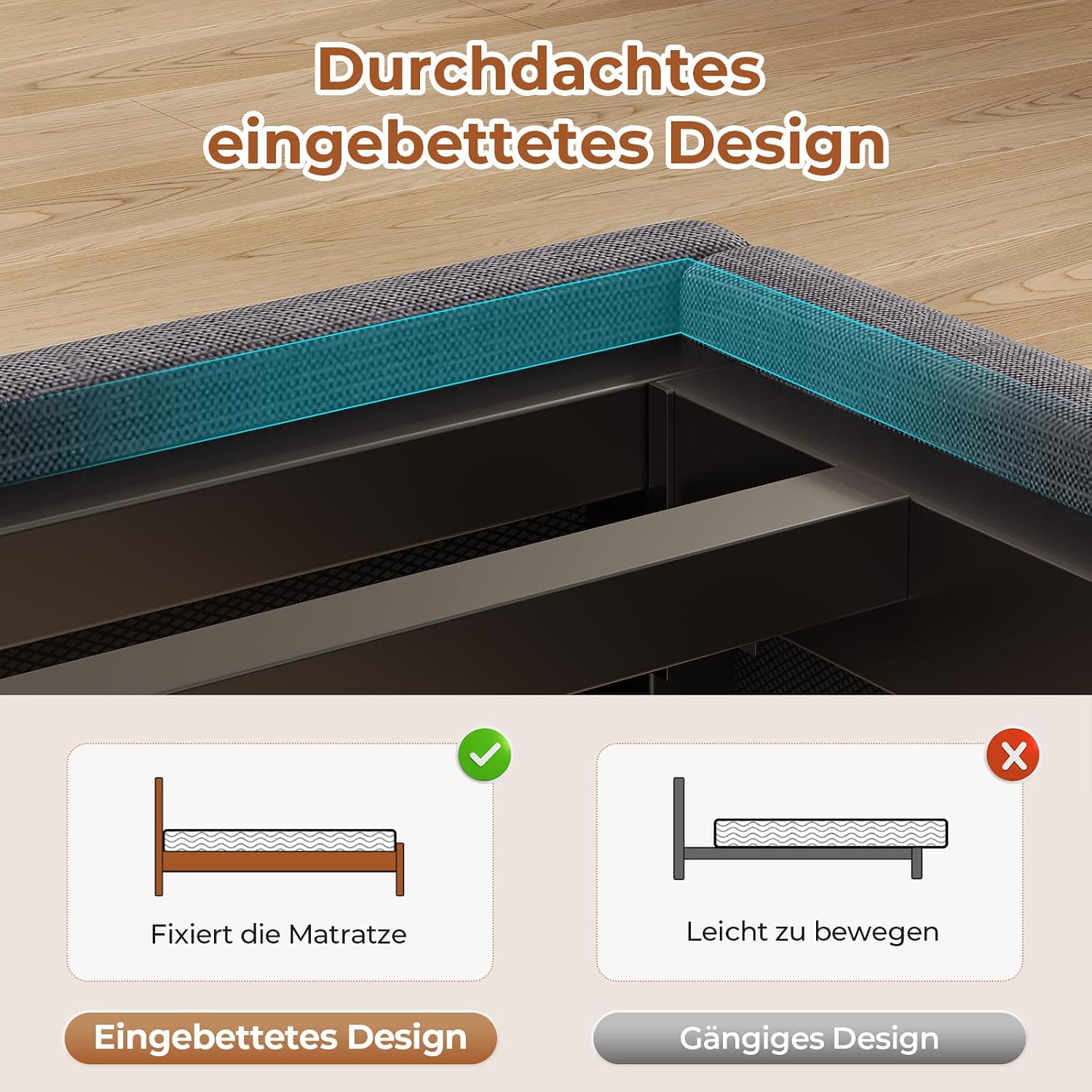
Image: Thoughtful embedded design for mattress stability.
- Tighten All Fasteners: Once all major components are in place, systematically tighten all bolts and screws using the provided Allen key. Do not overtighten.
- Install Power Strip and LED Lights: Integrate the power strip into the designated slot on the headboard. Attach the LED light strip as shown in the manual, typically along the headboard or under the bed frame. Connect the power cables.

Image: Built-in power strip in the headboard.
- Final Check: Ensure the bed frame is stable and all parts are correctly assembled before placing your mattress.
For a visual guide to the bed frame's structure and dimensions, refer to the image below:

Image: Product dimensions and load capacity.
5. Operating Instructions
5.1 LED Lighting System
Your AOGLLATI bed frame features adjustable LED lighting integrated into the headboard, controllable via a remote control or a dedicated smartphone application.
- Power On/Off: Use the designated button on the remote or app to turn the LED lights on or off.
- Color Adjustment: Select from millions of colors to match your mood or room decor. The remote and app provide color selection options.
- Brightness Control: Adjust the brightness level to your preference using the remote or app.
- Dynamic Modes: Explore 29 dynamic lighting modes, including music synchronization, to create various ambient effects.
- Timer Function: Set a timer for the lights to automatically turn off.

Image: Bed frame with RGB LED lighting features.
5.2 Integrated Power Strip
The headboard includes a convenient power strip with multiple charging ports:
- 1x USB-C Port (5V/3A): For fast charging compatible devices.
- 3x USB-A Ports (2x 5V/2A, 1x 5V/3A): For charging various smartphones, tablets, and other USB-powered devices.
- Power Cable: A 1.8m power cable is provided to connect the power strip to a wall outlet.
Simply plug your devices into the available ports for convenient charging while relaxing in bed.
5.3 Headboard Storage
The headboard features two open shelves for storing small items, keeping them within easy reach.
- Ideal for phones, tablets, alarm clocks, books, and decorative items.

Image: Headboard with two open storage surfaces.
6. Maintenance
- Cleaning: Wipe the bed frame surfaces with a soft, damp cloth. Avoid using harsh chemicals or abrasive cleaners, which can damage the finish or fabric.
- Upholstery Care: For the grey linen upholstered parts, spot clean with a mild fabric cleaner if necessary. Test on an inconspicuous area first.
- Fastener Check: Periodically check all bolts and screws to ensure they are tight. Re-tighten if any looseness is detected to maintain structural integrity.
- Under-Bed Area: The 25 cm clearance under the bed allows for easy cleaning and robot vacuum access. Regularly clean this area to prevent dust accumulation.

Image: Under-bed storage and clearance.
7. Troubleshooting
- Squeaking Noises: If the bed frame produces squeaking noises, check all connections, especially where metal parts meet. Ensure all bolts are securely tightened. The bed frame includes anti-vibration EVA strips to reduce friction; ensure these are correctly placed.
- LED Lights Not Working: Check if the power cable for the LED strip is securely plugged into both the bed frame and the wall outlet. Ensure the remote control batteries are not depleted. Try controlling with the smartphone app if the remote is unresponsive.
- USB Ports Not Charging: Verify that the main power cable for the integrated power strip is properly connected to a live wall outlet. Test with different devices and cables to rule out device-specific issues.
- Instability: If the bed feels unstable, re-check all assembly steps, ensuring all components are correctly aligned and all fasteners are fully tightened. Ensure the bed is on a flat, level surface.
8. Specifications
| Feature | Specification |
|---|---|
| Model Number | DE-4103 |
| Size | 160x200CM |
| Product Dimensions (L x W x H) | 2.12 x 1.6 x 1 meters |
| Material | Metal (frame), Wood (headboard shelf), Fabric (Grey Linen Upholstery) |
| Color | Grey |
| Special Features | Upholstered Headboard, USB Charging Station (3x USB-A, 1x USB-C), LED Lighting (Adjustable, Music Sync), Metal Slatted Base, Under-bed Storage Space |
| Recommended Mattress Thickness | 15-20 cm |
| Maximum Load Capacity | 400 Kilograms |
| Under-bed Clearance | 25 cm |
| Assembly Required | Yes |
9. Warranty and Support
AOGLLATI products are manufactured to high-quality standards. While specific warranty details are not provided in this manual, most products come with a standard manufacturer's warranty against defects in materials and workmanship.
For warranty claims, missing parts, assembly assistance, or any other product-related inquiries, please contact AOGLLATI customer support through your original point of purchase or visit the official AOGLLATI website for contact information.
10. Official Product Videos
No official product videos from the seller are available for this model at this time.