
1. Introduction
Thank you for choosing the Philips Solar Outdoor Light with Motion Sensor. This manual provides essential information for the safe and efficient operation of your new solar light. Please read these instructions carefully before installation and use, and retain them for future reference.
This solar light is designed for outdoor use, providing illumination with its 302 LEDs and 1200 lumens brightness. It features a motion sensor and three adjustable lighting modes, making it suitable for various outdoor applications such as gardens, courtyards, garages, paths, and front doors. The unit is IP65 rated for weather resistance and includes an updated solar module with a high-capacity 1800mAh battery.

Image 1: The Philips Solar Outdoor Light with Motion Sensor, showing the main unit with its three adjustable LED heads, solar panel, and motion sensor, alongside its product packaging.
2. Safety Information
- Ensure the product is installed in a location that receives direct sunlight for optimal charging.
- Do not attempt to disassemble or modify the product. This may void the warranty and pose safety risks.
- Keep the solar panel clean from dirt, snow, or debris to ensure efficient charging.
- Avoid installing the light near heat sources or flammable materials.
- This product is designed for outdoor use and is IP65 waterproof. However, avoid submerging it in water.
- Handle the product with care during installation to prevent damage.
3. Package Contents
Before installation, please verify that all components are present in the package:
- Philips Solar Outdoor Light Unit (1x)
- Mounting Accessories (screws, wall plugs)
- Instruction Manual
- LED Lens

Image 2: An illustration demonstrating the simple installation process of the Philips Solar Outdoor Light, including its dimensions (26.7 cm width, 12.5 cm depth, 12.4 cm height) and showing the mounting bracket, screws, and wall plugs included in the package.
4. Setup and Installation
The Philips Solar Outdoor Light is designed for easy, wire-free installation. No electrical wiring is required.
- Choose a Location: Select an outdoor location where the solar panel can receive at least 6-8 hours of direct sunlight daily for optimal charging. Avoid shaded areas.
- Mark Drilling Points: Use the mounting bracket as a template to mark the drilling points on the wall or desired surface.
- Drill Holes: Drill holes at the marked points. Insert the wall plugs if installing on masonry.
- Mount the Bracket: Secure the mounting bracket to the surface using the provided screws.
- Attach the Light: Slide or attach the solar light unit onto the mounted bracket. Ensure it is securely fastened.
- Adjust Light Heads: The three LED heads are adjustable by 130°. Angle them to cover your desired illumination area.
- Adjust Motion Sensor: The motion sensor has a 180° adjustable angle. Position it to cover the area where motion detection is desired.
The product is pre-assembled and can be installed directly from the packaging.
5. Operating Instructions
The Philips Solar Outdoor Light features a high-sensitivity PIR motion sensor with a detection range of up to 15 meters and a 180° detection angle. It offers three distinct lighting modes:

Image 3: A visual representation of the three operating modes: Sensor Mode (off until motion, then 100% brightness), Dim Mode (10% continuous brightness), and Dim+Sensor Mode (3% continuous brightness, then 100% on motion).

Image 4: An illustration showing the sensitive motion sensor with a 180° detection angle and a maximum detection range of 15 meters, demonstrating its coverage area.
Selecting Operating Modes:
The light typically has a button to cycle through the modes. Press the button to switch between the following:
- Sensor Mode: The light remains off (0% brightness) until motion is detected. Upon detection, it illuminates at 100% brightness (1200 lumens) for approximately 25 seconds, then turns off again.
- Dim Mode: The light stays continuously on at 10% brightness (120 lumens) for 8-10 hours after dark, regardless of motion.
- Dim + Sensor Mode: The light stays continuously on at 3% brightness (36 lumens) after dark. When motion is detected, it switches to 100% brightness (1200 lumens) for approximately 25 seconds, then returns to 3% brightness.
The light will automatically turn off during the day to charge the battery via the solar panel.
6. Maintenance
Regular maintenance ensures optimal performance and longevity of your solar light.
- Clean the Solar Panel: Periodically wipe the solar panel with a soft, damp cloth to remove dust, dirt, and debris. A clean panel ensures maximum sunlight absorption and charging efficiency.
- Check for Obstructions: Ensure no new obstructions (e.g., growing branches, new structures) are blocking sunlight from reaching the solar panel.
- Inspect for Damage: Occasionally check the light unit for any physical damage. The IP65 rating provides protection against weather, but extreme conditions can cause wear.
7. Troubleshooting
If your Philips Solar Outdoor Light is not functioning as expected, refer to the following common issues and solutions:
| Problem | Possible Cause | Solution |
|---|---|---|
| Light does not turn on at night. | Insufficient solar charge. | Ensure the solar panel is in direct sunlight for 6-8 hours daily. Clean the solar panel. |
| Light is dim or only stays on for a short time. | Low battery charge. | Allow the light to charge for 1-2 full sunny days. Check for obstructions blocking sunlight. |
| Motion sensor is not detecting movement. | Sensor obstructed or incorrectly aimed. | Clear any obstructions in front of the sensor. Adjust the sensor angle to cover the desired area. Ensure the light is in a motion-activated mode. |
| Light stays on constantly during the day. | Light sensor malfunction or insufficient darkness. | Ensure the solar panel is not covered or in a constantly dark area. If the problem persists, contact customer support. |
8. Specifications
Detailed technical specifications for the Philips Solar Outdoor Light (Model 929004621382):
- Brand: Philips
- Model Number: 929004621382
- Dimensions: 26.7 x 13.9 x 12.5 cm
- Weight: 470 grams
- Material: Plastic
- Color: Black
- Number of LEDs: 302
- Luminous Flux: 1200 lumens
- Color Temperature: 7000 Kelvin (Cool White)
- Power Source: Solar Powered
- Battery: 1x Non-standard battery (1800mAh, included)
- Motion Sensor Detection Range: Up to 15 meters
- Motion Sensor Detection Angle: 180°
- Light Head Adjustment: 130°
- Ingress Protection (IP) Rating: IP65 (Waterproof, Dustproof)
- Additional Features: Rustproof, Energy Saving, Foldable (adjustable heads)
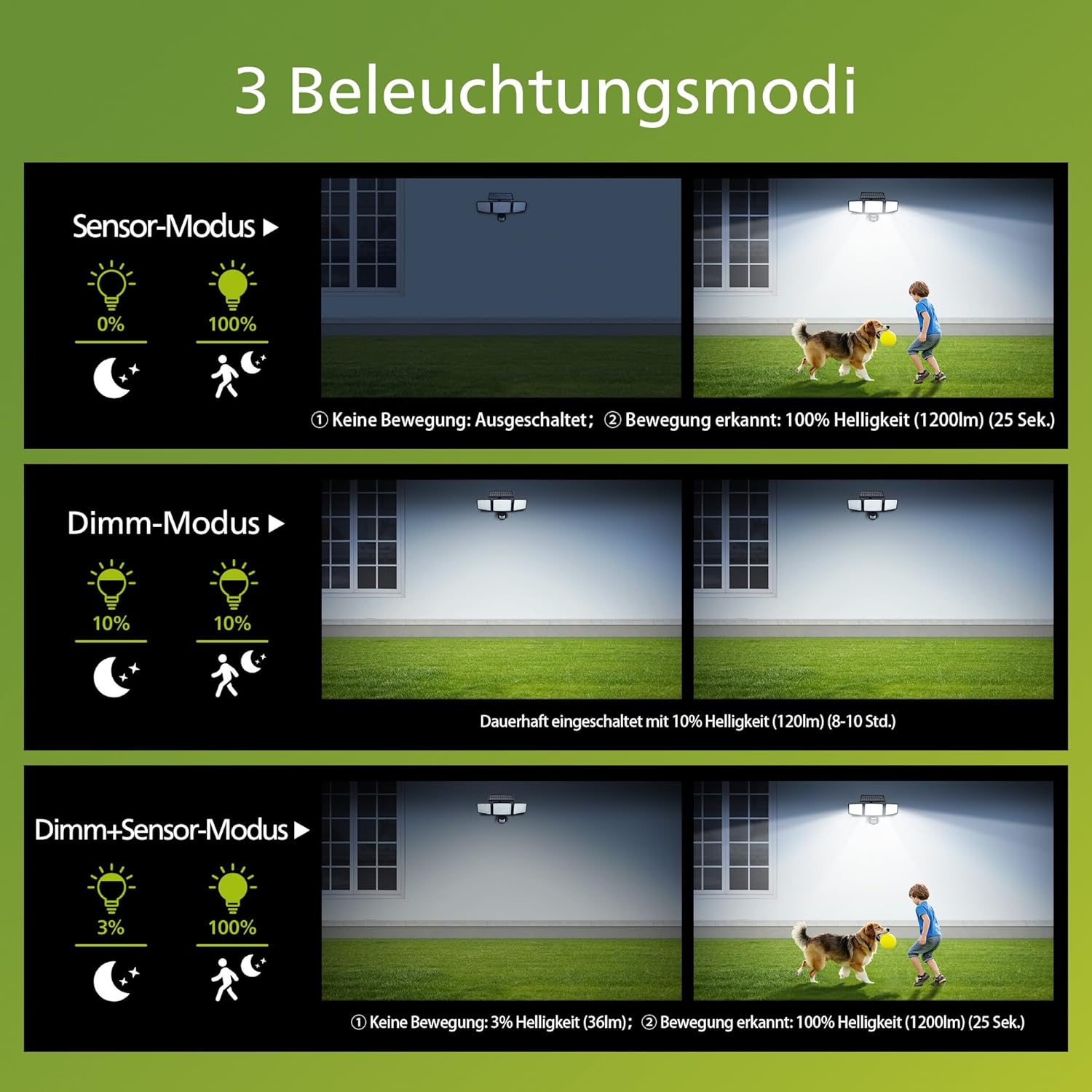
Image 5: An overview of key features including the high-quality solar module, integrated motion sensor, absence of wiring, long-lasting brightness, weather resistance, and corrosion resistance.

Image 6: Close-up view of the Philips Solar Outdoor Light highlighting its high-quality solar module and the 1800mAh high-capacity battery, indicating long operational duration of 8-10 hours.
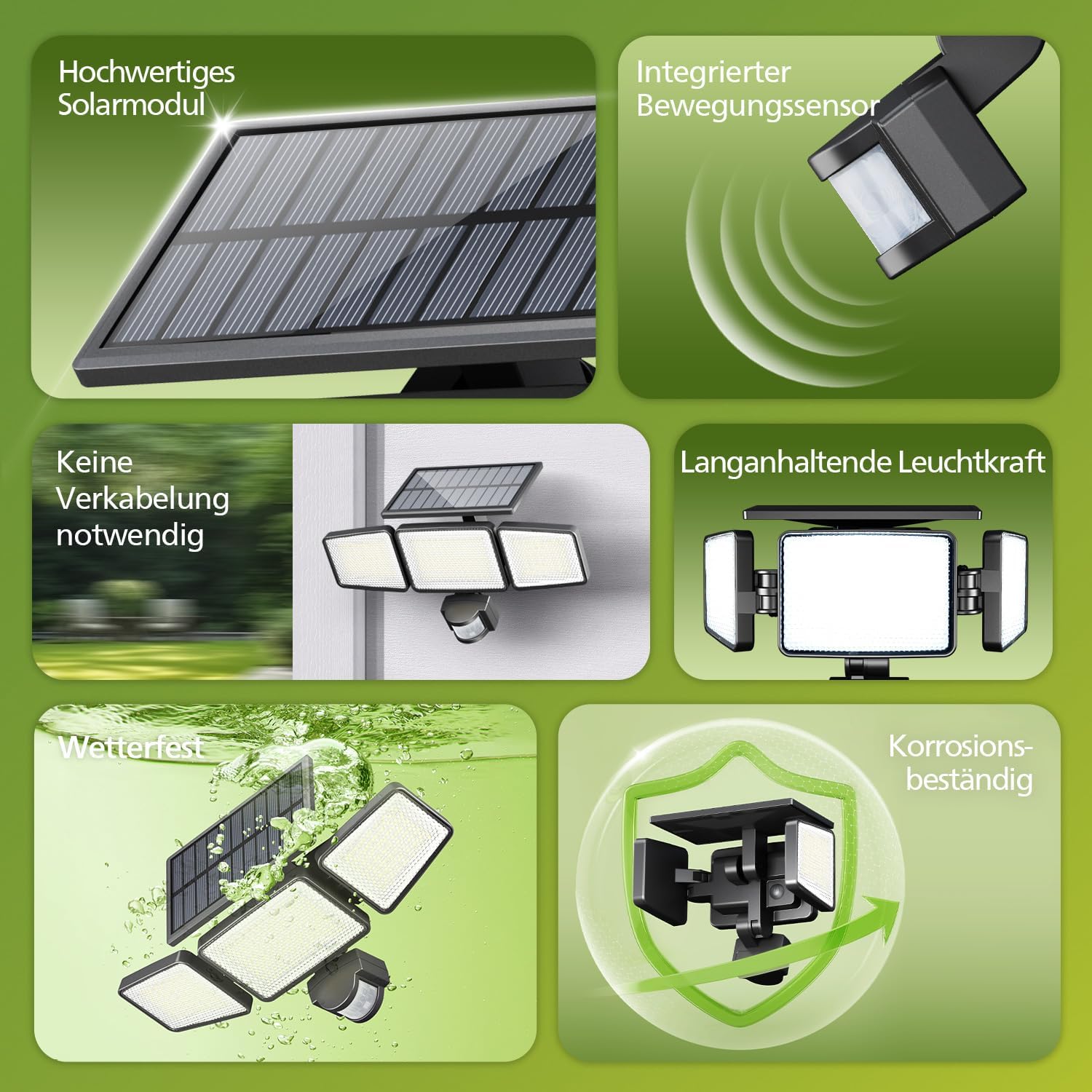
Image 7: A comparison table showcasing the superior features of the Philips Solar Security Light, including 302 LEDs, 1200 lumens brightness, 180° detection angle, 15m detection range, 20m illumination range, and an adjustable 180° sensor angle, compared to other brands.
9. Warranty and Support
For warranty information and customer support, please refer to the documentation provided with your purchase or visit the official Philips website. If you encounter any issues not covered in this manual, please contact Philips customer service for assistance.