
SVBONY SVGo
SVBONY SVGo Action Camera User Manual
Model: SVGo
1. Introduction
Thank you for choosing the SVBONY SVGo Action Camera. This manual provides essential information for setting up, operating, maintaining, and troubleshooting your new camera. Please read this manual thoroughly before using the product to ensure proper operation and to maximize its performance and lifespan. Keep this manual for future reference.

Figure 1.1: Front view of the SVBONY SVGo Action Camera, showcasing its dual lenses and front screen.
2. Product Overview and Components
The SVBONY SVGo is a versatile 4K action camera designed for various shooting conditions, including low-light environments and underwater use. It features a dual-lens system, dual IPS screens, and 6-axis electronic image stabilization (EIS).
2.1. Package Contents
Verify that all items listed below are included in your package:
- User Manual (this document)
- Dual-lens sports camera (SVBONY SVGo) x1
- External battery x1
- Rabbit cage (one large and one small) x2
- Waterproof case x1
- Cycling stand x1
- Adapter stand x4
- Base spare film x2
- Universal adapter x2
- Noise reduction sponge x1
- Cleaning cloth x1
- Data cable x1
- Battery handle x1
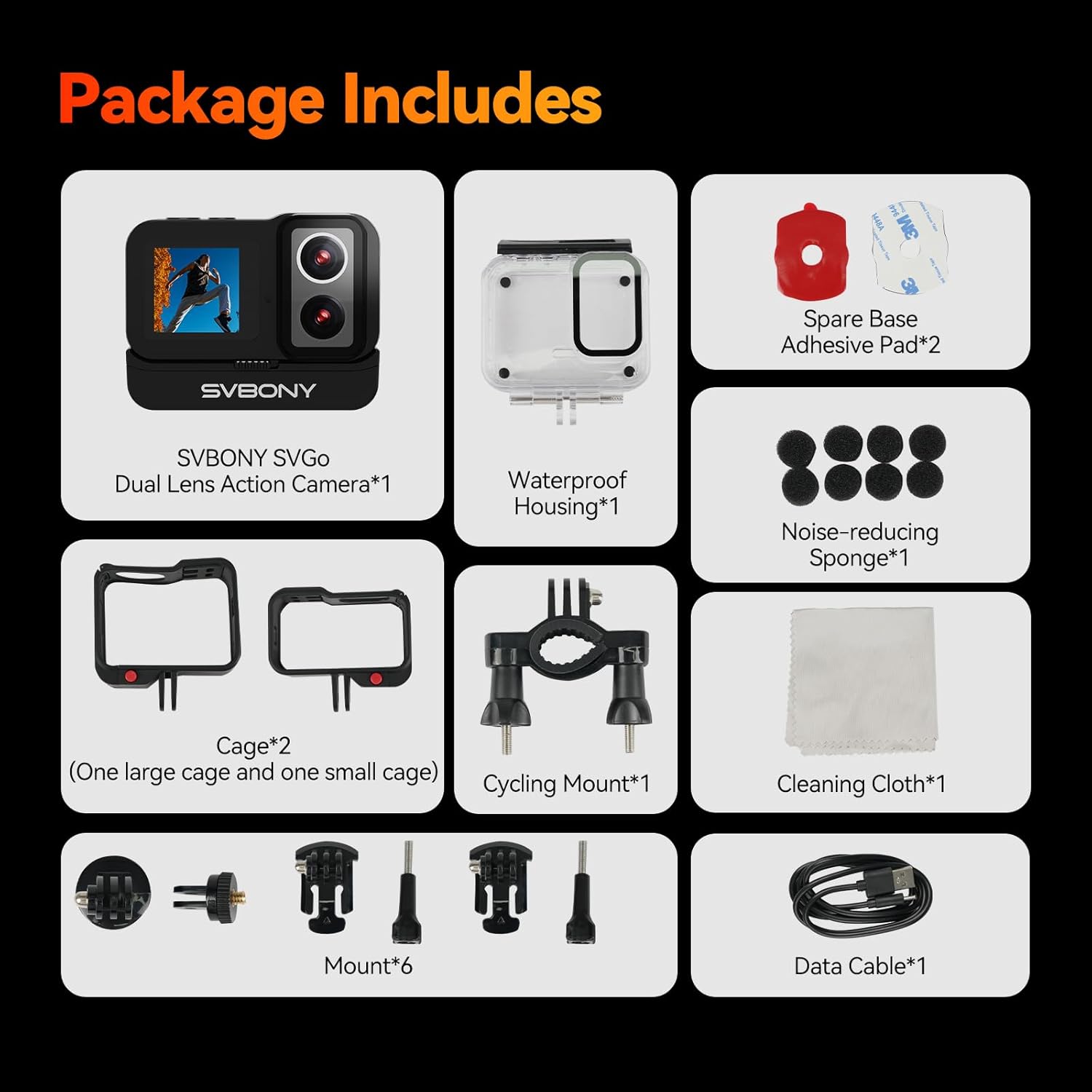
Figure 2.1: All components included in the SVBONY SVGo Action Camera retail package.
2.2. Camera Features
- Dual-Lens System: Equipped with a high-definition lens for daytime and a dedicated night lens for brighter, clearer images in low-light conditions.
- Dual Color Screens: Features a 2.29-inch HD touchscreen for operation and a 1.3-inch front selfie screen for convenient self-recording.
- 4K/30fps High Definition: Supports ultra-HD video recording at 4K resolution and 30 frames per second.
- Extended Battery Life: Includes a built-in 800mAh battery and a 1050mAh external battery, providing approximately 2 hours of 4K30fps recording when both are used.
- 6-Axis EIS: Advanced Electronic Image Stabilization reduces blurring and ghosting caused by camera movement.
- 145° Wide-Angle: Captures a broad perspective, expanding the field of view.
- 30-Meter Waterproof: With the standard waterproof case, the camera has an IPX8 rating, allowing dives up to 30 meters.
- Multiple Application Functions: Includes Motion Detection, Slow Motion, Time-lapse, Pre-recording, Continuous Shooting, Quick Shot, and Zoom.
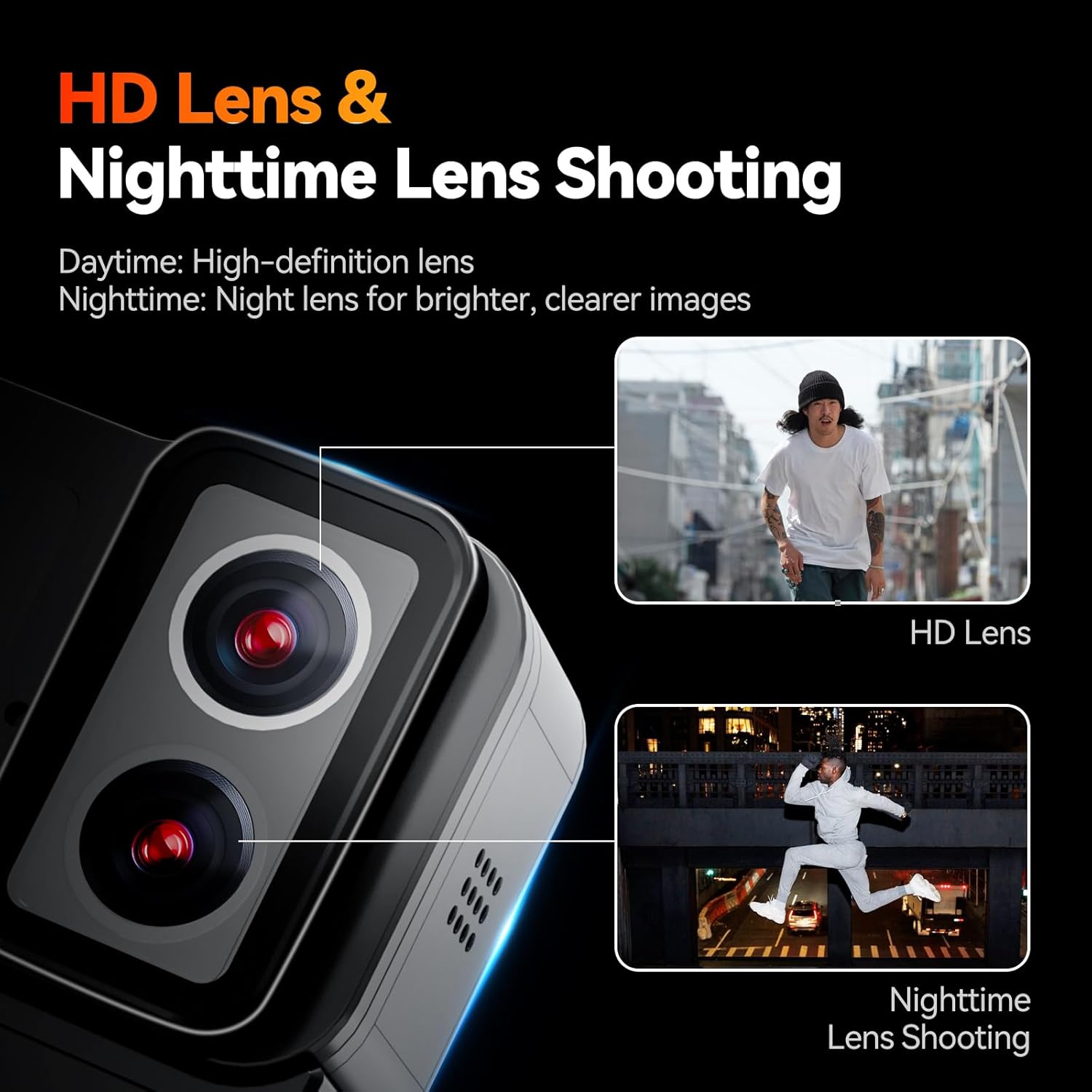
Figure 2.2: The camera's dual-lens system for optimized day and night shooting.

Figure 2.3: The camera's dual screen setup for versatile viewing and control.
3. Setup
3.1. Charging the Battery
The SVBONY SVGo comes with a built-in 800mAh battery and an additional 1050mAh external battery. For optimal performance, fully charge both batteries before first use.
- Connect the provided data cable to the camera's charging port.
- Connect the other end of the data cable to a USB power adapter (not included) or a computer's USB port.
- The charging indicator light will illuminate. It will turn off or change color once charging is complete.
- To charge the external battery, attach it to the camera, and charge the unit as a whole.

Figure 3.1: Battery components and their combined capacity for extended recording.
3.2. Inserting a MicroSD Card
The camera supports MicroSD cards up to 512GB. A high-speed card (Class 10 or UHS-I/UHS-3 recommended) is necessary for 4K recording.
- Locate the MicroSD card slot on the camera.
- Insert the MicroSD card with the gold contacts facing down until it clicks into place.
- To remove, gently push the card in until it springs out.
3.3. Using the Waterproof Case
The SVBONY SVGo is not waterproof without its dedicated waterproof case. Ensure the camera is securely placed inside the case and the latch is properly sealed before any water exposure.
- Open the waterproof case latch and gently place the camera inside, ensuring it fits snugly.
- Close the latch firmly until you hear a click.
- Before first use in water, perform a leak test by placing the empty case in water for 30 minutes.

Figure 3.2: The camera inside its waterproof case, ready for underwater use.
4. Operating Instructions
4.1. Power On/Off
- To Power On: Press and hold the Power/Mode button for a few seconds until the screen illuminates.
- To Power Off: Press and hold the Power/Mode button again until the screen turns off.
4.2. Switching Screens
The camera features a rear HD touchscreen and a front selfie screen.
- To switch between the front and rear screens, hold the top mode button (often marked with 'M').
4.3. Recording Videos and Taking Photos
- Video Mode: From the main screen, select the video icon. Press the Shutter/Record button to start recording. Press again to stop.
- Photo Mode: From the main screen, select the photo icon. Press the Shutter/Record button to take a photo.
4.4. Adjusting Resolution and Frame Rate
The camera offers various resolutions and frame rates to suit your needs:
- 4K (3840*2160): 24/25/30 FPS for ultra-HD quality.
- 2K (2560*1440): 60/50/30/25/24 FPS for balanced quality and speed.
- 1080P (1920*1080): 120/100/60/50/30/25/24 FPS for slow-motion beauty.
- 720P (1280*720): 120/100/60/50/30/25/24 FPS for smooth movement.
Access these settings through the camera's menu on the touchscreen.
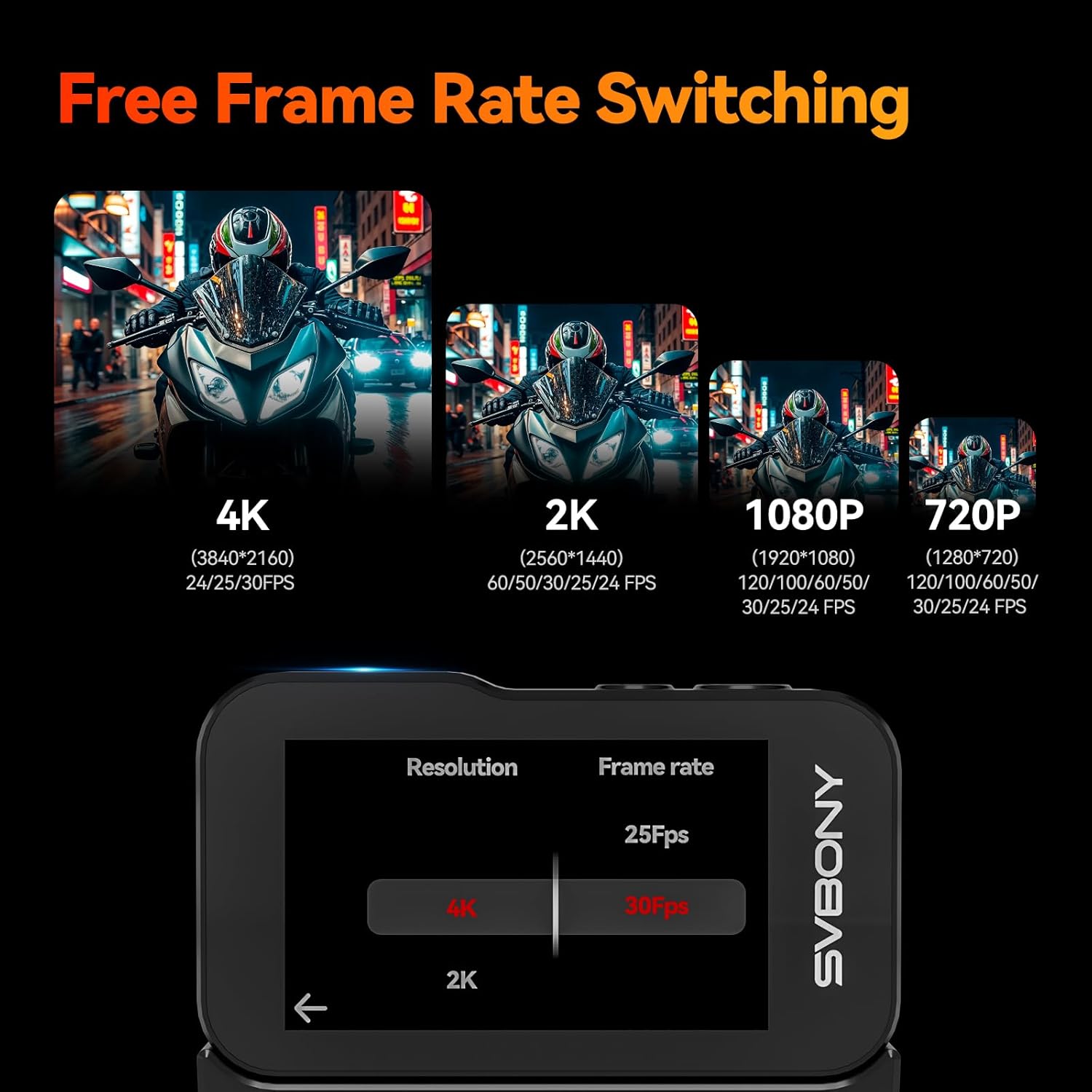
Figure 4.1: Screen interface for resolution and frame rate selection.
4.5. Special Features
The SVGo camera includes several advanced shooting modes:
- Motion Detection: Starts recording automatically when motion is detected.
- Slow Motion: Records at high frame rates for smooth slow-motion playback.
- Time-lapse: Captures a series of photos at set intervals to create a time-lapse video.
- Pre-recording: Captures footage before you press the record button, ensuring you don't miss a moment.
- Continuous Shooting: Takes multiple photos in quick succession.
- Quick Shot: Allows for rapid photo capture.
- Zoom: Digitally zoom in on your subject.
- 6-Axis EIS: Automatically stabilizes footage to reduce shake and blur.
- Fisheye Correction: Reduces or eliminates distortion effects common with wide-angle lenses, making the image closer to a standard perspective.
These features can be accessed and configured through the camera's settings menu.

Figure 4.2: Overview of rich application features.

Figure 4.3: Demonstration of 6-Axis EIS effectiveness.

Figure 4.4: Fisheye Correction in action.
5. Maintenance
5.1. Cleaning the Camera
- Use the provided cleaning cloth or a soft, lint-free cloth to wipe the camera body and lenses.
- For stubborn smudges on lenses, use a specialized lens cleaning solution.
- Do not use harsh chemicals or abrasive materials.
5.2. Battery Care
- Store batteries in a cool, dry place when not in use.
- Avoid fully discharging the battery frequently.
- If storing for extended periods, charge the battery to about 50% capacity.
5.3. Waterproof Case Maintenance
- After each use in water, rinse the waterproof case with fresh water and allow it to air dry.
- Inspect the O-ring seal regularly for any debris, cracks, or damage. Clean and lubricate if necessary.
6. Troubleshooting
If you encounter issues with your SVBONY SVGo Action Camera, refer to the following common problems and solutions:
| Problem | Possible Cause | Solution |
|---|---|---|
| Camera does not power on. | Low or depleted battery. | Charge the camera fully. |
| Camera freezes or becomes unresponsive. | Software glitch or full memory card. | Remove and reinsert the battery. Format the MicroSD card. |
| Video quality is poor or blurry. | Dirty lens, incorrect resolution settings, or insufficient lighting. | Clean the lens. Ensure 4K or 2K resolution is selected. Use the night lens in low light. |
| MicroSD card error. | Incompatible or faulty card, or needs formatting. | Use a recommended high-speed card. Format the card in the camera. Try a different card. |
| Water leakage into the case. | Improperly sealed case or damaged O-ring. | Ensure case is properly latched. Inspect and clean the O-ring. Replace O-ring if damaged. |
7. Specifications
Detailed technical specifications for the SVBONY SVGo Action Camera:
| Feature | Specification |
|---|---|
| Brand | SVBONY |
| Model Name | SVGo |
| Camcorder Type | Action Camera |
| Video Capture Resolution | 4K |
| Photo Sensor Technology | CMOS |
| Screen Size | 2.29 Inches (Rear HD Touchscreen), 1.3 Inches (Front Selfie Screen) |
| Maximum Focal Length | 3.1 Millimeters |
| Flash Memory Type | Micro SD (up to 512GB supported) |
| Video Capture Format | MP4 |
| Batteries | 1 A battery required (included) - Built-in 800mAh, External 1050mAh |
| Item Weight | 1.46 pounds |
| Product Dimensions | 2.7 x 2.1 x 1.1 inches |
| Special Features | F2.0/F1.4 Dual Lens, Front LCD and Touch Screens, IPX8 Waterproof (with case), Low Light HDR, Underwater with EIS |
8. Warranty and Support
8.1. Warranty Information
For detailed warranty information regarding your SVBONY SVGo Action Camera, please refer to the warranty card included in your product packaging or visit the official SVBONY website. Warranty terms and conditions may vary by region and purchase date.
8.2. Customer Support
If you require further assistance, technical support, or have questions not covered in this manual, please contact SVBONY customer service through their official website:
SVBONY Official Website: Visit the SVBONY Store on Amazon
Please have your product model (SVGo) and purchase details ready when contacting support.
Related Documents - SVGo
 |
SVBONY SVN O1 Wireless Daisy Chain Omni Microphone User Manual User manual for the SVBONY SVN O1 Wireless Daisy Chain Omni Microphone, detailing its features, operation, connection, and technical specifications for optimal use. |
 |
SVBONY Act20 Action Camera User Manual Comprehensive user manual for the SVBONY Act20 Action Camera, covering setup, operation, features, specifications, safety precautions, and warranty information. Learn how to use your waterproof action camera for sports and adventures. |
 |
SVBONY Universal Manual for Astro Cameras and Telescope Accessories Comprehensive user manual for SVBONY universal astronomy cameras and telescope accessories, covering safety, instructions, precautions, product structure, function overview, and troubleshooting. Includes product details and contact information. |
 |
SVBONY SV105 Astronomy Camera User Manual User manual for the SVBONY SV105 1.25-inch electronic astronomy camera, providing instructions for setup, usage, specifications, cleaning, and warranty details. Includes guidance on connecting to a PC, using SharpCap software, and camera controls. |
 |
SVBONY SM402 Zoom-Stereo Microscope User Manual: Operation, Features, and Troubleshooting Comprehensive user manual for the SVBONY SM402 zoom-stereo microscope. Learn about its features, installation, operation, technical parameters, and troubleshooting tips for optimal use. |
 |
SVBONY SA401 Spotting Scope User Manual Comprehensive user manual for the SVBONY SA401 spotting scope. Learn about its specifications, operation, maintenance, and safety precautions for bird watching, wildlife observation, sports, and outdoor activities. Discover compatibility with the SVBONY SC001 WIFI camera. Visit www.svbony.com for more information. |