1. Introduction
Thank you for choosing the BYLIFITY JUEMEL Wireless Tattoo Pen Machine. This manual provides essential information for the safe and effective operation, maintenance, and troubleshooting of your device. Please read it thoroughly before use and keep it for future reference.
The JUEMEL Wireless Tattoo Pen Machine is designed for professional tattoo artists, featuring a premium aluminum alloy construction for durability and corrosion resistance. It incorporates a 1500 mAh battery, offering 3 to 5 hours of operation on a single charge. The machine provides precise voltage adjustment from 4V to 12V in 0.1V increments, ensuring stable performance across various skin types and tattooing styles.
2. Safety Instructions
- Always ensure the machine is clean and sterilized before and after each use.
- Use only high-quality, pre-sterilized tattoo cartridges.
- Wear appropriate personal protective equipment (PPE), including gloves, during operation.
- Do not immerse the machine in liquids. Clean with appropriate surface disinfectants.
- Keep the machine away from children and unauthorized personnel.
- Avoid dropping or subjecting the machine to strong impacts.
- Do not attempt to disassemble or repair the machine yourself. Contact qualified service personnel if needed.
- Ensure proper ventilation in your workspace.
3. Package Contents
Verify that all items are present and in good condition upon unpacking:
- 1 x JUEMEL Wireless Tattoo Pen Machine
- 1 x USB-C Charging Cable
- 1 x User Manual
- Synthetic skin practice tips (for beginners)
4. Product Overview
The JUEMEL Wireless Tattoo Pen Machine integrates the power supply and motor into a single, compact unit for maximum portability and ease of use.
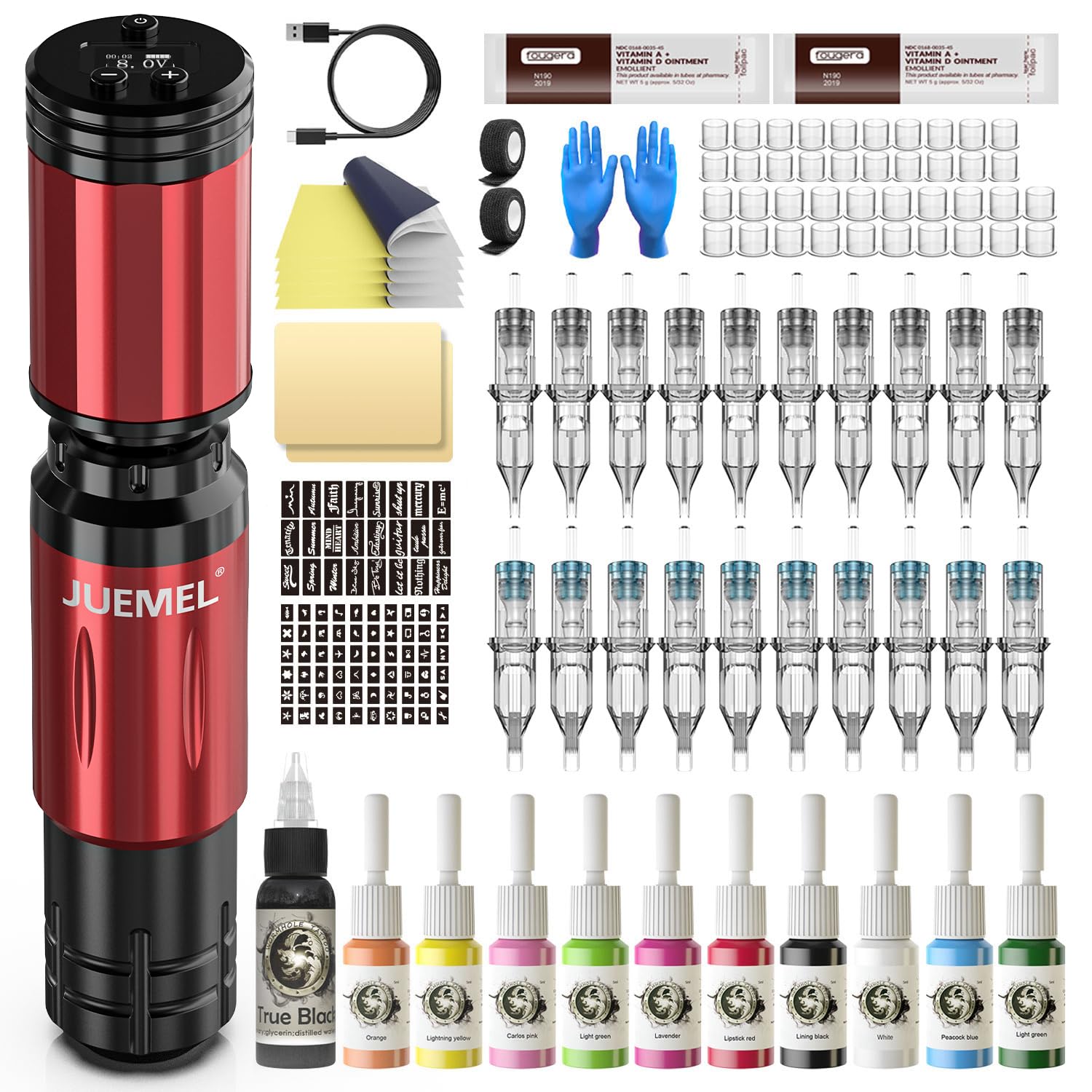
Figure 1: JUEMEL Wireless Tattoo Pen Machine. This image displays the complete wireless tattoo pen machine, highlighting its sleek design and integrated battery pack at the top, with the needle cartridge port at the bottom.
Key Components:
- Power Button/Display: Controls power on/off and displays current voltage.
- Voltage Adjustment Buttons: Used to increase or decrease voltage.
- Battery Pack: Integrated rechargeable 1500 mAh battery.
- Motor Housing: Contains the low-noise, high-performance motor.
- Grip: Ergonomically designed for comfortable handling.
- Needle Cartridge Port: Where the tattoo needle cartridge is inserted.
- Needle Depth Adjustment: Rotatable mechanism to adjust needle protrusion.
- USB-C Charging Port: For recharging the internal battery.
5. Setup
5.1 Charging the Machine
- Connect the provided USB-C charging cable to the charging port on the machine.
- Plug the other end of the cable into a compatible USB power adapter (not included).
- The display will indicate charging status. A full charge typically takes 2-3 hours.
- Disconnect the charger once fully charged to preserve battery life.
5.2 Attaching a Needle Cartridge
- Ensure the machine is turned off.
- Carefully insert a sterile tattoo needle cartridge into the needle cartridge port at the front of the machine.
- Twist the cartridge gently until it locks securely into place.
5.3 Adjusting Needle Depth
- Rotate the grip of the machine clockwise or counter-clockwise to adjust the needle protrusion (depth).
- The adjustable range is 0-4.2mm. Adjust according to your tattooing technique and desired depth.
- For beginners, practicing on synthetic skin with a recommended depth of 1.5-2mm can help master depth control.
6. Operating Instructions
6.1 Power On/Off
- To power on the machine, press and hold the power button for a few seconds until the display illuminates.
- To power off, press and hold the power button again until the display turns off.
6.2 Adjusting Voltage
- Once powered on, use the '+' and '-' buttons to increase or decrease the voltage.
- The voltage can be adjusted from 4V to 12V in 0.1V increments.
- The current voltage will be displayed on the screen.
6.3 Operating Modes
The machine features two distinct operating modes:
- Normal Mode: Operates at a standard speed of 10000 RPM at 8V. This mode is suitable for general lining and shading.
- Dotwork Mode: Features a 10V startup for intricate details and precise dotwork. This mode provides a controlled and consistent power delivery for fine artistic applications.
To switch between modes, refer to the specific instructions provided on the machine's display or a quick press of the power button (if applicable, consult the device's interface for exact mode switching procedure).
7. Maintenance
7.1 Cleaning
- After each use, disconnect the needle cartridge and dispose of it properly.
- Wipe down the exterior of the machine with a soft cloth dampened with an approved surface disinfectant.
- Do not spray disinfectant directly into the motor or charging ports.
- Ensure no liquids enter the internal components.
7.2 Storage
- Store the machine in a clean, dry, and cool environment.
- Keep it in its original packaging or a protective case to prevent damage.
- Avoid prolonged exposure to direct sunlight or extreme temperatures.
8. Troubleshooting
| Problem | Possible Cause | Solution |
|---|---|---|
| Machine does not turn on. | Low battery or no charge. | Charge the machine fully using the provided USB-C cable. |
| Inconsistent power or motor stuttering. | Low battery, loose cartridge, or damaged cartridge. | Ensure battery is charged. Check if the cartridge is securely attached. Replace with a new cartridge if necessary. |
| Needle depth adjustment is stiff. | Debris or dried pigment in the mechanism. | Clean the grip area thoroughly. Do not force adjustment. |
| Machine gets excessively hot. | Prolonged use at high voltage or internal issue. | Allow the machine to cool down. If problem persists, discontinue use and contact support. |
If you encounter issues not listed here or if solutions do not resolve the problem, please contact customer support.
9. Specifications
- Model: JUEMEL Wireless Tattoo Pen Machine
- Brand: BYLIFITY
- Material: Premium Aluminum Alloy
- Battery Capacity: 1500 mAh
- Working Voltage: 4V - 12V (0.1V increments)
- Stroke Length: 4mm
- Needle Depth Adjustment: 0 - 4.2mm
- Motor Speed: 10000 RPM at 8V (Normal Mode)
- Startup Voltage: 10V (Dotwork Mode)
- Charging Port: USB-C
- ASIN: B0FCF18W2Q
10. Warranty and Support
BYLIFITY products are manufactured to high-quality standards. This product is covered by a limited warranty against manufacturing defects from the date of purchase. Please retain your proof of purchase for warranty claims.
For technical support, warranty inquiries, or service, please contact BYLIFITY customer service through the retailer where the product was purchased or visit the official BYLIFITY website for contact information.
Note: Unauthorized disassembly or modification of the device will void the warranty.