
Introduction
This manual provides detailed instructions for the installation, operation, and maintenance of your CNSTWEI 12.3 Inch CarPlay and Android Auto multimedia receiver. This system is designed to upgrade your vehicle's infotainment experience while retaining original car functions.
Please read this manual thoroughly before installation and use to ensure proper functionality and to avoid any damage to the unit or your vehicle.
Compatibility
This multimedia screen is specifically designed for the following vehicle models:
- Mercedes Benz E Class W212 S212 (E200, E250, E300, E350, E500, E550)
- Model Years: 2009-2015
- Original System Requirement: Vehicles equipped with the NTG 4.5 System.
Important: This unit is not compatible with NTG 4.0, NTG 5.0, or other systems. It is also not suitable for E Coupe models. Verify your vehicle's original system before proceeding with installation.

Image: This image illustrates the visual differences between the NTG 4.0, NTG 4.5, and NTG 5.0 systems, highlighting the radio display interface and the LVDS port for each. The NTG 4.5 system is marked with a green checkmark, indicating compatibility.
Package Contents
Please check the package for the following items:
- 1 x Car CarPlay Screen (12.3 Inch)
- 1 x Power Cable
- 1 x USB Cable
- 1 x GPS Antenna
- 1 x 4G Antenna
- 1 x AUX Cable
- 1 x Plastic Base
- 1 x Installation Screw Set
- 1 x Installation Instruction (separate document)

Image: This image displays the complete set of accessories included with the CarPlay screen, such as the microphone, power cable, 4G antenna, GPS antenna, AMI cable, USB cable, AUX cable, and plastic base.
Setup and Installation
Installation of this multimedia receiver requires careful attention to detail and may involve disassembling parts of your car's dashboard. It is recommended that installation be performed by a qualified professional. If you choose to perform the installation yourself, please follow the included separate installation instruction document carefully.
General Installation Steps:
- Preparation: Ensure the vehicle's power is off and the battery is disconnected before starting.
- Dashboard Disassembly: Carefully remove the necessary trim panels and the original screen/radio unit from your dashboard.
- Wiring Connections: Connect the provided power cable, USB cable, GPS antenna, 4G antenna, and AUX cable to the new CarPlay screen and the vehicle's wiring harness. Ensure all connections are secure and correct.
- Mounting: Install the new CarPlay screen into the dashboard opening using the plastic base and installation screw set.
- Testing: Before reassembling the dashboard, reconnect the battery and power on the vehicle to test all functions of the new screen. Verify that the original radio, amplifier, joystick control, and camera functions are working correctly alongside the new Android features.
- Reassembly: Once all functions are confirmed, carefully reassemble the dashboard panels.
Note: Most installation issues arise from incorrect cable connections or settings. Refer to the dedicated installation instruction document for detailed, step-by-step guidance. Contact customer support if you encounter any difficulties.
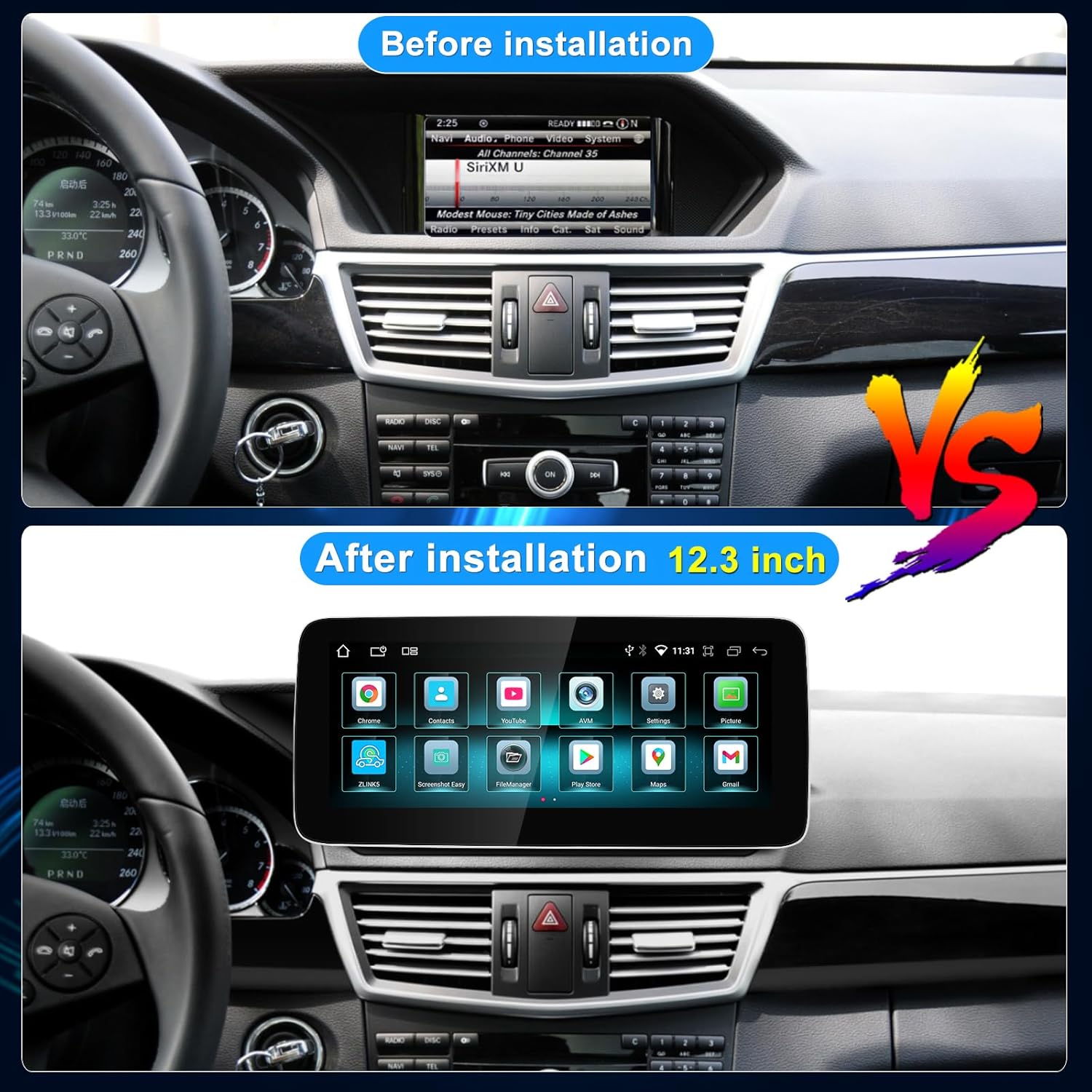
Image: This image provides a visual comparison of the car's dashboard before and after the installation of the 12.3-inch CarPlay screen, demonstrating the size and interface upgrade.
Operating Instructions and Features
Your CNSTWEI multimedia receiver integrates advanced features to enhance your driving experience. The unit runs on the Android 14 operating system, offering a wide range of functionalities.
Key Features:
- High-Definition Touchscreen: Features a 12.3-inch HD screen with 1920x720 resolution and a Glass+Glass Capacitive Touch Screen for clear visuals and responsive interaction.
- Android 14 Operating System: Access a wide range of applications and functionalities through the Android platform.
- Wireless & Wired Car Auto Play (CarPlay & Android Auto): Seamlessly integrate your smartphone for navigation, music, calls, and messages.
- Original System Retention: Maintains the functionality of your original car radio, CD player, Bluetooth, amplifier system, and backup camera display. Switching between the original and Android systems is seamless.
- GPS Navigation: Built-in GPS antenna supports online and offline navigation applications.
- Digital Sound Processor (DSP): Enjoy high-fidelity surround stereo sound with customizable audio settings.
- Connectivity:
- Wi-Fi: Supports dual-band Wi-Fi (2.4GHz and 5GHz) for internet access.
- 4G Connection: New-generation 4G connectivity for enhanced mobile data access.
- Bluetooth 5.0: For hands-free calling, music streaming, and connecting Bluetooth devices.
- USB Ports: Two built-in USB ports for media playback and device charging.
- USB Tethering: Share your phone's internet connection via USB.
- Split Screen Functionality: Run two applications simultaneously on the screen for multitasking.
- Multiple UI Themes: Customize the user interface with various themes to match your preference.
- AUX Audio Output: For connecting to external audio systems.

Image: The screen displays a map interface, demonstrating the GPS navigation capability. Icons for popular navigation and communication applications are visible at the top.

Image: This image shows the DSP interface on the screen, featuring a graphic equalizer that allows users to fine-tune audio frequencies for a personalized sound experience.

Image: A collage showcasing different user interface designs and application screens available on the CarPlay unit, including home screens with app icons, a music player, system settings, and a navigation view.
Specifications
| Feature | Specification |
|---|---|
| Display Size | 12.3 Inches |
| Resolution | 1920 x 720 HD |
| Operating System | Android 14 |
| RAM | 8GB |
| ROM (Storage) | 64GB SSD |
| Touch Screen Type | Capacitive (Glass+Glass) |
| Connectivity | Wi-Fi (2.4G/5G), 4G, Bluetooth 5.0 |
| Special Features | Wireless/Wired CarPlay & Android Auto, Built-in DSP, Split Screen, GPS Navigation, Dual USB Ports, AUX Output |
| Audio Output Mode | Stereo |
| Model Name | W212 S212 carplay screen |
Troubleshooting
If you encounter issues with your CarPlay screen, consider the following common troubleshooting steps:
- No Power/Screen Blank:
- Check all power cable connections. Ensure they are securely plugged in.
- Verify the vehicle's fuse related to the multimedia system.
- No Sound/Distorted Audio:
- Ensure the AUX cable is correctly connected and selected as the audio source on your original car system.
- Check volume settings on both the CarPlay screen and your original car radio.
- Verify speaker connections.
- CarPlay/Android Auto Not Connecting:
- For wireless connection, ensure Bluetooth and Wi-Fi are enabled on your phone and the screen.
- For wired connection, try a different USB cable. Ensure the USB cable is connected to the correct port.
- Restart your phone and the CarPlay screen.
- GPS Signal Issues:
- Ensure the GPS antenna is properly installed and has a clear view of the sky (e.g., mounted on the dashboard).
- Check antenna connection to the unit.
- Original Functions Not Working:
- Double-check all wiring connections, especially those related to the original car harness.
- Ensure the system is correctly configured to switch between Android and original car modes.
If problems persist after attempting these steps, please refer to the detailed installation instruction document or contact CNSTWEI customer support for further assistance.
Maintenance
To ensure the longevity and optimal performance of your CNSTWEI CarPlay screen, follow these maintenance guidelines:
- Cleaning: Use a soft, lint-free cloth to clean the screen. For stubborn smudges, slightly dampen the cloth with water or a screen-safe cleaner. Avoid harsh chemicals or abrasive materials.
- Temperature: Avoid exposing the unit to extreme temperatures, both hot and cold, for extended periods.
- Software Updates: Periodically check for available software updates to ensure the system runs efficiently and has the latest features and security patches. Follow instructions provided by CNSTWEI for software updates.
- Avoid Liquids: Prevent liquids from entering the unit, as this can cause damage to internal components.
Warranty and Support
This CNSTWEI CarPlay screen comes with a 1-year warranty from the date of purchase, covering manufacturing defects. Please retain your proof of purchase for warranty claims.
For technical support, installation assistance, or warranty inquiries, please contact the seller or CNSTWEI customer service through the platform where the product was purchased. Provide your product model number and a detailed description of the issue for efficient support.