
Lazellz PYE22PSHHSS, PYE22PSHISS, PYE22PSHJSS, PYE22PSKBSS
Lazellz Refrigerator Section Evaporator Fan Instruction Manual
Brand: Lazellz | Model Numbers: PYE22PSHHSS, PYE22PSHISS, PYE22PSHJSS, PYE22PSKBSS
1. Product Overview
This document provides general information and guidance for the Lazellz Refrigerator Section Evaporator Fan. This component is designed to circulate cool air within the refrigerator compartment of compatible GE appliances.
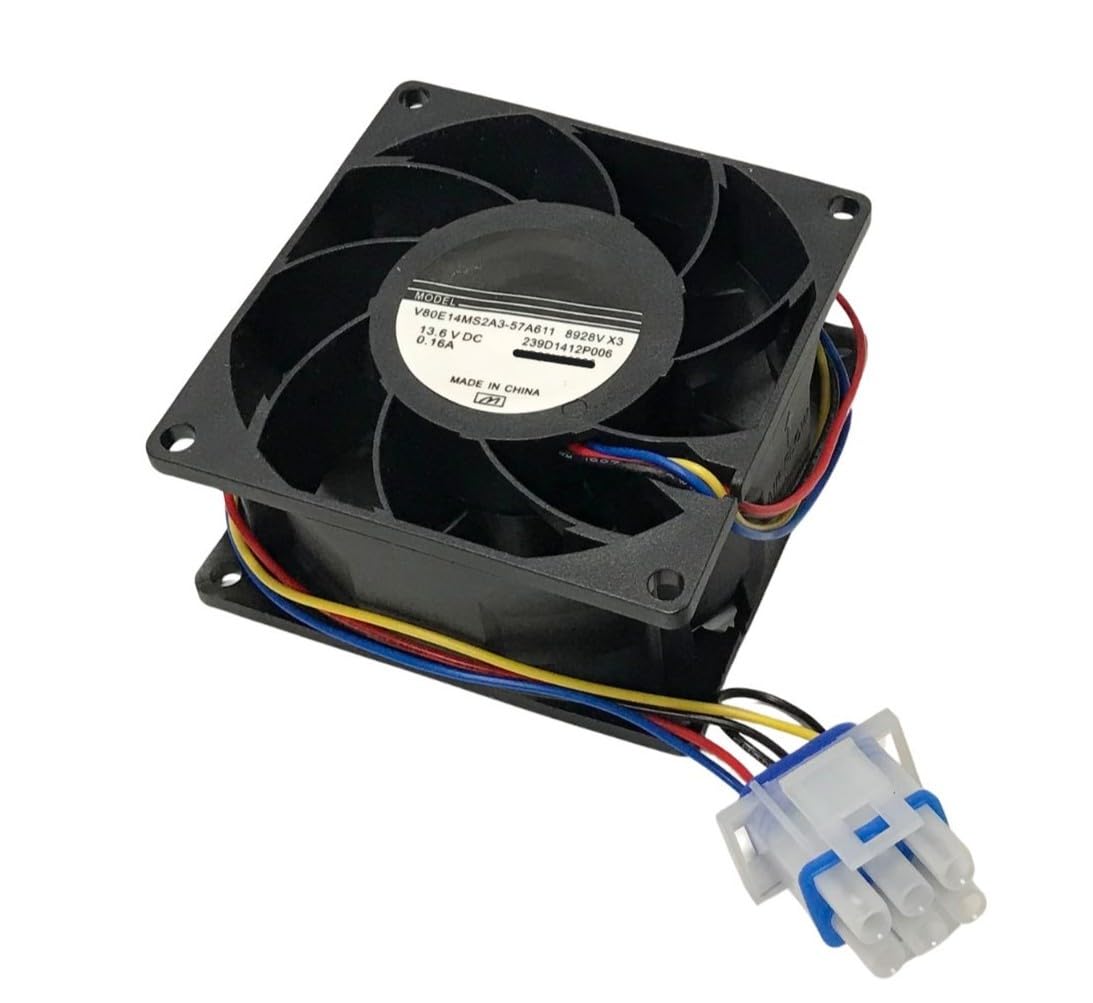
Image 1.1: Lazellz Refrigerator Section Evaporator Fan. This image displays the fan assembly, which is responsible for moving cool air within the refrigerator compartment.
2. Compatibility
The Lazellz Refrigerator Section Evaporator Fan is compatible with the following GE refrigerator model numbers:
- PYE22PSHHSS
- PYE22PSHISS
- PYE22PSHJSS
- PYE22PSKBSS
Please verify your appliance's model number before attempting installation or replacement to ensure proper fit and function.
3. Function
The Fresh Food Evaporator Fan is a critical component located in the refrigerator section, typically near the evaporator coils. Its primary function is to circulate cool air throughout the fresh food compartment, ensuring consistent temperatures and efficient cooling performance. Without proper fan operation, cold air may not distribute evenly, leading to warmer spots and potential food spoilage.
4. Installation
Important Note: Installation instructions are NOT included with this part. Professional installation by a qualified technician is highly recommended.
Replacing an evaporator fan typically involves:
- Safety First: Always disconnect power to the refrigerator before beginning any repair work.
- Accessing the Fan: This usually requires removing internal panels within the refrigerator compartment, often located at the back or top of the fresh food section.
- Disconnecting Wiring: Carefully disconnect the electrical connectors from the old fan.
- Removing Old Fan: Unmount the old fan assembly.
- Installing New Fan: Mount the new Lazellz evaporator fan in the same position and reconnect the wiring securely.
- Reassembly: Replace all panels and ensure they are properly secured.
- Testing: Restore power and verify the fan operates correctly and air circulates.
Refer to your specific GE refrigerator model's service manual or consult a professional for detailed, model-specific installation procedures.
5. Setup (Post-Installation)
After successful installation of the evaporator fan, no specific setup is typically required for the fan itself. The refrigerator's control system will manage its operation. However, it is good practice to:
- Ensure the refrigerator door seals properly.
- Allow the refrigerator to run for several hours to reach its set temperature before loading it with food.
- Monitor the internal temperature to confirm proper cooling.
6. Operating Principles
The evaporator fan operates automatically, controlled by the refrigerator's thermostat and defrost cycle. It will turn on to circulate cold air from the evaporator coils into the fresh food compartment and may turn off during defrost cycles or when the set temperature is reached. Normal operation may include periods of the fan running continuously or cycling on and off.
7. Maintenance
The Lazellz Refrigerator Section Evaporator Fan is designed for durability and generally requires minimal maintenance. However, to ensure optimal performance and longevity of your refrigerator:
- Keep Vents Clear: Ensure that air vents inside the refrigerator compartment are not blocked by food items, allowing for proper air circulation.
- Regular Cleaning: Periodically clean the interior of your refrigerator to prevent debris from accumulating near the fan area.
- Listen for Unusual Noises: If you hear unusual grinding, squealing, or excessive noise from the fan area, it may indicate a problem requiring inspection.
8. Troubleshooting Common Issues
If you experience issues after replacing the evaporator fan, consider the following:
| Symptom | Possible Cause | Action |
|---|---|---|
| Fan not running | No power, loose connection, faulty fan motor | Check power supply, verify wiring connections, consult a technician. |
| Refrigerator not cooling properly | Fan not circulating air, blocked vents, other refrigeration system issues | Ensure fan is running, clear vents, check for frost buildup on evaporator coils. |
| Unusual noise from fan | Obstruction, worn bearings, improper installation | Disconnect power and inspect for obstructions. If noise persists, professional inspection is advised. |
For complex issues or if you are unsure about a repair, it is always best to contact a qualified appliance repair technician.
9. Specifications
| Feature | Detail |
|---|---|
| Part Type | Refrigerator Section Evaporator Fan |
| Brand | Lazellz |
| Compatible Appliance | GE Refrigerators |
| Compatible Models | PYE22PSHHSS, PYE22PSHISS, PYE22PSHJSS, PYE22PSKBSS |
| Location | Refrigerator Fresh Food Section, near evaporator |
| GTIN (UPC) | 840503501181 |
| ASIN | B0FCDS4JXV |
10. Warranty and Support
Warranty: The warranty information for this product is typically covered under the seller's return policy. Please refer to the "See Return Policy" statement provided at the point of purchase for details regarding returns, exchanges, or warranty claims.
Customer Support: If you have questions regarding compatibility or require assistance, please contact the seller directly. If your model number is not listed in the compatibility section, reaching out to the seller is recommended for verification.
Ask a question about this manual
Ask about setup, troubleshooting, compatibility, parts, safety, or missing instructions. Manuals+ will review the question and use this page’s manual context to help answer it.