
1. Introduction
The YNAK AK22A 16-in-1 Indoor Air Quality Monitor is designed to provide real-time data on various indoor air pollutants and environmental factors. This device helps you maintain a healthy living or working environment by alerting you to potential air quality issues. It features a clear 7-inch display and high-precision sensors for accurate readings.

Figure 1: YNAK AK22A 16-in-1 Indoor Air Quality Monitor.
Video 1: Overview of CO2 Monitor functionality and benefits for home air quality.
2. Key Features
The YNAK AK22A monitor offers comprehensive air quality assessment with the following features:
- 16-in-1 Monitoring: Real-time detection of CO2, PM2.5, PM1.0, PM10, HCHO, TVOC, Temperature, Humidity, AQI, and Time.
- 7-inch Display: A large, clear display for easy readability of all parameters.
- High-Precision Sensors: Equipped with external high-precision sensors for accurate measurements (0.001 units).
- AQI Alert System: Features 7 distinct AQI alert functions to notify users of poor air quality.
- Time Adjustment: Easy 12/24-hour format switching and precise time setting.
- Temperature Unit Switching: Effortlessly switch between Fahrenheit (°F) and Celsius (°C).

Figure 2: Visual representation of the comprehensive monitoring capabilities.
3. Package Contents
Please ensure all items are present upon unboxing:
- YNAK AK22A 16-in-1 Indoor Air Quality Monitor
- USB Power Cable
- 1 x D Battery (included)
- User Manual (this document)
4. Setup
4.1 Powering the Device
The monitor can be powered via the included USB cable or by battery for backup.
- USB Power: Connect the provided USB cable to the monitor's USB port and plug the other end into a compatible USB power adapter (not always included) or a powered USB port. For continuous operation, it is recommended to keep the device plugged in.
- Battery Backup: The device uses 1 D battery (included). Open the battery compartment on the back of the monitor and insert the battery, ensuring correct polarity. While the device can run on battery, continuous USB power is recommended for uninterrupted monitoring.

Figure 3: The monitor can be powered via USB or battery for portability.
Video 2: Quick setup guide for the air quality monitor, demonstrating initial power-on and basic functions.
4.2 Initial Measurement and Calibration
Upon powering on, the device will initiate a measurement cycle. It typically takes about 30 seconds to measure CO2 and other air parameters. This process is repeated five times to ensure a stable and accurate initial reading.
- For optimal accuracy, allow the device to stabilize for a few minutes after initial power-on.
- Avoid touching the sensors or exposing them to perfumes or strong odors, as this can affect accuracy.
Video 3: Instructions on how to obtain accurate readings from an air quality monitor, including placement and environmental factors.
5. Operating Instructions
5.1 Display Overview
The 7-inch display provides a clear overview of all monitored parameters. The display is designed for easy readability with bright colors and crisp text.

Figure 4: The monitor features a crystal clear 7-inch HD display for optimal data readability.
Key indicators displayed include:
- PM2.5, PM1.0, PM10 concentrations (µg/m³)
- HCHO (Formaldehyde) concentration (mg/m³)
- TVOC (Total Volatile Organic Compounds) concentration (mg/m³)
- CO2 (Carbon Dioxide) concentration (ppm)
- Temperature (°F/°C)
- Humidity (%)
- AQI (Air Quality Index)
- Current Time (12/24-hour format)
5.2 Time Adjustment
- Switch Time Format: Click the “Time button” to toggle between 12/24-hour format.
- Set Hours: Long press the “Time button” to enter setting mode. Use the “Alarm button” or “Brightness button” to adjust hours.
- Set Minutes: Click the “Time button” again. Use the “Alarm button” or “Brightness button” to adjust minutes.
- Confirm: Click the “Time button” to save settings.
5.3 Temperature Unit Switching (°F/°C)
To switch between Fahrenheit (°F) and Celsius (°C), simply click the “Power button”.
5.4 AQI Alert Settings
The monitor features 7 distinct AQI alert functions to notify you of varying air quality levels. These alerts provide real-time warnings for pollutants like CO2, PM2.5, PM1.0, PM10, HCHO, TVOC, Temperature, Humidity, and AQI.
- When air quality reaches a predefined poor level, an audible alarm will sound, and visual indicators on the display will change.
- To silence an alarm, press the mute button.

Figure 5: The monitor's tri-color alarm system provides visual and audible alerts for severe pollution levels.
5.5 Brightness Control
The 7-inch display offers 3-level brightness control to suit your environment and preferences. Use the dedicated brightness button to cycle through the different levels.
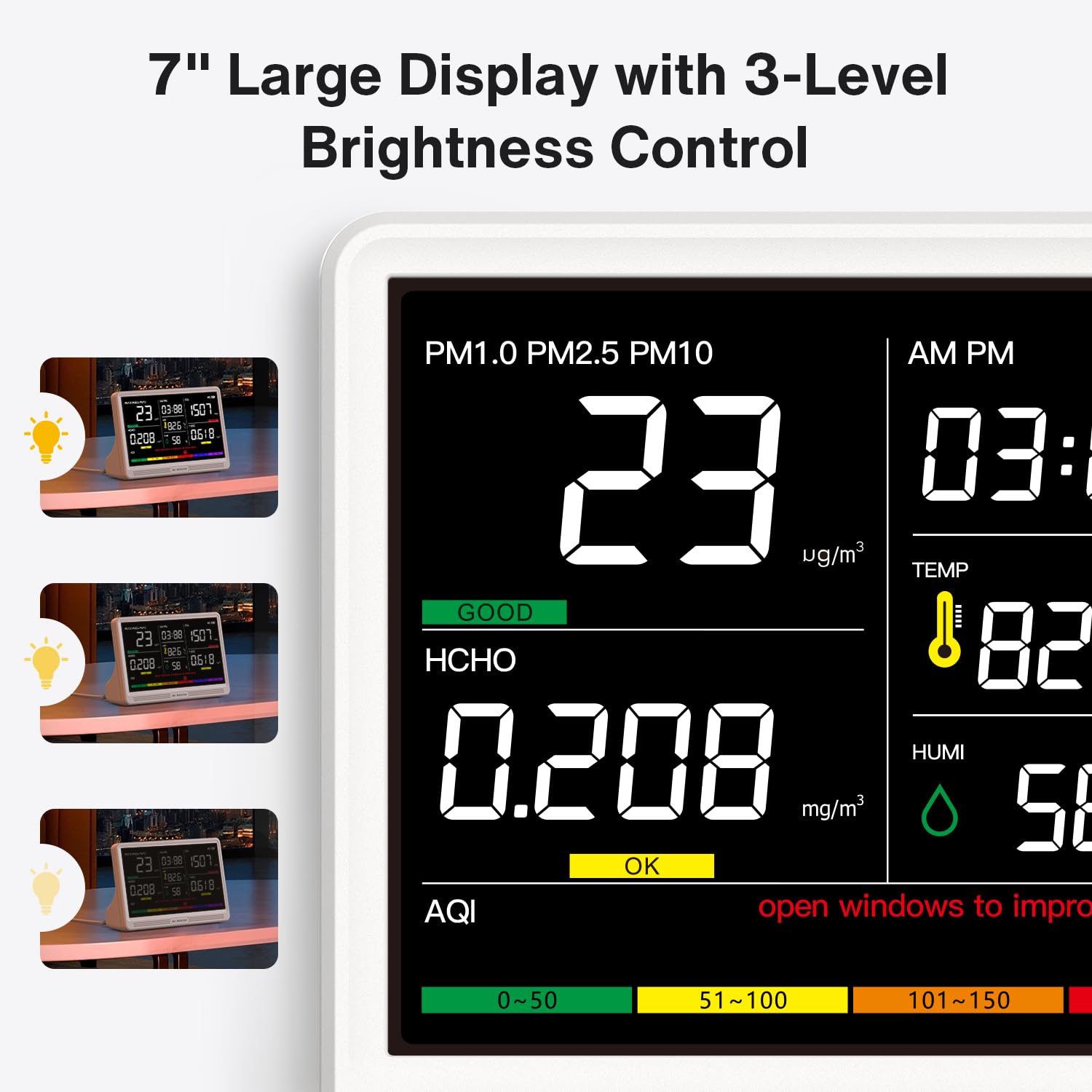
Figure 6: Adjust the display brightness to your preference using the dedicated button.
5.6 History Data
The monitor records historical data for various parameters, allowing you to track air quality trends over time. This feature helps in identifying patterns and understanding the impact of different activities on your indoor air quality.
6. Sensors and Accuracy
The YNAK AK22A is equipped with advanced external high-precision sensors that directly sample the air, providing measurements with 0.001 unit accuracy. The innovative multi-sensor array and enhanced airflow design enable the device to detect even subtle environmental changes for instant response and optimal safety.

Figure 7: Diagram illustrating the external sensors and enhanced airflow design for accurate air quality detection.
Important Note:
- Avoid touching the sensors directly.
- Do not expose the sensors to perfumes, strong odors, or chemical sprays, as this can compromise measurement accuracy and sensor lifespan.
6.1 Auto Recalibration
The device supports auto-recalibration to maintain precision. If you suspect inaccurate readings due to significant indoor changes, you can perform a one-click reset.
- One-Click Reset: Long-press the power button to reset and recalibrate for quick, accurate readings.
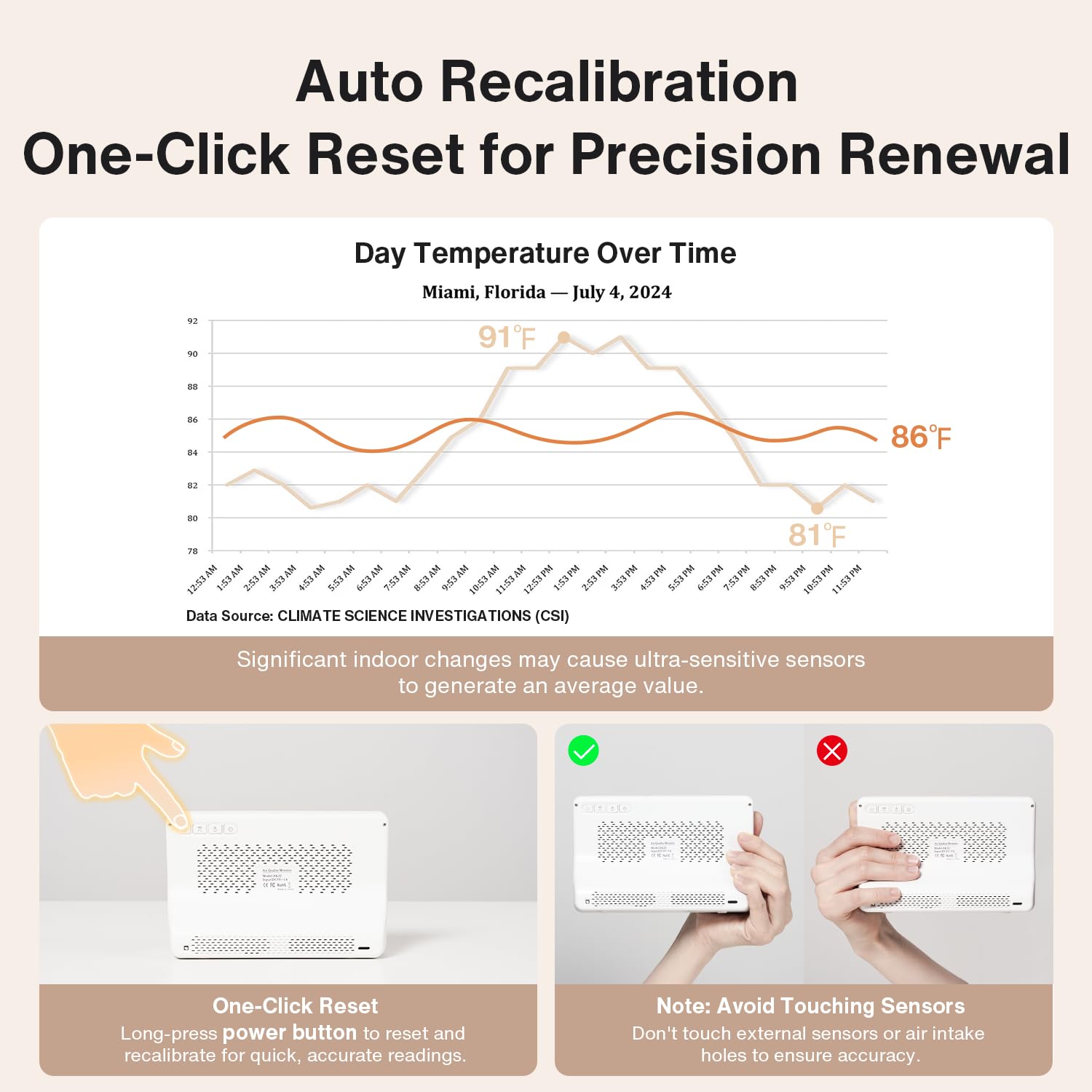
Figure 8: Instructions for auto-recalibration and important notes on sensor handling.
7. Maintenance
- Cleaning: Use a soft, dry cloth to clean the exterior of the monitor. Do not use liquid cleaners or aerosols.
- Sensor Care: Keep the sensor inlets clear of dust and debris. Do not insert any objects into the sensor openings.
- Battery Replacement: If using battery backup, replace the D battery when the low battery indicator appears on the display.
8. Troubleshooting
| Problem | Possible Cause | Solution |
|---|---|---|
| Inaccurate Readings | Sensors exposed to strong odors or physical contact; device not calibrated. | Move the device to a fresh air environment and perform a one-click reset. Avoid exposing sensors to contaminants. |
| Display Not Turning On | No power or low battery. | Ensure the USB cable is securely connected to a power source. If using battery, check battery level or replace the D battery. |
| No Audible Alerts | Alarm sound is muted. | Press the mute button to unmute the alarm sound. |
| Display Too Dim/Bright | Brightness setting is not optimal. | Use the brightness button to adjust the display to your preferred level. |
9. Technical Specifications
| Feature | Detail |
|---|---|
| Model Number | AK22A |
| Brand | YNAK |
| Product Dimensions | 100D x 20W x 40H millimeters (2 x 7 x 10 cm) |
| Item Weight | 299 g |
| Power Source | Battery Powered (1 D battery included) |
| Operating Humidity | 10% to 85% |
| Upper Temperature Rating | 100 Degrees Celsius |
| Alarm Type | Visual |
10. Warranty and Support
For warranty information or technical support, please contact UNNI customer service. If you have any questions or require assistance, you can reach out via email: