
ATOTONA A6G110PF-S01
ATOTONA Drive Chat AI Smart Car Stereo User Manual
Model: A6G110PF-S01
Introduction
The ATOTONA Drive Chat AI Smart Car Stereo (Model A6G110PF-S01) is an advanced in-car entertainment and navigation system designed to enhance your driving experience. Featuring a 10.1-inch QLED display with flexible adjustment, it integrates wireless CarPlay and Android Auto, a powerful DSP with 36-band EQ for superior audio, dual Bluetooth connectivity, and AI-powered voice commands. This manual provides essential information for installation, operation, and maintenance of your new car stereo.

Image: The ATOTONA Drive Chat AI Smart Car Stereo unit with its 10.1-inch display and an included rear view camera. The screen shows a user interface with various app icons.
Package Contents
Verify that all items listed below are present in your package:
- Smart Car Stereo Unit
- Rear View Camera (AC-HD01LR-A)
- 20-Pin Wire Harness
- 2-in-1 USB Cable (for external storage & phone link)
- 2-in-1 Antenna (WiFi/GPS)
- Mounting Brackets
- Mounting Screws
- DIN Pocket
- DIN Sleeve 1
- DIN Sleeve 2
- External Microphone
- RCA Cable
- Online Resources Quick Guide
- Product Care Online Support Information

Image: A visual representation of all components included in the product package, such as the car stereo, rearview camera, various cables, mounting hardware, and documentation.
Installation
Physical Installation and Dimensions
Before installation, ensure the unit's size and adjustment range are compatible with your vehicle's dashboard to avoid blocking vents or controls. A vehicle-specific harness or dash kit may be required and is not included.
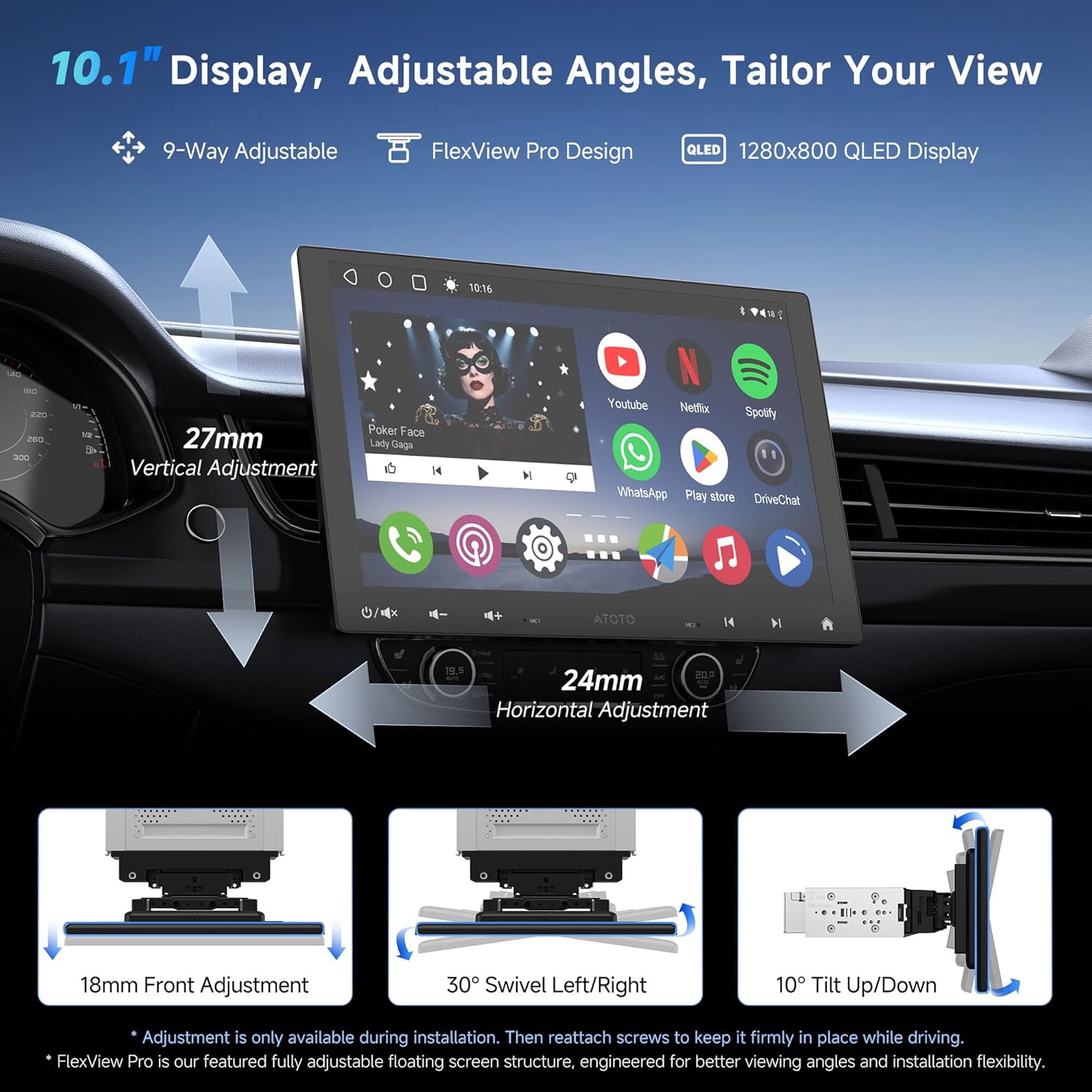
Image: This diagram details the FlexView Pro structure, showing the 10.1-inch QLED screen's 9-way adjustability, including 27mm vertical, 24mm horizontal, 18mm front, 30° swivel, and 10° tilt adjustments. These adjustments are primarily for installation and should be secured afterward.

Image: An installation reminder graphic showing the maximum left/right slide (24mm), up/down slide (27mm), and forward/backward slide (18mm) of the display, along with overall unit dimensions (242mm width, 158mm height) and the reachable gap for controls.
Wiring Diagram
Refer to the following diagram for proper wiring connections. Ensure all connections are secure before powering on the unit.
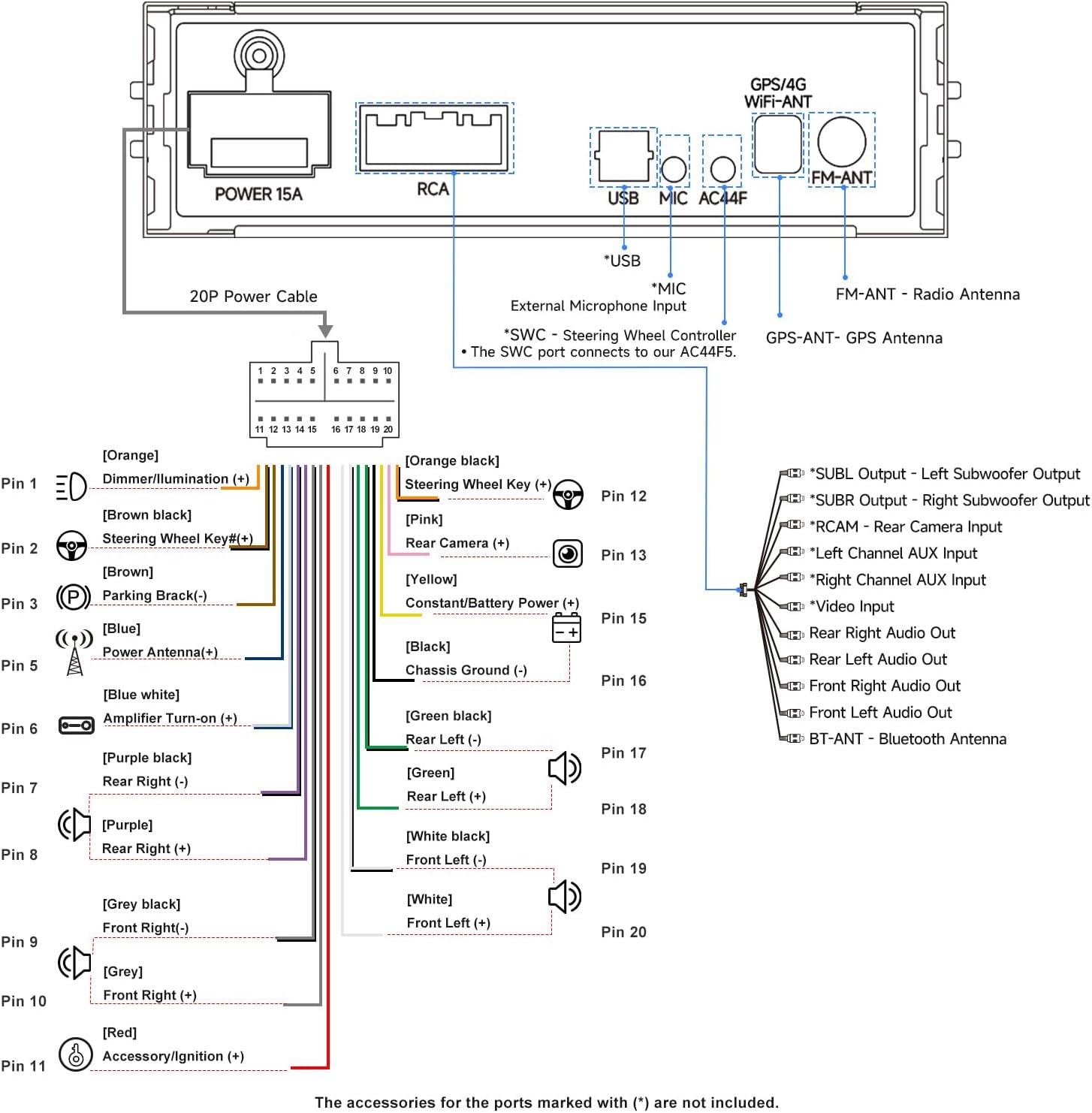
Image: A comprehensive wiring diagram illustrating the 20-pin power cable connections, RCA outputs, USB, microphone input, and antenna connections (GPS/4G WiFi and FM). It details connections for dimmer, steering wheel key, parking brake, power antenna, amplifier turn-on, speaker outputs, subwoofer outputs, video input, and auxiliary inputs.
Operating Instructions
Display and User Interface
The 10.1-inch 1280x800 QLED screen provides a clear and vibrant display. The unit runs on Android OS, offering a customizable theme and access to various applications.
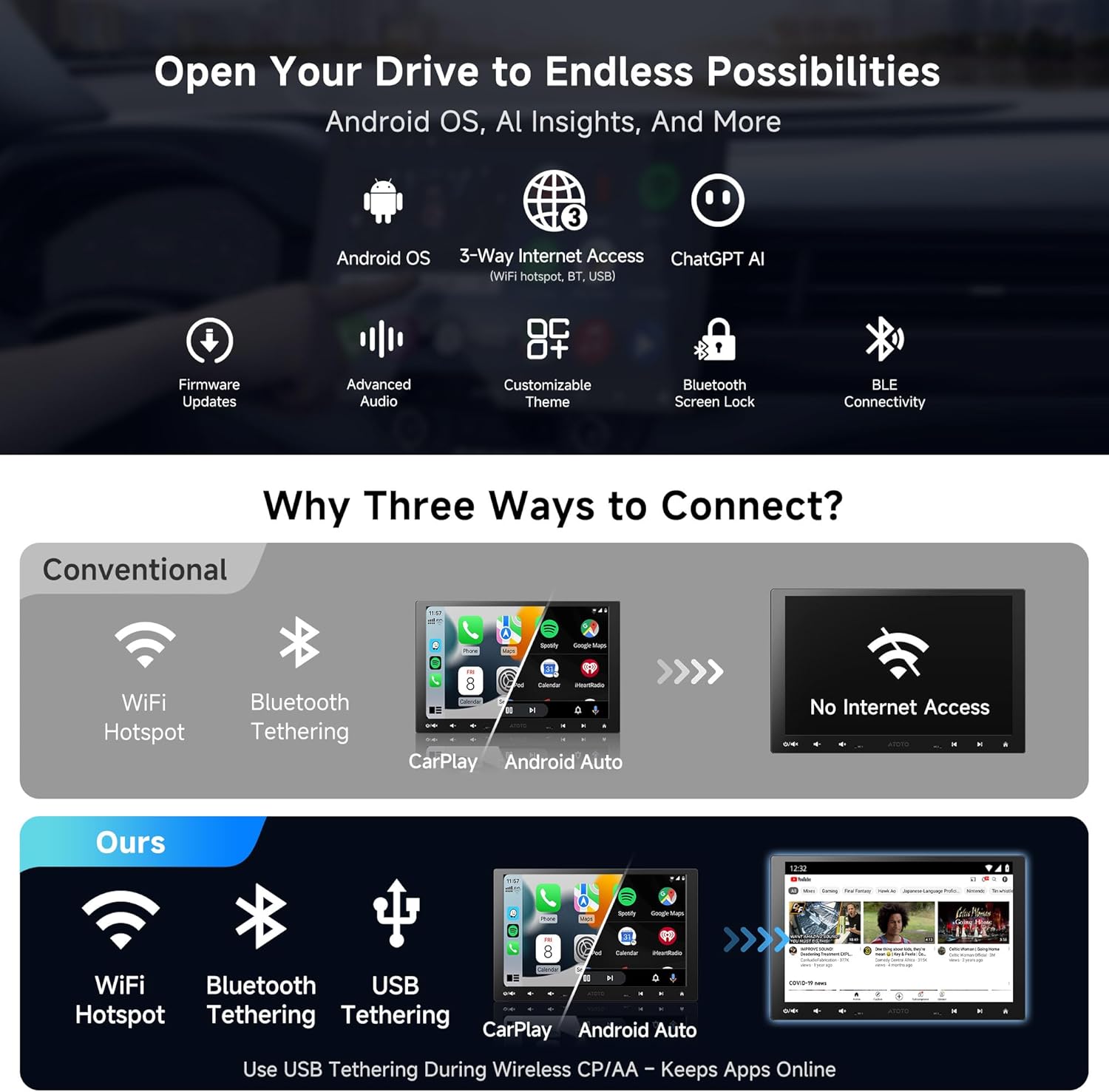
Image: This graphic highlights the core features of the system, including Android OS, 3-way internet access (WiFi hotspot, Bluetooth, USB), ChatGPT AI integration, firmware updates, advanced audio settings, customizable themes, and BLE connectivity.
Smart Assistant and AI Features
DriveChat AI enables voice commands and in-car chat, powered by ChatGPT for smarter responses. The system also supports various intelligent driving modes.
- Road View Mode: Provides live road alerts.
- Cabin View Mode: Designed for backseat awareness.
- OBD Monitor Mode: Allows for car health checks when connected to an OBD2 scanner.

Image: This image showcases the DriveChat GenAI Assistant, demonstrating its ability to provide smart responses and integrate with various chatbots. It also illustrates Road View Mode, Cabin View Mode, and OBD Monitor Mode.
Connectivity: CarPlay, Android Auto, MirrorLink & Bluetooth
Enjoy seamless integration with your smartphone through wireless CarPlay and Android Auto. MirrorLink expands app options, and dual Bluetooth modules provide versatile connections.
- Wireless CarPlay/Android Auto: Connect via Bluetooth for quick access to maps, calls, and music.
- MirrorLink: Allows mirroring of your phone's screen to the stereo.
- Dual Bluetooth (BT1 & BT2):
- BT1: Supports hands-free calls, music streaming, and Bluetooth-based auto screen lock for privacy.
- BT2 (with BLE): Connects to OBD2 scanners, LED signs, ambient lights, and other compatible devices, allowing direct control from the stereo screen.

Image: This graphic illustrates the dual Bluetooth capabilities. BT1 supports screen auto lock/unlock based on proximity, hands-free calls, music, and internet. BT2 enables connections to OBD scanners, AI interactive LED signs, and ambient lights.
For internet access, the unit supports Wi-Fi Hotspot, Bluetooth Tethering, and USB Tethering.
Audio Features
The integrated Digital Signal Processor (DSP) and 36-band Equalizer (EQ) allow for precise audio customization. Features include:
- 36-band EQ: Shape audio to fit your space and style with 8 presets.
- Time Alignment: Ensures sound reaches you at the optimal time for a balanced listening experience.
- SCVC (Speed Compensated Volume Control): Automatically adjusts volume to reduce road noise as you speed up.
- Built-in Amplifier: Delivers clear highs, deep lows, and strong output.
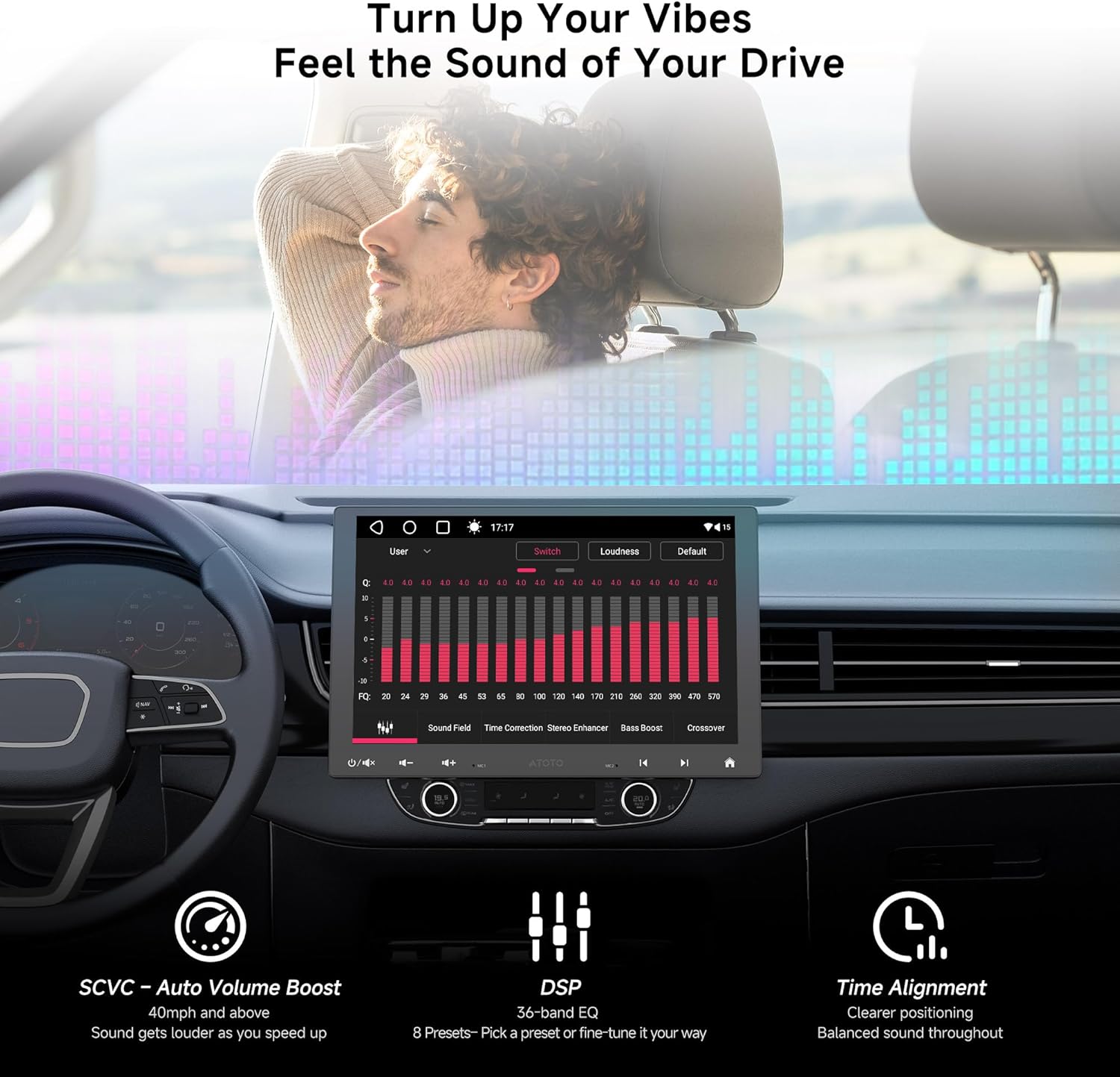
Image: This visual highlights the audio capabilities, showing the 36-band EQ interface, Time Alignment for centered sound, SCVC (Speed Compensated Volume Control) that boosts volume at 40mph, and the built-in amplifier for dynamic sound.
Rear View Camera and GPS Tracking
The included AHD 720P RearView Camera (AC-HD01LR-A) provides enhanced visibility. The system also features integrated GPS tracking.
- Live Rear View (LRV): Access real-time rear view via the RCAM app, even while driving forward.
- RearView Guideline: Assists with parking and maneuvering.
- Night Vision: Improved visibility in low-light conditions.
- TrackHU GPS Tracking: Tracks vehicle location and routes with flexible refresh rates (2min), accurate positioning (GPS, GLONASS, Galileo, Beidou), instant geofence alerts, and track playback with speed control.

Image: This graphic displays the AHD 720P RearView Camera (AC-HD01LR-A) and its functionalities: RearView Guideline, Live Rear View (LRV), and Night Vision. It also details the TrackHU Smart GPS Tracking features and the FindApps APK Downloader for accessing additional applications.
App Management
The FindApps APK Downloader allows access to featured apps that may not be available on Google Play, expanding your entertainment and utility options.
Control Methods
The stereo can be controlled via touchscreen, app, or voice commands through DriveChat AI. It also supports steering wheel controls (requires adapter, not included) and an optional wireless remote (AC-44F5, not included).
Maintenance
To ensure the longevity and optimal performance of your ATOTONA Smart Car Stereo, follow these general maintenance guidelines:
- Cleaning: Use a soft, dry cloth to clean the display and unit. Avoid abrasive cleaners or solvents.
- Software Updates: Regularly check for and install firmware updates to ensure the system runs efficiently and has the latest features. Refer to the online manual for update procedures.
- Environmental Conditions: Avoid exposing the unit to extreme temperatures, direct sunlight for prolonged periods, or excessive moisture.
- Cable Connections: Periodically check all wiring connections to ensure they remain secure and free from damage.
Troubleshooting
This section addresses common issues you might encounter. For more detailed troubleshooting or issues not listed here, please refer to the online manual or contact customer support.
| Problem | Possible Cause | Solution |
|---|---|---|
| Unit does not power on. | Loose power connection, blown fuse, incorrect wiring. | Check power cables and fuse. Verify wiring against the diagram. |
| No sound from speakers. | Speaker wires disconnected, volume too low, incorrect audio settings. | Ensure speaker wires are connected. Increase volume. Check DSP/EQ settings. |
| Wireless CarPlay/Android Auto not connecting. | Bluetooth not enabled, phone not paired, software glitch. | Ensure Bluetooth is on for both devices. Re-pair the phone. Restart the stereo and phone. |
| Rear view camera not displaying. | Camera cable loose, incorrect camera input selected, camera malfunction. | Check camera connections. Ensure the RCAM app is active or correct input is selected. |
Specifications
| Feature | Detail |
|---|---|
| Model Number | A6G110PF-S01 |
| Display Size | 10.1 Inches |
| Display Resolution | 1280x800 QLED |
| Operating System | Android OS |
| Connectivity Technology | Bluetooth (Dual), Wi-Fi, USB |
| Compatible Devices | Smartphone (Wireless CarPlay & Android Auto, MirrorLink) |
| Audio Output Mode | Stereo |
| Special Features | Touchscreen, DriveChat AI, TrackHU GPS Tracking, DSP, 36-Band EQ, FlexView Pro Structure, Live Rear View |
| Item Weight | 8.05 pounds |
| Package Dimensions | 11.65 x 9.65 x 8.46 inches |
| Manufacturer | Shenzhen Yufengzhixing Electronics Tech Co Ltd |
| Date First Available | June 8, 2025 |
Warranty and Support
Your ATOTONA Smart Car Stereo comes with a 12-month product care warranty from the date of purchase. You can receive an additional 6 months of product care by contacting ATOTONA customer support.
For any inquiries, technical assistance, or warranty claims, please contact our customer care team. They respond around the clock during workdays.
Please refer to the online manual for the most up-to-date information and detailed support resources.
Ask a question about this manual
Ask about setup, troubleshooting, compatibility, parts, safety, or missing instructions. Manuals+ will review the question and use this page’s manual context to help answer it.