
1. Introduction
This manual provides detailed instructions for the installation, operation, and maintenance of your WEIAV 10.25" Carplay Screen. This device is designed to enhance your driving experience by integrating modern infotainment features while retaining your vehicle's original functionalities.
1.1. Compatibility
This Carplay screen is specifically designed for BMW 5 Series F10 and F11 models from 2013-2017 equipped with the NBT System. It is not compatible with other BMW systems. Please verify your vehicle's system before installation.
1.2. Key Features
- 10.25" HD Touchscreen (1920*720 resolution)
- Android 13 Operating System with MTK 8-core processor
- Wireless Apple CarPlay and Android Auto support
- Retains original car radio, amplifier, joystick control, and camera functions
- Built-in Dual Band WiFi (2.4GHz and 5GHz)
- Integrated GPS Navigation
- Bluetooth 5.0 for music and calls
- Built-in DSP and multiple UI themes
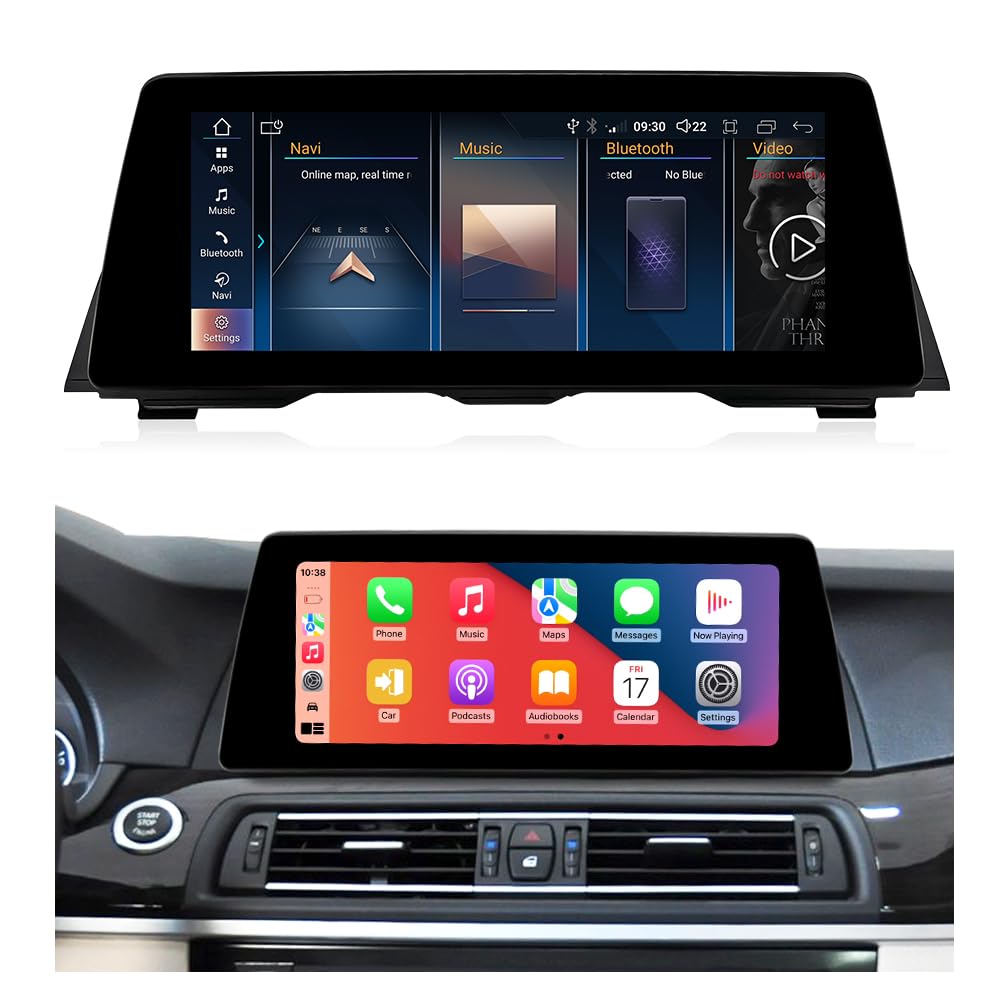
Figure 1: The WEIAV 10.25" Carplay Screen seamlessly integrated into a BMW 5 Series F10 dashboard, displaying various infotainment options.
2. Setup and Installation
Installation of the Carplay screen requires careful attention to wiring and dashboard disassembly. It is recommended that installation be performed by a qualified professional. If you choose to install it yourself, please follow the included installation guide meticulously.
2.1. Package Contents
Before beginning installation, ensure all components are present:
- 1 x WEIAV Carplay Screen
- 1 x Power Cable
- 1 x USB Cable
- 1 x GPS Antenna
- 1 x AUX Cable
- 1 x Installation Guide (separate document)

Figure 2: All components included in the WEIAV Carplay Screen package.
2.2. Installation Procedure Overview
- Preparation: Disconnect the vehicle's battery.
- Dashboard Disassembly: Carefully remove the necessary trim panels and the original screen from the dashboard.
- Wiring Connections: Connect the provided power cable, USB cable, GPS antenna, and AUX cable to the Carplay screen and the vehicle's existing wiring harness. Ensure all connections are secure and correct.
- Screen Mounting: Mount the new WEIAV Carplay screen into the dashboard opening.
- Testing: Before reassembling the dashboard, reconnect the battery and power on the vehicle to test all functions of the new screen, including audio, navigation, CarPlay/Android Auto, and original system integration.
- Reassembly: Once all functions are confirmed, carefully reassemble the dashboard trim panels.
Important: Incorrect wiring can cause damage to the device or vehicle. Refer to the dedicated installation guide for detailed, step-by-step instructions and diagrams.
3. Operating Instructions
The WEIAV Carplay Screen offers a user-friendly interface with both Android functionalities and seamless integration with your original BMW system.
3.1. Switching Between Systems
The device allows you to switch between the Android system and your original BMW NBT system. Typically, a dedicated button or an on-screen icon will facilitate this transition. When operating in the original OEM system, all factory controls, including the joystick, remain functional.
3.2. Wireless Apple CarPlay & Android Auto
To use Wireless CarPlay or Android Auto, access the "ZLINK" application on the screen. Follow the on-screen prompts to connect your smartphone via Bluetooth and Wi-Fi. This enables features such as:
- Navigation (using your phone's map apps)
- Music playback
- Phone calls
- Siri voice control (for Apple CarPlay) or Google Assistant (for Android Auto)
- Screen mirroring (for Android Auto)

Figure 3: Wireless Apple CarPlay and Android Auto interface on the WEIAV screen, showing common applications.
3.3. GPS Navigation
The unit comes with a GPS antenna and supports various navigation applications. You can download your preferred navigation apps from the Google Play Store (if available) or use those integrated with CarPlay/Android Auto. The system supports worldwide map types.

Figure 4: GPS navigation display on the WEIAV screen, showing a map interface.
3.4. Bluetooth Connectivity
Pair your phone via Bluetooth 5.0 for hands-free calling and audio streaming. Access the Bluetooth settings on the screen to pair new devices.
3.5. Original Vehicle Information Display
The system is designed to display original vehicle information, such as engine speed, odometer, seat belt reminders, fuel consumption, emergency braking warnings, and door warnings, directly on the new screen.

Figure 5: Original vehicle instrument display on the WEIAV screen.
3.6. Rear Camera Support
The unit supports the car's original rear camera, reverse sensors, and parking radar display. It is also compatible with aftermarket rearview cameras and DVR systems.

Figure 6: Rear camera display with parking assistance on the WEIAV screen.
4. Maintenance
Proper maintenance ensures the longevity and optimal performance of your Carplay screen.
- Cleaning: Use a soft, lint-free cloth slightly dampened with water or a screen cleaner specifically designed for electronics. Avoid harsh chemicals, abrasive materials, or excessive moisture.
- Temperature: Avoid exposing the device to extreme temperatures, both hot and cold, for extended periods.
- Software Updates: Periodically check for software updates to ensure optimal performance and access to new features. Follow the on-screen instructions for any available updates.
- Physical Protection: Avoid placing heavy objects on the screen or applying excessive pressure, which could cause damage.
5. Troubleshooting
If you encounter issues with your WEIAV Carplay Screen, refer to the following common problems and solutions:
| Problem | Possible Cause | Solution |
|---|---|---|
| Screen does not power on. | Incorrect power cable connection, blown fuse, vehicle battery issue. |
|
| No audio or distorted audio. | Incorrect AUX cable connection, volume settings, source selection. |
|
| CarPlay/Android Auto not connecting. | Bluetooth/Wi-Fi not enabled, incorrect pairing process, phone compatibility. |
|
| Original BMW system functions are not working. | Incorrect wiring harness connection, system setting conflict. |
|
If the problem persists after attempting these solutions, please contact customer support for further assistance.
6. Specifications
| Feature | Detail |
|---|---|
| Model | 10.25" NBT 4+32GB |
| Display Size | 10.25 Inches |
| Screen Resolution | 1920*720 HD |
| Operating System | Android 13 |
| Processor | MTK 8-core |
| RAM | 4GB |
| ROM (Storage) | 32GB SSD |
| Connectivity Technology | Bluetooth 5.0, Dual Band Wi-Fi (2.4G/5G) |
| Touch Screen Type | Capacitive |
| Audio Output Mode | Stereo |
| Map Type | Worldwide |
| Special Features | Wireless Apple CarPlay, Wireless Android Auto, Built-in DSP, 3 UI Themes, GPS Navigation, Supports Original Functions (Radio, Amplifier, Joystick, Camera) |
7. Warranty and Support
For any questions, technical assistance, or warranty inquiries regarding your WEIAV Carplay Screen, please contact the seller or manufacturer directly. It is recommended to have your purchase details and product model number ready when contacting support.
If you encounter any installation issues or require troubleshooting beyond what is covered in this manual, please reach out to us for assistance. We are committed to helping you resolve any problems.