
RERIOU SAT25
RERIOU Cordless Robotic Pool Vacuum SAT25 User Manual
Model: SAT25 | Brand: RERIOU
1. Introduction
Thank you for choosing the RERIOU SAT25 Cordless Robotic Pool Vacuum. This advanced pool cleaner is engineered with industrial-grade caterpillar treads for exceptional traction, an upgraded sonar navigation system for optimized cleaning paths, and dual 180W brushless motors for superior suction. Designed for effortless usability, it offers seamless one-touch activation and adaptive multi-mode cleaning technology to ensure comprehensive cleaning of your inground or above-ground pool up to 2150 sq. ft.
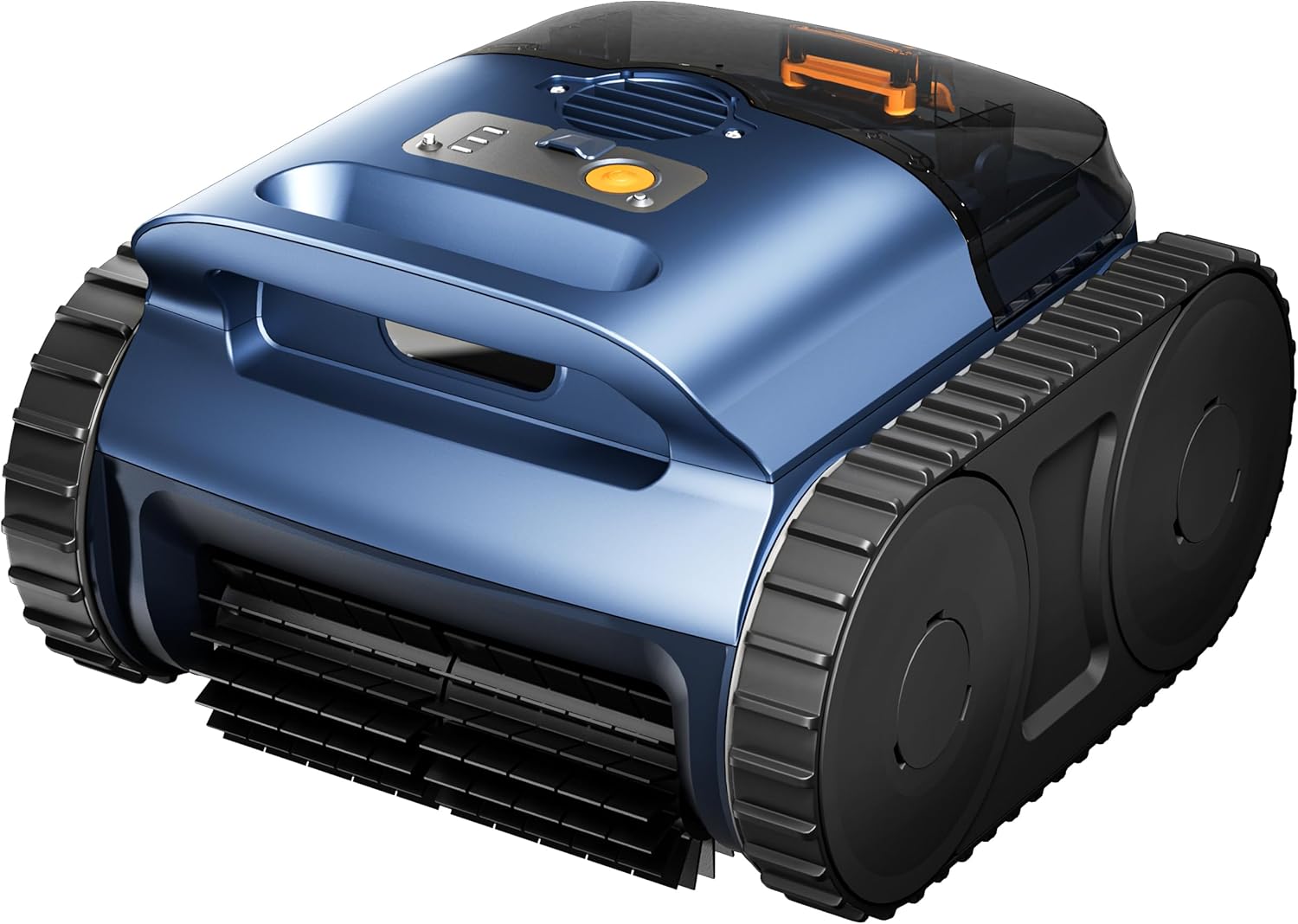
Figure 1: The RERIOU SAT25 Cordless Robotic Pool Vacuum.
2. Important Safety Information
- Read all instructions carefully before operating the device.
- Do not operate the pool cleaner when people or animals are in the pool.
- Ensure the charging port is completely dry before connecting the charger.
- Use only the original charger provided with the device.
- Keep the device out of reach of children.
- Do not attempt to disassemble or repair the device yourself. Contact qualified service personnel.
- Store the cleaner in a cool, dry place away from direct sunlight when not in use.
3. What's Included
Verify that all components are present in the package:
- RERIOU SAT25 Robotic Pool Vacuum (1)
- Charging Adapter (1)
- User Manual (1)
- Retrieval Hook (1)
- Filter Basket (1)

Figure 2: Contents of the RERIOU SAT25 package.
4. Setup
4.1 Initial Charging
- Ensure the robotic cleaner is completely dry before charging.
- Connect the charging adapter to a power outlet and then to the charging port on the cleaner.
- Allow the cleaner to charge for approximately 3 hours for a full charge. The indicator light will change to confirm charging status.

Figure 3: The robotic pool vacuum connected to its charger, indicating fast charging capability.
4.2 Preparing for Use
- Ensure the pool water is clear and free of large debris that could obstruct the cleaner.
- Confirm the filter basket is properly installed and clean.
5. Operating Instructions
5.1 Starting the Cleaner
- Press the power button on the top of the cleaner once. The indicator light will illuminate.
- Gently submerge the cleaner into the pool water. It will begin its cleaning cycle automatically.

Figure 4: The RERIOU SAT25 ready for operation in the pool.
5.2 Cleaning Modes
The RERIOU SAT25 features adaptive multi-mode cleaning technology:
- Floor Mode: Focuses on cleaning the pool floor, ideal for general debris.
- Wall Mode: Engages wall-climbing capabilities to scrub pool walls and waterline.
- Full Coverage Mode: Combines floor and wall cleaning for comprehensive pool maintenance.
The cleaner intelligently scans and maps the pool environment using sonar navigation to optimize cleaning paths, eliminating redundant overlap and ensuring edge-to-edge efficiency.

Figure 5: Advanced sonar navigation ensures comprehensive pool coverage.

Figure 6: The RERIOU SAT25 demonstrating its wall-climbing capability for thorough cleaning.
5.3 Ending the Cleaning Cycle
The cleaner will automatically shut off once its cleaning cycle is complete or the battery is low. Use the provided retrieval hook to safely lift the cleaner from the pool.
6. Maintenance
6.1 Cleaning the Filter Basket
- After each use, remove the filter basket from the cleaner.
- Empty any collected debris into a waste bin.
- Rinse the filter basket thoroughly with a garden hose until all fine particles are removed.
- Ensure the filter basket is completely dry before reinserting it into the cleaner.

Figure 7: The RERIOU SAT25 is designed for easy maintenance, including simple filter cleaning.
6.2 Storage
When not in use for extended periods, fully charge the cleaner, clean the filter, and store it in a cool, dry, and shaded area. Avoid direct sunlight and extreme temperatures.
7. Troubleshooting
| Problem | Possible Cause | Solution |
|---|---|---|
| Cleaner does not start. | Low battery; Power button not pressed correctly. | Charge the cleaner fully; Press the power button firmly. |
| Cleaner not moving or moving slowly. | Filter basket clogged; Obstruction in treads/brushes; Low battery. | Clean the filter basket; Check for and remove obstructions; Recharge the cleaner. |
| Poor cleaning performance. | Filter basket full/dirty; Water chemistry imbalance; Incorrect cleaning mode. | Clean the filter basket; Adjust pool water chemistry; Select appropriate cleaning mode. |
| Cleaner does not climb walls. | Low battery; Slippery pool surface (algae); Air trapped inside. | Recharge cleaner; Brush pool walls to remove algae; Gently shake cleaner underwater to release air. |
8. Specifications
| Feature | Detail |
|---|---|
| Model Name | SAT25 |
| Power Source | Battery Powered |
| Motor Type | Dual 180W Brushless Motors |
| Battery Type | Lithium Ion (1 included) |
| Charging Time | Approx. 3 Hours |
| Runtime | Up to 150 minutes (2.5 hours) |
| Max Pool Size | Up to 2150 Sq. Ft. |
| Cleaning Modes | Floor, Wall, Full Coverage |
| Navigation System | Sonar-Based |
| Mobility | Caterpillar Tread Design |
| Waterproof Rating | IP68-Grade |
| Product Dimensions | 14 x 13 x 9 inches |
| Item Weight | 19.8 pounds |
| Material | Metal, Plastic |
| UPC | 712490649057 |
9. Warranty and Support
9.1 Warranty Information
The RERIOU SAT25 Cordless Robotic Pool Vacuum is backed by a 3-year protection plan, which includes full machine replacement support. This ensures your pool stays clean without service delays or repair wait times, providing peace of mind.
9.2 Customer Support
For any questions, technical assistance, or warranty claims, please contact RERIOU customer support through the retailer's platform or visit the official RERIOU website for contact details.
Ask a question about this manual
Ask about setup, troubleshooting, compatibility, parts, safety, or missing instructions. Manuals+ will review the question and use this page’s manual context to help answer it.