
STAPON S13
STAPON 13.3-inch Android Car Stereo S13 User Manual
Model: S13
1. Introduction
Thank you for choosing the STAPON 13.3-inch Android Car Stereo S13. This advanced car head unit is designed to enhance your driving experience with its high-resolution QLED display, powerful performance, and extensive connectivity options. This manual provides essential information for installation, operation, and maintenance to ensure you get the most out of your device.
Key Features:
- Display: 13.3-inch QLED screen with 1920x1200 resolution for clear visuals.
- Performance: 8GB RAM and 256GB ROM, powered by an 8-core CPU for smooth multitasking.
- Operating System: Android 15.
- Smartphone Integration: Supports both Apple CarPlay and Android Auto.
- Connectivity: Bluetooth 5.0, WiFi, and 4G network support.
- Audio: Advanced DSP (Digital Sound Processor) with 36-band adjustment.
- Navigation: Built-in GPS for confident navigation.
- Camera Support: Compatible with AHD reverse cameras and 360-degree panorama camera systems (sold separately).
- Multimedia: FM/AM radio with RDS, support for various audio/video formats.
2. Safety Information
Please read and understand all safety instructions before installing and operating this device. Failure to follow these instructions may result in injury or damage to the device or vehicle.
- Professional Installation Recommended: Due to the complexity of car electrical systems, professional installation is highly recommended.
- Power Supply: Ensure the device is connected to a 12V DC power supply with negative grounding.
- Wiring: Do not modify or cut the wiring harness. Incorrect wiring can cause damage or fire.
- Operation While Driving: Do not operate the device in a way that distracts you from driving. Always prioritize road safety.
- Temperature: The operating temperature range is -4°F to 140°F (-20°C to 60°C). Avoid exposing the device to extreme temperatures outside this range.
- Cleaning: Use a soft, dry cloth for cleaning. Do not use abrasive cleaners or solvents.
3. What's in the Box
Upon unpacking, please verify that all components are present:
- Display Unit (STAPON 13.3-inch Android Car Stereo S13)
- Power Harness
- GPS Antenna
- USB Cables
- External Microphone (if included)
- Mounting Brackets and Screws
- User Manual (this document)
Note: Additional accessories like a 360-degree camera system or specific vehicle frames are sold separately.
4. Installation and Initial Setup
Proper installation is crucial for the performance and longevity of your car stereo. If you are unsure about any steps, consult a professional installer.
4.1. Pre-Installation Checks
- Disconnect the vehicle's battery to prevent electrical shorts.
- Ensure you have the correct wiring harness adapter for your vehicle model.
- Confirm the mounting space in your dashboard is compatible with a 2DIN unit and can accommodate the 13.3-inch display.
4.2. Mounting the Unit
The STAPON S13 unit is designed to be installed with a 9 or 10-inch frame and can be adjusted vertically. It features four fixing holes on the machine itself, and the frame typically comes with three groups of holes for flexible mounting.

Image: Installation diagram illustrating the unit's fixing points and adjustable frame options. The image shows the back of the unit with four screw points, a frame with multiple mounting holes, and side profiles indicating adjustable depth and height for installation.
- Attach the provided mounting brackets to the sides of the head unit using the screws.
- Secure the unit into your vehicle's dashboard opening. Ensure it is firmly seated and aligned.
- Connect the wiring harness, GPS antenna, and any other necessary cables (USB, camera inputs, etc.).
- Reconnect the vehicle's battery.
4.3. Initial Power On and Configuration
- Turn on your vehicle's ignition. The unit should power on automatically.
- Follow the on-screen prompts for initial setup, including language selection, time zone, and network configuration.
- Connect to a WiFi network or insert a 4G SIM card (if supported and desired) to enable online features.
- Calibrate the touch screen if prompted.
5. Operating Instructions
5.1. Display and User Interface
The 13.3-inch QLED display offers a 1920x1200 resolution, providing a clear and vibrant visual experience. The Android 15 operating system provides an intuitive interface.

Image: The main display of the STAPON car stereo, illustrating the 13.3-inch screen size with a diagonal measurement overlay. It shows a split-screen view with a navigation app on the right and a music player on the left, along with various app icons at the bottom.

Image: The STAPON 13.3-inch car stereo seamlessly integrated into a car's dashboard, showcasing its excellent color performance and clarity with a vivid image of an underwater coral reef and fish.

Image: A graphic highlighting the 2K screen with Ultra HD resolution of 1920x1200, emphasizing vivid and layered images for a rich visual experience, set against a vibrant underwater scene.
The unit supports a picture-in-picture split-screen function, allowing you to run two applications simultaneously, such as navigation and media playback.
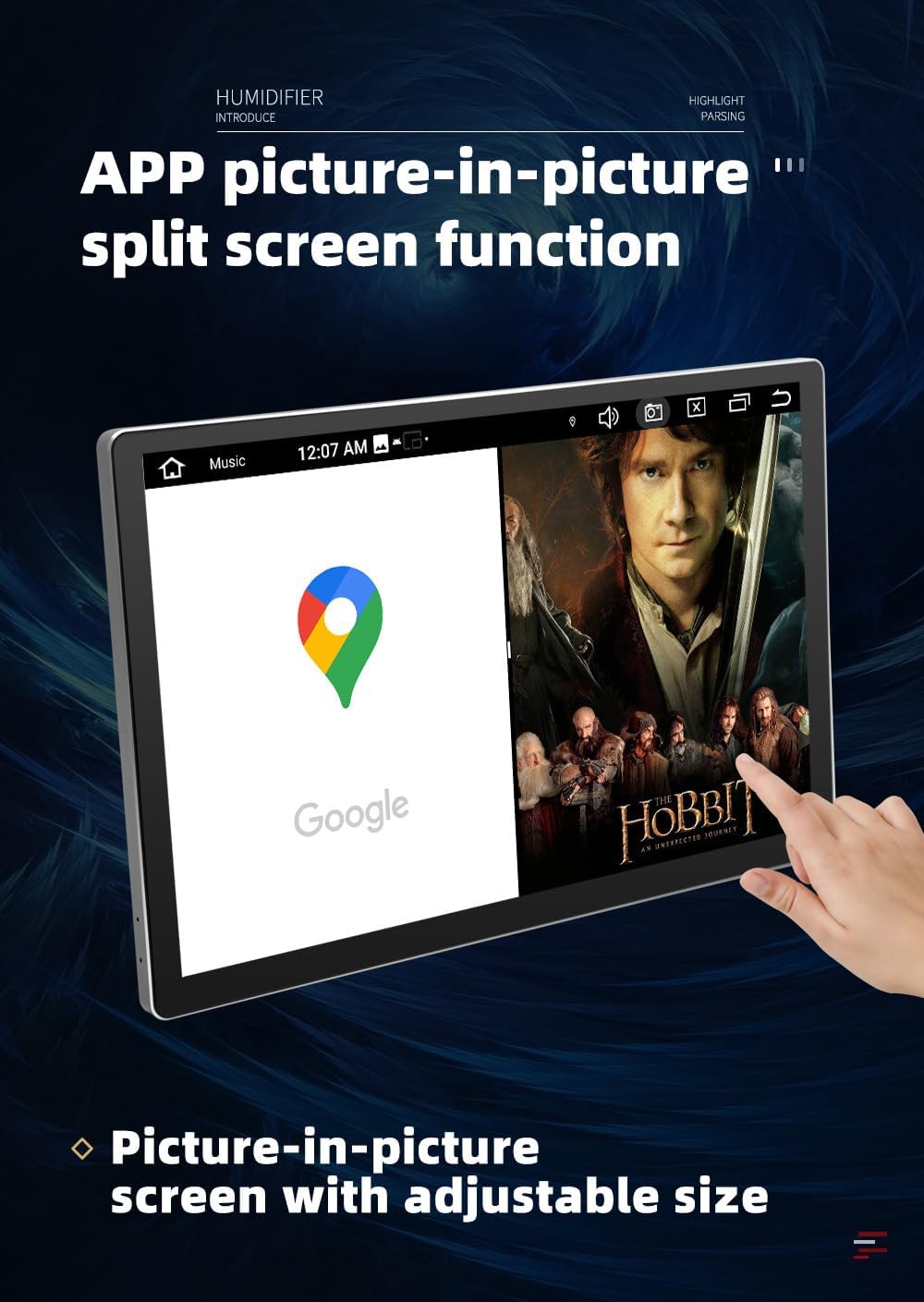
Image: The car stereo display demonstrating the picture-in-picture split-screen function, with Google Maps on the left side and a movie playing on the right, illustrating adjustable size for each window.
5.2. CarPlay and Android Auto
Connect your smartphone via USB or wirelessly to access Apple CarPlay or Android Auto. This allows for seamless integration of your phone's navigation, music, calls, and messaging apps directly on the car stereo display.

Image: A comparison showing the interfaces of iPhone CarPlay and Android Auto on the car stereo screen. Below, it illustrates how phone navigation display is mirrored and optimized for the car DVD screen display, highlighting the built-in CarPlay and Android Auto functionality.
5.3. Connectivity (Bluetooth, WiFi, 4G)
- Bluetooth 5.0: Pair your phone for hands-free calling, contact synchronization, and audio streaming.
- WiFi: Connect to a local WiFi hotspot for internet access, app downloads, and online services.
- 4G: Insert a compatible SIM card (not included) to enable direct 4G network access for online features without relying on a phone hotspot.

Image: The car stereo display showcasing various applications like Chrome, YouTube, and Maps, with a prominent '4G' icon indicating full network connectivity. This highlights the unit's 4G full network pass feature for enhanced online functionality.
5.4. Multimedia and DSP Sound Processing
The unit supports a wide range of audio and video formats (e.g., MP3, WAV, FLAC, MP4, AVI, MKV). The integrated DSP allows for detailed audio customization with a 36-band equalizer, enhancing your listening experience.

Image: The car stereo display showing the DSP sound processing interface with a 36-band equalizer. This visual representation demonstrates the extensive audio adjustment capabilities for a customized sound experience.
5.5. GPS Navigation
Utilize the built-in GPS module for accurate navigation. The unit supports online map applications, providing real-time traffic updates and route guidance.
5.6. 360-Degree Camera Support
If a compatible 360-degree camera system (with four cameras: front, rear, left, and right side) is purchased and installed, the unit can display a comprehensive panoramic view. This feature enhances safety during parking and maneuvering. The system can also function as a dashcam, recording footage from all four cameras simultaneously.
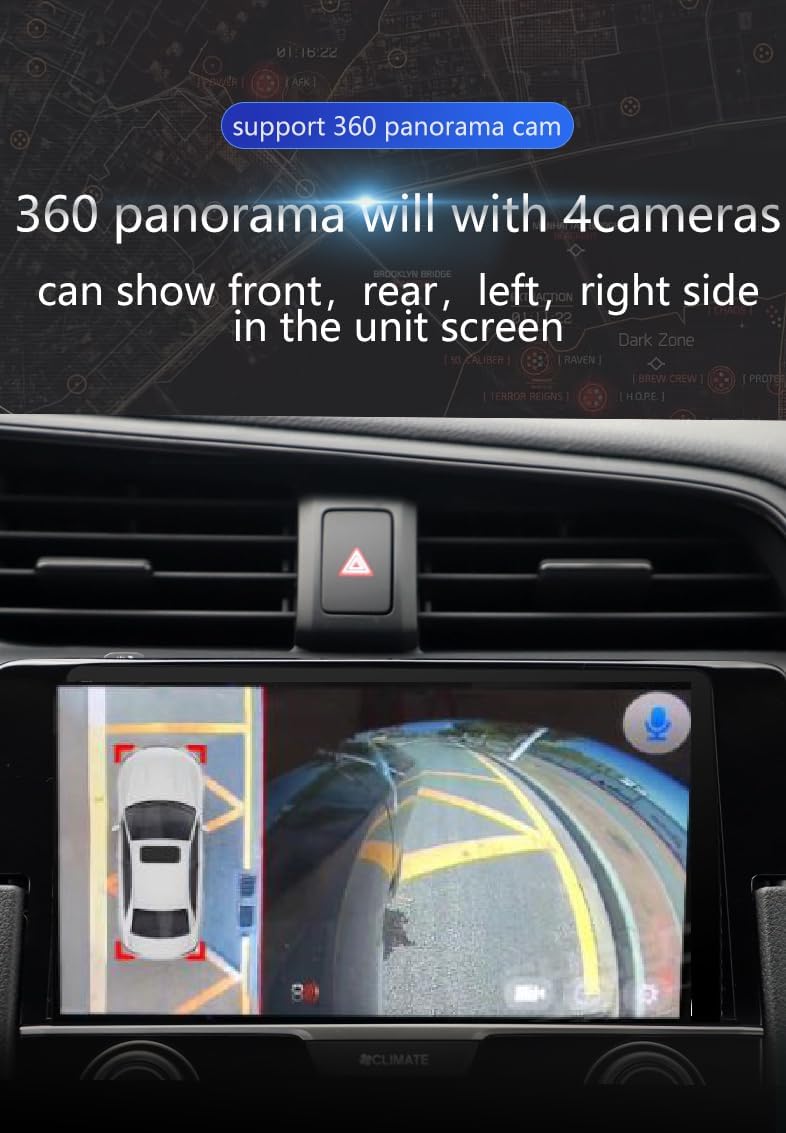
Image: The car stereo display showing a simulated 360-degree panorama view from a car's perspective, with a top-down view of the car and surrounding environment. This illustrates the unit's support for a 360-degree camera system for enhanced safety.
6. Maintenance
- Screen Cleaning: Use a soft, lint-free cloth to gently wipe the screen. For stubborn smudges, slightly dampen the cloth with water or a screen-safe cleaner. Avoid harsh chemicals.
- Software Updates: Periodically check for software updates through the unit's settings menu to ensure optimal performance and access to new features.
- Environmental Care: Avoid exposing the unit to direct sunlight for extended periods when the vehicle is parked, as this can lead to overheating.
7. Troubleshooting
If you encounter issues with your STAPON S13, refer to the following common problems and solutions:
| Problem | Possible Cause | Solution |
|---|---|---|
| Unit does not power on. | Loose power connection, blown fuse, vehicle battery issue. | Check power cables, inspect vehicle fuses, ensure battery is charged. |
| No sound. | Volume too low, mute activated, speaker wiring issue. | Increase volume, check mute settings, verify speaker connections. |
| GPS signal lost or inaccurate. | GPS antenna obstructed or improperly installed. | Ensure GPS antenna has a clear view of the sky and is securely connected. |
| Bluetooth connection issues. | Device not in pairing mode, interference, incorrect pairing process. | Ensure both devices are in pairing mode, try re-pairing, restart both devices. |
| Touch screen unresponsive. | Software glitch, screen damage. | Restart the unit. If issue persists, contact support. |
For issues not listed here, or if troubleshooting steps do not resolve the problem, please contact customer support.
8. Specifications
| Feature | Detail |
|---|---|
| Model Name | 13.3-inch Android Car Stereo (S13) |
| Display Size | 13.3 Inches |
| Screen Resolution | 1920x1200 (2K QLED) |
| Operating System | Android 15 |
| Processor | Octa-Core (UIS7862 12nm CPU) |
| RAM | 8GB |
| Internal Storage (ROM) | 256GB |
| Bluetooth Version | 5.0 (10m range) |
| Connectivity | Wi-Fi, 4G |
| Smartphone Integration | CarPlay, Android Auto |
| Audio Features | DSP (AK7604), TDA7850 Sound System, 36-band adjustment, Stereo Output |
| Radio | AM/FM with RDS |
| Navigation | Built-in GPS, Online Map Type |
| Camera Support | AHD Reverse Camera, 360-degree Panorama Camera (optional) |
| Operating Temperature | -4°F to 140°F (-20°C to 60°C) |
| Product Dimensions | 7.84 x 2 x 7.5 inches |
| Item Weight | 4.4 pounds |
| Mounting Type | In-dash |
9. Warranty Information
The STAPON 13.3-inch Android Car Stereo S13 comes with a 1-year warranty from the date of purchase. This warranty covers manufacturing defects and malfunctions under normal use. It does not cover damage caused by improper installation, misuse, accidents, unauthorized repairs, or normal wear and tear.
Please retain your proof of purchase for warranty claims.
10. Customer Support
If you have any questions, require technical assistance, or need to make a warranty claim, please contact STAPON customer support through the retailer where you purchased the product or refer to the contact information provided with your purchase documentation.
When contacting support, please have your product model (S13) and proof of purchase readily available.
Ask a question about this manual
Ask about setup, troubleshooting, compatibility, parts, safety, or missing instructions. Manuals+ will review the question and use this page’s manual context to help answer it.