
MAXRIENY AVX1 Phase Sequence Tester
BSIDE NCV 3 Phase Sequence Presence Rotation Tester
Model: AVX1 Phase Sequence Tester
1. Overview
The BSIDE NCV 3 Phase Sequence Presence Rotation Tester (Model AVX1) is a versatile 2-in-1 non-contact device designed for both phase sequence detection and induced voltage testing. It offers a safe and portable solution for electrical professionals and enthusiasts, featuring a clear LCD color screen, adjustable sensitivity, and a rechargeable battery.
1.1 What's in the Box
- AVX1 Non-contact Tester
- Charging Cable
- User's Manual
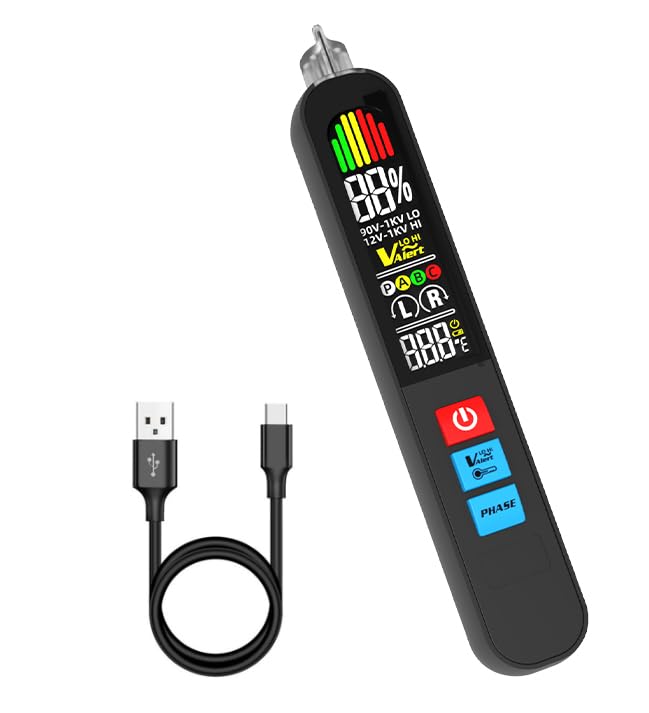
Image 1.1: The AVX1 Phase Sequence Tester and its included charging cable.
2. Key Features
- Non-contact Phase Sequence Tester: Safely detects 3-phase sequence (forward or reverse) without direct metal contact.
- Non-contact Voltage Tester (NCV): Features high sensitivity (12-1000V) and low sensitivity (90-1000V) voltage sensing modes.
- Intensity Alarms: Provides visual (color analog bars) and audible (beeping) alarms, along with signal strength percentage display.
- LCD Color Screen: Large, clear display for easy viewing of test results and indicators.
- Rechargeable Battery: Equipped with a 400mAh lithium battery for convenience and extended use.

Image 2.1: The intelligent digital display color screen provides clear readings.

Image 2.2: Non-contact electric field induction for safe voltage detection.
3. Setup and Charging
3.1 Initial Setup
Before first use, ensure the device is fully charged. The AVX1 comes with a built-in rechargeable lithium battery.
3.2 Charging the Battery
- Locate the charging port on the device (typically at the bottom or side).
- Connect the provided charging cable to the device.
- Connect the other end of the charging cable to a standard USB power adapter (not included) or a computer USB port.
- The charging indicator on the device will illuminate during charging and typically turn off or change color when fully charged.

Image 3.1: The AVX1 features a convenient rechargeable 400mAh battery, charged via USB.
4. Operating Instructions
4.1 Power On/Off
- To power on, press and hold the power button (⏻) until the screen illuminates.
- To power off, press and hold the power button again. The device also features an auto-shutdown function to conserve battery.
4.2 Phase Sequence Detection
The AVX1 can detect the phase sequence (forward or reverse) of a 3-phase AC system without direct contact.
- Ensure the device is powered on.
- Press the PHASE button to enter phase sequence detection mode.
- Approach the three phases (A, B, C) with the sensing tip of the tester.
- The LCD screen will display 'L' for reverse phase sequence or 'R' for forward phase sequence, along with corresponding indicators.

Image 4.1: Detecting phase sequence for phases A, B, and C.
4.3 Non-Contact Voltage (NCV) Detection
The NCV function allows for safe detection of AC voltage presence.
- Ensure the device is powered on.
- The device automatically enters NCV mode upon power-on.
- Approach the conductor or outlet with the sensing tip.
- The device will beep, and the LED indicator will light up (green for low, orange for medium, red for high sensitivity detection). The screen will display an analog bar and signal strength percentage.
4.4 Sensitivity Adjustment
The AVX1 offers adjustable sensitivity for NCV detection:
- Low Sensitivity (12-1000V): Suitable for general voltage detection. Indicated by a green light and green analog bar.
- High Sensitivity (90-1000V): For detecting weaker signals or voltage from a distance. Indicated by an orange or red light and corresponding analog bar.
To switch sensitivity, press the V-Alert button. The display will indicate the current sensitivity level (LO or HI).
Image 4.2: The tester can switch between high and low sensitivity for voltage detection.
4.5 Temperature Unit Switching
The device supports switching between Celsius (℃) and Fahrenheit (℉) temperature units. Refer to the on-screen prompts or specific button (if available) for this function.
5. Maintenance
5.1 Battery Charging
Regularly charge the device's internal 400mAh lithium battery using the provided USB cable. A low battery indicator will appear on the screen when charging is required.
5.2 Cleaning
- Wipe the device with a soft, dry cloth.
- Do not use abrasive cleaners, solvents, or corrosive chemicals.
- Ensure the device is powered off and disconnected from any power source before cleaning.
6. Troubleshooting
| Problem | Solution |
|---|---|
| Device does not power on. | Ensure the battery is charged. Connect the charging cable and allow it to charge for at least 30 minutes before attempting to power on again. |
| Inaccurate or inconsistent readings. | Ensure the sensing tip is clean. Avoid strong electromagnetic interference. Check battery level. Try switching sensitivity modes. |
| No response during phase sequence test. | Ensure the device is in phase sequence mode (PHASE button pressed). Confirm the presence of voltage on the phases using NCV mode first. |
| Screen is dim or flickering. | The battery may be low. Recharge the device. If the issue persists, contact customer support. |
7. Product Specifications
| Specification | Detail |
|---|---|
| Product Dimensions | 1.08 x 0.79 x 6.54 inches |
| Item Model Number | AVX1 Phase Sequence Tester |
| Batteries | 1 Nonstandard Battery (included) |
| Manufacturer | BSIDE |
| Brand | MAXRIENY |
| Power Source | Battery Powered |
| Style | Non-contact Phase Sequence Tester Voltage Tester |
| Color | Black |
| Item Weight | 60.2 Grams (2.12 ounces) |
8. Warranty and Support
For warranty information, technical support, or service inquiries, please refer to the contact details provided on the product packaging or the official MAXRIENY website. Keep your purchase receipt as proof of purchase for any warranty claims.
Ask a question about this manual
Ask about setup, troubleshooting, compatibility, parts, safety, or missing instructions. Manuals+ will review the question and use this page’s manual context to help answer it.