
1. Introduction
This manual provides detailed instructions for the setup, operation, and maintenance of your RORIOS AA-AFG001 Digital Sport Watch. Please read this manual thoroughly to ensure proper use and to fully utilize all features of your new timepiece.
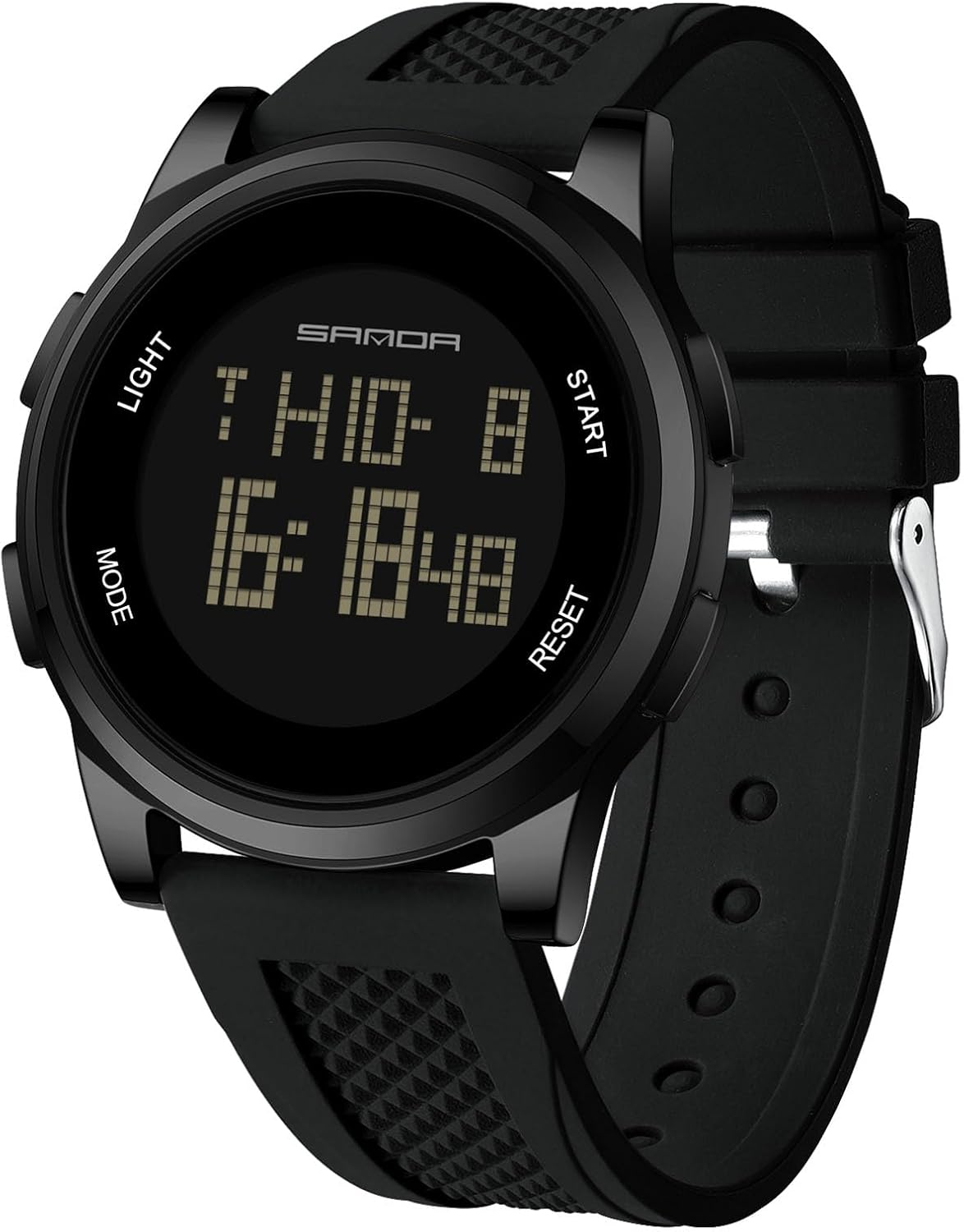
Figure 1: Front view of the RORIOS AA-AFG001 Digital Sport Watch, displaying current time and date.
2. Product Features
- Digital Display: Large electronic screen with high-definition display for clear readability.
- Multi-functional: Includes time, calendar, alarm clock, stopwatch, countdown timer, metronome, second time display, altitude measurement, atmospheric pressure measurement, and compass.
- Water Resistance: 50 meters (5 ATM) for daily life activities such as hand washing, rain exposure, and short-term soaking. Note: Do not operate buttons while submerged in water.
- Luminous Backlight: One-key cold light mode for clear visibility in dark environments.
- Durable Construction: High-hardness mineral tempered glass for scratch resistance.
- Comfortable Wear: High-quality silicone strap for a comfortable fit.
- Hourly Chime: Option for hourly report.
- Time Formats: Supports 12-hour and 24-hour time formats.

Figure 2: Key features of the RORIOS AA-AFG001 watch, including its luminous function, daily life waterproof capability, high-quality anti-scratch glass, and removable silicone strap.
3. Button Functions
Your RORIOS AA-AFG001 watch features four buttons for navigation and setting:
- Button A (LIGHT): Activates the backlight for 3 seconds in any mode.
- Button B (MODE): Cycles through different operational modes (Timekeeping, Pedometer, Alarm, Chronograph, Countdown Timer, Metronome, Second Time, Altitude, Atmospheric Pressure, Compass). Also used to enter/exit setting modes.
- Button C (RESET/DECREASE): Used to reset values or decrease numerical settings. In some modes, it reviews records.
- Button D (START/INCREASE): Used to start/stop functions or increase numerical settings. In some modes, it shifts display content.

Figure 3: Diagram illustrating the watch's buttons and their primary functions, including Light, Mode, Start, and Reset/Setup keys, along with Week, Month/Date, and Time Display areas.
4. Setup and Operating Instructions
This section details how to set up and operate the various functions of your RORIOS AA-AFG001 watch. For a visual guide, please refer to the official instruction video below.
Video 1: Official instruction video for the RORIOS Digital Sport Watch (Model TG-2106, similar to AA-AFG001), covering all modes and settings.
4.1. Time and Date Setting
- In normal timekeeping mode, press and hold Button B for 3 seconds until the seconds start flashing.
- Press Button C or Button D to set the seconds to zero.
- Press Button B to cycle through the items you wish to change: Time (Hour, Minute), Date (Year, Month, Day), 12/24-hour format, Luminance, Key sounds on/off, Weather signs.
- Use Button C to decrease the value or Button D to increase the value. Hold the button to adjust quickly.
- After all settings are complete, press and hold Button B for 3 seconds to exit the setting mode. The watch will automatically exit setting mode after 1 minute of inactivity.
4.2. Pedometer Mode
- From timekeeping mode, press Button B repeatedly until you reach the Pedometer mode (indicated by 'STEP').
- To turn the pedometer on/off, press and hold Button C for 3 seconds. The pedometer symbol will display when it is on.
- Press Button D to shift between displayed data: Steps → Mileage → Calories → Exercise Time → Steps.
- To set units (metric/imperial): In Pedometer mode, press and hold Button B for 3 seconds. The unit will flash. Press Button C to select the desired unit (e.g., km/inch, kg/weight). Press Button B to select the item to change. Use Button C or Button D to increase/decrease the value.
- After setting, press and hold Button B for 3 seconds to exit.
4.3. Alarm Mode
- From timekeeping mode, press Button B repeatedly until you reach the Alarm mode (indicated by 'ALM1', 'ALM2', or 'CHIME').
- Press Button D to shift between Alarm 1 (ALM1), Alarm 2 (ALM2), and Hourly Chime (CHIME).
- Press Button C to turn the selected alarm or hourly chime ON or OFF.
- To set an alarm: In Alarm mode, press and hold Button B for 3 seconds. The minute display will flash.
- Press Button B to select between Minute and Hour.
- Use Button C to decrease or Button D to increase the value.
- Press and hold Button B for 3 seconds to exit.
- When an alarm sounds, it will beep for 20 seconds. Press any button to stop it.
4.4. Chronograph (Stopwatch) Mode
- From timekeeping mode, press Button B repeatedly until you reach the Chronograph mode (indicated by 'CHR'). The maximum timing range is 99 hours, 59 minutes, and 59.99 seconds.
- Press Button D to start or stop the chronograph.
- When stopped, press and hold Button C for 3 seconds to reset the chronograph to zero.
- Split Time Record: While the chronograph is running, press Button C to record a LAP time. The LAP time will display for 15 seconds, then return to the running chronograph. Press Button C again for the next LAP.
- To review LAP records: Stop the chronograph with Button D. Press and hold Button B for 2 seconds to enter LAP record mode. Use Button C/D to review LAPs.
- To exit LAP record mode: Press and hold Button B for 3 seconds.
- Background Operation: You can press Button B to enter other modes while the chronograph is running in the background. When the chronograph stops, it will return to timekeeping mode after 5 minutes.
4.5. Countdown Timer Mode
- From timekeeping mode, press Button B repeatedly until you reach the Countdown Timer mode (indicated by 'TMR'). The maximum countdown range is 99 hours, 59 minutes, and 59.99 seconds.
- To start/stop the timer: Press Button D.
- To return to your set value: When the timer is stopped, press Button C.
- When the countdown reaches 0, an alarm will sound for 30 seconds.
- To set the timer: In Countdown Timer mode, press and hold Button B for 3 seconds. The hour display will flash.
- Press Button B to select Hour, Minute, or Second.
- Use Button C to decrease or Button D to increase the value. Hold the button to adjust quickly.
- Press and hold Button B for 3 seconds to exit. The watch will automatically exit setting mode after 1 minute of inactivity.
4.6. Metronome Mode
- From timekeeping mode, press Button B repeatedly until you reach the Metronome mode (indicated by 'PACER').
- Press Button D to turn the metronome on/off. The maximum value is 99999.
- When stopped, press Button C for 3 seconds to reset.
- To set frequency (30-180): In Metronome mode, press and hold Button B for 3 seconds.
- Use Button C to decrease or Button D to increase the frequency. Hold the button to adjust quickly.
- Press and hold Button B for 3 seconds to exit. The watch will automatically exit setting mode after 1 minute of inactivity.
4.7. Second Time Setting
- From timekeeping mode, press Button B repeatedly until you reach the Second Time mode (indicated by 'T2').
- Press and hold Button B for 3 seconds. The minute display will flash.
- Press Button B to select Hour or Minute.
- Use Button C to decrease or Button D to increase the value. Hold the button to adjust quickly.
- Press and hold Button B for 3 seconds to exit. The watch will automatically exit setting mode after 1 minute of inactivity.
4.8. Altitude Measurement Mode
- In timekeeping mode, press Button C to enter Altitude Measurement mode.
- Press Button D to shift the top row display content: Temperature → Altitude Trend.
- When the trend is displayed, you can review the former hourly curve by quickly pressing Button C.
- The watch will return to timekeeping mode after 24 hours without any button presses. When displaying the curve, the first line flashes (current altitude).
- To shift units: Press and hold Button D for 3 seconds to cycle through °C/ft → °C/m → °F/m → °F/ft → °C/ft.
- Altitude Setting: Press and hold Button B for 3 seconds to enter altitude setting mode. Press Button B to move and set the following items:
- Relative Altitude Setting (ZERO): Press Button D/C to shift between "YES"/"NO". "YES" means the relative altitude is 0. "NO" uses the default value (calculated based on default sea level atmosphere 1013.25mb). If "YES" is chosen, the measurement result is relative, and '(r)' will appear on screen.
- Input Current Altitude (ALTI): Press Button D to increase or Button C to decrease the value. Hold the button to adjust quickly. Press Button B for 3 seconds to confirm and return to altitude measurement mode.
- Input Sea Level Atmosphere Value (SEAP): Press Button D to increase or Button C to decrease the value. Hold the button to adjust quickly. Press Button B for 3 seconds to confirm and return to altitude measurement mode.
- Factory Default Sea Level Atmospheric Pressure Value (FDEF): Press Button D/C to shift between "YES"/"NO". "YES" means using the default value 1013.25mb. Press Button B for 3 seconds to confirm and return to altitude measurement mode.
4.9. Atmospheric Pressure Measurement
- In timekeeping mode, press Button D to enter Atmospheric Pressure Measurement mode.
- Press Button D to shift the display: Temperature → Sea Level Atmospheric Pressure → Trend.
- When the trend is displayed, you can review the former hourly curve by quickly pressing Button C. Press Button D to return.
- To shift units: Press and hold Button D for 3 seconds to cycle through °C/hpa/mb → °C/Inhg → °F/Inhg → °F/hpa/mb.
- Press Button B to return to timekeeping mode. The watch will automatically return to timekeeping mode after 24 hours without any button presses.
- Atmospheric Pressure Setting: In timekeeping mode, press Button D to enter atmospheric pressure measurement mode. Press Button B for 3 seconds to enter atmospheric pressure setting mode. Press Button B to move and set the following items:
- Input Current Atmospheric Pressure (AIRP): Press Button D/C to increase or decrease the value. Hold the button to adjust quickly. Press Button B for 3 seconds to confirm and return to atmospheric pressure measurement mode.
- Input Current Temperature (TEMP): Press Button D/C to increase or decrease the value. Hold the button to adjust quickly. Press Button B for 3 seconds to confirm and return to atmospheric pressure measurement mode. Note: When adjusting temperature, if the unit is °C, it will increase/decrease by 0.1 each press. If the unit is °F, it will increase/decrease by 0.2 each press.
- Factory Default Atmospheric Pressure Value (FDEF): Press Button D/C to shift between "YES"/"NO". "YES" means using the default value for pressure and temperature. Press Button B for 3 seconds to confirm and return to atmospheric pressure measurement mode.
4.10. Compass Mode
Note: If your compass has never been used before, please adjust it using the following method.
- Compass Adjust Mode (CAL): In compass mode, press and hold Button B for 3 seconds to enter CAL mode. Then, turn the watch slowly, both clockwise and anti-clockwise. This watch will exit the correction mode automatically and return to compass measurement mode after simply turning two circles in the same direction.
- During compass correction, after 60 direction points illuminate and go out one by one sequentially, it will confirm the correction automatically. (Note: After changing the battery and using the compass for the first time, it will enter automatically adjust mode first).
- Digital Adjust Mode (DEC): The maximum correction angle range is ±90° ("W" "E" ±90°). If you have a correct north, and after CAL, it still deviates much, then use the DEC to correction. In compass mode, press and hold Button B for 3 seconds to enter CAL, press Button B again to enter DEC (press Button D to increase 1, Button C to decrease 1). Press Button B for 3 seconds to confirm the corrected value, and return to normal measurement mode.
- Compass Using: In the Compass mode, position the watch horizontally, rotate the watch to make the needle point to 0. The 12 o'clock direction is the north.
- In compass measurement mode, press Button C to turn on/off reverse direction display. When open the reverse direction, there is a "--" on the bottom left of the screen. And when needle point to 0, the "S" direction indicated by the 12 o'clock position is the south.
- It will exit the measuring mode after 1 minute without button pressing. You can measure again by pressing Button D.
The following table indicates the meaning of each acronym for each direction:
| DIR | Meaning | DIR | Meaning | DIR | Meaning | DIR | Meaning |
|---|---|---|---|---|---|---|---|
| N | North | NNE | North-north-east | NE | North-east | ENE | East-north-east |
| E | East | ESE | East-south-east | SE | South-east | SSE | South-south-east |
| S | South | SSW | South-south-west | SW | South-west | WSW | West-south-west |
| W | West | WNW | West-north-west | NW | North-west | NNW | North-north-west |
5. Maintenance
- Clean the watch regularly with a soft, damp cloth. Avoid harsh chemicals.
- Do not expose the watch to extreme temperatures (hot or cold) for extended periods.
- Avoid strong impacts or dropping the watch.
- While the watch is water-resistant, avoid operating buttons underwater to prevent water ingress.
- If the watch is exposed to saltwater, rinse it with fresh water and dry thoroughly.
- Battery replacement should be performed by a qualified technician to maintain water resistance.
6. Troubleshooting
- Display is blank or dim: The battery may be low. Replace the battery.
- Buttons are unresponsive: Ensure the watch is not in a locked mode (if applicable) or try resetting the watch by removing and reinserting the battery (professional assistance recommended to maintain water resistance).
- Time is inaccurate: Re-set the time and date following the instructions in Section 4.1.
- Water inside the watch: Immediately take the watch to a professional for inspection and repair to prevent further damage.
- Compass is inaccurate: Perform the compass calibration steps outlined in Section 4.10.
7. Specifications
| Feature | Detail |
|---|---|
| Model Number | AA-AFG001 |
| Manufacturer | RORIOS |
| Product Dimensions | 1.57 x 1.57 x 1.57 inches |
| Item Weight | 2.12 ounces |
| Dial Diameter | 44mm |
| Case Thickness | 10mm |
| Band Length | 240mm |
| Band Width | 24mm |
| Clasp Type | Buckle |
| Movement | Electronic |
| Water Resistance | 50 Meters (5 ATM) |
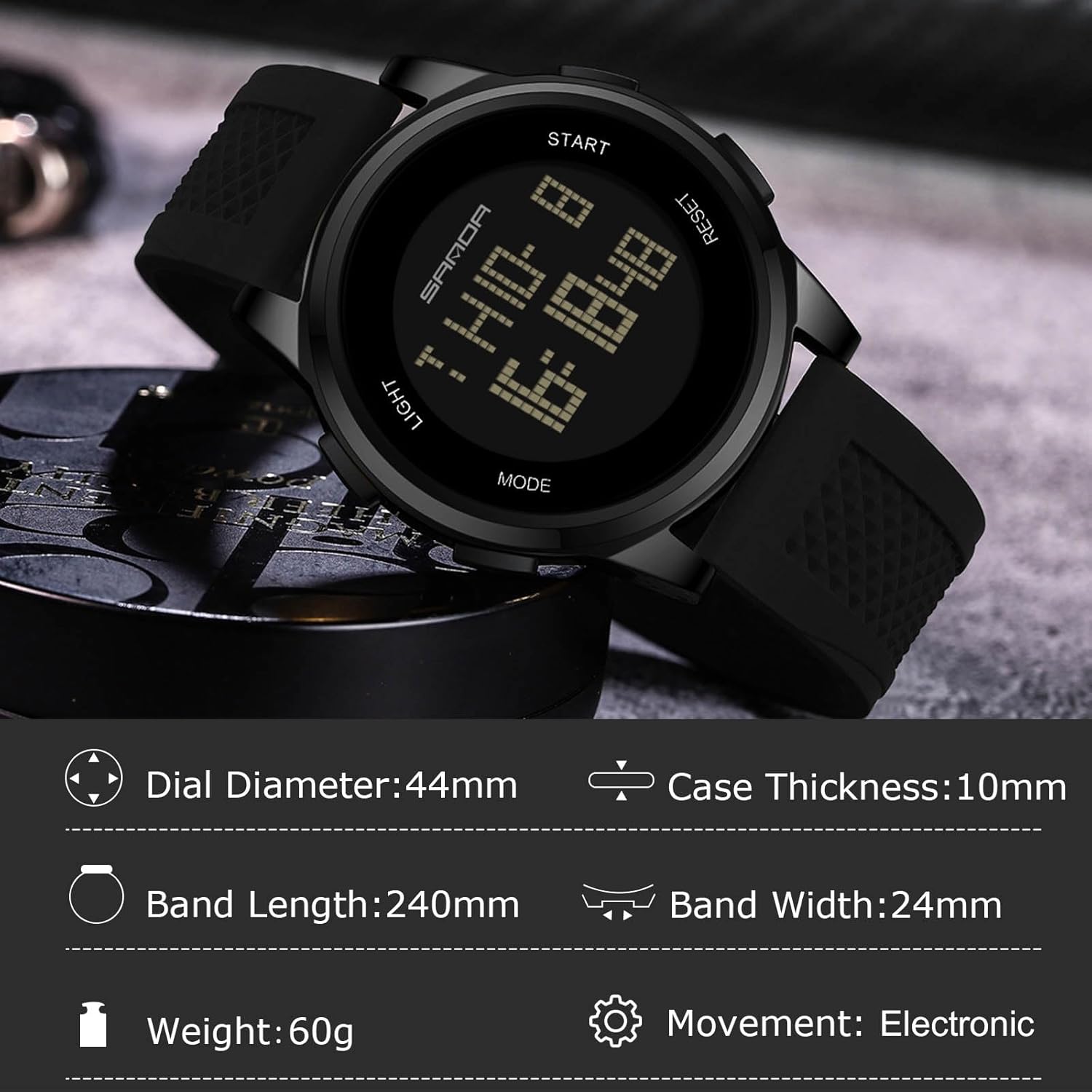
Figure 4: Detailed dimensions and specifications of the RORIOS AA-AFG001 Digital Sport Watch.
8. Warranty and Support
Your RORIOS AA-AFG001 watch comes with a user manual and warranty information included in the beautiful gift box. For any support inquiries or warranty claims, please refer to the contact information provided in your warranty documentation or visit the official RORIOS website.

Figure 5: The RORIOS watch is presented in a beautiful gift box, which also contains the user manual and warranty information.