
1. Introduction
The THREELEMON TOMPD-63LW is a 1P+N 63A Smart Switch Energy Meter designed for advanced electrical circuit management. This device integrates kilowatt-hour metering, circuit breaking, and timer functionalities with comprehensive voltage, current, and leakage protection. It allows for remote control and monitoring via a mobile application, enhancing safety and energy efficiency in various applications.
Key Features:
- Simultaneous disconnection of Live (L) and Neutral (N) lines for enhanced safety.
- Remote control (on/off) via mobile phone from any location.
- Real-time monitoring of current, voltage, leakage current, and total power consumption on a mobile device.
- Programmable timer function for automated operation.
- Adjustable overvoltage, undervoltage, overcurrent, and leakage current protection settings via application or manual input.
- Configurable reconnection time (delayed opening time).
- Voltage/current/kW calibration capability.
- Low power consumption (less than 2W).
2. Safety Information
Please read and understand all safety instructions before installing or operating this device. Failure to follow these instructions may result in electric shock, fire, or serious injury.
- Qualified Personnel Only: Installation and maintenance should only be performed by qualified electricians or personnel with appropriate electrical training.
- Power Disconnection: Always ensure the main power supply is disconnected before performing any installation, wiring, or maintenance on the device.
- Proper Wiring: Connect the device according to the wiring diagram provided in this manual and local electrical codes. Incorrect wiring can lead to malfunction or hazards.
- Voltage and Current Ratings: Do not exceed the rated voltage (230V) and current (63A) of the device.
- Environmental Conditions: Install the device in a dry, well-ventilated area, away from direct sunlight, high temperatures, and corrosive gases.
- Grounding: Ensure proper grounding if required by local regulations.
- Inspection: Regularly inspect the device for any signs of damage or wear. Do not use a damaged device.
3. Product Overview and Components
The TOMPD-63LW Smart Switch Energy Meter features a compact design for DIN rail mounting, equipped with a digital display and control buttons for local operation, alongside WiFi connectivity for remote management.

Figure 3.1: Front view of the THREELEMON TOMPD-63LW Smart Switch Energy Meter. The display shows real-time voltage (218V), current (0mA, 000.0A), and energy consumption (00000.0 kWh). Control buttons for Power, Set, Timer, and WiFi are visible, along with indicators for Voltage, Amperage, Leakage, WiFi status, and Pulse. Input (IN) and Output (OUT) terminals are marked for Neutral (N) and Live (L) connections.
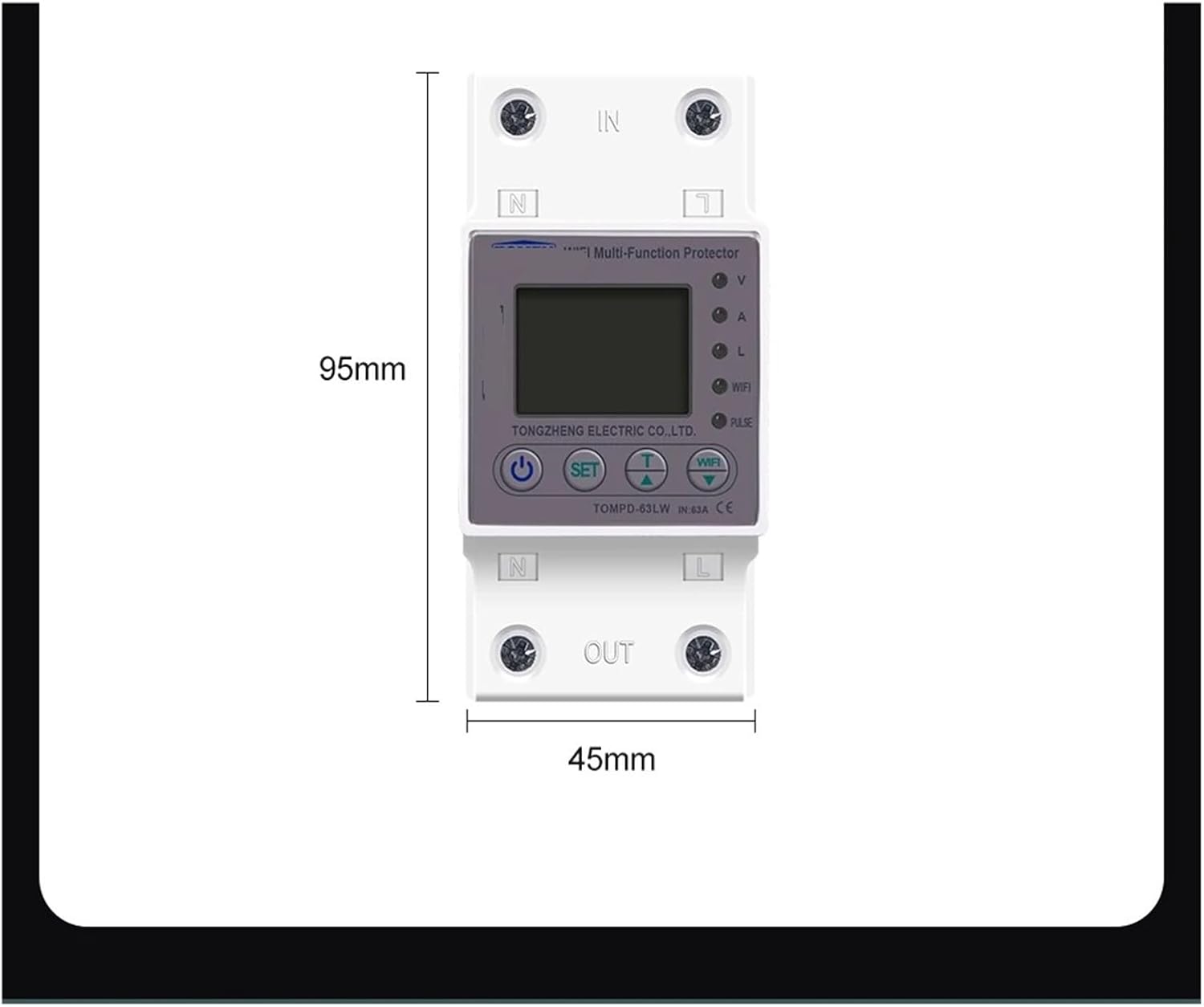
Figure 3.2: Dimensional diagram of the TOMPD-63LW Smart Switch Energy Meter, indicating a height of 95mm and a width of 45mm.
4. Installation
The TOMPD-63LW is designed for standard DIN rail mounting. Ensure the main power supply is OFF before proceeding with installation.
- Power Disconnection: Turn off the main circuit breaker at your electrical panel to cut off power to the installation area. Verify with a voltage tester that no power is present.
- Mounting: Snap the TOMPD-63LW onto a standard 35mm DIN rail within your electrical distribution box.
- Wiring - Input: Connect the incoming Live (L) wire to the 'IN L' terminal and the incoming Neutral (N) wire to the 'IN N' terminal on the top of the device. Ensure connections are secure.
- Wiring - Output: Connect the outgoing Live (L) wire to the 'OUT L' terminal and the outgoing Neutral (N) wire to the 'OUT N' terminal on the bottom of the device. Ensure connections are secure.
- Double Check: Verify all wiring connections are tight and correctly matched (L to L, N to N).
- Restore Power: Once installation is complete and verified, restore power by turning on the main circuit breaker. The device display should illuminate.
Note: Always consult a qualified electrician if you are unsure about any part of the installation process.
5. Setup and Configuration
The TOMPD-63LW can be configured via its mobile application for smart features and protection parameters.
Mobile App Connection:
- Download App: Download the compatible mobile application (e.g., Tuya Smart or Smart Life) from your smartphone's app store.
- Register/Login: Create an account or log in to the application.
- Add Device: Follow the in-app instructions to add a new device. This typically involves putting the TOMPD-63LW into pairing mode (often by pressing and holding the WiFi button until the indicator blinks rapidly).
- Connect to WiFi: Select your 2.4GHz WiFi network and enter the password. The device will connect to your home network.
- Device Renaming: Once connected, you can rename the device for easy identification.
Adjustable Protection Parameters:
The following parameters can be set via the mobile application or, in some cases, manually using the device's buttons:
- Undervoltage Protection: Adjustable range 140V-210V (Default: 170V).
- Overvoltage Protection: Adjustable range 225V-295V (Default: 265V).
- Overcurrent Protection: Adjustable range 1A-63A (Default: 40A).
- Leakage Current Protection: Adjustable via application.
- Reconnection Time (Delayed Opening Time): Adjustable range 1s-500s (Default: 30s).
- Action Time: Adjustable range 1-30s (Default: 1s).
- Voltage/Current/kW Calibration: Adjustable range -9.9% to 9.9%.
6. Operating Instructions
Local Operation:
- Power Button: Press the power button on the device to manually turn the circuit on or off.
- SET Button: Used to enter settings mode for local parameter adjustments (refer to the device's on-screen menu for navigation).
- Timer Button: Used to access timer settings locally.
- WiFi Button: Used to initiate WiFi pairing mode or check WiFi status.
Remote Operation (via Mobile App):
- On/Off Control: Use the main switch icon in the app to remotely turn the connected circuit on or off.
- Monitoring: View real-time voltage, current, leakage current, and total power consumption on the app's dashboard.
- Timer Function: Set schedules and countdown timers for automatic switching of the circuit.
- Protection Settings: Adjust all protection parameters (overvoltage, undervoltage, overcurrent, leakage current, reconnection time, action time, calibration) directly from the app.
7. Technical Specifications
| Specification | Value |
|---|---|
| Model | TOMPD-63LW |
| Rated Voltage | 230V |
| Rated Frequency | 50Hz/60Hz |
| Rated Current | 63A |
| Poles | 1P+N |
| Undervoltage Protection Range | 140V-210V (Default: 170V) |
| Overvoltage Protection Range | 225V-295V (Default: 265V) |
| Overcurrent Protection Range | 1A-63A (Default: 40A) |
| Reconnection Time | 1s-500s (Default: 30s) |
| Action Time | 1-30s (Default: 1s) |
| Power Consumption | < 2W |
| Dimensions (H x W) | 95mm x 45mm (approx.) |
| Item Weight | 1.76 ounces |
| Assembly Required | No |
8. Troubleshooting
If you encounter issues with your TOMPD-63LW device, refer to the following common problems and solutions:
- Device Not Powering On:
- Check if the main power supply is on.
- Verify all wiring connections are secure and correct (L to L, N to N).
- Ensure the input voltage is within the rated range (230V).
- WiFi Connection Failure:
- Ensure your router is broadcasting a 2.4GHz WiFi signal. The device does not support 5GHz networks.
- Check if the WiFi password entered in the app is correct.
- Move the device closer to the WiFi router to improve signal strength.
- Restart the device and your router, then try pairing again.
- Device Trips Frequently:
- Check the current load connected to the device. It might be exceeding the overcurrent protection setting. Adjust the overcurrent threshold in the app if necessary, or reduce the load.
- Verify the input voltage. Frequent overvoltage or undervoltage conditions can cause tripping. Adjust protection thresholds or consult an electrician about power supply stability.
- A leakage current might be detected. Inspect connected appliances and wiring for faults.
- Inaccurate Readings:
- Use the voltage/current/kW calibration feature in the mobile app to fine-tune readings if you have a reference meter.
- Remote Control Not Responding:
- Ensure your smartphone has an active internet connection.
- Check if the device is connected to WiFi and has internet access (WiFi indicator should be solid).
- Restart the mobile application.
9. Maintenance
The THREELEMON TOMPD-63LW is designed for minimal maintenance. However, periodic checks can ensure optimal performance and longevity.
- Cleaning: Gently wipe the device's exterior with a dry, soft cloth. Do not use abrasive cleaners, solvents, or liquids that could enter the device.
- Connection Checks: Periodically (e.g., annually) ensure all wiring terminals are tight and free from corrosion. Always disconnect power before performing this check.
- Firmware Updates: Check the mobile application for any available firmware updates for the device. Updates can improve performance and add new features.
- Environmental Conditions: Ensure the operating environment remains within specified conditions (temperature, humidity) to prevent premature wear.
10. Warranty and Support
For warranty information and technical support, please refer to the documentation provided at the time of purchase or contact your retailer. Keep your purchase receipt as proof of purchase for warranty claims.