1. Introduction
This manual provides detailed instructions for the XikeStor SKN-U410GT Thunderbolt 4 / USB4 10Gbps LAN Adapter. Please read this document carefully to ensure proper installation, operation, and maintenance of your device. This adapter is designed to provide high-speed wired network connectivity for compatible devices.

Image 1.1: XikeStor SKN-U410GT Thunderbolt 4 / USB4 10Gbps LAN Adapter with included cable.
2. Key Features
- Advanced Chipset for Stable Performance: Equipped with an Intel JHL6340 controller and Marvell AQC113 network chip, ensuring stable and high-speed 10Gbps wired communication.
- Thunderbolt 4 / USB4 Compatibility: Supports a maximum communication speed of 40Gbps and up to 240W (20V/12A) high-power delivery with the included cable. This makes it suitable for laptops and docking station environments.
- Durable Metal Casing: The high-quality metal exterior offers excellent wear resistance, scratch protection, and impact resistance, making it reliable for daily use and portability.
- Silent Cooling Fan: Features a built-in high-efficiency silent fan to maintain stable temperatures during extended operation. The aluminum alloy body further enhances cooling performance.
- Wide Application: Ideal for high-load network environments such as data centers, video editing, VR development, and cloud infrastructure. It boasts high compatibility with Windows, macOS, and Linux operating systems.

Image 2.1: Internal components illustrating the temperature-controlled fan, alloy cooling fins, and vented metal housing for efficient heat dissipation.
3. Package Contents
Please verify that all items are present in your package:
- XikeStor SKN-U410GT LAN Adapter Unit
- USB-C to USB-C Cable (Thunderbolt 4 / USB4 compatible)
4. Setup Instructions
4.1. Connecting the Adapter
- Connect one end of the included USB-C to USB-C cable to the USB4/Thunderbolt port on the XikeStor SKN-U410GT adapter.
- Connect the other end of the USB-C cable to a compatible Thunderbolt 4 or USB4 port on your computer (e.g., laptop, desktop, Mac mini).
- Connect a Cat6a or higher specification RJ45 Ethernet cable (not included) from your network router or switch to the 10G RJ45 port on the adapter.

Image 4.1: Illustration of the adapter's USB4 and 10G ports, along with their respective indicator lights.
4.2. Driver Installation
The XikeStor SKN-U410GT adapter is generally plug-and-play for most macOS and Linux systems. For Windows operating systems, especially Windows 10, drivers may not install automatically. If the device is not recognized as a network adapter:
- Check your computer's Device Manager for any unrecognized devices.
- Visit the official XikeStor support website to download and install the latest drivers for your operating system.
5. Operating the Device
5.1. Indicator Lights
The adapter features several indicator lights to provide status information:
- PWR (Power) Light: Illuminates when the adapter is connected to a power source and receiving power.
- Link Light: Illuminates when a network connection is established.
- 10G Port Left LED (Orange): Indicates a connection to a 1Gbps, 2.5Gbps, or 5Gbps network device.
- 10G Port Right LED (Green): Indicates a connection to a 10Gbps network device.
5.2. Network Speed
To achieve 10Gbps network speeds, ensure that your network infrastructure (router, switch, and Ethernet cables) also supports 10Gbps. Use Cat6a or higher specification Ethernet cables for optimal performance.

Image 5.1: Visual representation of 10GbE data transfer speed compared to standard Gigabit Ethernet.
6. Maintenance
- Cleaning: Use a soft, dry cloth to clean the exterior of the adapter. Do not use liquid cleaners or aerosols.
- Environment: Store and operate the device in a clean, dry environment, away from direct sunlight, extreme temperatures, and high humidity.
- Ventilation: Ensure the adapter's vents are not obstructed to allow for proper airflow and cooling.
- Disassembly: Do not attempt to disassemble or repair the device yourself. This may void your warranty and cause damage.
7. Troubleshooting
7.1. Device Not Recognized or No Power
- Check Connections: Ensure the USB-C cable is firmly connected to both the adapter and your computer's Thunderbolt 4 or USB4 port.
- Verify Port Functionality: Test your computer's Thunderbolt 4 or USB4 port with another device to confirm it is working correctly.
- Power Indicator: Check if the PWR indicator light on the adapter is illuminated. If not, the device may not be receiving power.
- Driver Installation: For Windows users, ensure the necessary drivers are installed as described in Section 4.2.
7.2. No Network Connection or Slow Speed
- Ethernet Cable: Ensure the RJ45 Ethernet cable is securely connected to both the adapter and your network device.
- Cable Type: For 10Gbps speeds, use a Cat6a or higher specification Ethernet cable. Lower category cables may limit speed.
- Network Indicators: Observe the 10G Port LEDs. A green light indicates a 10Gbps connection, while an orange light indicates a 1Gbps, 2.5Gbps, or 5Gbps connection. If no lights are on, there is no active network link.
- Network Device Compatibility: Ensure your router or switch supports 10Gbps Ethernet.
- General Compatibility Note: The manufacturer notes that achieving 100% connection success in all environments with 10G adapters can be challenging due to chip and cable compatibility variations.
7.3. Specific Device Incompatibility (e.g., Mac mini M4)
- While the adapter supports macOS, some specific hardware revisions (e.g., Mac mini M4 as reported by some users) may experience recognition issues. If you encounter such problems, please contact customer support for assistance.
7.4. Overheating
- The adapter is designed with a cooling fan and aluminum casing. If it feels excessively hot, ensure it is placed in an area with adequate ventilation and is not covered.
If troubleshooting steps do not resolve your issue, please contact XikeStor customer support.
8. Specifications
| Brand | XikeStor |
| Model Number | SKN-U410GT |
| Hardware Interface | Thunderbolt, USB-C |
| Data Transfer Rate | 10 Gigabits per second |
| Data Link Protocol | USB |
| Compatible Devices | Notebook PCs (Mac mini, MacBook, Mini PC, Laptops, PC) |
| Incompatible Devices | PS, Switch, Xbox (Gaming Consoles) |
| Color | Gray |
| Product Dimensions | 11 x 5 x 2.5 cm |
| Item Weight | 0.1 kg (100 g) |
| Included Components | LAN Adapter Unit, USB-C to USB-C Cable |
| Manufacturer | Anhui Seeker Electronic Technology Co., LTD |
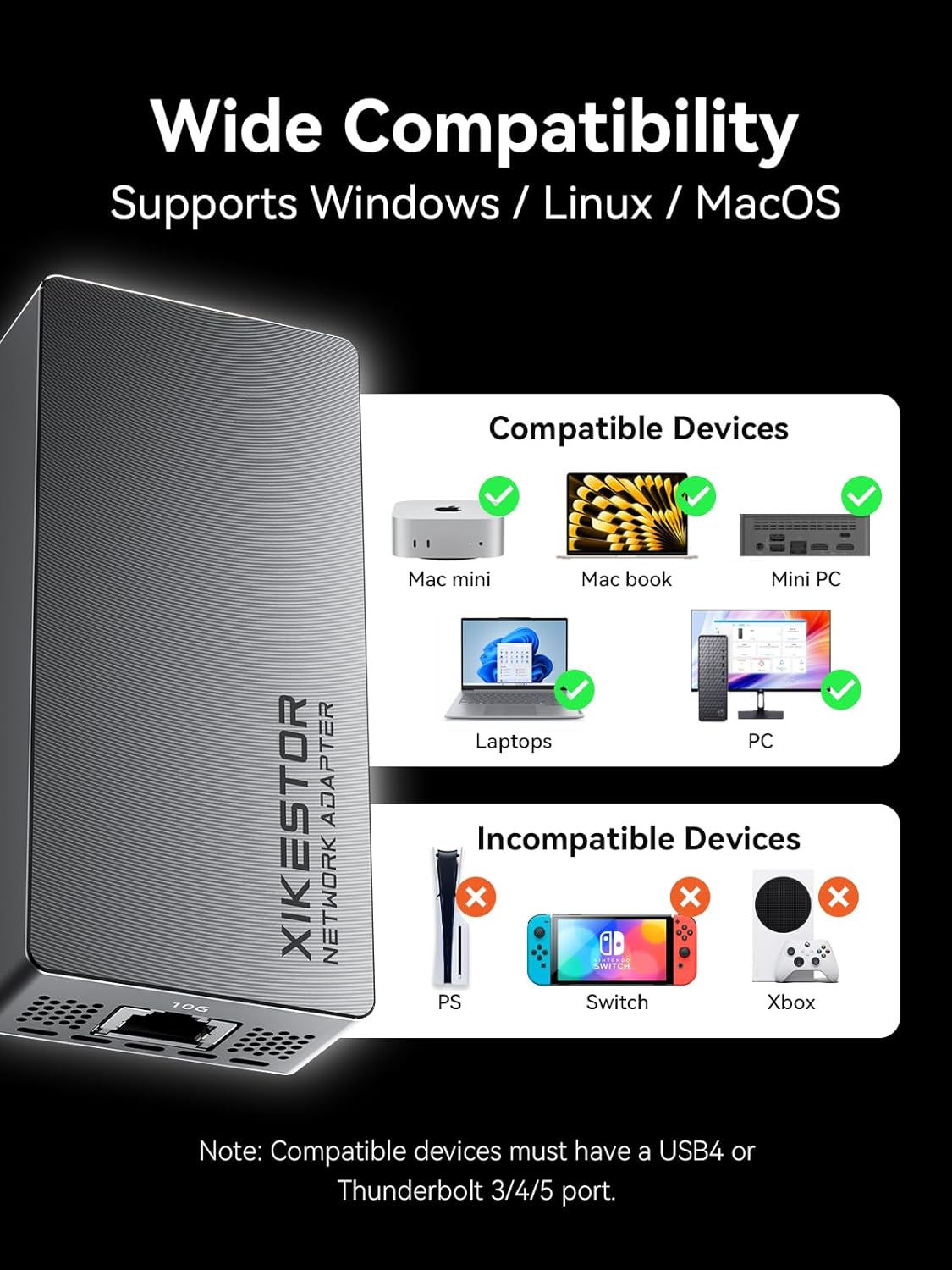
Image 8.1: Overview of compatible and incompatible devices, highlighting the requirement for USB4 or Thunderbolt 3/4/5 ports.
9. Warranty and Support
XikeStor is committed to providing reliable products and customer satisfaction. If you encounter any issues with your SKN-U410GT LAN Adapter, including recognition failures or performance problems, please do not hesitate to contact our customer service team.
Our support team is available to provide technical assistance, and facilitate returns or exchanges as needed. Please refer to your purchase documentation for specific warranty terms and contact information.
We appreciate your understanding regarding potential compatibility variations with 10G adapter products across different chipsets and cables. Our goal is to ensure a satisfactory experience for all users.


