
1. Introduction
Thank you for choosing the Bion HEATING 12000 BTU Portable Air Conditioner with Heat Pump. This appliance is designed to provide efficient cooling and heating for your indoor spaces. Please read this manual carefully before installation and use to ensure proper operation, maintenance, and safety.
This portable unit offers versatility with its cooling and heating functions, making it suitable for year-round comfort. Its compact design allows for easy relocation between rooms.
2. Important Safety Instructions
Always follow basic safety precautions when using electrical appliances to reduce the risk of fire, electric shock, and injury to persons.
- Read all instructions before using this appliance.
- Ensure the power supply matches the voltage specified on the rating label.
- Do not operate the unit with a damaged cord or plug. If the supply cord is damaged, it must be replaced by the manufacturer, its service agent, or similarly qualified persons to avoid a hazard.
- Do not block air outlets or inlets. Maintain a minimum distance from walls and furniture.
- Do not insert fingers or foreign objects into the air inlets or outlets.
- Keep the appliance away from flammable materials and open flames.
- Always unplug the unit before cleaning or servicing.
- This appliance is not intended for use by persons (including children) with reduced physical, sensory or mental capabilities, or lack of experience and knowledge, unless they have been given supervision or instruction concerning use of the appliance by a person responsible for their safety.
- Children should be supervised to ensure that they do not play with the appliance.
- Do not use the unit in wet environments such as bathrooms or laundry rooms.
- Ensure the unit is placed on a flat, stable surface to prevent tipping.
3. Product Overview
The Bion HEATING 12000 BTU Portable Air Conditioner is a versatile unit designed for ease of use and efficient climate control. Below is an image illustrating the general appearance of the unit.
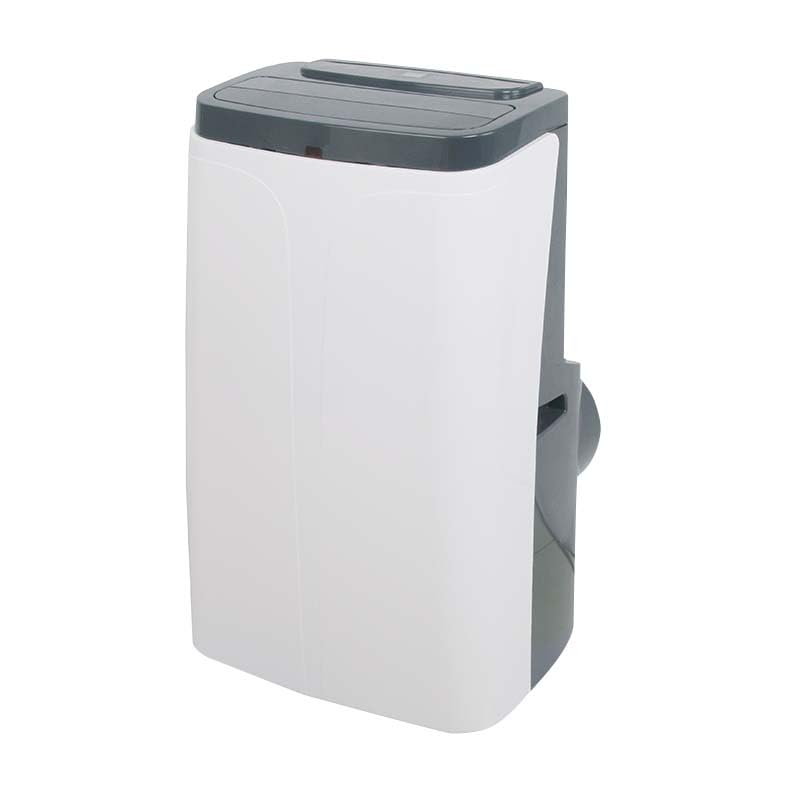
Figure 1: Front view of the Bion HEATING 12000 BTU Portable Air Conditioner. This image shows the compact design of the unit, including the air outlet grille and control panel area.
Main Components:
- Control Panel: Located on the top of the unit for manual operation.
- Air Outlet: Adjustable louvers to direct airflow.
- Air Inlet/Filter: Located on the rear or side, where air is drawn in and filtered.
- Exhaust Air Outlet: Connection point for the exhaust hose.
- Drainage Port: For continuous drainage or manual draining of condensed water.
- Remote Control: For convenient operation from a distance.
- Casters: Wheels for easy mobility.
4. Setup and Installation
4.1 Unpacking
- Carefully remove the air conditioner from its packaging.
- Remove all packing materials, including any tape or protective films.
- Check for any damage that may have occurred during transit. If the unit is damaged, do not operate it and contact your retailer.
4.2 Placement
Place the unit on a firm, level surface in the desired room. Ensure there is at least 30 cm (12 inches) of space around the unit for proper air circulation.
- Avoid placing the unit near heat sources, direct sunlight, or where it might be exposed to water.
- Ensure the exhaust hose can reach a window or vent opening without excessive bending or kinking.
4.3 Exhaust Hose and Window Kit Installation
- Attach the exhaust hose connector to the exhaust air outlet on the back of the unit.
- Extend the exhaust hose and attach the window kit adapter to the other end.
- Install the window sealing plate kit into your window opening. Adjust the length of the window kit to fit your window securely.
- Insert the window kit adapter into the opening of the window sealing plate. Ensure a tight seal to prevent outside air from entering.
4.4 Power Connection
Plug the power cord into a grounded electrical outlet. Ensure the outlet meets the electrical requirements of the unit (refer to specifications).
5. Operating Instructions
5.1 Control Panel and Remote Control
The unit can be operated using the control panel on the top of the unit or the provided remote control. The remote control offers full functionality for convenience.
5.2 Power On/Off
Press the POWER button to turn the unit on or off.
5.3 Mode Selection
Press the MODE button to cycle through the available operating modes:
- Cool (❄): For cooling the room.
- Heat (☀): For heating the room (heat pump function).
- Fan (💨): Circulates air without cooling or heating.
- Dry (💧): Dehumidifies the room.
5.4 Temperature Setting
In Cool or Heat mode, use the UP (▲) or DOWN (▼) buttons to adjust the desired temperature. The temperature range is typically between 16°C and 30°C (61°F and 86°F).
5.5 Fan Speed
Press the FAN SPEED button to select the desired fan speed: Low, Medium, or High.
5.6 Timer Function
The timer function allows you to set the unit to turn on or off automatically after a specified period.
- Press the TIMER button.
- Use the UP (▲) or DOWN (▼) buttons to set the desired delay time (e.g., 1-24 hours).
- Press TIMER again to confirm.
6. Maintenance
Regular maintenance ensures optimal performance and extends the lifespan of your air conditioner. Always unplug the unit before performing any maintenance.
6.1 Cleaning the Air Filter
The air filter should be cleaned every two weeks or more frequently depending on usage and air quality.
- Turn off and unplug the unit.
- Locate and remove the air filter from the back or side of the unit.
- Wash the filter with warm, soapy water. Rinse thoroughly and allow it to air dry completely before reinstalling. Do not expose to direct sunlight.
- Reinstall the dry filter into the unit.
6.2 Draining Condensed Water
The unit has a self-evaporative system, but in high humidity conditions, water may accumulate. The unit will indicate when the water tank is full.
- Turn off and unplug the unit.
- Place a shallow pan or tray under the drainage port at the bottom rear of the unit.
- Remove the drain plug to allow water to flow out.
- Once drained, replace the drain plug securely.
6.3 Storage
If storing the unit for an extended period:
- Drain all condensed water completely.
- Clean the air filter.
- Unplug the power cord and coil it neatly.
- Store the unit in a dry, cool place, away from direct sunlight and extreme temperatures.
7. Troubleshooting
Before contacting customer support, please refer to the following troubleshooting guide for common issues.
| Problem | Possible Cause | Solution |
|---|---|---|
| Unit does not turn on. | No power supply; Power cord not plugged in; Circuit breaker tripped. | Check power outlet; Ensure cord is securely plugged in; Reset circuit breaker. |
| Unit does not cool/heat effectively. | Air filter dirty; Exhaust hose blocked/kinked; Window kit not sealed; Room too large; Doors/windows open. | Clean air filter; Check and clear exhaust hose; Ensure window kit is sealed; Close doors/windows. |
| Unit is noisy. | Unit not on a level surface; Air filter dirty; Obstruction in fan. | Place on a level surface; Clean air filter; Check for obstructions. |
| Water leakage. | Drain plug loose; Water tank full (in high humidity). | Ensure drain plug is secure; Drain water tank. |
| Remote control not working. | Batteries dead or incorrectly inserted; Obstruction between remote and unit. | Replace batteries; Ensure line of sight to unit's receiver. |
8. Product Specifications
The following specifications are for the Bion HEATING 12000 BTU Portable Air Conditioner with Heat Pump:
- Brand: bion HEATING
- Model Name: Bion HEATING 12000 BTU Portatile
- Cooling Capacity: 12000 BTU (British Thermal Units)
- Heating Function: Yes (Heat Pump)
- Energy Class: A/A+
- Control Method: Remote Control
- Item Weight: 40 Kilograms
- Installation Type: Portable
- Compressor Type: Rotary Scroll
- External Unit Required: No
- Application: Home use
- Operating Modes: Cooling and Heating
- Country of Origin: Italy
9. Warranty and Support
9.1 Limited Warranty
This Bion HEATING product comes with a limited warranty. Please refer to the warranty card included with your purchase for specific terms, conditions, and duration. The warranty typically covers defects in materials and workmanship under normal use.
Keep your proof of purchase (receipt or invoice) as it will be required for any warranty claims.
9.2 Customer Support
For technical assistance, troubleshooting beyond this manual, or warranty inquiries, please contact your retailer or the manufacturer's customer service. Contact information can usually be found on the product packaging or the manufacturer's official website.
When contacting support, please have your product model number (12000 BTU) and purchase date ready.


