
1. Introduction
The Lymorvex 64GB Magnetic Voice Activated Recorder is a compact and versatile audio recording device designed for various applications, including lectures, meetings, interviews, and personal notes. Featuring AI-intelligent noise reduction, a powerful magnetic design, and extended battery life, this recorder ensures clear audio capture and convenient use.
Please read this manual thoroughly before using the device to ensure proper operation and to maximize its potential.

The Lymorvex voice recorder, a compact and discreet device.
2. What's in the Box
Verify that all items are present in the package:
- Voice Recorder: The main recording unit.
- Earphone: For direct playback of recordings.
- User Manual: This document, providing instructions.
- Data Cable: USB Type-C cable for charging and data transfer.
- OTG Transfer Cable: For direct connection to smartphones.
- Adapters: For various device compatibility.
- Storage Pouch: For protecting and carrying the device and accessories.
3. Product Overview
The Lymorvex recorder features a sleek, ultra-portable design with a durable metal body. Its compact size allows for discreet placement and easy transport.
3.1 Key Features
- 64GB Internal Memory: Stores up to 9800 hours of audio (at 192kbps).
- Long Battery Life: Up to 72 hours of continuous recording on a single charge.
- AI-Intelligent Noise Reduction: Equipped with an upgraded DSP 4.0 chip to filter background noise.
- Magnetic Design: Allows secure attachment to metal surfaces.
- One-Touch Recording: Simple slide switch for instant recording.
- Voice Activation: Automatically records when sound exceeds 45dB, saving battery and storage.
- Multi-Functional: Functions as an MP3 player and supports OTG direct connection for file transfer.

An overview of the recorder's main features, highlighting its storage capacity, battery life, and smart functions.
3.2 Physical Components
- ON/OFF Switch: Slide to initiate or stop recording.
- USB Type-C Port: For charging, data transfer, and connecting earphones.
- Indicator Light: Provides status feedback (e.g., recording, charging).
- Reset Button: For factory reset if needed.
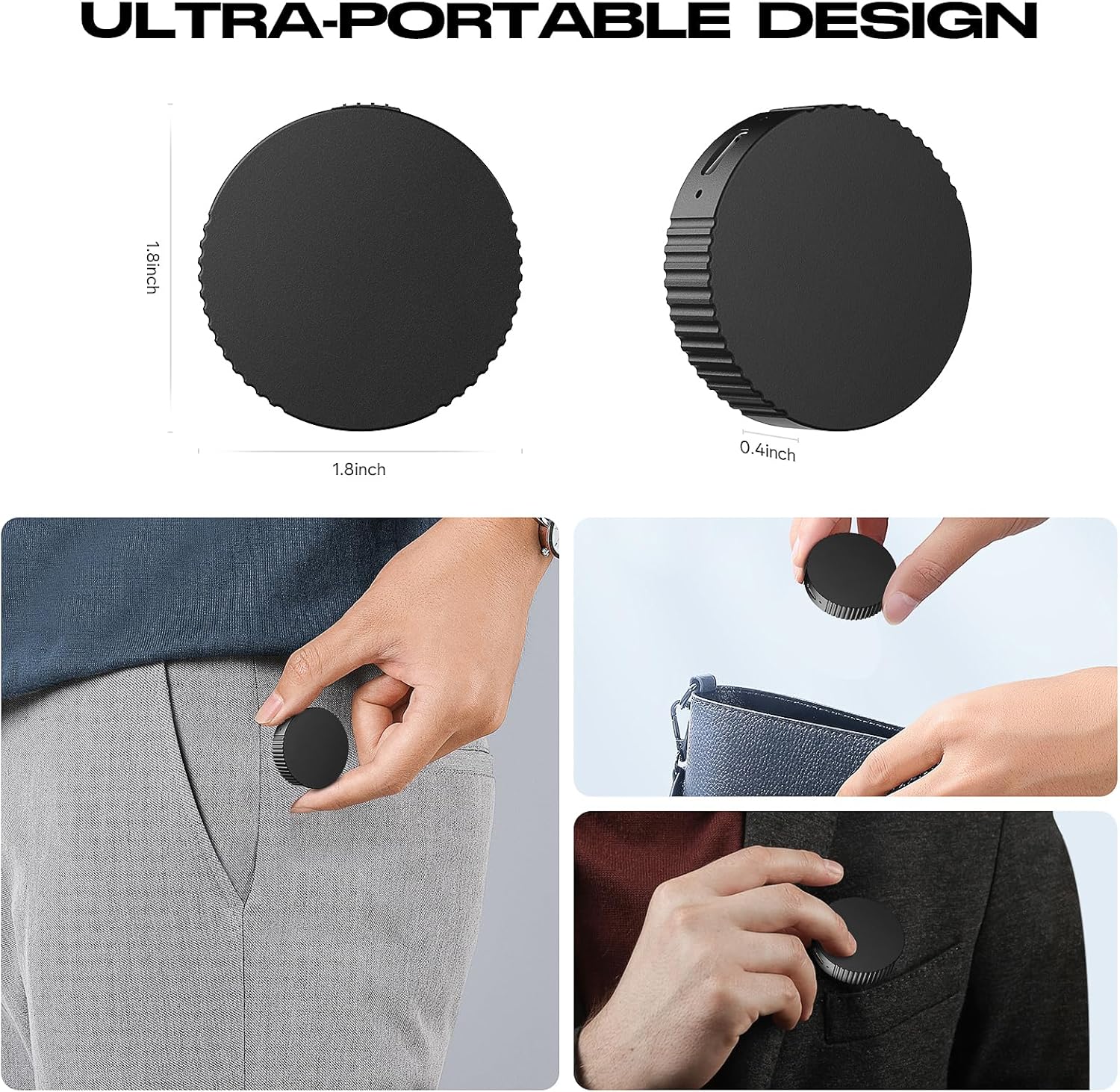
Highlights the ultra-portable design, showing its compact size (1.8 inches diameter, 0.4 inches thick) and how it fits into pockets or bags.
4. Setup
4.1 Initial Charging
- Connect the provided USB Type-C data cable to the recorder's USB-C port.
- Plug the other end of the cable into a USB power adapter or a computer's USB port.
- The indicator light will show charging status. A full charge typically takes approximately 2 hours.
4.2 Setting Date and Time
To ensure accurate timestamps on your recordings, connect the device to a computer. A text file for setting the date and time will be accessible. Follow the instructions within that file to synchronize the device's clock.
5. Operating Instructions
5.1 One-Touch Recording
- To start recording, simply slide the ON/OFF switch to the 'ON' position. The device will begin recording automatically without any visible lights or audible beeps.
- To stop recording, slide the ON/OFF switch to the 'OFF' position. The recording will be saved automatically.
5.2 Voice Activated Recording (VAR)
The device supports Voice Activated Recording, which starts recording only when sound above 45dB is detected and pauses during silence, conserving battery and storage. By default, VAR is set to 'On'.

Demonstrates the voice activation feature, which automatically starts recording when sound exceeds 45dB and pauses during silence.
To change the VAR setting (On/Off), connect the device to a computer and access the settings file. Refer to the detailed user manual for specific instructions on modifying this setting.
5.3 Playback
- Connect the provided earphones to the USB Type-C port on the recorder.
- Slide the ON/OFF switch to the 'ON' position. The device will enter playback mode.
- Use the controls on the earphone cable to navigate between recordings, adjust volume, and play/pause.
6. Data Transfer
Recordings are saved in WAV format and can be easily transferred to a computer or smartphone.
6.1 Transfer to Computer
- Connect the recorder to your computer using the USB Type-C data cable.
- The device will appear as a removable drive (e.g., 'NO NAME' or 'RECORDED').
- Open the drive to access your recorded WAV files. You can then copy, move, or delete files as needed.
6.2 Transfer to Smartphone (OTG)
- Use the provided OTG transfer cable and appropriate adapter (Lightning for iPhone, USB-C for Android) to connect the recorder to your smartphone.
- On your smartphone, open a file management application. The recorder will appear as an external storage device.
- Navigate to the 'RECORDED' folder to find and manage your audio files.

Shows the device's multi-functional compatibility with various operating systems and its ability to transfer files via OTG.
7. Maintenance
7.1 Battery Care
- Charge the device fully before first use.
- Recharge when the battery is low to prevent data loss (automatic save function is active).
- Avoid extreme temperatures that can affect battery performance.
7.2 Cleaning and Storage
- Wipe the device with a soft, dry cloth. Do not use liquid cleaners.
- Store the recorder in the provided storage pouch to protect it from dust and scratches.
8. Troubleshooting
- Device not turning on/recording: Ensure the device is sufficiently charged. If the issue persists, try using the reset button.
- Poor audio quality/muffled sound: Ensure the device is placed on an open surface and not obstructed. Verify that AI Noise Reduction settings are configured as desired.
- Voice Activation not working as expected: Check the voice activation settings via computer connection to ensure it is enabled and configured to your preference.
- Cannot transfer files: Ensure the data cable and adapters are correctly connected. Try connecting to a different USB port or device.
For more detailed troubleshooting steps, please refer to the comprehensive user manual included in your package.
9. Specifications
| Feature | Detail |
|---|---|
| Model | B0FC5W9DYB |
| Memory Storage Capacity | 64 GB |
| Digital Recording Time | Up to 9800 hours (at 192kbps) |
| Battery Life (Continuous Recording) | 72 Hours |
| Charging Time | Approx. 2 hours |
| Noise Reduction | AI-Intelligent Noise Reduction, DSP 4.0 chip |
| Hardware Interface | USB Type C |
| Compatible Devices | Earphone, Laptop, Personal Computer, Smartphone, Tablet |
| Operating Systems | Windows XP/7/8/10, iOS, Linux, Mac OS, Android |
| Audio Format | WAV |
| Dimensions | 1.8 x 1.8 x 0.4 inches |
| Item Weight | 1 ounce |
10. Official Product Videos
Lymorvex Voice Recorder AI-Intelligent Noise Reduction
Official video demonstrating the AI-Intelligent Noise Reduction capabilities of the Lymorvex voice recorder, ensuring clear audio in various environments.
Portable Audio Recorder for Lectures
Official video showcasing the portability and ease of use of the Lymorvex audio recorder for lectures and meetings, highlighting its discreet design.
64GB (9800 Hour) Magnetic Voice Activated Recorder
Official product video highlighting the 64GB storage, 9800-hour recording capacity, and magnetic voice activation features for extended use.
11. Warranty and Support
The Lymorvex 64GB Magnetic Voice Activated Recorder comes with a 1-year manufacturer's warranty. This warranty covers defects in materials and workmanship under normal use.
For warranty claims, technical support, or any inquiries regarding your device, please contact Lymorvex-US customer service through their official channels or the retailer where the product was purchased.