
1. Introduction
The Stealth Cam Spectre 4K Dual-Core Cellular Trail Camera is designed for advanced monitoring of hunting properties and stand locations. This camera offers high-resolution imaging, 4K video recording, and cellular connectivity for remote access to captures. Its dual-core processing ensures efficient performance, while dual image sensors optimize quality for both day and night conditions. The Spectre 4K also features 32GB of internal memory, eliminating the need for an SD card, and an invisible 940nm No-Glo LED array for discreet operation.
2. Package Contents
Verify that all items are present in your package:
- Stealth Cam Spectre 4K Cellular Trail Camera
- Tree Strap
3. Key Features
- High-Resolution Imaging and Video: Captures 40MP still photos and 4K ultra-HD video with clear audio. Dual image sensors optimize quality for day and night.
- Dual-Core Performance: Provides faster performance, better responsiveness, and smoother operation, powering image capture and wireless uploads efficiently.
- On Demand & Live View Functionality: Access On Demand image captures and Live View streaming directly from the Command Pro app for real-time activity monitoring.
- Reliable Internal Storage: Features 32GB of internal memory, removing the need for an SD card and ensuring secure, accessible storage.
- Invisible Infrared & Fast Trigger Speed: Equipped with a 940nm No-Glo LED array for an invisible flash and detection range up to 80 feet. A 0.3-second trigger speed ensures immediate capture.
4. Setup
4.1. Battery Installation
The Spectre 4K requires 16 AA batteries for internal power. Ensure batteries are inserted with correct polarity. For extended operation, consider using rechargeable internal or external batteries, or one of the available solar solutions.
4.2. App Download and Camera Activation
Download the Command Pro app to your mobile device. The camera is easy to set up by scanning a QR code. It will automatically connect to the strongest available cellular network.
4.3. Mounting the Camera
Use the included tree strap to securely mount the camera to a tree or post. Ensure the camera is positioned to capture the desired area. Stealth Cam offers a diverse assortment of mounting accessories for various deployment scenarios.

The Spectre 4K camera securely mounted to a tree, ready for deployment in a natural environment.

A user making adjustments to the Spectre 4K camera while it is mounted on a tree, demonstrating ease of access.
5. Operating Instructions
5.1. Photo and Video Capture
The dual-core processor allows the Spectre 4K to simultaneously capture and upload high-resolution photos (up to 40MP) and 4K Ultra HD video to the Command Pro app. The 0.3-second trigger speed ensures quick capture of activity. You can select various photo settings, including a 9-photo burst mode, and record 4K video with enhanced audio.
5.2. Remote Monitoring with Command Pro App
Utilize the Command Pro app for full control over your camera. Access On Demand image captures to instantly receive photos when prompted. The Live View streaming functionality provides a real-time feed of your camera's perspective, keeping you connected to the action.
This video provides an overview of the Stealth Cam Spectre 4K Cellular Trail Camera's features and benefits, including its dual-core processing, 4K video capabilities, and cellular connectivity.
5.3. Day and Night Imaging
Dual image sensors are optimized to provide superior image quality during both day and night. The 940nm No-Glo LED array ensures that nighttime images are crisp and clear without emitting visible light that could disturb wildlife.
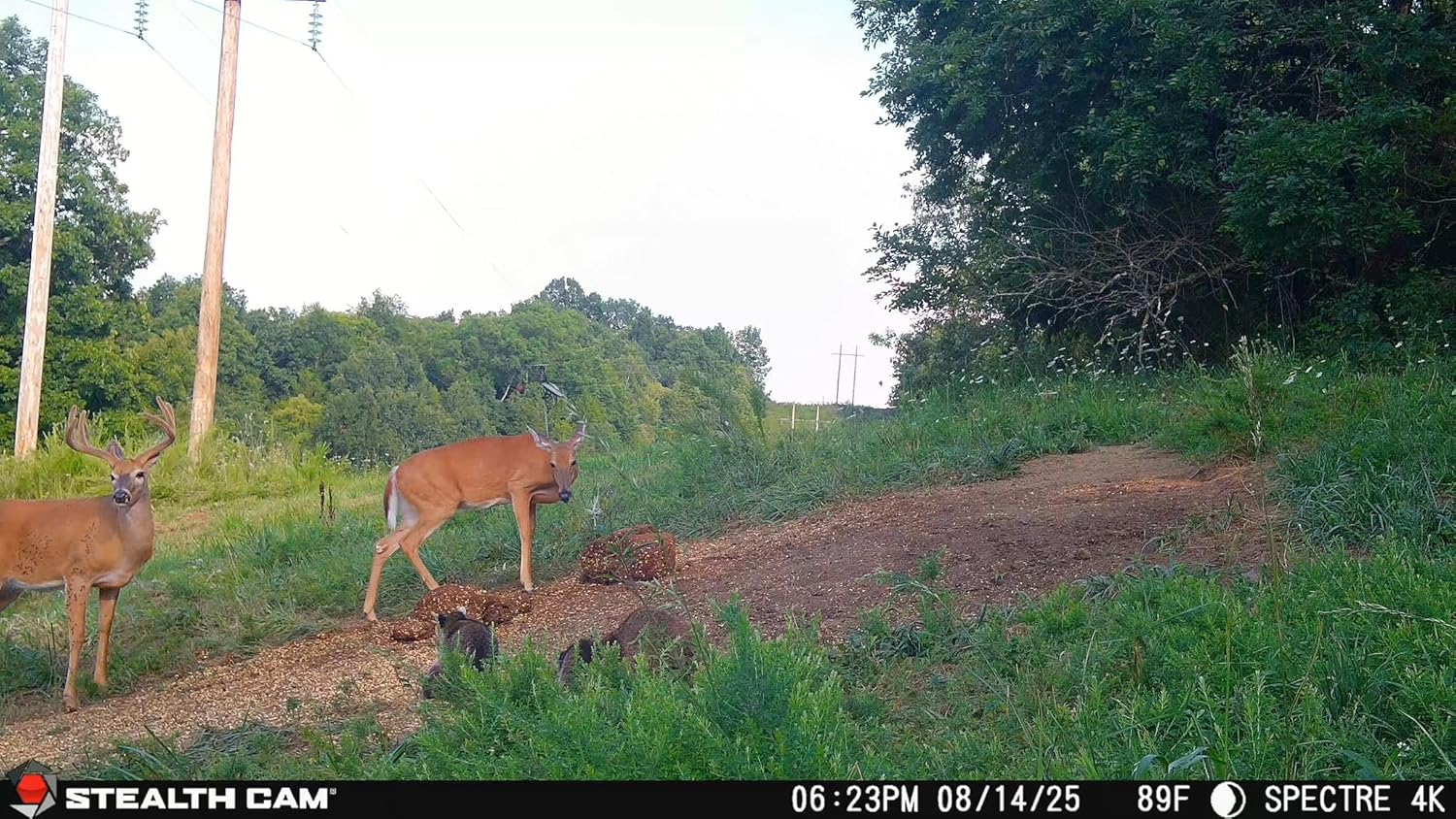
A daytime image captured by the Spectre 4K, showcasing its high-resolution capabilities with deer in a wooded area.

An example of a night vision image captured by the Spectre 4K, featuring deer and a raccoon with clear detail.
5.4. Internal GPS Tracking
The Spectre 4K includes internal GPS functionality, allowing you to track the location of your camera(s) via the Command Pro app. Camera locations will automatically update on the app's map interface.
6. Maintenance
6.1. Battery Management
Regularly check the battery level through the Command Pro app. Replace the 16 AA internal batteries as needed. For prolonged use, consider investing in rechargeable battery packs or a compatible solar panel solution to ensure continuous operation.
6.2. General Care
The Spectre 4K is designed to be weatherproof for outdoor use. Periodically clean the camera lens and sensors to ensure optimal image quality. Avoid using abrasive materials or harsh chemicals. Ensure all latches are securely closed to maintain its weatherproof seal.
7. Troubleshooting
- No Power: Check battery installation and ensure batteries are fresh. If using external power, verify connections.
- No Cellular Connection: Ensure the camera is in an area with adequate cellular coverage. Check your data plan status through the Command Pro app. The camera automatically connects to the strongest available network.
- Poor Image/Video Quality: Clean the camera lens. Ensure the camera is securely mounted and not subject to excessive movement. Verify settings in the Command Pro app.
- App Connectivity Issues: Ensure your mobile device has a stable internet connection. Update the Command Pro app to the latest version.
8. Specifications
| Feature | Specification |
|---|---|
| Model Name | Spectre |
| Item Model Number | STC-SPCTR4K |
| Brand | Stealth Cam |
| Indoor/Outdoor Usage | Outdoor |
| Compatible Devices | Cellular Devices |
| Power Source | Battery Powered (16 AA batteries required) |
| Connectivity Protocol | Cellular |
| Controller Type | Command App |
| Mounting Type | Tree Mount |
| Video Capture Resolution | 4K |
| Number of Items | 1 |
| Included Components | Camera, Tree Strap |
| Material | Mixed |
| Item Dimensions (L x W x H) | 4 x 2 x 12 inches |
| Item Weight | 1.45 pounds |
| Video Capture Format | MP4 |
| UPC | 888151085509 |
| Special Feature | HD Resolution, Motion Sensor, Weather Proof |
9. Warranty and Support
For warranty information and technical support, please refer to the official Stealth Cam website or contact their customer service directly. Keep your purchase receipt for warranty claims.