
1. Introduction
This manual provides essential information for the safe and efficient use of your LKTOP 100W USB-C Power Adapter. Please read this manual thoroughly before operating the device and retain it for future reference. This power adapter is designed for fast charging of various devices, including DJI drones, charging hubs, remote controllers, and cameras.
2. Safety Information
- Do not expose the adapter to water, moisture, or extreme temperatures.
- Avoid dropping or subjecting the adapter to strong impacts.
- Do not disassemble or attempt to repair the adapter. Contact customer support if service is required.
- Ensure the power outlet voltage is compatible with the adapter's input voltage (100V-240V).
- Use only the provided or certified USB-C cables to prevent damage to the adapter or connected devices.
- Unplug the adapter from the power outlet when not in use or during electrical storms.
- Keep out of reach of children.
3. Package Contents
Verify that all items are present in your package:
- LKTOP 100W USB-C Power Adapter (x1)
- 100W USB-C to USB-C Cable (x1)
- AC Power Cord (x1)
- Instruction Manual (x1)

4. Product Overview
The LKTOP 100W USB-C Power Adapter features a compact design with dual USB-C ports for versatile charging. It supports PD/QC/PPS protocols for super-fast charging and includes intelligent temperature control for safety.


5. Setup
- Unfold the Plug: Gently pull out the foldable AC plug from the adapter body.
- Connect to Power: Insert the AC plug into a standard wall outlet (100V-240V).
- Connect USB-C Cable: Plug one end of the USB-C to USB-C cable into either USB-C port (C1 or C2) on the adapter.
- Connect to Device: Plug the other end of the USB-C cable into your device or charging hub.
6. Operating Instructions
The LKTOP 100W USB-C Power Adapter can charge a variety of devices. When using both USB-C ports simultaneously, the adapter intelligently distributes power. USB-C1 can provide up to 82W, and USB-C2 can provide up to 18W, with a total maximum output of 100W.
6.1. Charging Drones
Connect your drone directly to the adapter using a USB-C cable. Charging times vary by drone model.

Video 6.1: Demonstrates charging a DJI Mavic 4 Pro drone with the LKTOP 100W USB-C Power Adapter (2C), showing 62W output and 115 minutes charging time for a single body.
6.2. Charging Hubs
Connect your charging hub to the adapter. The adapter supports various LKTOP and DJI charging hubs.
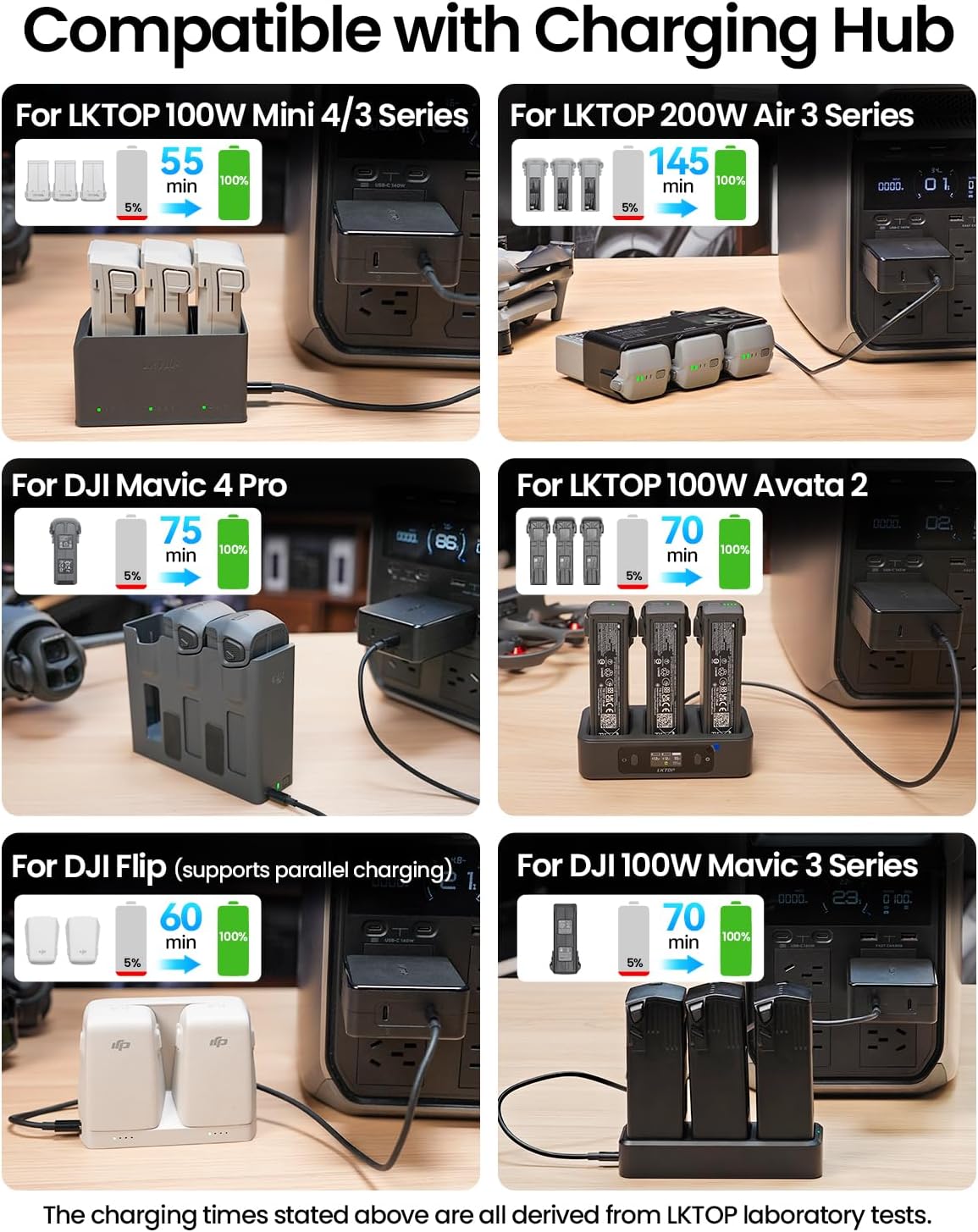
Video 6.2: Demonstrates charging an LKTOP 65W Neo Charging Hub with the LKTOP 100W USB-C Power Adapter (3C1A), showing 64W output and 45 minutes charging time for 3 batteries.
Video 6.3: Demonstrates charging an LKTOP Mini 4/3 Series Charging Hub with the LKTOP 100W USB-C Power Adapter (3C1A), showing 100W output and 47 minutes charging time for 3 batteries.
Video 6.4: Demonstrates charging a DJI Neo Charging Hub with the LKTOP 100W USB-C Power Adapter (2C), showing 57W output and 60 minutes charging time for 3 batteries.
Video 6.5: Demonstrates charging an LKTOP Air 3 Series Charging Hub with the LKTOP 100W USB-C Power Adapter (3C1A), showing 185W output and 70-80 minutes charging time for 3 batteries.
Video 6.6: Demonstrates charging an LKTOP Avata 2 Charging Hub with the LKTOP 100W USB-C Power Adapter (2C), showing 97W output and 70 minutes charging time for 3 batteries.
6.3. Charging Remote Controllers
Connect your DJI remote controller to the adapter using a USB-C cable.

6.4. Charging Cameras
Connect your compatible camera to the adapter using a USB-C cable.
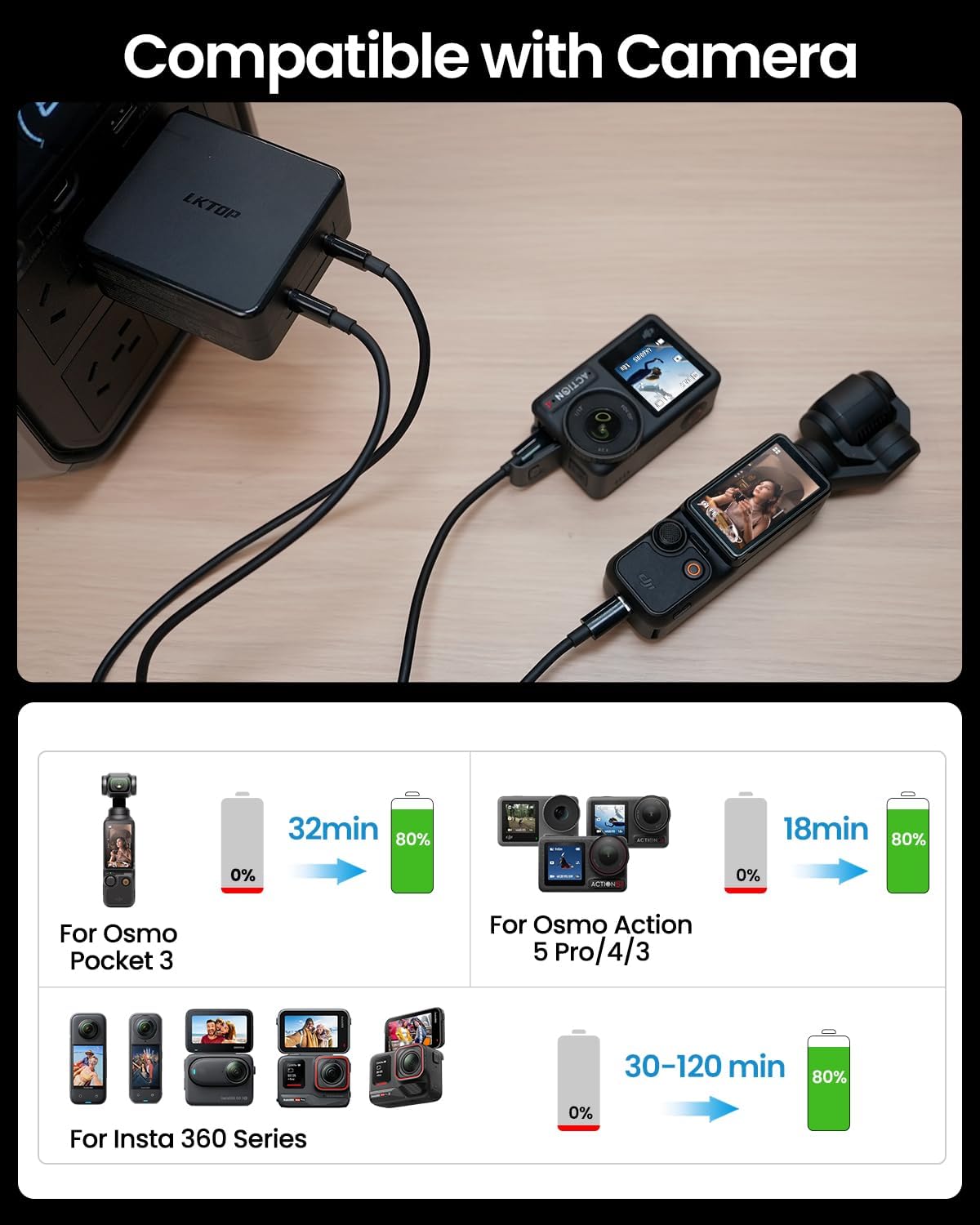
Video 6.7: Demonstrates charging an Insta 360 X3 with the LKTOP 100W USB-C Power Adapter (3C1A), showing 13W output and 90 minutes charging time for a single body.
Video 6.8: Demonstrates charging a DJI Pocket 3 with the LKTOP 100W USB-C Power Adapter (3C1A), showing 35W output and 32 minutes charging time for a single body.
Video 6.9: Demonstrates charging a DJI Pocket 3 with the LKTOP 100W USB-C Power Adapter (2C), showing 34W output and 32 minutes charging time for a single body.
7. Compatibility
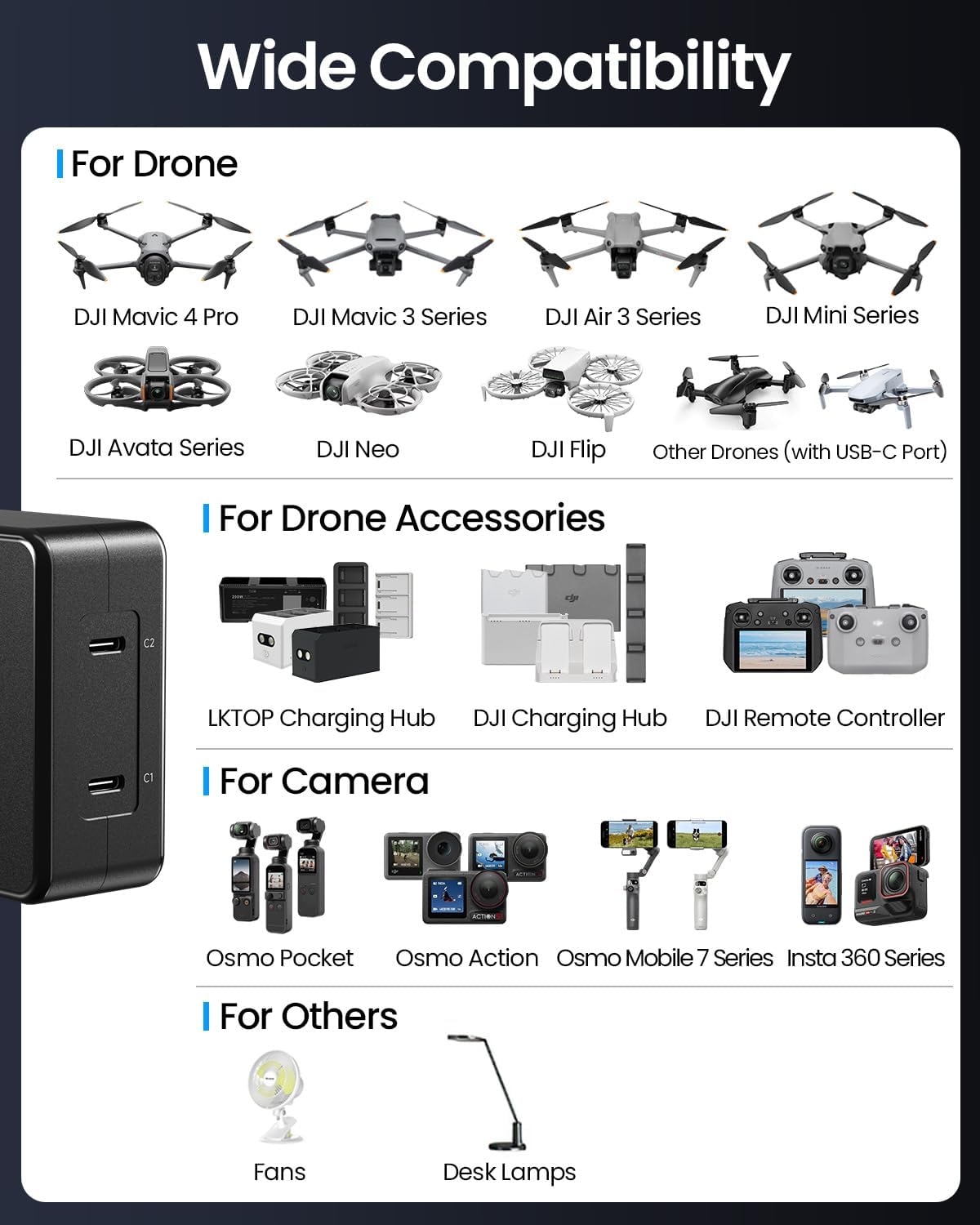
The LKTOP 100W USB-C Power Adapter is compatible with a wide range of devices, including:
- DJI Drones: Mini 5 Pro, Mini 4 Pro, Mini 3 Pro, Mini 3, Mini 4K, Mini 2 SE, Mini 2, Mini SE, Mavic Mini, Air 3, Air 3S, Mavic 3 Pro, Mavic 3 Cine, Mavic 3 Classic, Mavic 3, Mavic 3 Enterprise Series, Mavic 4 Pro, Avata/Avata 2, Neo/Neo 2, Flip.
- DJI/LKTOP Charging Hubs: Mini 5/4/3 Series Charging Hub, Air 3 Series Charging Hub, Mavic 3 Series Charging Hub, Avata 2 Charging Hub, Neo Charging Hub, Flip Charging Hub.
- DJI Remote Controllers: All USB-C compatible models.
- DJI Action Cameras: All USB-C compatible models.
- Other USB-C Port Devices: Any device compatible with PD/QC/PPS protocols.
8. Specifications
| Feature | Detail |
|---|---|
| Brand | LKTOP |
| Product Name | LKTOP 100W USB-C Power Adapter |
| Product Model | AD1-100FCP |
| Input Voltage | 100-240V AC, 50-60Hz, 2.5A |
| Single Port Output | USB-C1: 100W (Max), USB-C2: 100W (Max) |
| Dual Port Output | USB-C1 + USB-C2: Single port 82W (Max), Total power 100W (Max) |
| Output Voltage | 20 Volts |
| Current Rating | 5 Amps |
| Number of Ports | 2 (USB Type C) |
| Product Dimensions | 73.5 x 70 x 32mm (2.89"D x 1.26"W x 2.76"H) |
| Product Weight | 286 ± 5g (excluding cable weight) |
| Operating Temperature | 0° to 40°C (32° to 104°F) |
| Certifications | CCC, FCC, RoHS |

9. Troubleshooting
- Device not charging: Ensure the adapter is securely plugged into a working power outlet. Check that the USB-C cable is properly connected to both the adapter and the device. Verify device compatibility.
- Slow charging: Ensure you are using a 100W compatible USB-C cable. If charging two devices, power distribution may reduce individual port output. Disconnect one device to maximize power to the other.
- Adapter overheating: The adapter features intelligent temperature control. If it feels excessively hot, disconnect it immediately and allow it to cool down. Ensure adequate ventilation around the adapter during use.
- No power indicator: Some devices or cables may not have a visible power indicator. Refer to your device's manual for charging status.
10. Maintenance
- Clean the adapter with a soft, dry cloth. Do not use liquid cleaners or aerosols.
- Store the adapter in a cool, dry place when not in use.
- Avoid bending or stressing the USB-C cables excessively to prevent internal damage.
11. Warranty and Support
The LKTOP 100W USB-C Power Adapter comes with a 1-year warranty. For warranty claims, technical support, or any inquiries, please contact LKTOP customer service through the retailer where you purchased the product or visit the official LKTOP website.
Please retain your proof of purchase for warranty validation.