
1. Introduction
Thank you for purchasing the HUAHUU Vanity Desk with LED Lights & Sliding Mirror. This manual provides essential information for the safe assembly, operation, and maintenance of your new vanity desk. Please read these instructions thoroughly before beginning assembly or use, and retain them for future reference.

Image 1.1: The HUAHUU Vanity Desk, featuring its LED-lit mirror, multiple drawers, and open shelves.
2. Safety Information
To ensure safe use and prevent damage, please observe the following safety precautions:
- Adult Assembly Required: This product contains small parts and requires adult assembly. Keep children and pets away during assembly.
- Secure to Wall: For stability and to prevent tipping, it is highly recommended to secure the vanity desk to a wall using appropriate anti-tip hardware (not included, but recommended for safety).
- Weight Capacity: Do not overload drawers or shelves. Distribute weight evenly. Refer to specifications for maximum load capacities if available in the physical manual.
- Electrical Safety: Ensure the power outlet is connected to a grounded electrical source. Do not use damaged cords or plugs. Keep liquids away from electrical components.
- Placement: Place the vanity desk on a flat, stable surface. Avoid direct sunlight, excessive moisture, or extreme temperature changes.
- Mirror Care: Handle the mirror with care. Avoid striking or dropping it. Clean with a soft, damp cloth and mild glass cleaner.
3. Package Contents
Before beginning assembly, verify that all parts and hardware are present. Refer to the detailed parts list provided in your physical assembly manual. Typically, the package includes:
- Desk panels and components (MDF, Engineered Wood)
- Sliding mirror with integrated LED lights
- Power outlet strip (1 Type-C, 2 AC, 2 USB ports)
- Drawers and cabinet hardware
- Assembly hardware (screws, dowels, cam locks, etc.)
- Assembly instructions manual
If any parts are missing or damaged, please contact customer support immediately.
4. Assembly Instructions
Assembly of the HUAHUU Vanity Desk requires careful attention to detail. It is recommended to have two people for assembly. Please follow the step-by-step instructions and diagrams provided in the separate physical assembly manual included with your product.
- Prepare Your Workspace: Clear a spacious area and lay out all components on a soft, clean surface to prevent scratches.
- Identify Parts: Match all parts and hardware to the provided list in the physical manual. Each part is typically labeled.
- Follow Step-by-Step: Adhere strictly to the sequence of steps outlined in the assembly manual. Do not skip steps.
- Tighten Fasteners: Ensure all screws and fasteners are securely tightened, but do not overtighten to avoid damaging the material.
- Install Anti-Tip Hardware: Once assembled, secure the vanity desk to a wall using appropriate anti-tip hardware for safety.
Note: Assembly can be time-consuming due to the number of parts. Patience and careful adherence to instructions will ensure a successful build.
5. Operating Instructions
5.1 LED Lighting Modes
The integrated LED mirror offers three color lighting modes and adjustable brightness to suit your preference.
- Power On/Off: Tap the touch switch located on the mirror surface to turn the LED lights on or off.
- Change Color Mode: While the lights are on, tap the touch switch repeatedly to cycle through the three color modes: Cold White, Warm White, and Warm Yellow.
- Adjust Brightness: To adjust brightness, long-press the touch switch. The brightness will gradually increase or decrease. Release the switch when the desired brightness is reached.
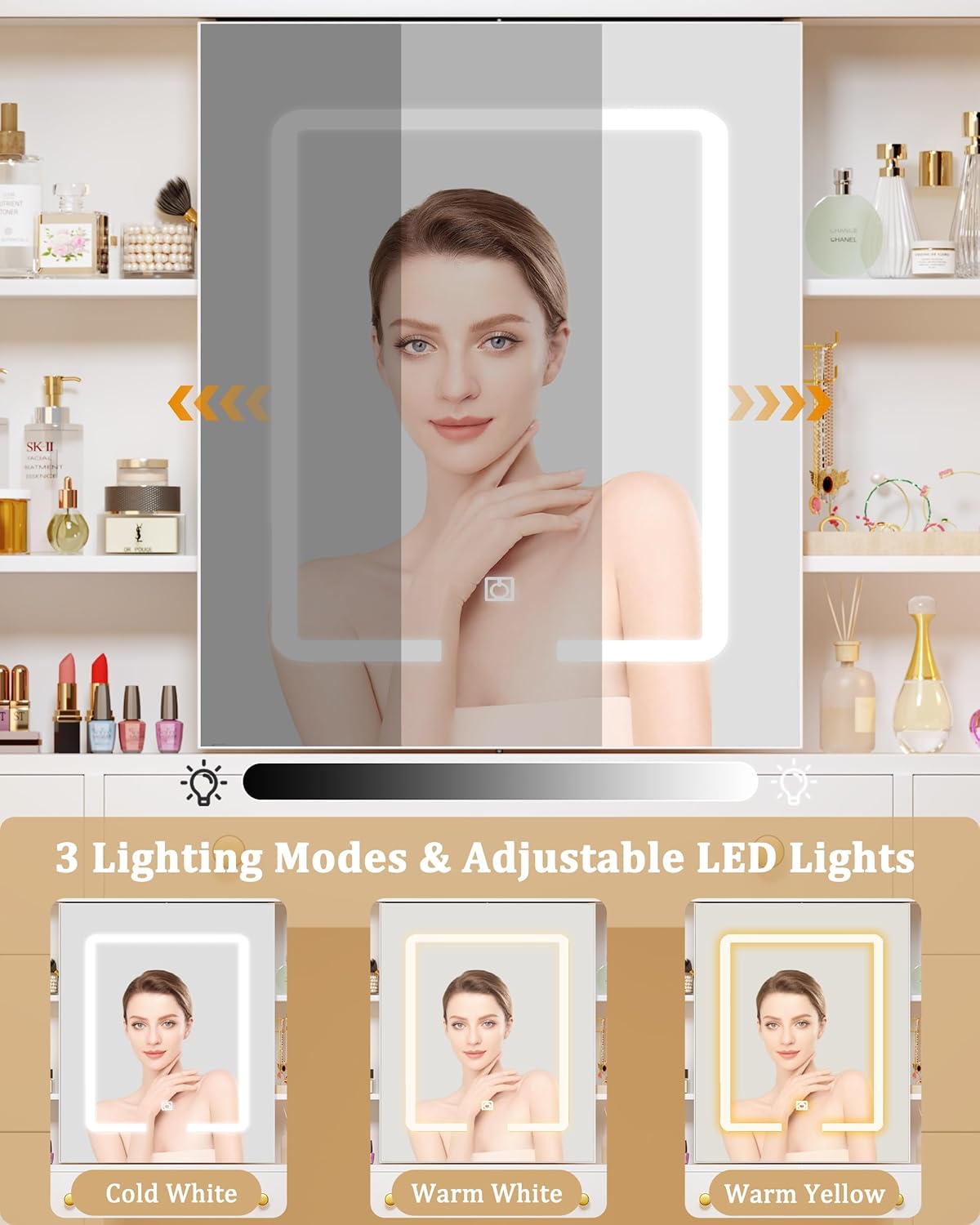
Image 5.1: Illustration of the three LED lighting modes and touch control for brightness adjustment.
5.2 Sliding Mirror and Hidden Storage
The mirror is designed to slide left and right, revealing hidden storage compartments behind it. This feature allows for discreet storage of items and helps maintain a clutter-free countertop.
- Sliding Operation: Gently push the mirror frame to the left or right to access the hidden shelves. Ensure the path is clear of obstructions.
- Hidden Storage: Utilize the space behind the mirror for storing perfumes, skincare products, or other personal items.

Image 5.2: The sliding mirror feature, showing access to hidden storage space.
5.3 Integrated Power Outlet
The vanity desk includes a convenient power outlet strip for charging devices and powering beauty tools.
- Components: The power outlet consists of:
- 1 x Type-C outlet (PD 20W)
- 2 x Standard AC outlets (125V / 12A)
- 2 x USB ports (5V / 2A)
- Usage: Plug in your phone, tablet, hair dryer, curling iron, or other electronic devices directly into the vanity desk's power strip.
- Safety: Always ensure devices are compatible with the provided power specifications. Do not exceed the maximum load capacity of the outlets.

Image 5.3: The built-in charging station with various power outlets.
5.4 Storage Features
The vanity desk is equipped with extensive storage options to keep your items organized.
- Drawers: Features 7 large-capacity drawers for cosmetics, accessories, and personal items.
- Open Shelves: Includes 6 open storage shelves for displaying frequently used items or decorative pieces.
- Cabinets: Two storage cabinets provide additional enclosed space for larger items.
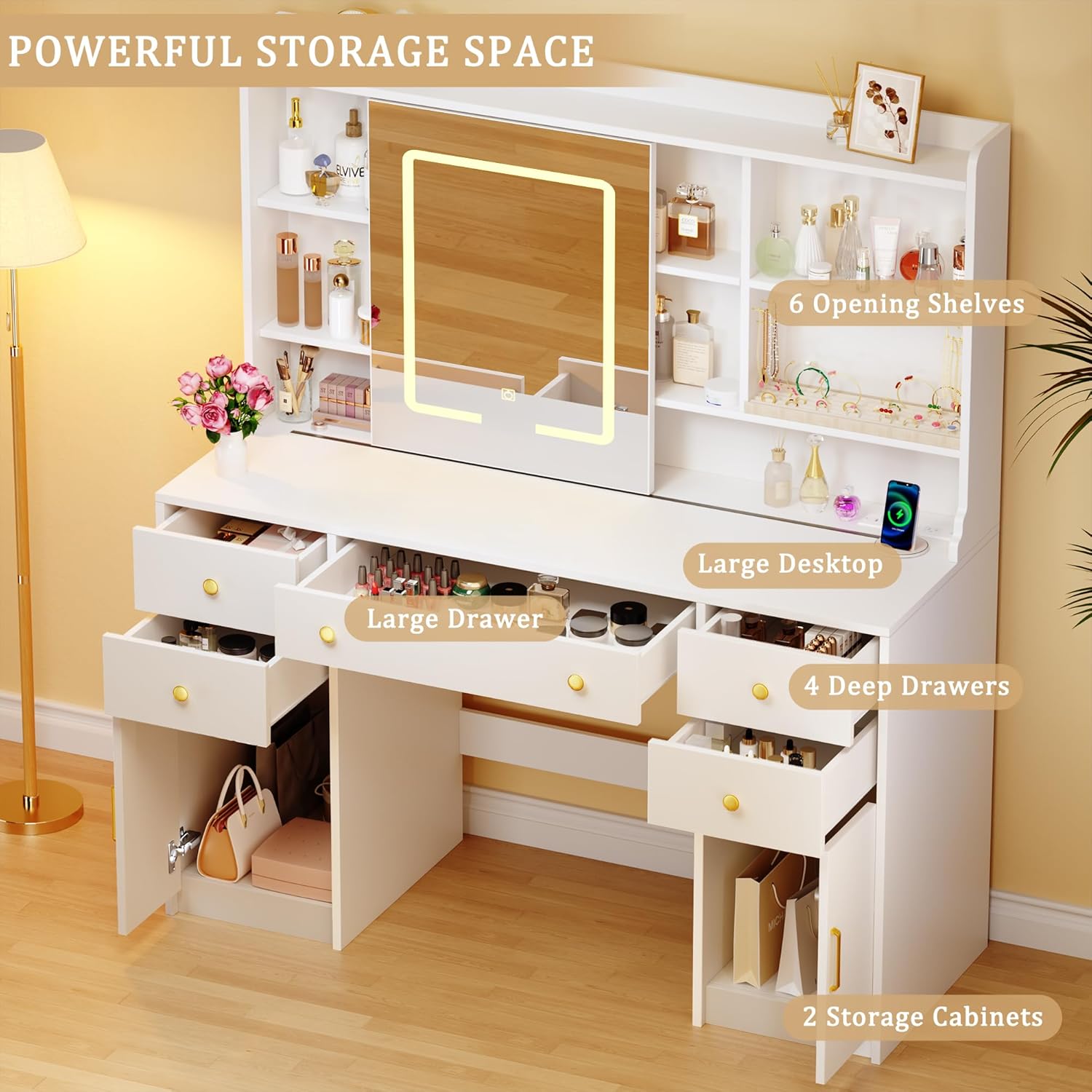
Image 5.4: Overview of the vanity desk's powerful storage space, including drawers, shelves, and cabinets.
6. Maintenance
Proper care and maintenance will extend the life and appearance of your vanity desk.
- Cleaning Surfaces: Wipe surfaces with a soft, damp cloth. Avoid harsh chemicals or abrasive cleaners that could damage the finish.
- Mirror Cleaning: Use a glass cleaner specifically designed for mirrors and a lint-free cloth to avoid streaks.
- Spills: Immediately wipe up any spills to prevent staining or damage to the MDF material.
- Hardware: Periodically check and tighten all screws and fasteners to ensure the desk remains stable.
- Electrical Components: Keep the power outlet and LED lights free from dust and moisture.
7. Troubleshooting
If you encounter any issues with your vanity desk, refer to the following common problems and solutions:
| Problem | Possible Cause | Solution |
|---|---|---|
| LED lights not turning on or flickering. | Loose power connection, faulty power source, damaged LED strip. |
|
| Power outlets (AC/USB/Type-C) are not working. | Desk's main power cord unplugged, circuit breaker tripped, faulty power strip. |
|
| Mirror not sliding smoothly. | Obstruction in the track, debris, misaligned track. |
|
| Desk feels wobbly or unstable. | Loose fasteners, uneven floor. |
|
For issues not listed here or if troubleshooting steps do not resolve the problem, please contact HUAHUU customer support.
8. Specifications
| Feature | Detail |
|---|---|
| Model Number | Vanity Desk 0005 |
| Brand | HUAHUU |
| Product Dimensions (L x W x H) | 15.8"D x 42.6"W x 55.9"H (40.1cm D x 108.2cm W x 142cm H) |
| Item Weight | 101.6 pounds (46.08 kg) |
| Material | Engineered Wood (MDF) |
| Color | White |
| LED Lighting Modes | 3 (Cold White, Warm White, Warm Yellow) |
| Brightness Adjustment | Dimmable via long-press touch switch |
| Power Outlet | 1x Type-C (PD 20W), 2x AC (125V/12A), 2x USB (5V/2A) |
| Assembly Required | Yes |
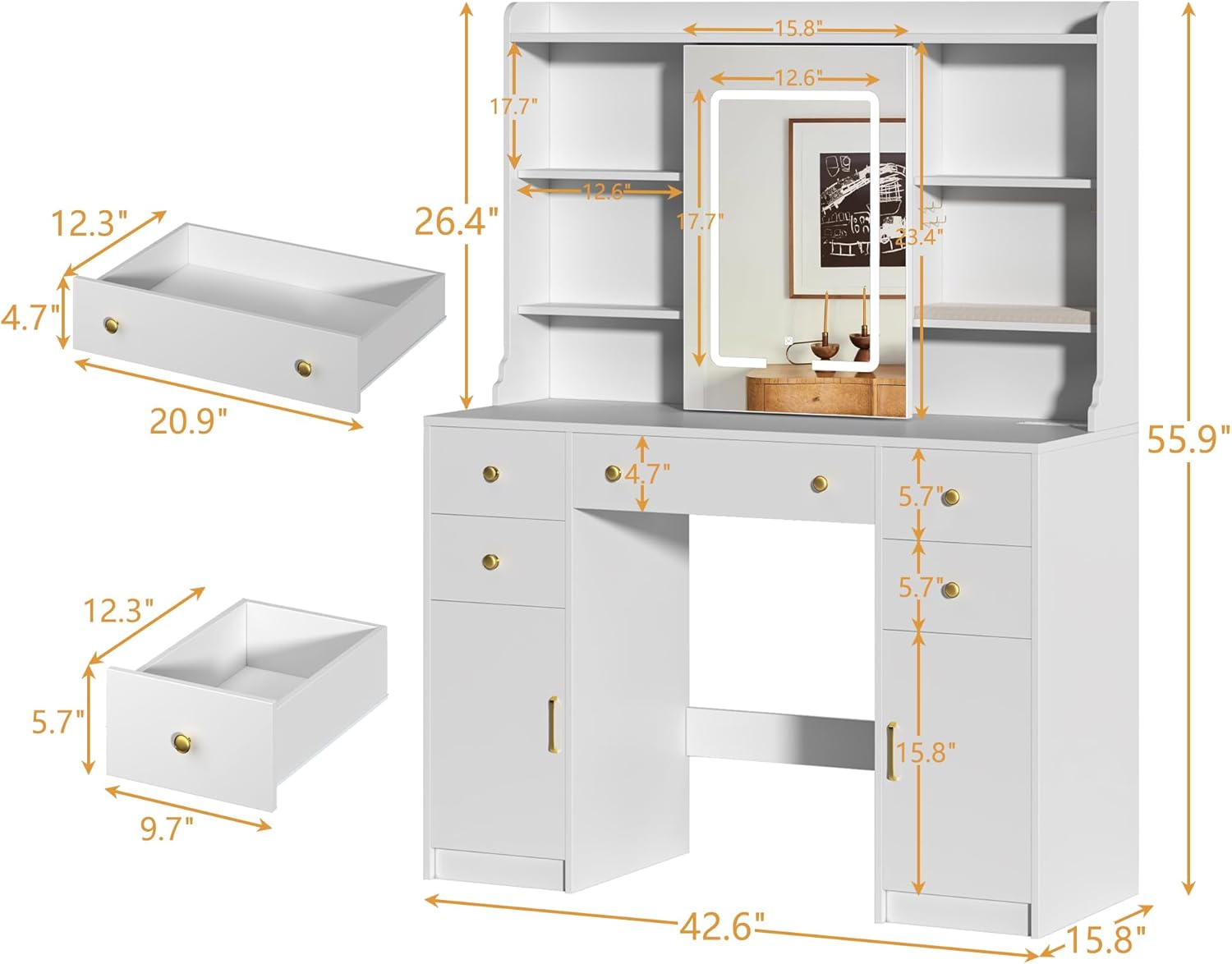
Image 8.1: Dimensional diagram of the HUAHUU Vanity Desk.
9. Warranty and Customer Support
HUAHUU is committed to providing high-quality products and customer satisfaction. For any questions, concerns, or assistance with your vanity desk, please do not hesitate to contact our customer support team.
- Contacting Support: If you have questions about assembly, missing parts, or product functionality, please click "Contact Seller" on the platform where you purchased the product to get a satisfactory solution.
- Warranty Information: Please refer to your purchase documentation or contact customer support for specific warranty details applicable to your product.
We are always here to help customers solve any problems immediately.


