
1. Introduction
This manual provides detailed instructions for the assembly, operation, maintenance, and troubleshooting of your ADORNEVE Twin Size Loft Bed. Please read this manual thoroughly before assembly and use to ensure safe and proper operation of the product. Keep this manual for future reference.

Figure 1.1: Overview of the ADORNEVE Twin Size Loft Bed, showcasing the integrated L-shaped gaming desk, storage drawers, hutch, and RGB lighting.
2. Safety Information
Your safety is paramount. Adhere to all warnings and instructions to prevent injury or damage to the product.
- Weight Capacity: Do not exceed the recommended weight capacity for the bed frame. Consult the specifications section for details.
- Mattress Requirements: Use only a mattress that is 4-6 inches thick to ensure the effectiveness of the safety guardrails.
- Guardrails: Ensure all guardrails are properly installed and secured before use. The bed features 13.4-inch tall guardrails for enhanced safety.
- Ladder Safety: Always use the provided wide-step ladder for climbing to and from the bed. Ensure the ladder is stable before ascending or descending. Pool noodles are included for added comfort on the ladder steps.
- Anti-Toppling Device: Install the anti-toppling device as instructed during assembly to secure the bed to the wall and prevent accidental tipping.
- Electrical Safety: The integrated power outlet includes a safety switch. Always turn off the switch when not in use or during maintenance. Do not overload the outlets.
- Assembly: Assembly requires two adults. Follow all steps precisely. Do not use power tools for assembly unless specifically instructed, as overtightening can damage components.
- Ventilation: Ensure adequate ventilation around the bed, especially near electronic components and RGB lights, to prevent overheating.

Figure 2.1: Illustration of the anti-toppling device components and their installation to ensure bed stability.

Figure 2.2: Detail of the 13.4-inch full-length enclosed safety rail, designed to prevent falls from the bed.
3. Package Contents
Before beginning assembly, verify that all parts and hardware are present. If any components are missing or damaged, contact customer support immediately.
3.1. Components List
- Metal Bed Frame Sections (various lengths and shapes)
- L-Shaped Desk Panels
- Hutch and Shelf Panels
- 3 Storage Drawers (2 medium, 1 deep)
- Integrated Power Outlet Unit
- RGB LED Light Strip and Controller (App/Remote)
- Pegboard and Grid Panel
- Ladder Steps and Rails
- Acrylic Cabinet Fronts
3.2. Hardware and Tools
- Assorted Screws, Bolts, Washers, and Nuts
- Hex Key (Allen Wrench)
- S-clips (5 included for pegboard/grid panel)
- Pool Noodles for Ladder Steps
- Anti-Toppling Hardware
4. Setup and Assembly Instructions
Assembly is estimated to take approximately 8 hours for one person. It is highly recommended to have two adults for easier and safer assembly. Follow the step-by-step visual instructions provided in the included assembly manual. Ensure all parts are correctly oriented as some pieces may appear similar but have different hole alignments.
4.1. Pre-Assembly Checklist
- Clear a spacious area for assembly.
- Unpack all components and lay them out, verifying against the parts list.
- Keep all hardware organized to avoid confusion.
4.2. Assembly Steps (Summary)
- Assemble the main bed frame structure, ensuring all connections are secure but not overtightened initially.
- Attach the L-shaped desk panels to the frame.
- Install the hutch, shelves, and drawer supports.
- Assemble and insert the three storage drawers into their designated slots.
- Mount the pegboard and grid panel.
- Install the integrated power outlet unit into the desk surface.
- Attach the ladder and secure the safety guardrails.
- Install the RGB LED light strip and connect the controller.
- Secure the anti-toppling device to a wall stud.
- Once all components are in place, go back and fully tighten all screws and bolts.
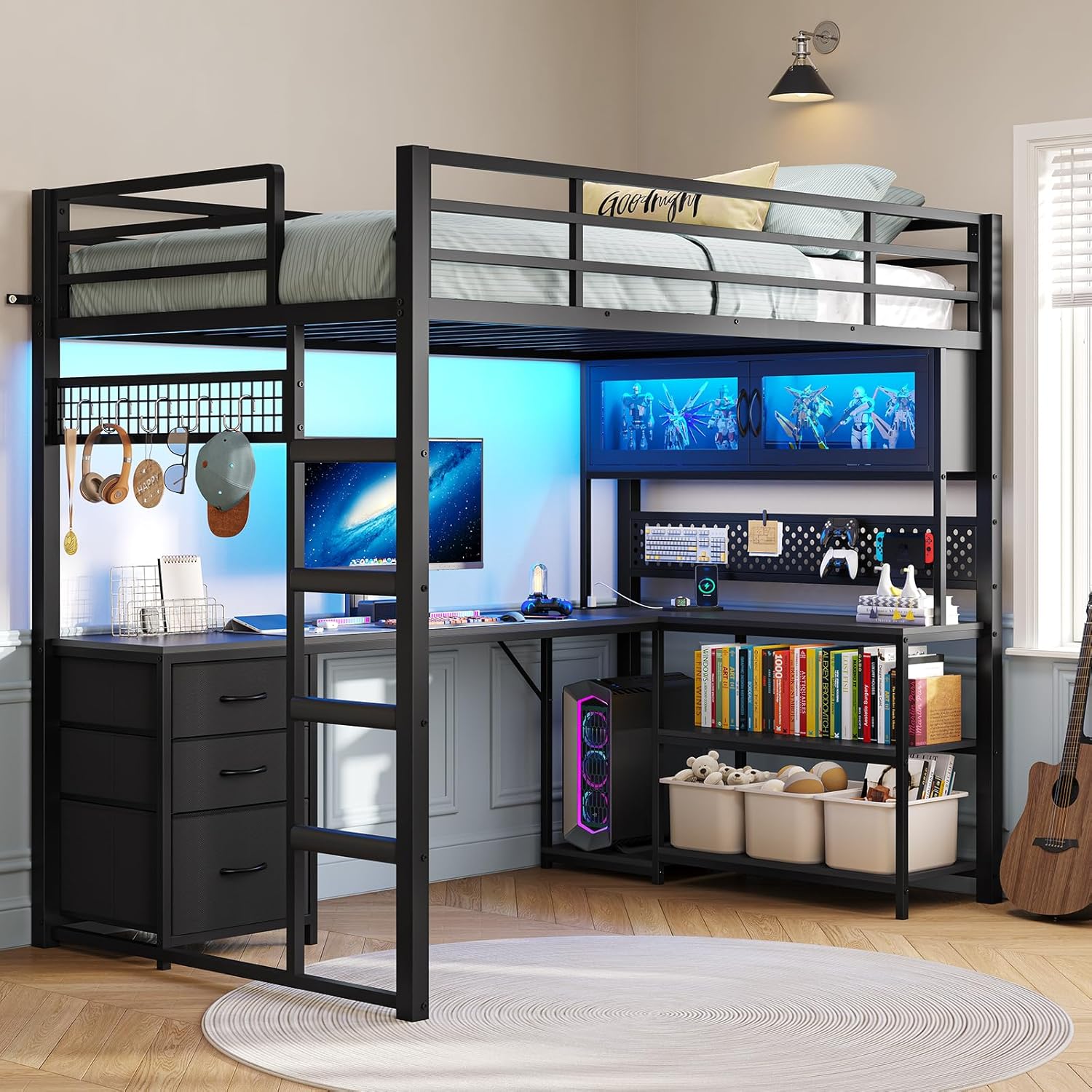
Figure 4.1: The fully assembled ADORNEVE Twin Size Loft Bed, ready for use.
5. Operating Instructions
5.1. L-Shaped Gaming Desk and Storage
The integrated L-shaped desk provides a spacious area for gaming, studying, or crafting. Utilize the hutch, shelves, and three drawers for organized storage. The acrylic-front cabinet is ideal for displaying collectibles.

Figure 5.1: The L-shaped desk setup, demonstrating ample space for a monitor, keyboard, and other accessories, with integrated storage.

Figure 5.2: Close-up of the three varied-sized drawers, two-tier bookshelves, grid panel for S-clips, and pegboard for customizable storage.
5.2. Expanded Safety Power Outlet
The desk features a built-in power hub with 4 AC outlets (125V/12A) and 2 USB ports (5V/2A). A red safety switch is included to control power to all outlets. Always use the safety switch to turn off power when not in use or before unplugging devices.

Figure 5.3: The expanded power outlet, showing the four AC sockets, two USB ports, and the integrated safety switch.
5.3. RGB LED Lights
The RGB lights offer over 60,000 color options and music sync functionality. Control the lights via a dedicated mobile application or the included remote control. The lights in the acrylic cabinet illuminate your displayed items.
- App Control: Download the specified mobile application (refer to the light kit instructions for app name) to access full features, including dynamic modes, music sync, and timing functions.
- Remote Control: Use the provided remote for basic functions such as power, color selection, brightness adjustment, and mode changes.

Figure 5.4: The RGB ambient lighting system, illustrating control options via mobile app and remote, with various color and mode capabilities.
6. Maintenance
Regular maintenance will prolong the life and appearance of your loft bed.
- Cleaning the Frame and Desk: Wipe down metal and desk surfaces with a soft, damp cloth. Avoid abrasive cleaners or harsh chemicals that could damage the finish.
- Drawer Care: The fabric drawers can be spot cleaned with a mild detergent and water. Allow to air dry completely.
- LED Lights: Gently wipe the LED strip and acrylic cabinet with a dry, soft cloth. Do not use liquid cleaners directly on electrical components.
- Hardware Check: Periodically check all screws, bolts, and connections to ensure they remain tight. Retighten as necessary to maintain stability.
- Power Outlet: Keep the power outlet free from dust and debris. Ensure no liquids come into contact with the electrical components.
7. Troubleshooting
This section addresses common issues you might encounter.
| Problem | Possible Cause | Solution |
|---|---|---|
| Bed feels unstable or wobbly. | Loose hardware; Anti-toppling device not installed or loose. | Ensure all bolts and screws are fully tightened. Verify the anti-toppling device is securely anchored to a wall stud. |
| LED strip losing adhesion. | Surface not clean; Adhesive weakening. | Clean the surface thoroughly before re-applying. Use additional adhesive tape if necessary. |
| LED remote control not working. | Dead battery; Remote malfunction. | Replace the battery in the remote. If the issue persists, try controlling via the mobile app. Contact support if both fail. |
| Power outlets not working. | Safety switch off; Overload; Loose connection. | Ensure the red safety switch is in the 'ON' position. Unplug some devices if overloaded. Check the main power connection to the outlet unit. |
| Difficulty assembling certain parts. | Incorrect orientation of parts; Missing hardware. | Double-check the assembly manual for correct part orientation. Verify all hardware is present and correctly used. Contact support if parts are mislabeled or missing. |
8. Specifications
| Feature | Detail |
|---|---|
| Size | Twin |
| Product Dimensions (L x W x H) | 78"L x 42"W x 72.8"H |
| Color | Black |
| Material | Metal Frame |
| Item Weight | 128 pounds |
| Mattress Thickness Recommendation | 4-6 inches (not included) |
| Guardrail Height | 13.4 inches |
| Power Outlet | 4 AC Sockets (125V/12A), 2 USB Ports (5V/2A), with Safety Switch |
| Lighting | RGB LED Lights (60,000+ colors, music sync, app/remote control) |
| Storage | 3 Drawers (2 medium, 1 deep), Hutch, Shelves, Pegboard, Grid Panel |
| Assembly Required | Yes |

Figure 8.1: Comprehensive dimensions of the ADORNEVE Twin Size Loft Bed, including bed frame, desk, and drawer measurements.

Figure 8.2: Specific dimensions of the L-shaped desk, highlighting the 75.6-inch length and 41-inch width for the workspace.
9. Warranty and Support
ADORNEVE stands behind the quality of its products. For specific warranty details, please refer to the warranty card included with your purchase or visit the official ADORNEVE website. If you encounter any issues, require replacement parts, or have questions not covered in this manual, please contact our customer support team. Provide your model number and purchase date for faster service.
Customer Support Contact: Refer to your purchase documentation or the ADORNEVE brand store for the most current contact information.


