
Kiivakii bed1201
Kiivakii Full Size Bed Frame with Headboard, LED Platform Bed, and Charging Station - Instruction Manual
Model: bed1201 | Brand: Kiivakii
Introduction
This manual provides detailed instructions for the assembly, operation, and maintenance of your Kiivakii Full Size Bed Frame. Please read all instructions carefully before beginning assembly and retain this manual for future reference.
Safety Information
- Weight Capacity: Do not load more than 800 pounds on the bed frame.
- Assembly: Ensure all screws are tightened to 80% first, then fully tighten all screws to 100% after all parts are assembled.
- Electrical Safety: Ensure the charging station is properly installed and connected to a suitable power outlet. Do not overload the outlets.
- Sharp Edges: Exercise caution during assembly and use to avoid injury from metal edges.
- Children: Keep small parts and packaging materials away from children.
Package Contents
Before assembly, verify that all components listed below are present and undamaged. If any parts are missing or damaged, please contact customer support.
- Headboard components (metal frame, wooden panel, charging station)
- Footboard component (wooden panel)
- Side rails (metal)
- Center support beams and legs (metal)
- Bed slats (metal)
- 4 Storage Drawers (wire baskets with wooden fronts and wheels)
- LED light strip and remote control
- Assembly hardware (screws, Allen wrench)
- Instruction Manual

Image: All components of the Kiivakii Full Size Bed Frame, including metal frame parts, wooden panels, hardware, and the charging station, laid out for inspection.
Assembly Instructions
Please follow these steps carefully. It is recommended to have two people for assembly. Do not fully tighten screws until all parts are loosely assembled.
Assembly Video Guide
For a visual guide, please watch the official assembly video:
Video: Official assembly guide for the Kiivakii Bed Frame with 4 Drawers, demonstrating each step of the construction process.
Step-by-Step Written Instructions
- Assemble the Headboard Frame (Part 1): Connect the main headboard frame pieces (parts 1, 4) using the provided screws and Allen wrench. Ensure connections are secure but do not fully tighten yet.

Image: Close-up of hands attaching two metal frame pieces together with a screw and Allen wrench, forming part of the headboard structure.
- Attach Headboard Panel (Part 2): Secure the main wooden headboard panel (part 5) to the assembled headboard frame using screws.

Image: A person attaching a dark wooden panel to the metal frame of the headboard, securing it with screws.
- Install Charging Station (Part 3): Insert the charging station (part K) into the designated cutout on the headboard panel and secure it with screws.

Image: A close-up of hands inserting the black charging station unit, featuring two power outlets and USB ports, into the headboard's pre-cut opening.
- Assemble Upper Headboard Rail (Part 4): Attach the upper metal rail (part 3) to the top of the headboard frame.

Image: A person securing the top metal rail of the headboard frame, ensuring it aligns with the pre-drilled holes.
- Attach Top Headboard Panel (Part 5): Place the top wooden panel (part 6) onto the upper headboard rail and secure it.

Image: Hands carefully placing the top wooden shelf panel onto the headboard frame, preparing to secure it.
- Assemble Footboard (Part 6): Attach the footboard side rails (parts 7, 8) to the footboard panel (part 14).

Image: A person attaching the metal side rails to the wooden footboard panel, securing them with screws.
- Connect Headboard and Footboard: Attach the long side rails (parts 9, 10) to the headboard and footboard assemblies.

Image: A person connecting the long metal side rail to the headboard frame, aligning the holes for screw insertion.
- Install Center Support Beams: Assemble and install the center support beams (parts 11, 12) and their legs (part 10) to the main bed frame.
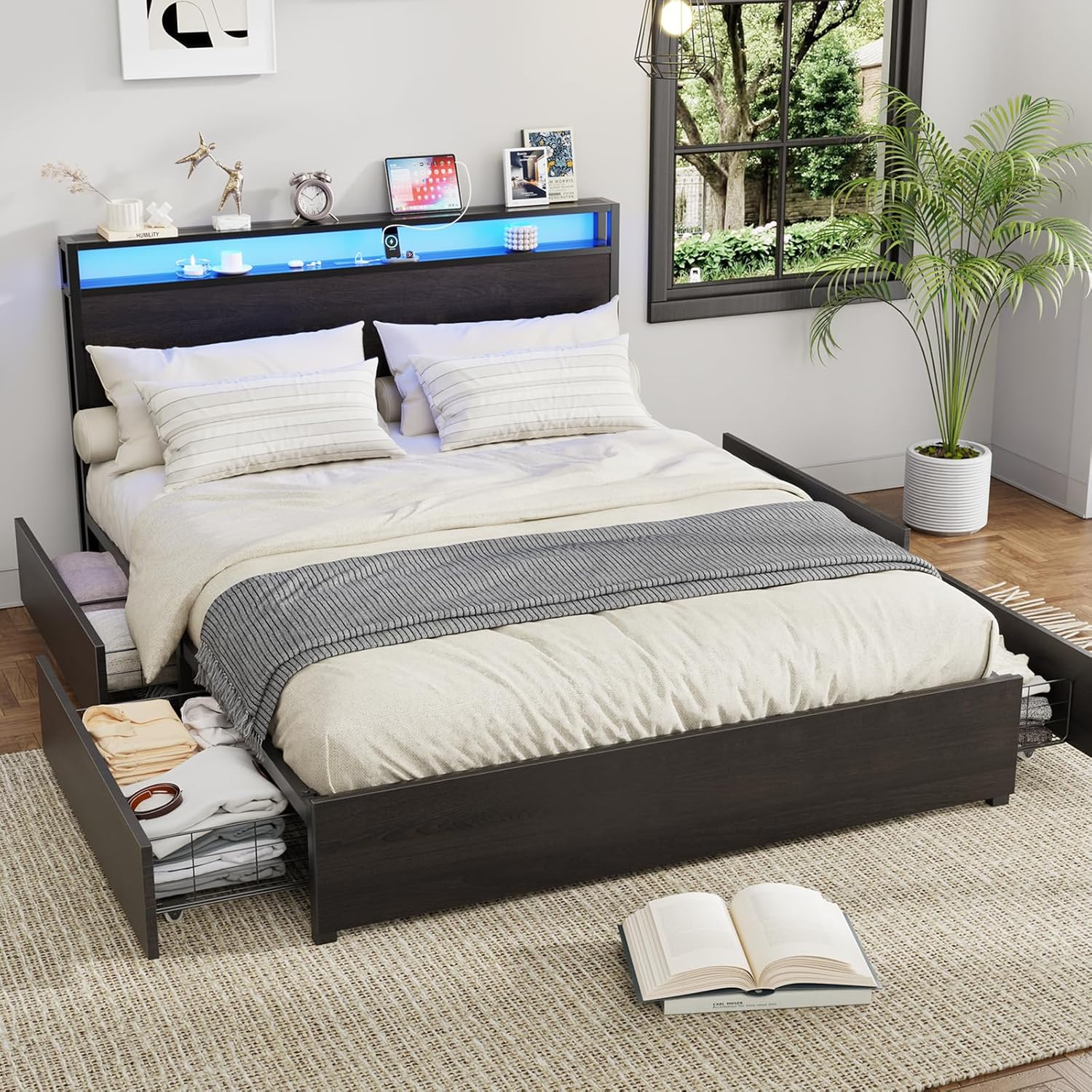
Image: A person assembling the central support structure of the bed frame, connecting the crossbeams and support legs.
- Place Bed Slats: Lay the metal bed slats (part 15) across the frame and secure them using the plastic clips (part 16).

Image: A close-up of hands attaching a metal bed slat to the frame using a black plastic clip, ensuring a secure and noise-free fit.
- Assemble Storage Drawers: Assemble the wire baskets (part 17) and attach the wooden drawer fronts (part 16) and wheels.

Image: A person attaching the wooden front panel to the wire mesh storage drawer, securing it with screws.
- Install LED Light Strip: Adhere the LED light strip (part L) to the underside of the top headboard panel and connect it to the power source.

Image: Hands carefully pressing the LED light strip into place along the underside of the headboard's top shelf.
- Final Tightening: Once all parts are assembled, go back and fully tighten all screws to 100%.
Operating Instructions
LED Lighting System
The integrated RGB LED lighting system offers customizable ambiance for your bedroom.
- Control: The LED lights can be controlled via a dedicated mobile application or the included remote control.
- Color Options: Choose from over 60,000 color options to match your mood or decor.
- Brightness & Modes: Adjust brightness levels and select from various flash modes.
- Timer Function: Set timers for automatic on/off functionality.
- Music Sync: Sync the lights with music for an immersive audio-visual experience.

Image: The Kiivakii Full Size Bed Frame with its LED headboard illuminated in a soft blue light, showcasing the ambient lighting feature.
Built-in Charging Station
The headboard features a convenient charging hub for your electronic devices.
- Outlets: Includes 2 standard AC plug outlets (125V/12A).
- USB Ports: Features 1 USB port and 1 Type-C port (5V 2A) for charging smartphones, tablets, and other USB-powered devices.
- Usage: Simply plug your devices into the appropriate ports for convenient bedside charging.
Image: A close-up view of the integrated charging station on the headboard, showing the two AC outlets, USB port, and Type-C port in use.
Storage Drawers
The bed frame is equipped with 4 sliding drawers for additional storage.
- Access: The drawers are designed to slide smoothly for easy access to stored items.
- Capacity: Ideal for storing bedding, clothing, books, or other personal items.
Image: One of the underbed storage drawers pulled out, revealing its wire mesh construction and capacity for storing folded clothes.
Maintenance
- Cleaning: Wipe metal and wooden surfaces with a soft, damp cloth. Avoid harsh chemicals.
- Fasteners: Periodically check all screws and bolts to ensure they remain tight. Re-tighten as necessary to maintain stability and prevent noise.
- LED Lights: If LED lights malfunction, check the power connection. If issues persist, contact customer support.
- Charging Station: Ensure the charging station is free from dust and debris. Do not attempt to repair electrical components yourself.
Troubleshooting
- Issue: Bed frame is noisy or squeaks.
- Solution: Check all assembly screws and bolts. Fully tighten any loose fasteners. Ensure bed slats are properly seated in their clips. The design includes silent cotton to minimize noise, but loose connections can still cause sound.
- Issue: LED lights are not working.
- Solution: Verify that the LED light strip is securely connected to the power source and that the power cord for the charging station is plugged into a working wall outlet. Check the remote control battery if applicable. If using the app, ensure Bluetooth connection is active.
- Issue: Charging station is not providing power.
- Solution: Ensure the main power cord for the charging station is firmly plugged into a functional wall outlet. Test the outlet with another device. If the issue persists, contact customer support.
- Issue: Drawers do not slide smoothly.
- Solution: Check that the drawer wheels are properly installed and not obstructed. Ensure the bed frame is on a level surface. Clear any debris from the drawer's path.
Specifications
| Feature | Detail |
|---|---|
| Name | Full Size Bed Frame with LED 4 Drawers Charging Station |
| Model Number | bed1201 |
| Brand | Kiivakii |
| Color | Black |
| Material | Metal, Wood |
| Product Dimensions | 81.9"L x 54.3"W x 39"H |
| Product Weight | 91 lbs |
| Max Load Capacity | 800 lbs |
| Charging Station | 2 Standard Plug Outlets, 1 USB Port, 1 Type-C Port |
| LED Lighting | RGB LED Light, App/Remote Control, 60,000+ Colors, Adjustable Brightness, Flash Modes, Timers, Music Sync |
| Storage | 4 Sliding Drawers, 2-tier Storage Headboard Shelf |
| Noise Reduction | Noise-Free design with metal support base and secured slats |
| Box Spring Needed | No |
Warranty and Support
For warranty information, replacement parts, or further assistance, please refer to the product packaging or contact Kiivakii customer support directly. You may also visit the official Kiivakii Store on Amazon.
Protection plans are available for purchase separately:
- 2-Year Protection Plan
- 3-Year Protection Plan
- Complete Protect (monthly plan covering eligible purchases)
Ask a question about this manual
Ask about setup, troubleshooting, compatibility, parts, safety, or missing instructions. Manuals+ will review the question and use this page’s manual context to help answer it.