
Introduction
This manual provides essential instructions for setting up, operating, and maintaining your Generic Series 10 Smart Watch. Please read this manual thoroughly before using the device to ensure proper function and safety. This smartwatch is compatible with both Android and iOS devices.
What's in the Box
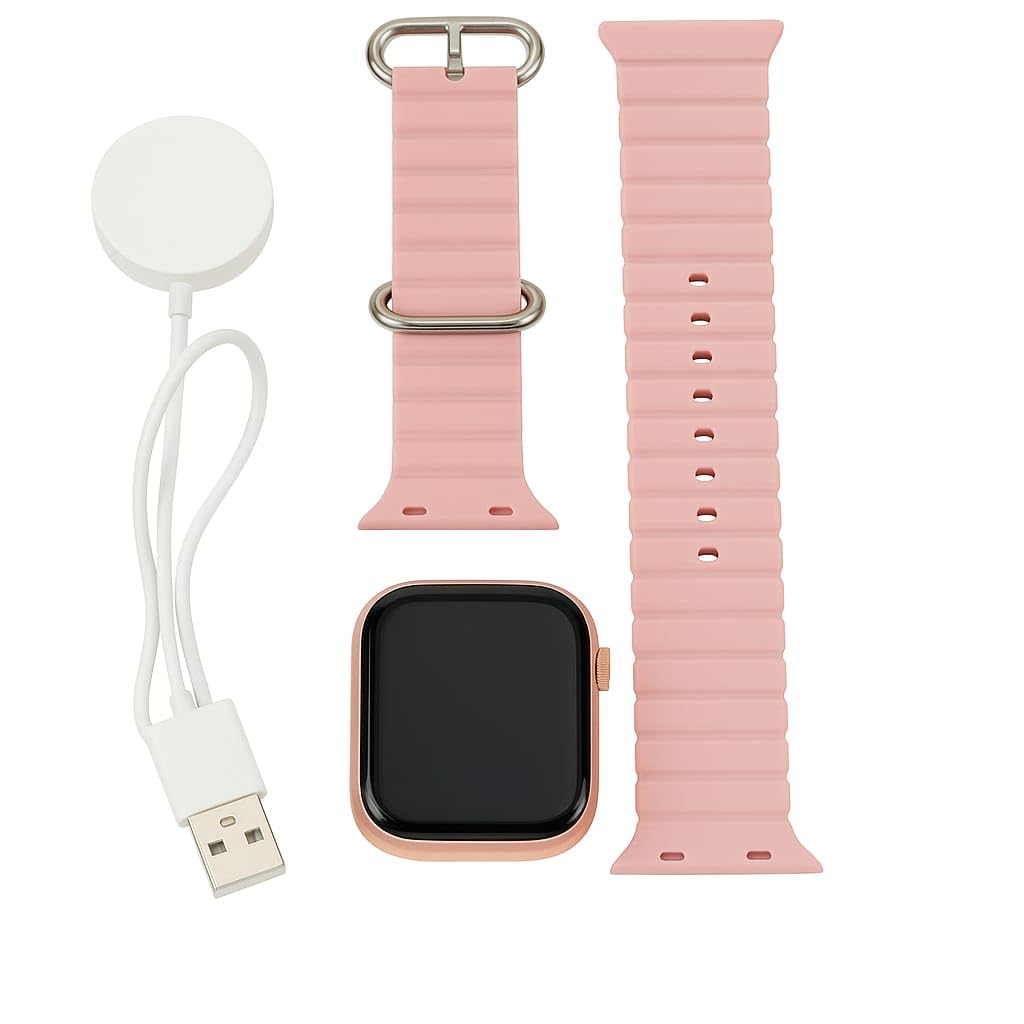
- Series 10 Smart Watch
- Charging Cable
- Two Pink Silicone Straps

Product Overview
Display
The Series 10 Smart Watch features a large 2.19-inch HD display, providing clear visibility and vibrant colors. The responsive touch screen allows for easy navigation of calls, notifications, and health statistics.

Design and Straps
The watch comes with two interchangeable pink silicone straps, offering flexibility to switch styles while maintaining comfort and durability for everyday use. The watch case is made of metal.

Setup Guide
1. Charging the Smart Watch
Before initial use, fully charge your Series 10 Smart Watch. Connect the provided charging cable to the watch's charging port and a compatible USB power source. The watch has a 250 mAh battery capacity and takes approximately 2 hours to fully charge, providing up to 7 days of average use with its ultralow power consumption technology.
2. Pairing with Your Smartphone
To utilize all features, pair your smart watch with your Android or iOS smartphone via Bluetooth. Download the dedicated companion app (refer to the watch's on-screen instructions or packaging for the app name). Enable Bluetooth on your phone, open the app, and follow the on-screen prompts to connect your Series 10 Smart Watch.
Operating Instructions
Bluetooth Calling
Once paired, you can make and receive calls directly from your wrist. Ensure your watch is within Bluetooth range of your phone for this feature to function.
Smart Notifications
Receive real-time app alerts and SMS notifications on your watch. Configure notification settings within the companion app on your smartphone.
Navigation
Navigate through the watch interface using the touchscreen. Swipe, tap, and long-press to access various functions and menus.
Health and Fitness Tracking
The Series 10 Smart Watch includes an integrated fitness tracker and advanced health sensors to monitor your daily activities and health metrics for a more active lifestyle.
- Heart Rate Monitor: Continuously track your heart rate.
- Sleep Tracking: Monitor your sleep patterns and duration.
- Activity Tracking: Count steps, distance, and calories burned.
- Multiple Sports Modes: Track various workout types.
Specifications
| Feature | Detail |
|---|---|
| Model Number | AWS344 |
| Display Size | 2.19 inches HD |
| Operating System Compatibility | Android, iOS |
| Connectivity | Bluetooth |
| Battery Capacity | 250 Milliamp Hours |
| Battery Life (Average) | Up to 7 Days |
| Charging Time | Approx. 2 Hours |
| Special Features | Heart Rate Monitor, Sleep Tracking, Fitness Apps, Bluetooth Calling |
| Water Resistance Level | Water Resistant (IP67) |
| Band Material | Rubber |
| Case Material | Metal |
| Item Weight | 120 Grams |
Troubleshooting
Watch Not Turning On
- Ensure the watch is fully charged. Connect it to the charger for at least 30 minutes.
Cannot Pair with Phone
- Ensure Bluetooth is enabled on your phone and the watch.
- Make sure the watch is in pairing mode.
- Restart both your phone and the watch.
- Check the companion app for specific pairing instructions.
Inaccurate Health Data
- Ensure the watch is worn snugly on your wrist, not too tight or too loose.
- Clean the sensors on the back of the watch regularly.
Notifications Not Appearing
- Verify notification permissions are granted to the companion app on your phone.
- Check notification settings within the app and on the watch.
- Ensure the watch is connected via Bluetooth.
Warranty and Support
This product comes with a standard manufacturer's warranty. For warranty claims or technical support, please contact the manufacturer, Jannat Wala Digital Pvt Ltd, at Jannatwaladigitalpvtltd@gmail.com. For further product information, please visit the product detail page on Amazon.in.