1. Introduction
This manual provides essential instructions for the safe and efficient operation of your OUKITEL P2001 Plus Portable Power Station and PV200 Solar Panel. Please read this manual thoroughly before use and retain it for future reference.
The OUKITEL P2001 Plus is a high-capacity portable power station featuring a 2048Wh LiFePO4 battery and a 2400W AC output. It is designed to provide reliable power for various applications, including home backup, outdoor camping, and powering tools. The unit is complemented by the PV200 Solar Panel for efficient solar charging.

Image 1.1: OUKITEL P2001 Plus Portable Power Station with PV200 Solar Panel. The power station is shown connected to a foldable solar panel, ready for outdoor use.
2. Safety Information
Always observe the following safety precautions to prevent injury or damage to the device:
- Do not disassemble, repair, or modify the unit.
- Keep the unit away from fire or extreme temperatures.
- Avoid exposure to water or moisture.
- Ensure proper ventilation during use and charging.
- Do not use damaged cables or accessories.
- Keep out of reach of children and pets.
3. Package Contents
Verify that all items are included in your package:
- OUKITEL P2001 Plus Portable Power Station
- AC Charging Cable
- Car Charging Cable
- Solar Charging Cable
- User Manual
- OUKITEL PV200 Solar Panel (if purchased as a bundle)
Note: Due to the product's weight, the power station and solar panels may be delivered in separate packages.
4. Product Overview
4.1. Front Panel and Ports

Image 4.1: Detailed view of the OUKITEL P2001 Plus front panel. It features a new version LCD display, a charging adjustment knob, input protection rubber stoppers, and various output ports.
The OUKITEL P2001 Plus features a comprehensive set of output ports and controls for versatile power delivery:
- LCD Display: Shows battery status, input/output wattage, remaining charge time, and other operational information.
- Charging Adjustment Knob: Allows adjustment of AC input power from 0W to 1800W (400W, 800W, 1200W, 1800W settings).
- AC Outlets (x4): Provide 2400W pure sine wave AC power for household appliances.
- USB-A QC3.0 Ports (x2): For fast charging compatible USB devices.
- USB-C PD Ports (x4): Includes 20W, 45W, and 100W Power Delivery ports for laptops, tablets, and smartphones.
- DC Outlets (x2): 12V/3A for DC-powered devices.
- Cigarette Lighter Port (x1): 12V/10A for car appliances.
- Input Protection Rubber Stopper: Protects input ports from dust and moisture.
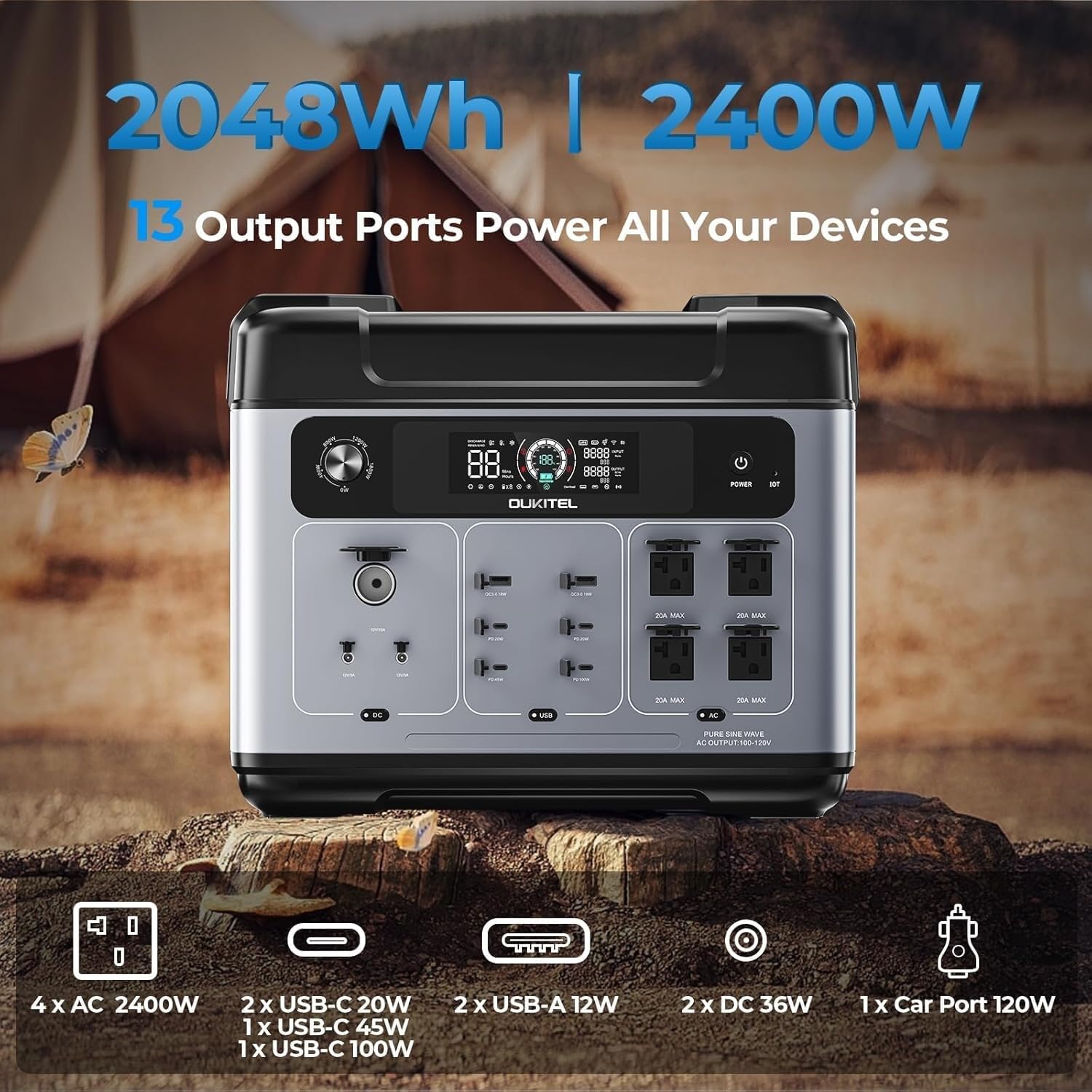
Image 4.2: The power station's 13 versatile output ports, including AC, USB-A, USB-C, DC, and a car cigarette lighter port.
5. Setup and Initial Use
5.1. Unpacking and Inspection
Upon receiving your OUKITEL P2001 Plus, carefully unpack all components and inspect them for any signs of damage. If any items are missing or damaged, contact customer support immediately.
5.2. Initial Charging
Before first use, it is recommended to fully charge the power station. You can charge it via AC wall outlet, car charger, or solar panels.
- AC Charging: Connect the AC charging cable to the power station's AC input port and then to a wall outlet. The LCD display will show the charging status. You can adjust the charging speed using the charging adjustment knob (400W-1800W).
- Solar Charging: Connect the solar charging cable to the PV200 Solar Panel and then to the power station's solar input port. Ensure the solar panel is placed in direct sunlight for optimal charging efficiency.
- Car Charging: Use the car charging cable to connect the power station to your vehicle's cigarette lighter port.

Image 5.1: The power station being charged simultaneously by an AC outlet and solar panels, demonstrating fast charging capabilities.

Image 5.2: Illustration of the adjustable input power feature, allowing users to select charging rates from 300W to 1100W to extend battery life.
6. Operating Instructions
6.1. Powering On/Off
Press and hold the main power button for a few seconds to turn the unit on or off. The LCD display will illuminate upon activation.
6.2. Using AC Outlets
To use the AC outlets, ensure the power station is on, then press the AC power button. The AC indicator on the display will light up. Plug your devices into the AC outlets. The P2001 Plus can power most electrical appliances up to 2400W.

Image 6.1: Examples of appliances powered by the OUKITEL P2001 Plus, including an air fryer, electric kettle, hair dryer, camera, speaker system, and projector, with estimated run times.
6.3. Using USB and DC Ports
The USB and DC ports are typically active when the unit is powered on. Simply plug your compatible devices into the respective ports. Refer to the LCD display for output wattage.
6.4. Uninterruptible Power Supply (UPS) Function
The P2001 Plus features a server-level UPS function with an ultra-rapid response time of less than 10ms. When connected to an AC wall outlet and powering devices, it can seamlessly switch to battery backup during a power outage, providing continuous power. Note: If the battery is fully depleted during an outage, the AC outlets may need to be manually reactivated once grid power is restored and the unit begins charging.

Image 6.2: The power station providing uninterrupted power to a computer setup during a simulated power outage, highlighting its UPS capability.
6.5. Smart App Control
Manage your OUKITEL P2001 Plus remotely using the dedicated smartphone application. The app allows you to monitor real-time stats, control output ports, and adjust settings via Bluetooth or Wi-Fi connection.
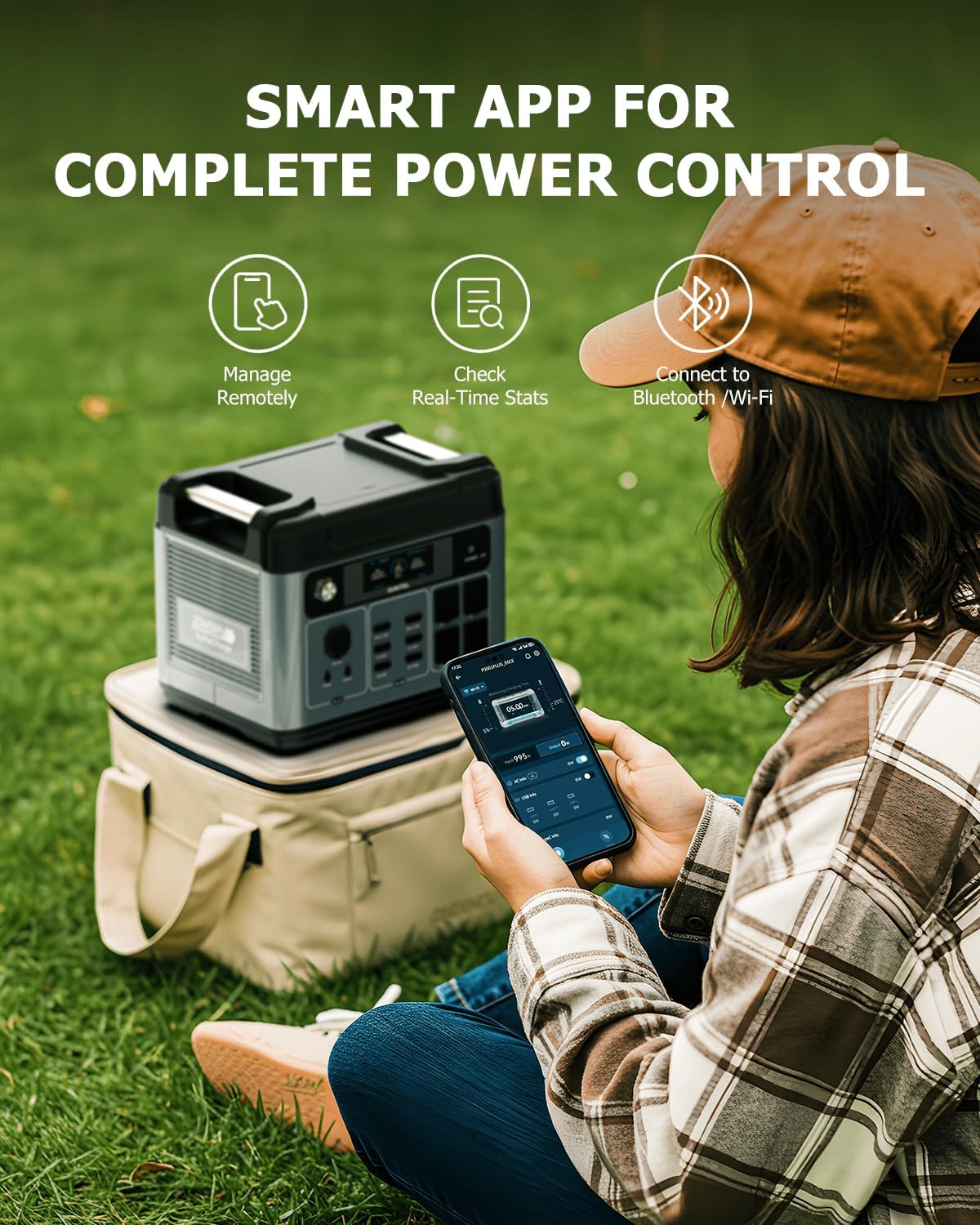
Image 6.3: A user interacting with the OUKITEL smartphone app to manage the power station, showing remote control and real-time status monitoring.
6.6. Portability
Despite its large capacity, the P2001 Plus is designed to be portable, weighing approximately 22.23 kg (48.4 lbs). Its compact design, similar in size to a microwave, makes it suitable for transport and use in various locations.

Image 6.4: The OUKITEL P2001 Plus being carried, illustrating its compact dimensions (Length: 39.9cm, Width: 28.6cm, Height: 32cm) and portability.
6.7. Product Video
Video 6.1: An official promotional video for the OUKITEL P2001 Plus Power Station, showcasing its features, internal components, and various use cases in home and outdoor settings.
7. Maintenance
7.1. Battery Care
The OUKITEL P2001 Plus uses a high-quality LiFePO4 battery, designed for longevity with over 3500 charge/discharge cycles, maintaining 80% capacity for over 10 years. To maximize battery life:
- Store the unit in a cool, dry place away from direct sunlight.
- If storing for extended periods, charge the battery to approximately 50-80% every 3-6 months.
- Avoid fully discharging the battery frequently.
- The built-in Battery Management System (BMS) and Microcontroller Unit (MCU) manage cell voltage and temperature for optimal performance and safety.
7.2. Cleaning
Wipe the exterior of the power station with a soft, dry cloth. Do not use abrasive cleaners or immerse the unit in water.
8. Troubleshooting
If you encounter issues with your OUKITEL P2001 Plus, refer to the following common problems and solutions:
- Unit not turning on: Ensure the battery is charged. If not, connect to an AC outlet or solar panel for charging.
- No output from AC ports:
- Confirm the AC output button is pressed and the AC indicator is lit on the display.
- Check if the connected appliance exceeds the 2400W output limit.
- If using the UPS function and the battery was fully depleted, manually reactivate the AC output after grid power is restored.
- Slow charging:
- For AC charging, adjust the charging knob to a higher wattage setting (e.g., 1800W).
- For solar charging, ensure solar panels are in direct sunlight and free from obstructions. Check cable connections.
- LCD display frozen or unresponsive: Try restarting the unit by turning it off and then on again. If the issue persists, contact customer support.
For further assistance, please contact OUKITEL customer service.
9. Specifications
| Feature | Detail |
|---|---|
| Brand | OUKITEL |
| Model Name | P2001 Plus |
| Battery Type | LiFePO4 |
| Capacity | 2048Wh |
| AC Output | 2400W (Pure Sine Wave) |
| Peak Wattage | 4800W |
| Voltage | 120 Volts |
| Input Wattage (Adjustable) | 400W-1800W (AC) |
| Solar Input | Max 500W |
| USB-A QC3.0 Output | 2 ports |
| USB-C PD Output | 4 ports (20W/45W/100W) |
| DC Output | 2 ports (12V/3A) |
| Cigarette Lighter Output | 1 port (12V/10A) |
| UPS Function | <10ms switchover time |
| Dimensions (L x W x H) | 18.9" x 11.4" x 12.6" (48cm x 29cm x 32cm) |
| Item Weight | 22.23 kg (48.4 lbs) |
10. Warranty and Customer Support
OUKITEL provides comprehensive support for its products:
- Warranty: The OUKITEL P2001 Plus comes with a 5-year customer service and a 2-year free repairment policy from the date of order.
- Return/Replacement: Customers are eligible for a no-worry return/replacement within 30 days of purchase.
- Repair Service: Free repairment is available within two years from the order date. To initiate a repair, contact customer service to obtain a return label. Repairment typically takes 1-2 weeks. Note: Water damage due to deliberate human factors is not covered under free repairment.
- Contact: For any inquiries, technical support, or warranty claims, please contact OUKITEL customer service. Ensure you purchase from the official OUKITEL store for genuine products and guaranteed service.