
1. Introduction
Thank you for choosing the Vossfamul 12000 BTU Portable Air Conditioner. This unit is designed to provide efficient cooling, dehumidification, and air circulation for rooms up to 550 square feet. Please read this manual thoroughly before operating your new appliance to ensure proper use, maintenance, and safety.
2. Important Safety Instructions
Always follow basic safety precautions when using electrical appliances to reduce the risk of fire, electric shock, and injury.
- Read all instructions before using the appliance.
- Do not operate the unit with a damaged cord or plug.
- Ensure the unit is placed on a flat, stable surface.
- Do not block air outlets or inlets.
- Keep children and pets away from the unit during operation.
- Unplug the unit before cleaning or servicing.
- Do not use the unit in wet areas like bathrooms or laundry rooms.
3. Product Features
The Vossfamul Portable Air Conditioner offers versatile functionality and efficient performance:
- 3-in-1 Functionality: Cool, Fan, and Dehumidifier modes.
- Powerful Cooling: 12000 BTU capacity, suitable for rooms up to 550 sq. ft.
- Wide Temperature Range: Operates efficiently between 59°F and 88°F.
- Quiet Operation: Advanced noise isolation system for a quiet environment, as low as 48dB.
- Convenient Control: Features a touch control panel and a remote control.
- 24-Hour Timer: Program the unit to turn on or off automatically.

Figure 3.1: The 12000 BTU portable air conditioner efficiently cools large spaces up to 550 sq. ft. with an airflow of 400 CFM, maintaining temperatures between 59°F and 88°F.

Figure 3.2: The unit features quiet cooling and a sleep mode, utilizing an advanced noise isolation system to operate at approximately 48dB, ensuring minimal disturbance.
4. Setup and Installation
Proper installation is crucial for the efficient operation of your portable air conditioner. Ensure the unit is placed near a window for exhaust ventilation.
4.1 Choosing a Location
- Place the unit on a firm, level surface.
- Maintain at least 20 inches (50 cm) of clearance from walls or other objects to ensure proper airflow.
- Position the unit near a window that can accommodate the window exhaust kit.
4.2 Window Kit Installation
The window kit is designed for most standard vertical and horizontal sliding windows. The window panel can extend from 17 inches to 53 inches in width. For vertical sliding windows, the maximum height should not exceed 59 inches.
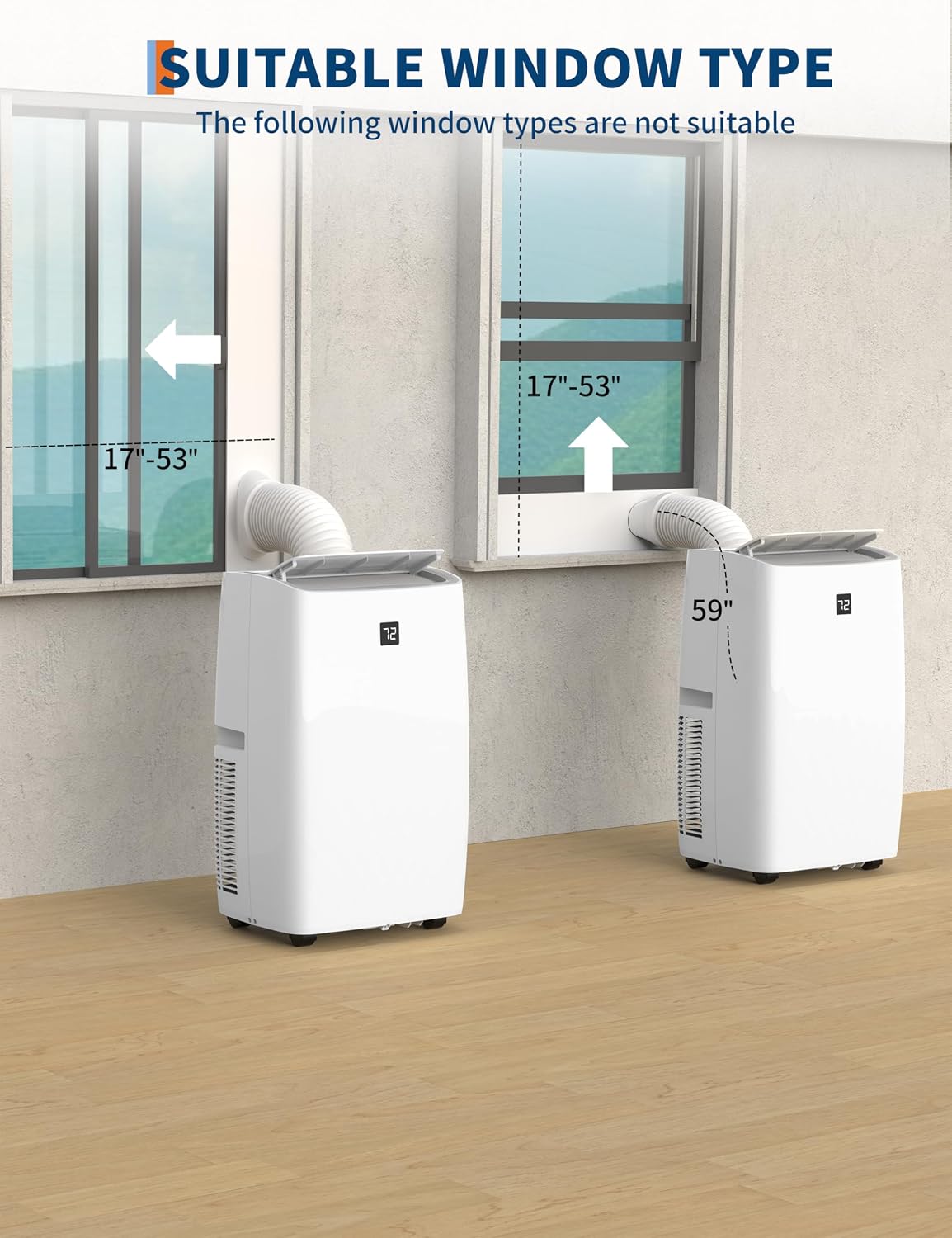
Figure 4.1: Illustration of suitable window types for the exhaust kit. The window panel adjusts from 17 to 53 inches. Note that certain window types, such as casement windows, may not be suitable.
- Assemble the window seal plate kit according to your window type (horizontal or vertical).
- Insert the exhaust hose into the adapter and then attach the adapter to the window seal plate.
- Connect the other end of the exhaust hose to the exhaust outlet on the back of the air conditioner unit.
- Ensure all connections are secure to prevent air leakage.
5. Operating Instructions
Your portable air conditioner can be controlled via the touch panel on the unit or the included remote control.
5.1 Control Panel and Remote Control Overview

Figure 5.1: The unit features an intuitive touch panel and a remote control for easy operation across Cool, Dehumidify, Fan, and Sleep modes.
5.2 Operating Modes
The unit offers three primary operating modes:

Figure 5.2: The unit provides three modes: Cool (59°F-88°F), Dry (dehumidifies up to 50 pints/day), and Fan (with high/low speeds).
- Cool Mode: Provides powerful cooling. Set your desired temperature between 59°F and 88°F using the temperature adjustment buttons.
- Dry (Dehumidifier) Mode: Removes excess moisture from the air, extracting up to 50 pints (1.2 liters/hour) per day. The fan speed is automatically set to low in this mode.
- Fan Mode: Circulates air without cooling. Select between High and Low fan speeds.
- Sleep Mode: Activates quiet operation and gradually adjusts the temperature for comfortable sleep.
5.3 Timer Function
The 24-hour timer allows you to program the unit to turn on or off automatically.
- Press the Timer button.
- Use the temperature adjustment buttons to set the desired ON or OFF time in hours.
- The timer indicator will illuminate.
6. Maintenance
Regular maintenance ensures optimal performance and extends the lifespan of your air conditioner.
6.1 Cleaning the Air Filter
The air filter should be cleaned every two weeks or more frequently depending on usage and air quality.
- Unplug the unit from the power outlet.
- Remove the filter from the back of the unit.
- Wash the filter with warm, soapy water. Rinse thoroughly.
- Allow the filter to air dry completely before reinstalling.
6.2 Draining Water
The unit will accumulate condensate water during operation, especially in dehumidifier mode. The unit has a self-evaporative system, but in high humidity conditions, manual draining may be required.
- Turn off and unplug the unit.
- Place a shallow pan or tray under the drain port located at the bottom rear of the unit.
- Remove the drain plug to allow water to flow out.
- Once drained, replace the drain plug securely.
7. Troubleshooting
Before contacting customer support, please refer to the following troubleshooting guide for common issues.
| Problem | Possible Cause | Solution |
|---|---|---|
| Unit does not turn on | No power supply Power cord not plugged in Circuit breaker tripped | Check power outlet Ensure cord is securely plugged in Reset circuit breaker |
| Unit not cooling effectively | Air filter dirty Room too large Windows/doors open Exhaust hose not properly installed | Clean air filter Ensure room size is within specifications (up to 550 sq. ft.) Close all windows and doors Check exhaust hose for proper sealing and connection |
| Water leakage | Drain plug loose Drain pan full (in high humidity) | Ensure drain plug is securely in place Drain the unit manually |
| Noisy operation | Unit not on a level surface Obstruction in fan | Place unit on a flat, stable surface Check for and remove any obstructions |
8. Specifications
Refer to the table below for key specifications of your Vossfamul Portable Air Conditioner.
| Feature | Specification |
|---|---|
| Brand | Vossfamul |
| Model Number | B0FBWP2R47 |
| Cooling Capacity | 12000 BTU |
| Coverage Area | Up to 550 sq. ft. |
| Operating Modes | Cool, Fan, Dehumidifier |
| Dehumidification Capacity | 50 Pints/Day (1.2 Liters/Hr) |
| Temperature Range | 59°F - 88°F |
| Noise Level | Approx. 48dB |
| Timer | 24-Hour Programmable |
| Control Type | Touch Panel, Remote Control |
| UPC | 199414096584 |
8.1 Choosing the Right BTU Capacity
The BTU cooling capacity required depends on various factors including room size, sunlight exposure, and insulation. The table below provides general guidelines based on ASHRAE standards.
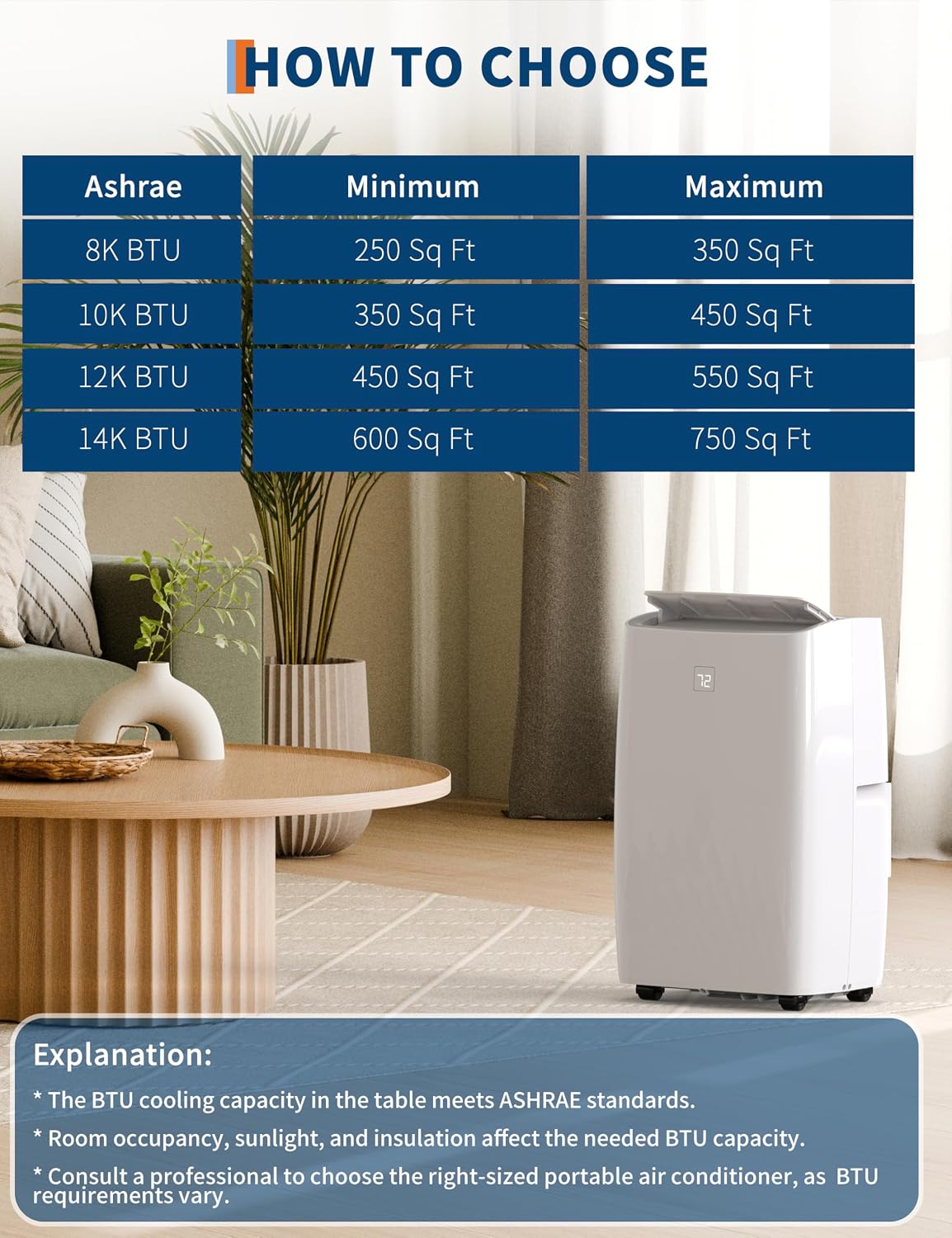
Figure 8.1: ASHRAE BTU recommendations for room sizes. This unit's 12K BTU capacity is suitable for 450-550 sq. ft. Factors like room occupancy, sunlight, and insulation affect the needed BTU capacity. Consult a professional if unsure.
9. Warranty and Support
For warranty information or technical support, please contact Vossfamul customer service. Details regarding your product's specific warranty period and terms can be found on the product packaging or our official website.
Customer Support: Please refer to the contact information provided with your purchase or visit the official Vossfamul website for assistance.