
Yespick ZQ02623
Yespick 150W Mini Moving Head Light
Model: ZQ02623
1. Introduction
Thank you for choosing the Yespick 150W Mini Moving Head Light. This versatile stage lighting fixture is designed to create dynamic and vibrant effects for various events, including parties, weddings, family gatherings, and professional stage performances. Featuring multiple light sources and control modes, it offers a comprehensive lighting solution.
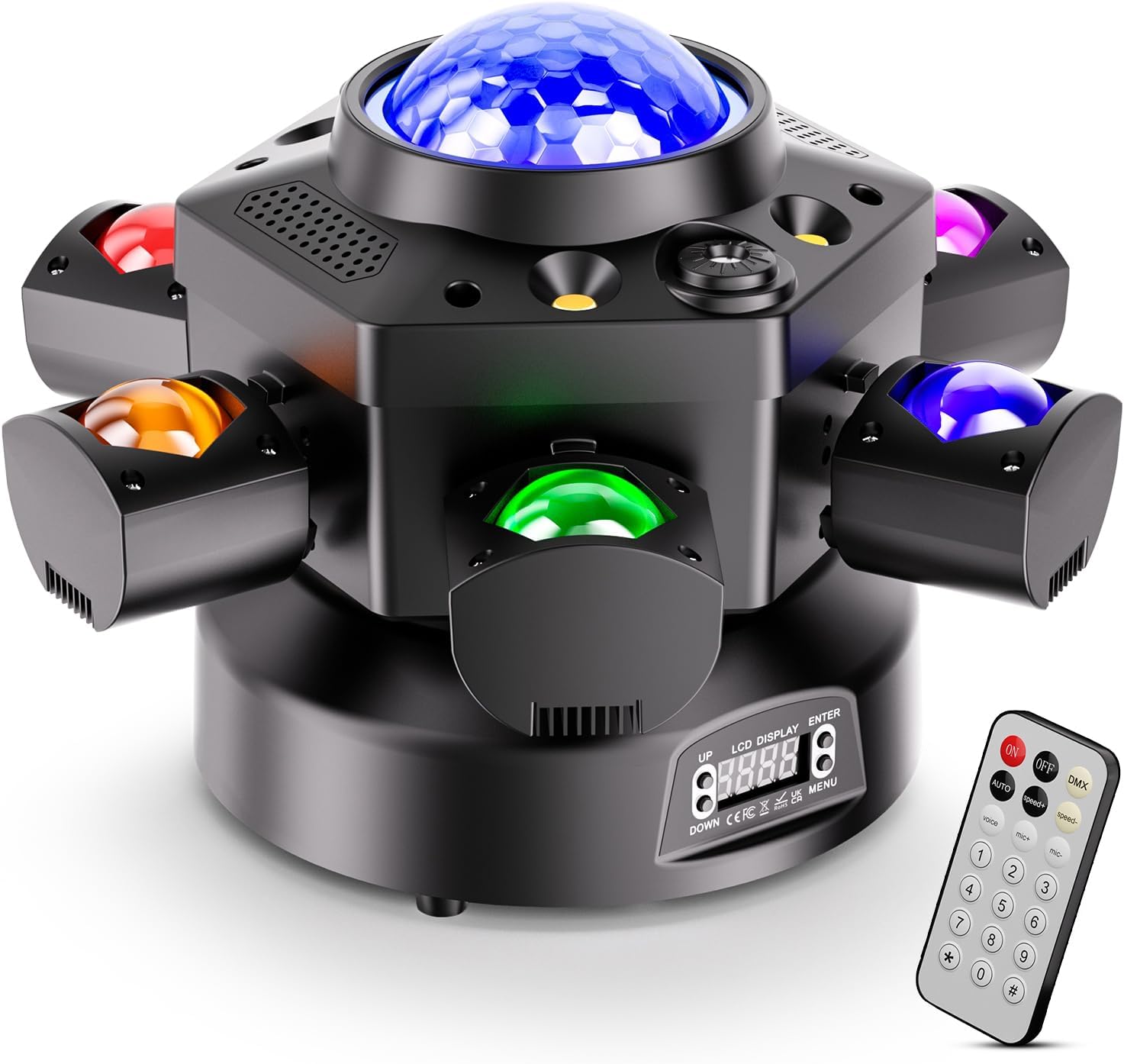
The Yespick 150W Mini Moving Head Light, showcasing its compact design and included remote control.
2. Safety Information
- Always connect the device to a grounded power outlet.
- Ensure proper ventilation around the unit to prevent overheating.
- Do not expose the device to rain or moisture. This product is for indoor use only.
- Avoid direct eye exposure to the light source.
- Disconnect power before cleaning or performing any maintenance.
- Keep out of reach of children.
3. Package Contents
Please check the package to ensure all items are present and in good condition:

Contents included in the product package.
- Moving Head Light (x1)
- Power Cable (x1)
- Remote Control (x1)
- Signal Cable (x1)
- Hook Accessory (x1)
- Instruction Manual (x1)
4. Product Overview
The Yespick Mini Moving Head Light integrates multiple lighting elements to deliver diverse effects:
- 6 RGBW Beam Lamp Beads: For vibrant color beams.
- 1 Disco Ball Lamp Bead: Creates a classic disco ball effect.
- Red & Green Starry Sky Lights: 100mW red and 50mW green lasers for starry patterns.
- Strobe Lights: Two golden and two white strobe lights for dynamic flashing effects.
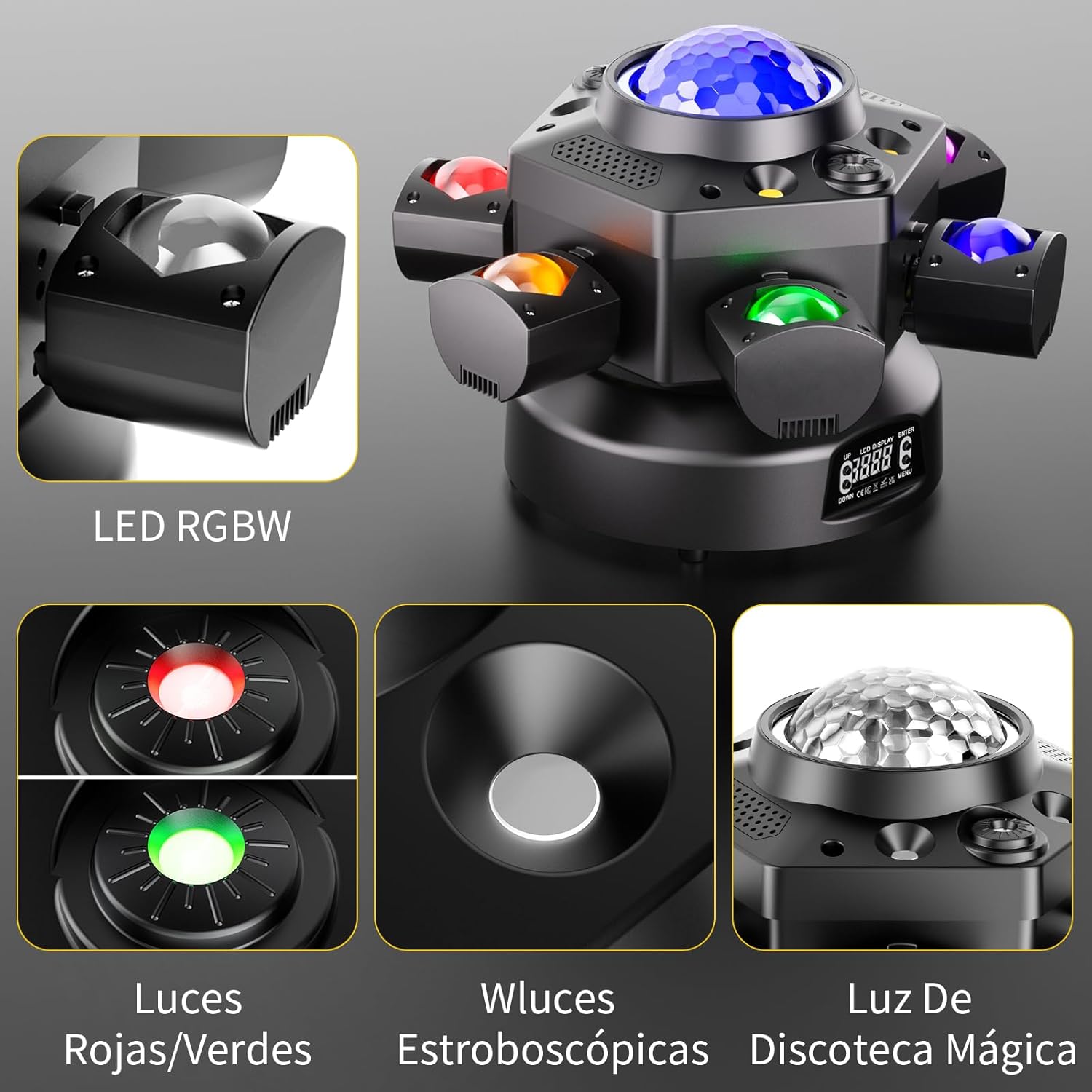
Key lighting components of the device.
5. Setup
5.1 Initial Placement
Place the light on a stable, flat surface or mount it securely using the provided hook accessory. Ensure there is sufficient space around the unit for ventilation.
5.2 Power Connection
Connect the power cable to the power input port on the rear of the unit, then plug it into a suitable power outlet.
5.3 DMX Connection (Optional)
For DMX control, connect a DMX cable from your DMX controller's output to the DMX IN port on the light. If linking multiple units, connect the DMX OUT of the first unit to the DMX IN of the next.

Control panel and rear connection ports.
6. Operating Modes
The Yespick Mini Moving Head Light offers five control modes for flexible operation:

Visual representation of the various control modes.
6.1 Remote Control Mode
Use the included remote control for convenient, one-click switching of light effects and modes. Refer to the remote control function table below:

Remote control button functions.
| Button | Function |
|---|---|
| OFF/ON | Turn the light off/on |
| DMX | DMX Mode |
| AUTO | Automatic Mode |
| Speed+/- | Adjust speed in Automatic Mode |
| Voice | Sound Activated Mode |
| Mic+/- | Adjust sound sensitivity |
| 1-4 | Red/Green/Blue/White Beam Light |
| 5 | Red and Green Light |
| 6-7 | 2 Automatic Modes |
| 8-9 | 2 Sound Activated Modes |
6.2 Automatic Mode
In Automatic mode, the light cycles through pre-programmed effects without external input. This mode is ideal for hands-free operation.
6.3 Sound Activated Mode
The light reacts to music or sound, changing patterns and colors in sync with the beat. Adjust sensitivity using the remote or control panel.
6.4 Master-Slave Mode
Connect multiple units via DMX cables. Set one unit as the master and others as slaves. The slave units will mirror the master's effects, creating synchronized lighting displays.
6.5 DMX512 Mode (24 Channels)
For professional control, connect the light to a DMX512 controller. This allows for precise programming of individual parameters such as color, movement, dimming, and strobe effects. The unit supports 24 DMX channels.

Overview of available control models.
6.6 Movement and Dimming
The moving head light features a 540° horizontal pan and 180° vertical tilt rotation, allowing for flexible beam positioning. It also supports 0-100% linear dimming to adjust light brightness as needed.

Rotation angles for flexible light positioning.

Examples of multifunctional combined effects.
7. Maintenance
7.1 Cleaning
Regularly clean the lens and housing with a soft, dry cloth to maintain optimal light output and appearance. Do not use abrasive cleaners or solvents.
7.2 Storage
When not in use, store the light in a cool, dry place, away from direct sunlight and extreme temperatures. It is recommended to keep the original packaging for storage and transport.
8. Troubleshooting
- No Power: Ensure the power cable is securely connected to both the unit and the power outlet. Check the power outlet for functionality.
- No Light Output: Verify the unit is powered on and not in standby mode. Check the selected operating mode.
- Remote Control Not Working: Ensure the remote's battery is not depleted. Point the remote directly at the unit's IR receiver.
- No DMX Control: Check DMX cable connections. Ensure the DMX address is correctly set on the unit and matches your controller's settings.
9. Specifications

Product dimensions and weight.
| Feature | Detail |
|---|---|
| Brand | Yespick |
| Model Number | ZQ02623 |
| Manufacturer | Shenzhen Zhuogiong Technology Co., Ltd. |
| Dimensions (L x W x H) | 37 x 36 x 28 cm (Packaged) |
| Item Weight | 3.7 Kilograms (Packaged) / 2.6 Kilograms (Unit) |
| Light Source | RGBW Beam LEDs, Disco Ball LED, Red/Green Lasers, Strobe LEDs |
| Control Modes | Remote Control, Voice Control, Automatic, Master-Slave, DMX512 (24 Channels) |
| Pan Rotation | 540° |
| Tilt Rotation | 180° |
| Dimming | 0-100% Linear Dimming |
| Strobe Frequency | 0-20 Hz |
| Batteries Required | No |
| Country of Origin | China |
10. Warranty and Support
This product comes with a standard manufacturer's warranty. For warranty claims, technical support, or any inquiries, please contact your retailer or the manufacturer directly using the contact information provided at the point of purchase. Please retain your proof of purchase for warranty purposes.