
1. Introduction
Thank you for choosing the Bruder New Holland T5.120 Tractor, model 02187. This highly detailed 1:16 scale toy tractor provides a realistic play experience with its functional front loader, loading box, forks, and a round bale. This manual provides essential information for assembly, operation, and maintenance to ensure safe and enjoyable use.

Image 1.1: The Bruder New Holland T5.120 Tractor with all included accessories.
2. Safety Information
WARNING: Not suitable for children under 36 months. This product contains small parts which may present a choking hazard.
Please ensure that children play with this toy under adult supervision, especially during initial assembly and operation of accessories.
3. Package Contents
Verify that all the following components are included in your package:
- New Holland T5.120 Tractor
- Removable Front Loader
- Loading Box
- Forks (for front loader)
- Round Bale
- Additional Steering Rod
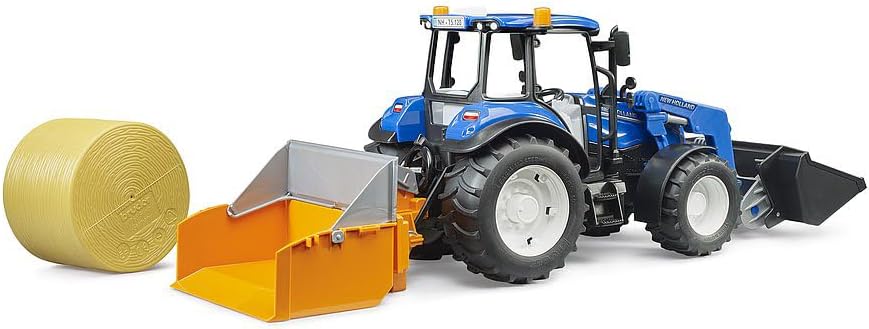
Image 3.1: Tractor with loading box, round bale, and separate forks.
4. Assembly
4.1 Attaching the Front Loader
The front loader is designed for easy attachment and removal. Align the connection points on the front loader with the corresponding slots on the front of the tractor chassis. Push firmly until it clicks into place. To remove, gently pull the release tabs (if present) and detach.
4.2 Attaching the Loading Box and Forks
The loading box and forks are interchangeable attachments for the front loader. To attach the loading box, align its mounting points with the front loader's attachment mechanism and secure it. The loading box can be set down and folded up for various play scenarios.
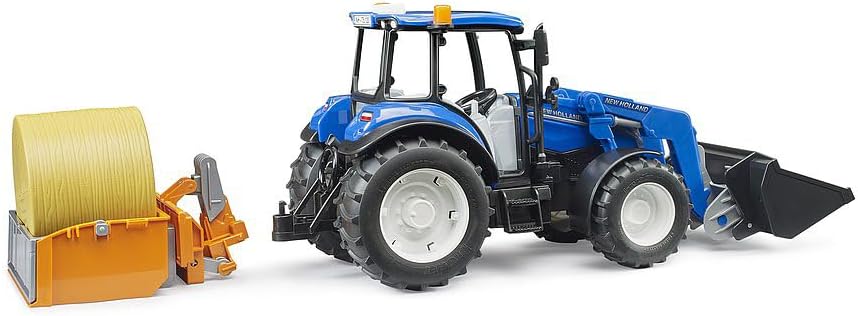
Image 4.1: Tractor with the loading box detached, showing its foldable design.
To attach the forks, remove the loading box and then align the forks with the front loader's attachment points. Ensure they are securely fastened before use.

Image 4.2: Tractor with the forks attached to the front loader, ready for lifting.
4.3 Inserting the Additional Steering Rod
For enhanced steering control, especially in tight spaces or uneven terrain, locate the sliding roof on the driver's cab. Open the sliding roof and insert the additional steering rod through the opening. This rod connects directly to the steering mechanism, allowing for external steering.
5. Operating Instructions
5.1 Steering the Tractor
The tractor can be steered using the steering wheel inside the cab or by using the additional steering rod inserted through the sliding roof. The all-terrain pendulum front axle allows for precise steering even on varied surfaces.
5.2 Operating the Front Loader
The front loader is fully functional. Use the levers on the side of the loader to raise, lower, and tilt the attached implement (loading box or forks). This allows for realistic loading and unloading actions.

Image 5.1: Tractor demonstrating the front loader in a raised position with the loading box and round bale.
5.3 Using the Loading Box and Forks
The loading box is ideal for transporting the included round bale or other small items. It can be folded up for compact storage or set down for loading. The forks are designed to lift and move the round bale, simulating real farm tasks.

Image 5.2: Side view of the tractor, showcasing the front loader and loading box with the round bale.
6. Maintenance
6.1 Cleaning
To clean the tractor and its accessories, wipe them with a damp cloth. For stubborn dirt, a mild soap solution can be used. Rinse thoroughly and dry completely before storage. Avoid harsh chemicals or abrasive cleaners, as these may damage the plastic.
6.2 Storage
Store the toy in a clean, dry place away from direct sunlight and extreme temperatures to prevent material degradation and color fading.
7. Troubleshooting
- Parts not moving smoothly: Check for any obstructions or dirt in the moving parts. Clean as described in the Maintenance section.
- Accessories not attaching correctly: Ensure that all connection points are properly aligned and free from debris. Apply gentle, even pressure to secure.
- Missing parts: Refer to the Package Contents section. If a part is missing, contact Bruder customer support.
8. Specifications
| Feature | Detail |
|---|---|
| Model Number | 02187 |
| Scale | 1:16 Scale |
| Material Type | Plastic (ABS) |
| Color | Multicoloured |
| Product Dimensions | 45 x 12.5 x 19.5 cm |
| Item Weight | 525 g |
| Recommended Age | 3 years and up |
| Assembly Required | No (minor attachment of accessories) |
| Batteries Required | No |
9. Warranty and Support
Bruder products are manufactured to high-quality standards. For any questions regarding your product, potential defects, or to inquire about replacement parts, please contact Bruder customer support directly. Please retain your proof of purchase for warranty claims.
For more information, visit the official Bruder website or contact your local retailer.


