
Hagibis MC60 Pro Mac mini Hub & Stand with 40Gbps SSD Enclosure User Manual
Model: MC60 Pro
1. Product Overview
The Hagibis MC60 Pro is a versatile hub and stand designed for the Mac mini M4, integrating multiple functionalities into a compact form factor. It features a 40Gbps M.2 NVMe SSD enclosure, a USB-C docking station, and various ports to expand connectivity and storage for your device.
- Integrated Design: Perfectly matches the size and aesthetic of the Mac mini M4, providing a seamless extension.
- High-Speed Storage: Features a 40Gbps M.2 NVMe SSD enclosure supporting up to 8TB storage, compatible with M.2 2230/2242/2260/2280 NVMe SSDs.
- Enhanced Connectivity: Includes multiple USB 2.0 ports and a 3.5mm AUX jack for connecting peripherals like keyboards, mice, USB drives, headphones, and microphones.
- Efficient Heat Dissipation: Constructed from aluminum alloy with a raised middle design to promote better ventilation and heat management for the Mac mini.
- Convenient Power Access: A reserved hole allows easy access to the Mac mini's power button.

Image 1.1: The Hagibis MC60 Pro Hub and Stand with a Mac mini, showcasing its integrated design and various features.
2. Package Contents
Please verify that all items listed below are included in your package:
- USB-C Docking Station (Hagibis MC60 Pro)
- USB-C to USB-C Cable
- Screwdriver
- Screws
- Thermal Grease (x2)
- User Manual (this document)

Image 2.1: Visual representation of the items included in the Hagibis MC60 Pro package.
3. Setup Instructions
3.1 Installing an M.2 NVMe SSD
- Carefully turn the Hagibis MC60 Pro upside down to access the SSD enclosure bay.
- Using the provided screwdriver, remove the screws securing the SSD bay cover.
- Insert your M.2 NVMe SSD (2230/2242/2260/2280) into the slot, ensuring it is properly seated.
- Apply the thermal grease pads to the SSD for optimal heat dissipation.
- Secure the SSD with the provided screw and replace the bay cover.
- Important: When using an SSD for the first time, format it to exFAT format on your computer.

Image 3.1: Diagram illustrating the installation process for an M.2 NVMe SSD into the enclosure.
3.2 Connecting to Mac mini
- Place your Mac mini M4 securely on top of the Hagibis MC60 Pro stand. The stand is designed to fit the Mac mini perfectly.
- Connect the provided USB-C to USB-C cable from the "HOST" port on the rear of the Hagibis MC60 Pro to a Thunderbolt/USB4 port on your Mac mini.
- Ensure all connections are firm. The hub is plug-and-play and does not require additional drivers or external power.

Image 3.2: The Hagibis MC60 Pro connected to a Mac mini, demonstrating the high-speed data transfer capability.
Video 3.1: Official product video demonstrating the unboxing, SSD installation, and connection of the Hagibis Mac mini M4 USB-C Hub with 40Gbps SSD Case and Stand.
4. Operating Instructions
4.1 Port Usage
The Hagibis MC60 Pro provides a variety of ports for expanded functionality:
- Front USB 2.0 Ports (x2): Connect keyboards, mice, USB drives, and other low-bandwidth peripherals. These ports offer data transfer speeds of up to 480Mbps.
- Rear USB 2.0 Port (x1): Similar to the front ports, suitable for additional peripherals.
- 3.5mm AUX Jack: Connect headphones, microphones, or headsets for audio input/output.
- 40Gbps M.2 NVMe SSD Enclosure: Provides high-speed storage expansion with theoretical read/write speeds up to 3000MB/s.

Image 4.1: Detailed view of the front and rear interfaces of the Hagibis MC60 Pro, including USB 2.0 ports, AUX jack, and indicator light.

Image 4.2: Illustration of connecting multiple audio devices to the 3.5mm audio port.

Image 4.3: Demonstrates the use of the USB 2.0 ports for connecting peripherals.
4.2 Powering On/Off Mac mini
The Hagibis MC60 Pro features a reserved hole on the stand, allowing direct access to the Mac mini's power button for convenient startup and shutdown without needing to remove the Mac mini from the stand.
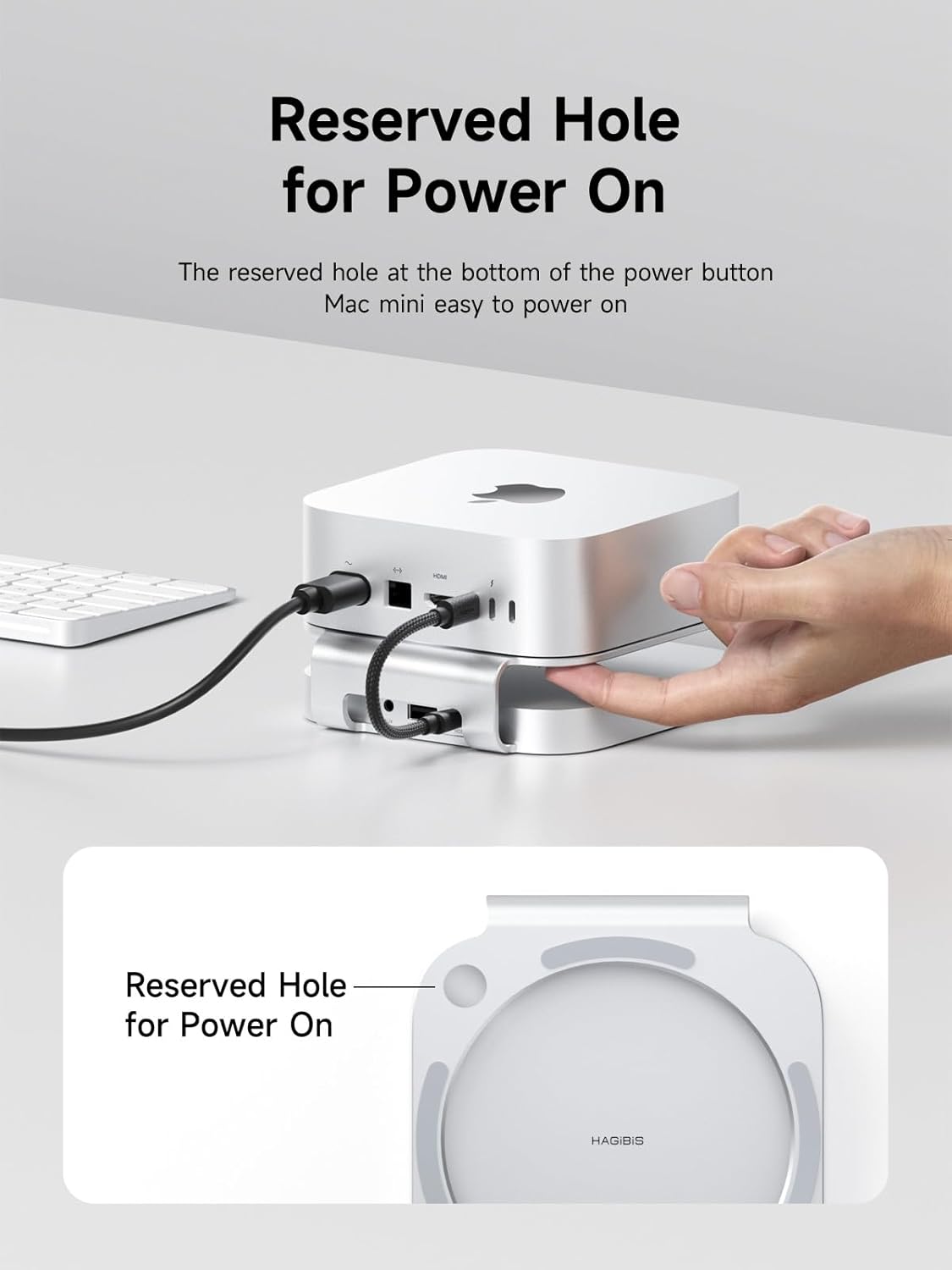
Image 4.4: Close-up view of the reserved hole on the stand for accessing the Mac mini's power button.
5. Maintenance
5.1 Heat Dissipation
The aluminum alloy construction and raised design of the Hagibis MC60 Pro are engineered for efficient heat dissipation. To maintain optimal performance and prevent overheating, ensure the area around the hub and Mac mini is well-ventilated and free from obstructions.

Image 5.1: Illustration of the aluminum alloy material and raised design contributing to high-efficiency heat dissipation.
5.2 Cleaning
To clean the device, gently wipe the exterior with a soft, dry, lint-free cloth. Avoid using harsh chemicals, abrasive cleaners, or excessive moisture, as these can damage the finish or internal components.
6. Troubleshooting
- SSD Not Recognized:
- Ensure the SSD is correctly installed and secured in the enclosure.
- Verify the SSD is formatted (exFAT recommended for first use).
- Check the USB-C connection between the hub and your Mac mini.
- Confirm your Mac mini's operating system (macOS 14.0 or above for Apple CPU M1/2/3/4 Series) or Windows version (Intel CPU 12th Gen or above Thunderbolt 4/5 port, AMD CPU USB4 port) supports 40Gbps mode.
- Slow Data Transfer Speeds:
- Ensure you are using the provided 40Gbps USB-C to USB-C cable.
- Confirm your Mac mini's port supports 40Gbps (Thunderbolt 4/5 or USB4).
- Check the specifications of your M.2 NVMe SSD; not all SSDs achieve maximum theoretical speeds.
- Avoid running multiple bandwidth-intensive applications simultaneously.
- Peripherals Not Working:
- Ensure the peripheral is properly connected to the correct USB 2.0 or AUX port.
- Test the peripheral directly with your Mac mini to rule out device issues.
7. Specifications
| Feature | Detail |
|---|---|
| Model Number | MC60 Pro |
| Brand | Hagibis |
| Material | Aluminum Alloy, ABS |
| Compatible Devices | Mac mini (M4 / M4 Pro), Apple CPU M1/2/3/4 Series, Intel CPU macOS 14.0+, Windows Intel CPU 12th Gen+ Thunderbolt 4/5, AMD CPU USB4 |
| SSD Compatibility | M.2 PCIe3.0x4 NVMe M Key, NVMe B+M Key (2280/2260/2242/2230) up to 8TB. Not compatible with M.2 SATA SSDs, M.2 PCIe AHCI SSDs. |
| Data Transfer Rate (SSD) | Up to 40 Gigabits Per Second (3000MB/s theoretical read/write) |
| USB 2.0 Ports | 3 (2 front, 1 rear), 480Mbps |
| Audio Port | 3.5mm AUX Jack |
| Product Dimensions | 5.4 x 5 x 1.4 inches (137.16 x 127 x 35.56 mm) |
| Item Weight | 3.9 ounces (110.6 grams) |

Image 7.1: Detailed product dimensions and material information for the Hagibis MC60 Pro.
8. Warranty and Support
Hagibis products are designed for reliability and performance. For warranty information, technical support, or customer service inquiries, please refer to the official Hagibis website or contact their customer support directly. Keep your purchase receipt for warranty claims.
For further assistance, visit the Hagibis Store on Amazon.


