
1. Introduction
Thank you for choosing the Hazlewolke WP6027 Metal Detector and HS-1 Pinpointer. This comprehensive system is designed for both land and underwater treasure hunting, offering advanced detection capabilities and user-friendly operation. The WP6027 metal detector is built for deep water exploration, while the HS-1 pinpointer provides precise target location. Please read this manual thoroughly before using the devices to ensure proper operation, safety, and longevity.
2. Safety Information
- Waterproof Rating: The WP6027 metal detector is waterproof up to 130 feet (40 meters). Ensure all seals are clean and properly secured before submerging the device. The HS-1 pinpointer is also waterproof.
- Battery Safety: Use only recommended batteries. Do not mix old and new batteries, or different types of batteries. Dispose of batteries according to local regulations.
- Environmental Awareness: Always be aware of your surroundings when metal detecting. Avoid dangerous areas such as active construction sites, military zones, or areas with unexploded ordnance.
- Underwater Use: When diving, ensure you are properly trained and equipped. Do not exceed your diving limits or the detector's depth rating. Rinse the device thoroughly with fresh water after saltwater use.
- Children: Keep the device out of reach of small children. Adult supervision is recommended for minors using the detector.
- Electrical Safety: Do not attempt to open or modify the internal components of the devices. Refer all servicing to qualified personnel.
3. Package Contents
Your Hazlewolke WP6027 Metal Detector and HS-1 Pinpointer package should include the following items:
- Hazlewolke WP6027 Underwater Metal Detector (main unit with search coil)
- Hazlewolke HS-1 Metal Detector Pinpointer
- Charging cable(s)
- User Manual (this document)
- Additional accessories (e.g., lanyard for pinpointer, carrying bag - may vary by package)
4. Product Overview
4.1 Hazlewolke WP6027 Metal Detector
The WP6027 is an advanced underwater metal detector designed for deep and challenging environments. It features robust construction and intuitive controls.
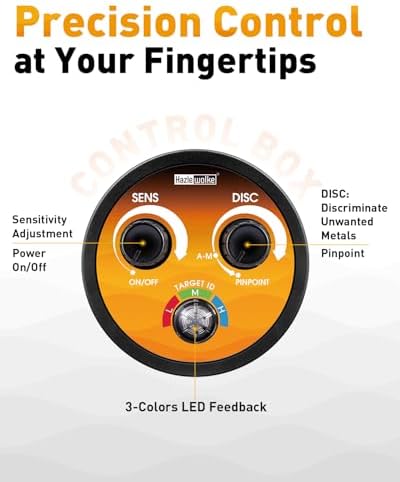
Image: WP6027 Control Box. This image displays the control panel of the Hazlewolke WP6027 metal detector, highlighting the 'SENS' (Sensitivity Adjustment/Power On/Off) and 'DISC' (Discriminate Unwanted Metals/Pinpoint) knobs, along with the 3-color LED feedback for target identification (Low, Medium, High value).
- Control Box: Houses the main electronics and user interface.
- Search Coil: The primary detection component, designed for effective scanning.
- Shaft: Adjustable for comfortable use.
- Sensitivity Knob (SENS): Adjusts detection sensitivity and powers the device on/off.
- Discrimination Knob (DISC): Allows for discrimination of unwanted metals and activates the pinpoint function.
- LED Feedback: 3-color LED system (Red, Green, Blue) indicates target value (Low, Medium, High).
4.2 Hazlewolke HS-1 Metal Detector Pinpointer
The HS-1 pinpointer is a handheld device designed for precise location of targets found by the main detector, reducing excavation time.

Image: HS-1 Pinpointer in use. This image shows the Hazlewolke HS-1 pinpointer being used to locate a small coin in the ground, emphasizing its role in precise target recovery.
- Detection Tip: The end of the pinpointer used for scanning.
- Control Button(s): For power, mode selection, and sensitivity adjustment.
- LED Indicator: Provides visual feedback on target proximity.
- Audio/Vibration Feedback: Alerts the user to detected targets.
- Rechargeable Battery: Integrated power source.
5. Setup
5.1 Assembling the WP6027 Metal Detector
- Attach the Search Coil: Securely fasten the search coil to the lower stem using the provided bolt and washers.
- Connect the Stems: Connect the lower stem to the middle stem, and then the middle stem to the upper stem (which includes the control box and armrest). Ensure all connections are tight.
- Wrap the Cable: Carefully wrap the search coil cable around the stem, ensuring it is not pinched or strained. Plug the coil connector into the corresponding port on the control box. Ensure the connection is secure and waterproof.
- Adjust Length: Adjust the length of the stem to a comfortable height, allowing the search coil to be parallel to the ground when standing upright.
5.2 Charging the Devices
- WP6027: Connect the charging cable to the charging port on the control box and to a suitable USB power adapter. The charging indicator will show the charging status.
- HS-1: Connect the charging cable to the pinpointer's charging port and to a suitable USB power adapter. The indicator light will confirm charging.
- Ensure both devices are fully charged before initial use for optimal performance.
6. Operation
6.1 Operating the WP6027 Metal Detector

Image: Diver using WP6027 underwater. This image shows a person equipped with diving gear, actively using the Hazlewolke WP6027 metal detector underwater, demonstrating its intended use for submerged treasure hunting.
- Power On/Off: Rotate the 'SENS' knob clockwise to turn the detector on. Continue rotating to increase sensitivity. Rotate counter-clockwise to decrease sensitivity and turn off.
- Sensitivity Adjustment: Adjust the 'SENS' knob to find a balance between detection depth and stability. Higher sensitivity detects deeper targets but may be more susceptible to interference.
- Discrimination (DISC): Rotate the 'DISC' knob to filter out unwanted metals (e.g., iron). Turning it clockwise increases the level of discrimination. Start with a low discrimination setting and increase as needed.
- Pinpoint Function: To pinpoint a target, rotate the 'DISC' knob fully counter-clockwise to activate the pinpoint mode. Move the coil slowly over the target area until the strongest signal is heard/seen.
- Target Identification (LED Feedback): The 3-color LED system provides visual cues:
- Red: Low value target.
- Green: Medium value target.
- Blue: High value target.
- Underwater Use: Ensure all connections are watertight before submerging. The WP6027 is designed to operate effectively in both fresh and saltwater environments up to 130 feet (40 meters).

Image: Diver with WP6027 showing LED flash alert. This image illustrates a diver using the WP6027 metal detector in low-light underwater conditions, with the LED flash alert system visible, indicating target detection through color-coded lights (Red for low, Green for medium, Blue for high value).
6.2 Operating the HS-1 Pinpointer
- Power On/Off: Press and hold the power button for a few seconds to turn the pinpointer on or off.
- Sensitivity Adjustment: The HS-1 features 9 levels of adjustable sensitivity. Briefly press the power button to cycle through sensitivity levels. Higher levels detect smaller or deeper objects.
- Ground Interference Elimination: The HS-1 utilizes Superhet technology to minimize ground interference. In areas with high mineralization, a quick press of the power button can help recalibrate and reduce false signals.
- Detection: Move the tip of the pinpointer slowly over the excavated area. The device will provide audio and/or vibration feedback, with intensity increasing as you get closer to the target.

Image: HS-1 Pinpointer with Superhet Technology. This image highlights the Hazlewolke HS-1 pinpointer's 'One-key Interference Elimination' feature, powered by Superhet Technology, demonstrating its ability to reduce ground interference for clearer detection.
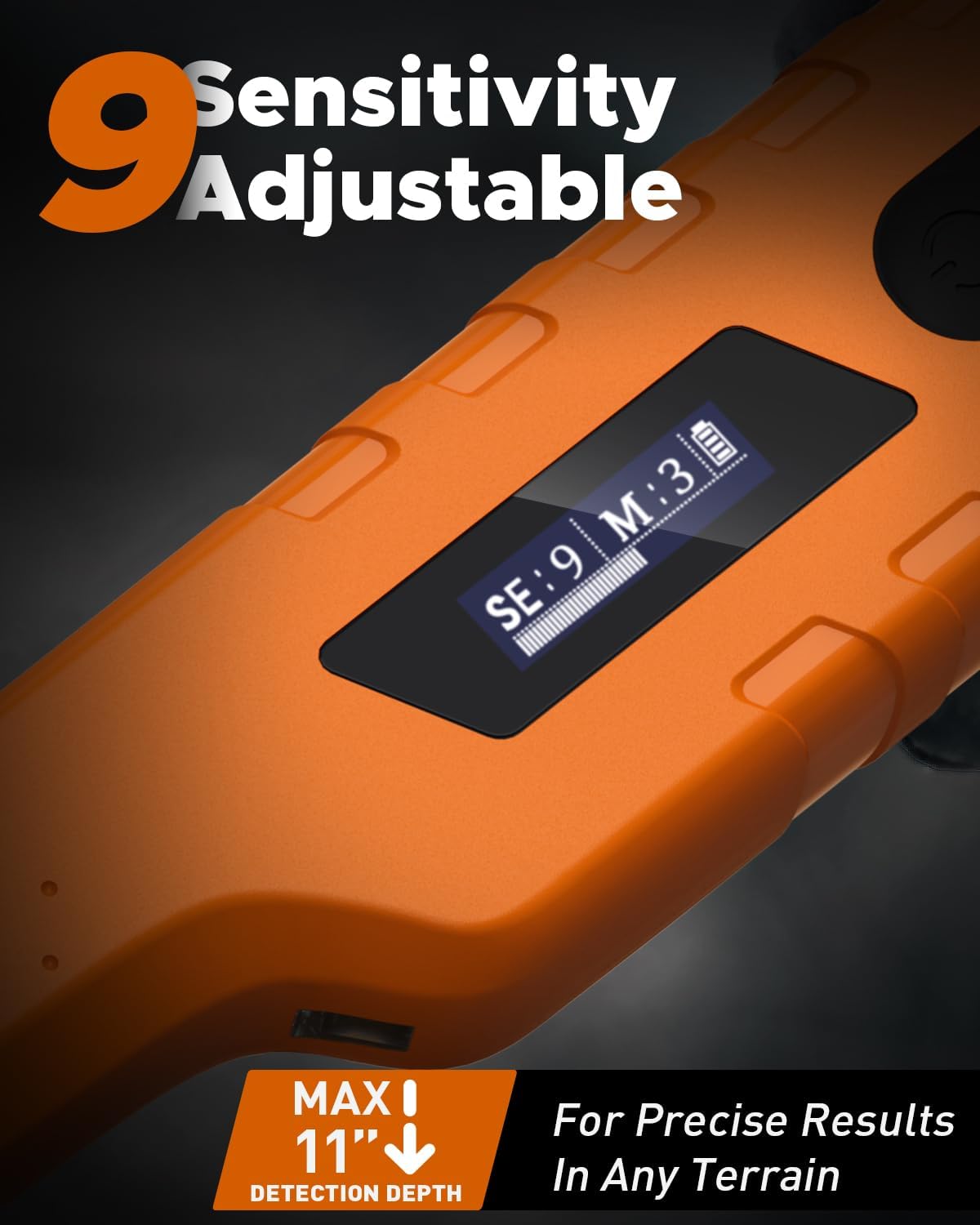
Image: HS-1 Pinpointer 9 Sensitivity Adjustable. This image focuses on the display of the HS-1 pinpointer, showing 'SE:9 M:3' which indicates its 9 levels of adjustable sensitivity, allowing for precise results in various terrains and for different target sizes.
7. Maintenance
- Cleaning: After each use, especially in saltwater, rinse both the WP6027 and HS-1 thoroughly with fresh water. Wipe them dry with a soft cloth. Do not use abrasive cleaners or solvents.
- Battery Care: Recharge batteries regularly, even if the devices are not used frequently, to maintain battery health. Avoid fully discharging the batteries. Store devices with a partial charge (around 50%).
- Storage: Store the metal detector and pinpointer in a cool, dry place away from direct sunlight and extreme temperatures. If storing for extended periods, remove any non-rechargeable batteries (if applicable) and ensure rechargeable ones are partially charged.
- Seal Inspection: Regularly inspect all O-rings and seals on the WP6027 for dirt, cracks, or damage, especially before underwater use. Clean and lubricate them with silicone grease if necessary to maintain waterproofing.
8. Troubleshooting
| Problem | Possible Cause | Solution |
|---|---|---|
| WP6027 No Power | Battery discharged; Loose connection. | Charge the battery; Check all cable connections. |
| WP6027 False Signals | High sensitivity; Electromagnetic interference; Mineralized ground. | Reduce sensitivity; Move away from power lines/electronics; Adjust discrimination. |
| WP6027 Poor Depth Detection | Low sensitivity; Incorrect ground balance (if applicable); Deeply buried target. | Increase sensitivity; Ensure proper sweep technique. |
| HS-1 No Power | Battery discharged. | Charge the battery. |
| HS-1 Constant Beeping/Vibration | High sensitivity; Interference; Pinpointer too close to metal. | Reduce sensitivity; Recalibrate (briefly press power button); Move away from metal objects. |
| Water Leakage (WP6027) | Improperly sealed connections; Damaged O-rings. | Ensure all caps/connectors are tightly sealed; Inspect and replace damaged O-rings. Do not use if leakage is suspected. |
9. Specifications
9.1 Hazlewolke WP6027 Metal Detector
- Waterproof Depth: Up to 130 feet (40 meters)
- Operating Frequency: 2.4 kHz (Ultra-low frequency technology)
- Detection Modes: All-Metal, Discrimination, Pinpoint
- Feedback: 3-color LED (Red, Green, Blue for Low, Medium, High value)
- Corrosion Resistance: Specially treated for saltwater environments
- Power Source: Rechargeable battery
9.2 Hazlewolke HS-1 Metal Detector Pinpointer
- Technology: Superhet technology for ground interference rejection
- Sensitivity Levels: 9 adjustable levels
- Detection Depth: Small coins at 6cm, larger items up to 28cm (11 inches)
- Feedback: Audio, Vibration, LED indicator
- Waterproof: Yes
- Power Source: Rechargeable battery
10. Warranty and Support
Hazlewolke products are manufactured to high-quality standards. For warranty information, technical support, or service inquiries, please refer to the warranty card included with your product or visit the official Hazlewolke website. Please retain your proof of purchase for warranty claims.
For further assistance, you may contact Hazlewolke customer support through the contact information provided on their official website or through your retailer.