
Introduction
This manual provides essential instructions for the safe and efficient operation of your MAMNV T7S 2-in-1 Robot Vacuum and Mop Combo. Please read this manual thoroughly before using the device and retain it for future reference. The T7S is designed to simplify floor cleaning by combining vacuuming and mopping functionalities, suitable for various floor types including hard floors and low-pile carpets.
Safety Information
To reduce the risk of injury or damage, read and follow all safety precautions. This appliance is for household use only. Do not use outdoors or on wet surfaces. Keep hair, loose clothing, fingers, and all parts of the body away from openings and moving parts. Do not operate the vacuum in areas where there are lit candles or fragile objects. Ensure the charging dock is placed against a wall on a level surface and clear of obstacles.
Package Contents
Verify that all components are present and in good condition upon unpacking.
- 1 x MAMNV T7S Robot Vacuum
- 1 x Remote Control (with 2 x AAA Batteries)
- 1 x Charging Dock
- 1 x Power Adapter
- 1 x Dust Bin
- 1 x Water Tank (with Washable Mopping Cloth)
- 2 x Side Brushes
- 1 x Cleaning Brush
- 1 x User Manual
- 1 x Networking Guide

Image: The MAMNV T7S Robot Vacuum and Mop Combo shown with its remote control, charging dock, and water tank module.
Product Features
- 2-in-1 Vacuum and Mop: Features separate water and dust tanks for simultaneous vacuuming and mopping, suitable for hard floors and low-pile carpets.
- Powerful Suction: Equipped with a 2000Pa brushless motor and three adjustable suction speeds (Quiet, Standard, Maximum) for effective cleaning of debris and pet hair. The unique air intake design helps prevent hair tangles.
- Smart Navigation: Utilizes 15 smart infrared sensors to detect and avoid obstacles, stairs, and walls. Its slim 2.9-inch design allows it to clean under furniture.
- Multiple Cleaning Modes: Offers Auto, Zigzag, Spot, and Edge cleaning modes to address various cleaning needs.
- Extended Runtime & Self-Charging: A 2600mAh battery provides up to 180 minutes of cleaning in quiet mode, covering areas up to 1937 sq ft. The robot automatically returns to its charging dock when the battery is low or cleaning is complete.
- App and Remote Control: Manage the robot vacuum via the Tuya Smart App or the included remote control. Adjust cleaning modes, suction power, and schedules. Compatible with Google Assistant for voice control. (Note: Supports 2.4GHz Wi-Fi and Bluetooth only.)
Setup
1. Charging Dock Placement
Place the charging dock against a wall in an open, uncluttered area. Ensure there is at least 1 meter (3 feet) of clear space in front of the dock and 0.5 meters (1.5 feet) on either side. Connect the power adapter to the charging dock and plug it into a power outlet.
2. Initial Charging
Place the robot vacuum onto the charging dock. Ensure the charging contacts on the robot align with those on the dock. The indicator light on the robot will show charging status. Fully charge the robot before its first use (approximately 4.5 hours).

Image: The MAMNV T7S Robot Vacuum positioned on its charging dock, illustrating the automatic return charging feature.
3. Installing Side Brushes
Press the side brushes onto the posts at the bottom of the robot until they click into place.
4. App Connection (Optional but Recommended)
- Download the "Tuya Smart" app from your mobile device's app store.
- Register or log in to your account.
- Ensure your phone is connected to a 2.4GHz Wi-Fi network.
- Follow the in-app instructions to add your T7S robot vacuum. This typically involves putting the robot into pairing mode (refer to the Networking Guide for specific steps).
- Once connected, you can control the robot, set schedules, and monitor its status via the app.

Image: The MAMNV T7S Robot Vacuum being controlled by a smartphone app and a physical remote control, highlighting its smart control options.
Operating Instructions
1. Starting a Cleaning Cycle
- Via Robot Button: Press the power button on the robot once to start an automatic cleaning cycle.
- Via Remote Control: Use the "Auto" button on the remote control to start an automatic cleaning cycle.
- Via App: Open the Tuya Smart app and select the desired cleaning mode (Auto, Zigzag, Spot, Edge) to begin cleaning.
2. Selecting Cleaning Modes
The T7S offers four cleaning modes:
- Auto Cleaning: The robot intelligently navigates and cleans the entire floor area.
- Zigzag Cleaning: For maximum coverage and efficiency, the robot cleans in a Z-shaped path. Avoid interrupting the robot during this mode to maintain its path.
- Spot Cleaning: Focuses on a specific dirty area, cleaning in a spiral pattern.
- Edge Cleaning: Cleans along walls and furniture edges.

Image: The MAMNV T7S Robot Vacuum illustrating its various cleaning patterns, including automatic, spot, edge, and zigzag modes.
3. Mopping Function
To use the mopping function, fill the water tank with clean water and attach the washable mopping cloth. Insert the water tank into the robot. The T7S features two adjustable water flow levels. Select the appropriate level via the app or remote control for different cleaning needs. The mopping system ensures even water distribution for hard floors.

Image: The MAMNV T7S Robot Vacuum displaying its integrated water tank and dustbin, highlighting its dual vacuuming and mopping functionality with adjustable water flow and suction levels.
4. Adjusting Suction Power
Adjust the suction power (Quiet, Standard, Maximum) via the app or remote control to suit the cleaning task and floor type.

Image: The MAMNV T7S Robot Vacuum illustrating its powerful 2000Pa suction, with options for 1000Pa (Quiet), 1400Pa (Standard), and 2000Pa (Maximum) modes.
5. Obstacle Avoidance and Threshold Climbing
The robot is designed to navigate around furniture and obstacles. It can also climb over thresholds up to 1.5cm (0.6 inches) high, allowing it to move between different floor types.
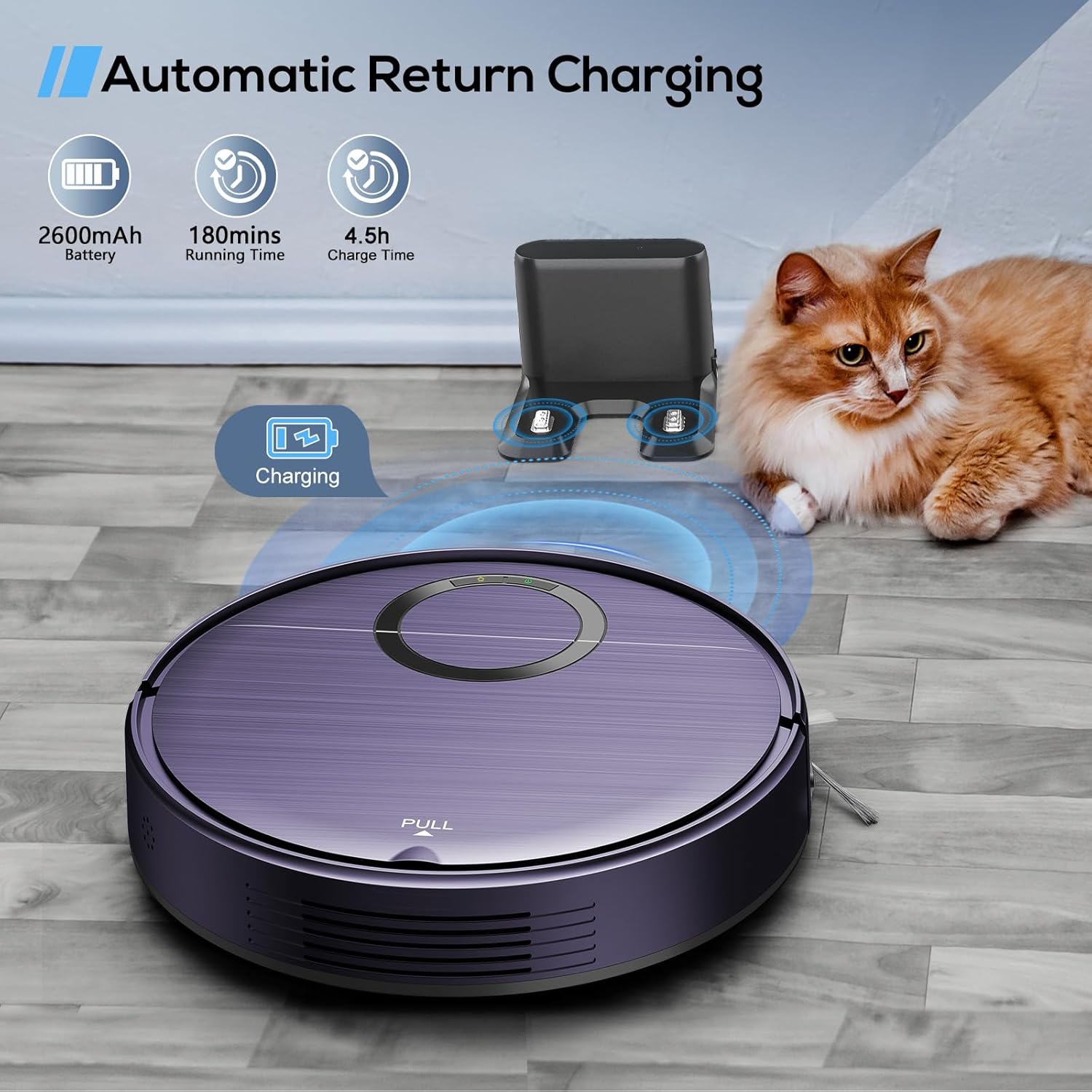
Image: The MAMNV T7S Robot Vacuum's slim 2.9-inch profile, demonstrating its ability to clean under low-clearance furniture and its 15-degree climbing capability for thresholds.
Maintenance
Regular maintenance ensures optimal performance and extends the lifespan of your robot vacuum.
1. Emptying the Dust Bin
Empty the dust bin after each cleaning cycle or when full. Open the top cover of the robot, remove the dust bin, and dispose of the collected debris. Clean the filter regularly.
2. Cleaning the Water Tank and Mopping Cloth
After mopping, empty any remaining water from the tank. Remove and wash the mopping cloth. Allow both to air dry completely before reassembling.
3. Cleaning Side Brushes
Periodically check the side brushes for tangled hair or debris. Remove and clean them as needed. Replace worn brushes to maintain cleaning efficiency.
4. Cleaning Sensors and Charging Contacts
Wipe the robot's sensors and charging contacts, as well as the charging dock's contacts, with a dry cloth to ensure proper function and charging.
Troubleshooting
| Problem | Possible Cause | Solution |
|---|---|---|
| Robot does not start. | Low battery; Power switch off; Obstruction. | Charge the robot; Ensure power switch is on; Clear any obstructions. |
| Robot gets stuck frequently. | Too many obstacles; Uneven surfaces; Loose cables. | Clear the cleaning area; Remove loose cables and small objects. |
| Poor cleaning performance. | Full dust bin; Clogged filter; Worn brushes. | Empty dust bin; Clean/replace filter; Clean/replace side brushes. |
| Robot does not return to charging dock. | Charging dock obstructed; Robot too far from dock; Low battery. | Ensure clear path to dock; Manually place robot on dock if too far; Check power to dock. |
| App connection issues. | Incorrect Wi-Fi band; Robot not in pairing mode; Network interference. | Ensure 2.4GHz Wi-Fi; Follow Networking Guide for pairing; Restart router and robot. |
Specifications
| Feature | Detail |
|---|---|
| Brand | MAMNV |
| Model Name | T7S Robot Vacuum and Mop Combo |
| Product Dimensions | 11.8"L x 11.8"W x 2.9"H |
| Item Weight | 7.7 pounds |
| Max Suction Power | 2000Pa |
| Battery Capacity | 2600mAh |
| Max Runtime | 180 minutes (in quiet mode) |
| Charging Time | Approx. 4.5 hours |
| Dust Bin Capacity | 450 Milliliters |
| Water Tank Capacity | 230 Milliliters |
| Control Method | App, Remote, Touch, Voice (Amazon Echo, Google Home) |
| Wi-Fi Compatibility | 2.4GHz only |
| Filter Type | Foam |
| Threshold Climbing Ability | Up to 1.5cm (0.6 inches) |
Warranty and Support
Your MAMNV T7S Robot Vacuum and Mop Combo is covered by a 12-month warranty from the date of purchase. This warranty covers manufacturing defects and issues arising from normal use. For warranty claims, technical assistance, or any questions regarding your product, please contact MAMNV professional customer service. Refer to the contact information provided in the product packaging or on the official MAMNV website.