
OWMSIC W70
OWMSIC W70 Wireless Earbuds Bluetooth User Manual
Model: W70
Brand: OWMSIC
Introduction
Thank you for choosing the OWMSIC W70 Wireless Earbuds. These earbuds feature advanced Bluetooth 5.4 technology, immersive Hi-Fi sound, and a long-lasting battery life of up to 38 hours with the charging case. Designed for comfort and durability, they are IPX7 waterproof and equipped with ENC noise-canceling microphones for clear calls. This manual provides detailed instructions for setup, operation, maintenance, and troubleshooting to ensure you get the best experience from your device.
What's in the Box

Image: Package contents of the OWMSIC W70 Wireless Earbuds.
- OWMSIC W70 Wireless Earbuds (Left and Right)
- Charging Case
- USB-C Charging Cable
- User Manual
- Three sets of Liquid Silicone Earbuds (S/M/L)
Product Overview
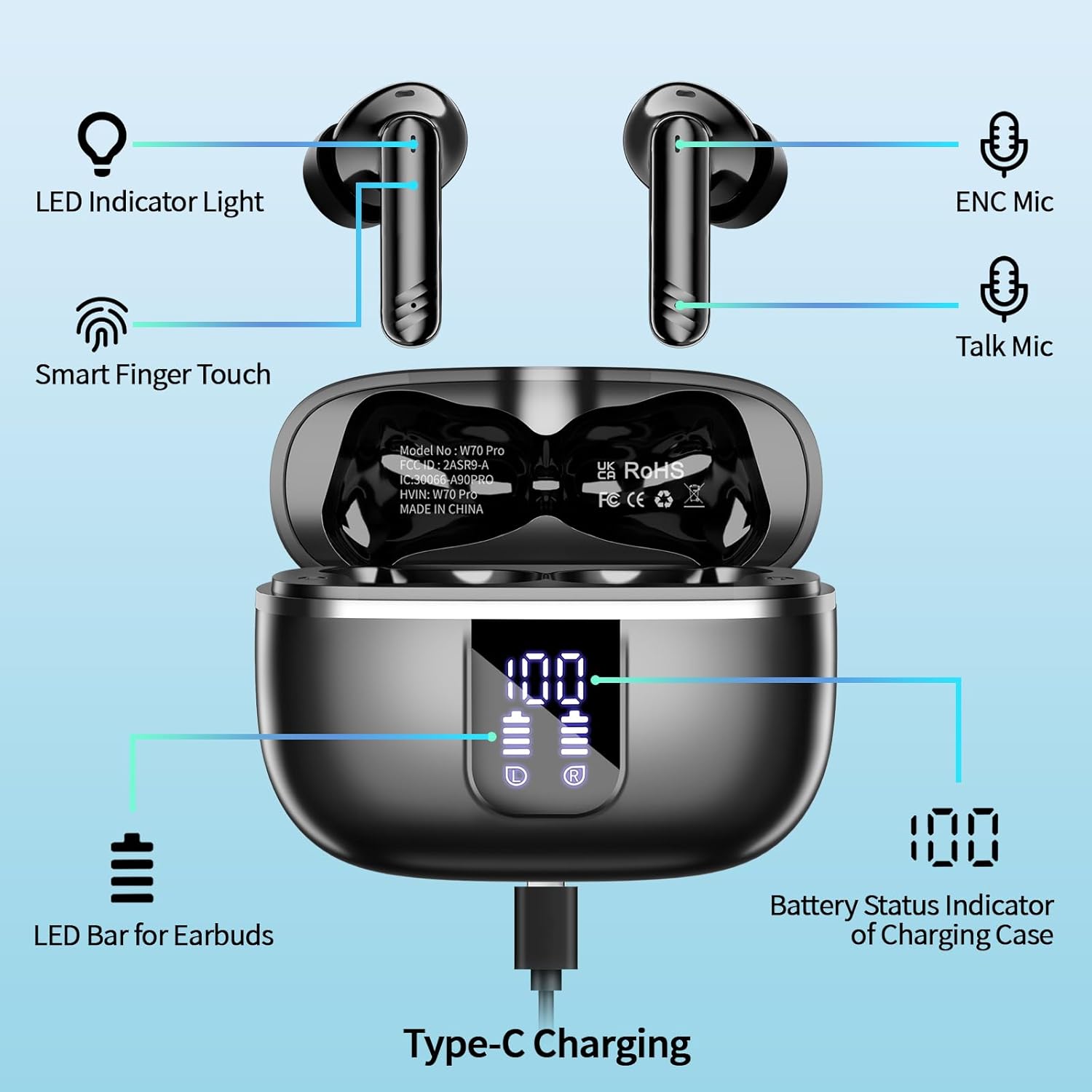
Image: Labeled components of the OWMSIC W70 Earbuds and Charging Case.
The OWMSIC W70 earbuds are designed for intuitive use and high performance. Key components include:
- LED Indicator Light: Provides status updates for charging and connection.
- Smart Finger Touch Area: For controlling playback, calls, and voice assistant.
- ENC Microphones: Four microphones for Environmental Noise Cancellation during calls.
- Talk Microphone: Dedicated microphone for voice pickup.
- Charging Case LED Display: Digital display showing battery percentage of the case and individual earbud charge levels.
- USB-C Charging Port: For fast charging the case.
Setup
1. Charging the Earbuds and Case

Image: Battery life and charging details.
Before first use, fully charge the earbuds and the charging case.
- Connect the provided USB-C charging cable to the charging port on the case and to a power source.
- The LED digital display on the case will show the charging progress. The earbuds will also charge automatically when placed inside the case.
- A full charge for the case takes approximately 1.5 hours. The earbuds provide 6-8 hours of listening time on a single charge, and the case extends this to a total of 38 hours.
2. Pairing with Your Device

Image: Earbuds pairing with a smartphone.
- Open the charging case. The earbuds will automatically enter pairing mode.
- On your device (smartphone, tablet, etc.), enable Bluetooth.
- Search for "W70 Pro" in the list of available Bluetooth devices and select it to connect.
- Once connected, the earbuds will automatically reconnect to the last paired device when taken out of the case.
Operating Instructions
Touch Controls

Image: OWMSIC W70 Earbuds Touch Control Guide.
| Action | Gesture (L/R Earbud) |
|---|---|
| Play/Pause | Single tap (L or R) |
| Next Song | Double tap (R) |
| Previous Song | Double tap (L) |
| Volume Up | Triple tap (R) |
| Volume Down | Triple tap (L) |
| Answer/End Call | Single tap (L or R) |
| Reject Call | Press and hold for 2 seconds (L or R) |
| Activate Voice Assistant (Siri/Google Assistant) | Press and hold for 2 seconds (L or R) |
Audio Quality

Image: Internal structure and audio features.
The W70 earbuds are equipped with 14.2mm dynamic drivers, delivering rich bass and clear treble for an immersive audio experience. The advanced Bluetooth 5.4 technology ensures stable and high-fidelity sound transmission.
Call Quality

Image: ENC Noise Cancelling for calls.
With four built-in ENC (Environmental Noise Cancellation) microphones, the W70 earbuds effectively filter out ambient noise, ensuring your voice is transmitted clearly during calls, even in noisy environments.
Maintenance

Image: IPX7 Waterproof feature.
- Cleaning: Regularly clean the earbuds and charging case with a soft, dry, lint-free cloth. Do not use harsh chemicals or abrasive materials.
- Ear Tips: Remove and clean the silicone ear tips periodically with water and mild soap. Ensure they are completely dry before reattaching.
- Water Resistance: The earbuds are IPX7 waterproof, meaning they can withstand submersion in up to 1 meter of water for 30 minutes. However, the charging case is not waterproof. Avoid exposing the charging case to liquids.
- Storage: Store the earbuds in their charging case when not in use to protect them and keep them charged. Store in a cool, dry place away from extreme temperatures.
Troubleshooting
| Problem | Solution |
|---|---|
| Earbuds not pairing/connecting. |
|
| Only one earbud working. |
|
| Low volume or poor sound quality. |
|
| Charging case not charging. |
|
Specifications
| Feature | Detail |
|---|---|
| Model Name | W70 |
| Connectivity Technology | Wireless (Bluetooth) |
| Bluetooth Version | 5.4 |
| Bluetooth Range | 10 Meters |
| Audio Driver Size | 14.2 Millimeters |
| Noise Control | Environmental Noise Cancellation (ENC) |
| Earbud Battery Life (Single Charge) | 6-8 Hours |
| Total Playtime with Charging Case | 38 Hours |
| Charging Time (Case) | 1.5 Hours (USB-C) |
| Water Resistance Level | IPX7 (Earbuds only) |
| Control Type | Touch Control |
| Item Weight (per earbud) | 3.9 grams |
| Compatible Devices | Mobile phones (iOS, Android) |
Warranty and Support

Image: Warranty and Customer Service Information.
OWMSIC provides a 2-year warranty for the W70 Wireless Earbuds from the date of purchase. This warranty covers manufacturing defects and ensures product quality.
For any questions, technical support, or warranty claims, please contact OWMSIC customer service. We aim to provide a 24-hour customer service response to assist you promptly.
You can find contact information on the official OWMSIC website or through your purchase platform.
Related Documents - W70
 |
W70 Rotterdam: Your Flexible Event and Workspace Hub Discover W70 Rotterdam, a unique upcycled location in the heart of the city offering flexible workspaces, meeting rooms, event spaces, and coworking facilities. Explore catering options, membership benefits, and the vibrant atmosphere of this dynamic community hub. |
 |
HD Digital Wireless Backup Camera & Monitor Kit - Installation Guide Comprehensive installation manual and user guide for the HD Digital Wireless Backup Camera & Monitor Kit (Model AM-W70). Learn how to install, test, and troubleshoot your vehicle camera system. |
 |
Blackview W70 PRO Upute za uporabu i jamstvo Detaljne upute za uporabu i informacije o jamstvu za pametni sat Blackview W70 PRO, pokrivajući rad, postavke, punjenje, uparivanje, sigurnost i uvjete jamstva. |
 |
ALINCO DJ-W70 HT User's Manual Comprehensive user's manual for the ALINCO DJ-W70 HT VHF/UHF Dual Band FM Transceiver, covering features, operation, specifications, and troubleshooting. |
 |
Rancilio Classe 20 Error Codes and Troubleshooting Guide Comprehensive list of error codes for the Rancilio Classe 20 espresso machine, detailing fault descriptions to aid in troubleshooting and maintenance. Quickly identify and resolve operational issues. |
 |
VIVOSUN AeroFlux W70 User Manual - Installation, Operation, and Safety Guide Comprehensive user manual for the VIVOSUN AeroFlux W70 smart heater. Learn about installation, operation, safety precautions, specifications, and warranty for your AeroFlux W70 device. |
Ask a question about this manual
Ask about setup, troubleshooting, compatibility, parts, safety, or missing instructions. Manuals+ will review the question and use this page’s manual context to help answer it.