
1. Introduction
Thank you for choosing the Sockspree Portable Tire Inflator A619. This compact and versatile device is designed to provide convenient and efficient inflation for various items, including car tires, motorcycle tires, bicycle tires, sports balls, and other inflatables. Equipped with intelligent inflation modes, dual power supply options, and multi-functional lighting, it is an essential tool for roadside emergencies and everyday use.
Please read this manual thoroughly before operation to ensure safe and optimal performance.
2. Safety Instructions
- Keep out of reach of children. This product contains small parts that may pose a choking hazard.
- Do not use in flammable environments or near explosive areas.
- Always monitor the inflation process. Do not leave the device unattended during use.
- Fully charge the device before first use. To maintain battery health, charge at least once a month, even when not in use.
- Avoid over-inflation. The automatic stop feature helps prevent this, but always verify the target pressure.
- Do not expose the device to extreme temperatures or direct sunlight for prolonged periods.
- Ensure the inflation hose is securely attached to both the inflator and the item's valve stem before starting.
3. Package Contents
The Sockspree Tire Inflator A619 package includes the following items:
- 1x Tire Inflator Unit
- 1x High-Pressure Air Hose (Threaded)
- 1x Inflation Needle (for balls)
- 2x Inflation Nozzle Adapters (for various inflatables)
- 1x 3-meter Cigarette Lighter Power Cord
- 1x USB Charging Cable (USB-A to USB-C)
- 1x Spare Fuse
- 1x Storage Bag
- 1x Presta Valve Adapter
- 1x User Manual
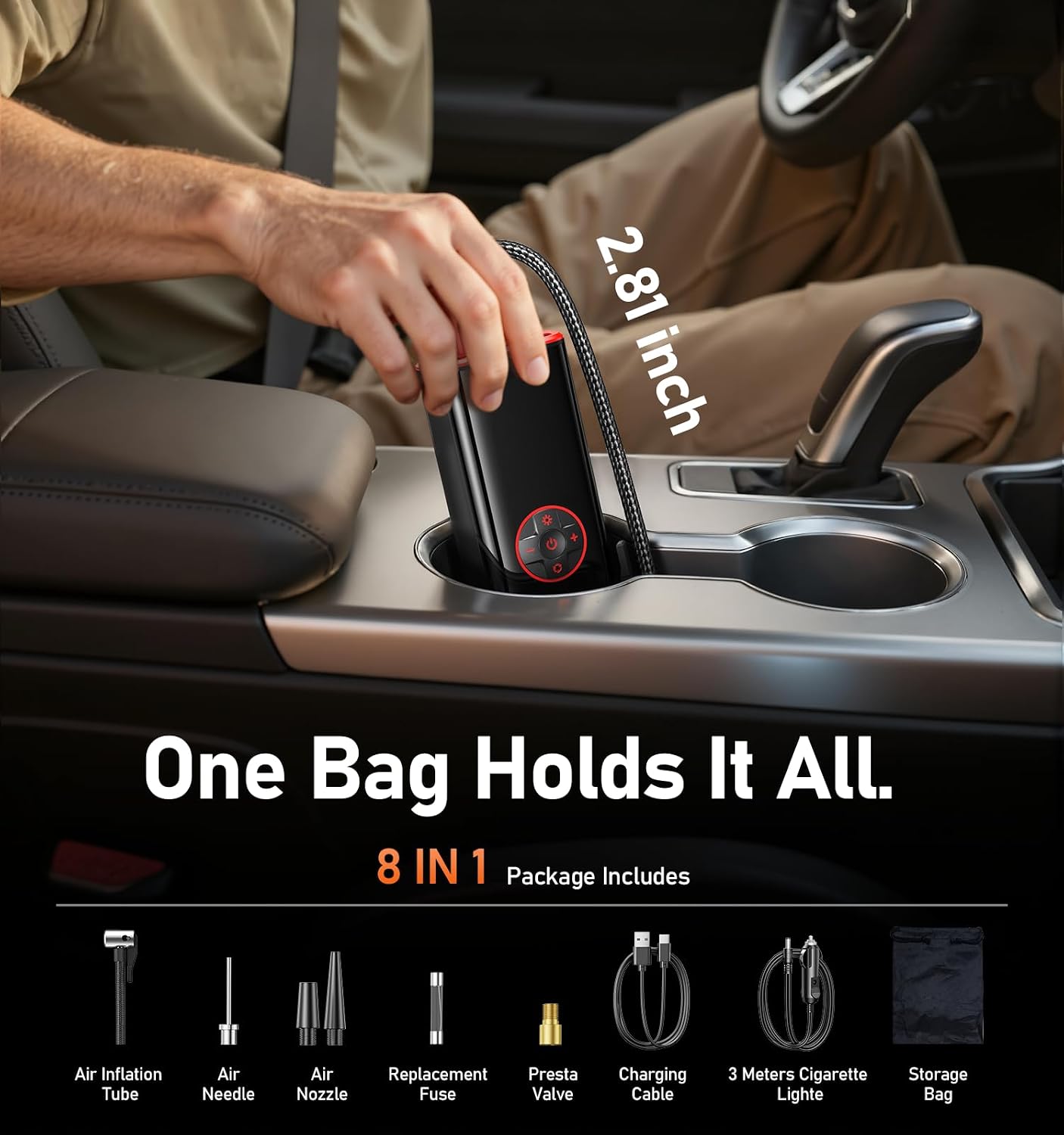
Image: All included accessories for the Sockspree Tire Inflator.
4. Product Overview
The Sockspree A619 features a compact design with an intuitive control panel and multiple ports for charging and accessories.

Image: Front view of the inflator with digital display and control panel.
Key Features:
- Digital LCD Display: Shows real-time tire pressure, preset pressure, battery level, and selected inflation mode.
- Control Panel: Includes Power/Start/Stop button, Mode selection button, Increase/Decrease pressure buttons, and LED light control button.
- Top Ports: Air hose connection, USB-A output (for power bank), USB-C input (for charging), and LED light.
- Bottom: Ventilation for heat dissipation.
5. Setup
5.1 Initial Charging
Before first use, fully charge the tire inflator. Connect the provided USB-A to USB-C charging cable to the USB-C input port on the inflator and a suitable USB power adapter (not included). The battery indicator on the LCD screen will show charging progress. A full charge can inflate 8-10 standard car tires under test conditions.
5.2 Attaching the Air Hose
Screw the high-pressure air hose clockwise into the air outlet port on the top of the inflator until it is securely tightened. Ensure no air leaks.

Image: Visual guide for attaching the hose and operating the inflator.
6. Operating Instructions
6.1 Power On/Off
- To Power On: Long press the Power/Start/Stop button (center button) for 3 seconds. The LCD screen will illuminate.
- To Power Off: Long press the Power/Start/Stop button for 3 seconds. The device will also automatically shut off after 2 minutes of inactivity.
6.2 Selecting Inflation Mode
Press the Mode button (bottom button with circular arrow) to cycle through the 5 intelligent inflation modes:
- Car Mode: Default preset pressure (e.g., 36 PSI).
- Motorcycle Mode: Default preset pressure (e.g., 32 PSI).
- Bicycle Mode: Default preset pressure (e.g., 45 PSI).
- Ball Mode: Default preset pressure (e.g., 8 PSI).
- Custom Mode: Allows manual setting of pressure from 3-150 PSI.

Image: The 5-in-1 intelligent inflation modes displayed on the inflator.
6.3 Setting Target Pressure
- After selecting a mode, use the '+' and '-' buttons to adjust the target pressure.
- The device supports pressure units PSI, BAR, and KPA. Press and hold the Mode button to switch between units.
6.4 Starting and Stopping Inflation
- Attach the air hose to the item's valve stem. Ensure a secure connection to prevent air leakage.
- Press the Power/Start/Stop button to begin inflation. The real-time pressure will be displayed.
- The inflator will automatically stop once the preset target pressure is reached.
- To manually stop inflation, press the Power/Start/Stop button again.
6.5 Multi-function LED Light
Press the LED light button (top button with sun icon) to cycle through light modes:
- First Press: Bright lighting (constant white light).
- Second Press: Road warning (dual-frequency white flash).
- Third Press: SOS signal.
- Fourth Press: Turn off light.
6.6 Power Bank Function
The inflator can serve as a 5V/2A mobile power bank. Connect your electronic device to the USB-A output port on the top of the inflator using a compatible USB cable (not included) to charge it.
Video: Official product overview demonstrating inflation and features.
7. Maintenance
- Cleaning: Wipe the device with a soft, dry cloth. Do not use harsh chemicals or abrasive cleaners.
- Storage: Store the inflator and its accessories in the provided storage bag in a cool, dry place, away from direct sunlight and extreme temperatures.
- Battery Care: To prolong battery life, fully charge the device at least once a month, even if not in regular use.
- Fuse Replacement: If the cigarette lighter power cord stops working, check and replace the fuse located within the cigarette lighter plug. A spare fuse is included in the package.
8. Troubleshooting
| Problem | Possible Cause | Solution |
|---|---|---|
| Inflator does not turn on. | Low battery or no power. | Charge the inflator using the USB-C cable or connect via the cigarette lighter power cord. |
| Inflator runs but no air comes out. | Hose not securely attached or blocked. | Ensure hose is tightly screwed in. Check for any blockages in the hose or nozzle. |
| Inflation is slow. | Low battery or large item being inflated. | Ensure the device is fully charged. For larger items, consider using the cigarette lighter power for continuous operation. |
| Device stops before reaching target pressure. | Battery is low. | Recharge the device. |
| LED light not working. | Low battery or light malfunction. | Charge the device. If still not working, contact customer support. |
Video: FAQs and troubleshooting tips for the Sockspree Portable Tire Inflator.
9. Specifications
- Brand: Sockspree
- Model Name: Tire Inflator Portable Air Compressor (A619)
- Maximum Operating Pressure: 150 PSI
- Voltage: 12 Volts
- Power Source: Battery Powered (1x 12V battery included) / Type-C 60W / 3-meter Vehicle Cigarette Lighter Power Cord
- Flow Rate: 20 L/Min
- Noise Level: 80 Decibels
- Special Features: Automatic Shut-Off, Digital Display, Portable, Multi-function LED Light (Lighting, Road Warning, SOS), Mobile Power Bank (5V/2A)
- Material: Acrylonitrile Butadiene Styrene
- Item Weight: 1.04 pounds (16.64 Ounces)
- Package Dimensions: 7.68 x 4.17 x 3.98 inches
- Manufacturer: Yuyao Xingming Intelligent Technology Co., Ltd.
10. Warranty & Support
For warranty information, technical support, or any inquiries regarding your Sockspree Tire Inflator A619, please refer to the contact details provided in the original product packaging or visit the official Sockspree website.
Customer Support: sockspree@outlook.com