
sako SUNON V 4.5KVA/4200W
SAKO SUNON V 4.5KVA/4200W Hybrid Solar Inverter User Manual
Model: SUNON V 4.5KVA/4200W
1. Introduction
This manual provides detailed instructions for the installation, operation, and maintenance of the SAKO SUNON V 4.5KVA/4200W Hybrid Solar Inverter. This high-frequency inverter is designed for solar energy storage solutions, featuring a built-in 120A MPPT controller for efficient power conversion and compatibility with BMS battery systems. It supports both on-grid and off-grid applications, offering stable pure sine wave output for various household appliances.
The inverter is equipped with smart monitoring capabilities via Wi-Fi and communication ports (USB/RS485/RS232), allowing users to monitor its status and configure settings. Please read this manual thoroughly before installation and operation to ensure safe and optimal performance of your inverter.
2. Safety Instructions
Always observe the following safety precautions to reduce the risk of injury and to ensure the safe operation of the inverter:
- Installation must be performed by qualified personnel in accordance with all local electrical codes and regulations.
- Before installation or maintenance, ensure all power sources (AC, DC, battery, solar) are disconnected.
- Do not disassemble the inverter. There are no user-serviceable parts inside. Refer all servicing to qualified service personnel.
- Ensure the inverter is installed in a well-ventilated area, away from flammable materials, moisture, and direct sunlight.
- Verify that the input voltage and frequency match the inverter's specifications.
- Proper grounding is essential for safety. Ensure the inverter is correctly grounded.
- Avoid touching live terminals. Use insulated tools when working with electrical connections.
- This inverter is designed for indoor use. Do not expose it to rain or snow.
3. Product Overview
3.1 Key Features
- Built-in 120A MPPT Controller for high solar conversion efficiency (up to 95%).
- Compatible with BMS battery systems, offering long cycle life (2000+ times).
- Supports 90-280VAC input voltage range for various applications.
- Operates with or without a battery, supporting direct solar load.
- Integrated overload, short circuit, overvoltage, undervoltage, and overtemperature protection.
- Compatible with AC/DC power sources, including diesel generators.
- Built-in Wi-Fi for mobile monitoring (Android app required).
- USB/RS485/RS232 communication ports for PC connection.
- LCD screen for setting DC/AC input priority, battery type, and charging current.
- Pure Sine Wave output.
3.2 Product Components
The SAKO SUNON V inverter features a user-friendly design with clearly labeled components. Refer to the image below for a visual guide to the inverter's external parts and connections.

Figure 3.2.1: Front and side views of the SAKO SUNON V Inverter with labeled components and ports.
This image highlights the LCD screen, radiator, ON/OFF switch, AC output, AC input, PV input, and battery terminals (BAT+ and BAT-). Understanding these components is crucial for proper installation and operation.
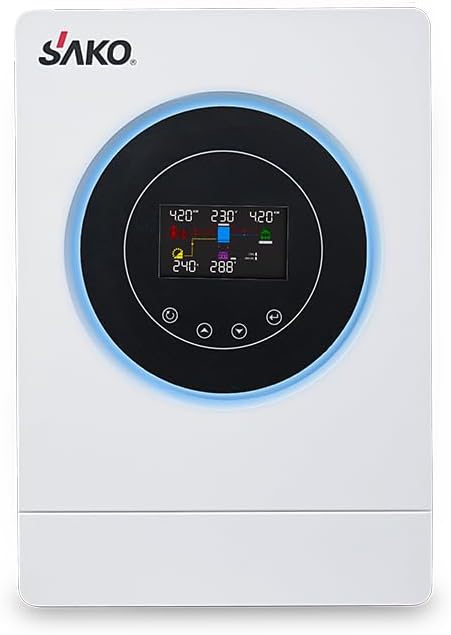
Figure 3.2.2: Front view of the SAKO SUNON V Hybrid Solar Inverter, showing the central LCD display and control buttons.
4. Setup and Installation
Proper installation is critical for the safe and efficient operation of your SAKO SUNON V inverter. Follow these steps carefully.
4.1 Site Selection
- Install the inverter indoors, in a dry, cool, and well-ventilated area.
- Avoid direct sunlight, high temperatures, and high humidity.
- Ensure sufficient clearance around the inverter for proper airflow and heat dissipation.
- Mount the inverter vertically on a sturdy wall or surface capable of supporting its weight.
4.2 Wiring Connections
All wiring must comply with local electrical codes. Ensure all power sources are disconnected before making any connections.
- Battery Connection: Connect the battery bank to the inverter's BAT+ and BAT- terminals. Ensure correct polarity.
- PV Array Connection: Connect the solar panel array to the inverter's PV input terminals. Observe correct polarity and ensure the PV voltage is within the inverter's specified range.
- AC Input Connection: Connect the utility grid or generator AC input to the inverter's AC INPUT terminals.
- AC Output Connection: Connect your household loads or distribution panel to the inverter's AC OUTPUT terminals.
- Grounding: Connect the inverter's ground terminal to a reliable earth ground.
Refer to the solar system connection diagram below for a visual representation of the wiring process.

Figure 4.2.1: Diagram illustrating the typical solar system connection for the SAKO SUNON V Inverter, showing connections for solar panels, utility/generator, battery, and home appliances.
This diagram shows how the inverter integrates with solar panels, a utility grid or generator, a battery bank (24V/48V Lithium Battery), and various home appliances for both daytime charging and nighttime discharging scenarios.
4.3 Initial Power-Up
- Double-check all connections for correctness and tightness.
- Turn on the battery breaker (if applicable).
- Turn on the solar array breaker (if applicable).
- Turn on the AC input breaker (if applicable).
- Finally, turn on the inverter's ON/OFF switch. The LCD screen should illuminate, indicating the inverter is starting up.
5. Operating the Inverter
The SAKO SUNON V inverter offers various operating modes and monitoring options for optimal energy management.
5.1 LCD Display and Control Buttons
The LCD screen provides real-time operational data and allows for configuration of various settings. Use the control buttons located below the screen to navigate menus and adjust parameters. Refer to the inverter's display for current status, input/output voltages, battery charge, and more.
5.2 Charging Modes
The inverter supports four user-configurable charging modes to optimize power usage based on your preferences and available sources:

Figure 5.2.1: Illustration of the four user-configurable charging modes: Solar Charging, Electricity Utility Priority, Solar Priority, and Hybrid Charging.
- 1. Solar Charging: Prioritizes solar power for charging the battery.
- 2. Electricity Utility Priority: Prioritizes utility grid power for charging, with solar as a backup.
- 3. Solar Priority: Prioritizes solar power for both charging and supplying loads, using utility only when solar is insufficient.
- 4. Hybrid Charging: Combines solar and utility power for charging, optimizing based on availability and load.
5.3 Smart Monitoring (Wi-Fi)
The SAKO SUNON V inverter includes built-in Wi-Fi for remote monitoring via a mobile application (Android only). This allows you to check the working status, perform parametric analysis, and receive warning messages directly on your smartphone.

Figure 5.3.1: Screenshot of the SAKO Inverter Smart App, demonstrating remote monitoring capabilities including real-time data, parametric analysis, and warning messages.
The app provides features such as monitoring and control remotely, real-time monitoring of power flow, parametric analysis of system performance, and immediate warning messages for any issues.
For detailed instructions on connecting to Wi-Fi and using the mobile application, please refer to the separate Wi-Fi monitoring guide provided with your inverter or available on the manufacturer's website.
6. Maintenance
Regular maintenance ensures the longevity and optimal performance of your SAKO SUNON V inverter.
- Cleaning: Periodically clean the inverter's exterior with a soft, dry cloth. Ensure ventilation openings are free from dust and debris to prevent overheating. Do not use liquid cleaners.
- Connections: Annually inspect all electrical connections for tightness and signs of corrosion. Loose connections can cause overheating and poor performance.
- Environment: Ensure the installation environment remains within the specified temperature and humidity ranges.
- Battery Health: If using external batteries, monitor their health and charge levels regularly as per battery manufacturer guidelines.
Always disconnect all power sources before performing any maintenance.
7. Troubleshooting
This section provides solutions to common issues you might encounter with your SAKO SUNON V inverter. For problems not listed here, contact technical support.
| Problem | Possible Cause | Solution |
|---|---|---|
| Inverter not turning on | No DC input from battery/solar; Loose battery connections; Inverter switch off. | Check battery voltage; Ensure battery connections are secure; Turn on inverter switch. |
| No AC output | Overload; Short circuit; Low battery voltage; AC output breaker tripped. | Reduce load; Check for short circuits in wiring; Charge battery; Reset AC output breaker. |
| Low battery alarm | Battery discharged; Insufficient charging. | Allow battery to charge from solar or utility; Check solar panel output and connections. |
| Over-temperature warning | Poor ventilation; Blocked fan/radiator; Excessive ambient temperature. | Ensure adequate airflow around inverter; Clean vents; Relocate inverter to cooler area if necessary. |
| Wi-Fi monitoring not working | Incorrect Wi-Fi setup; App not installed correctly; Inverter not connected to network. | Review Wi-Fi setup instructions; Reinstall app; Check network connection. |
8. Technical Specifications
The following table provides detailed technical specifications for the SAKO SUNON V 4.5KVA/4200W Hybrid Solar Inverter.

Figure 8.1.1: Technical specifications table for SAKO SUNON V 4.5KVA/24V and 6.5KVA/48V models.
This table details parameters such as Rated Power, Battery Voltage, Floating Charge Voltage, Overcharge Protection, Input Voltage Range, Frequency Range, AC Output Regulation, Surge Power, Efficiency, Transfer Time, Waveform, Solar Charger Type (MPPT), Maximum PV Array Power, Maximum Input Current, MPPT Range, Maximum PV Array Open Circuit Voltage, Maximum Solar Charge Current, Maximum AC Charge Current, Maximum Charge Current, Physical Dimensions, Net Weight, Communication Interface, and Operating Environment conditions (Humidity, Operating Temperature, Storage Temperature).
| Parameter | Specification (SUNON V 4.5KVA/24V) |
|---|---|
| Model Name | SUNON V |
| Rated Power | 4500VA/4200W |
| Battery Voltage | 24 VDC |
| Floating Charge Voltage | 27 VDC |
| Overcharge Protection | 33 VDC |
| Input Voltage Range | 170-280 VAC (for Personal Computers); 90-280 VAC (for Home Appliances) |
| Frequency Range | 50 Hz/60 Hz (Auto sensing) |
| AC Output Regulation (Batt. Mode) | 230 VAC ± 5% |
| Surge Power | 8400VA |
| Efficiency (Peak) | 90% - 93% |
| Transfer Time | 10 ms (for Personal Computers); 20 ms (for Home Appliances) |
| Waveform | Pure sine wave |
| Solar Charger Type | MPPT |
| Maximum PV Array Power | 5000W |
| Max. Input Current | 27A |
| MPPT Range @ Operating Voltage | 60-450V |
| Maximum PV Array Open Circuit Voltage | 500 VDC |
| Maximum Solar Charge Current | 120 A |
| Maximum AC Charge Current | 100 A |
| Maximum Charge Current | 120 A |
| Packing Dimension (D x W x H) | 583mm * 380mm * 214mm |
| Net Weight | 9.6 kgs |
| Communication Interface | USB/RS232/RS485(BMS)/Local WiFi/Dry-contact |
| Humidity | 5% to 95% Relative Humidity (Non-condensing) |
| Operating Temperature | -10°C to 50°C |
| Storage Temperature | -15°C to 60°C |
9. Warranty and Support
For warranty information, please refer to the warranty card included with your product or the terms and conditions provided at the time of purchase. SAKO offers protection plans and support for its products.
For technical support, troubleshooting assistance beyond this manual, or service inquiries, please contact SAKO customer service or your authorized dealer. Ensure you have your product model and serial number ready when contacting support.
You can find more information and support resources on the official SAKO website or through your point of purchase.
Related documentsSUNON V 4.5KVA/4200W


Ask a question about this manual
Ask about setup, troubleshooting, compatibility, parts, safety, or missing instructions. Manuals+ will review the question and use this page’s manual context to help answer it.