
1. Introduction
This manual provides essential instructions for the installation, operation, and maintenance of the GregYoung Fardriver Controller ND72240. This programmable BLDC controller is designed for 72V e-bikes and electric motorcycles, offering advanced features to fine-tune performance and optimize ride characteristics.
2. Safety Information
- Always disconnect the power source (battery) before installing, wiring, or performing any maintenance on the controller.
- High voltage is present in this device. Improper handling can lead to serious injury or death. If you are not experienced with electrical systems, seek professional assistance for installation.
- Ensure all connections are secure and properly insulated to prevent short circuits.
- Do not expose the controller to water, excessive moisture, or extreme temperatures.
- Verify that the controller's voltage and current ratings match your motor and battery specifications.
3. Package Contents
Upon opening the package, please verify that all components are present and undamaged:
- GregYoung Fardriver Controller ND72240
- Wiring Harness
- Bluetooth Dongle (for programming)

Image 3.1: GregYoung Fardriver Controller ND72240 with included wiring harness and Bluetooth dongle. This image displays the main controller unit, a multi-colored wiring harness for various connections, and a small black Bluetooth dongle for wireless configuration.
4. Setup and Installation
Proper installation is crucial for the safe and efficient operation of your Fardriver Controller. A wiring tutorial is typically provided by the manufacturer to assist with installation. Always refer to the specific wiring diagram for your model.
4.1 Wiring Connections
Connect the controller to your e-bike or electric motorcycle's motor, battery, and other components (e.g., throttle, display) according to the provided wiring diagram. Pay close attention to:
- Motor Phase Wires: Connect the three phase wires (U, V, W) from the controller to the corresponding motor phase wires.
- Hall Sensor Wires: Connect the Hall sensor wires for proper motor commutation.
- Battery Power: Connect the main positive and negative battery terminals to the controller's power input. Ensure correct polarity.
- Ignition/Key Switch: Connect the ignition wire if applicable.
- Throttle: Connect the throttle signal, ground, and 5V wires.
- Other Signals: Connect brake levers, speed sensor, display, etc., as per your system's requirements.
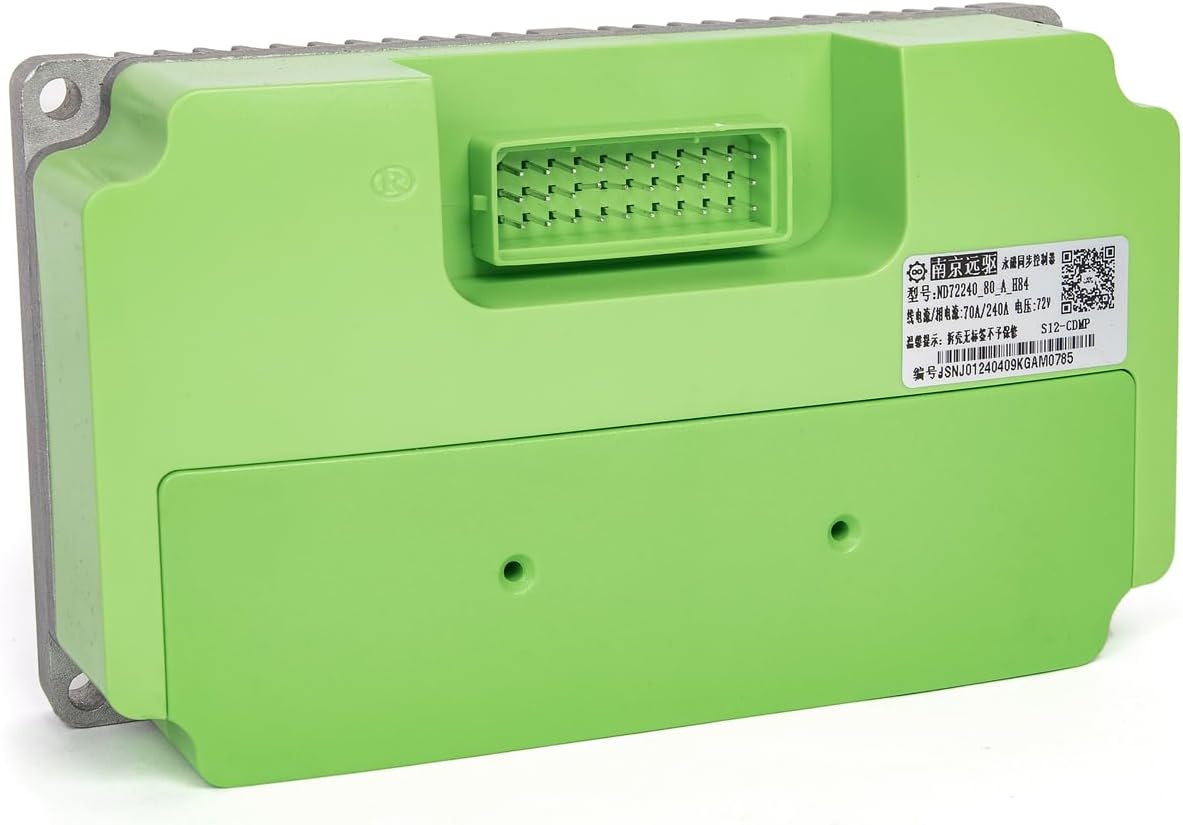
Image 4.1: Top view of GregYoung Fardriver Controller ND72240 showing the main connector port. This image highlights the multi-pin connector where the wiring harness attaches, crucial for all electrical connections.
4.2 Mounting
Mount the controller securely in a location that provides adequate ventilation and protection from physical damage, water, and direct sunlight. The aluminum casing with fins acts as a heatsink, so ensure airflow around it.

Image 4.2: Bottom view of GregYoung Fardriver Controller ND722240 showing the heat sink fins. This image illustrates the ribbed aluminum base designed to dissipate heat, emphasizing the importance of proper mounting for cooling.
5. Operating and Programming
The Fardriver Controller ND72240 features advanced programming capabilities, allowing users to customize various parameters for optimal performance. The included Bluetooth dongle facilitates wireless connection to a compatible application for programming and debugging.
5.1 Initial Power-Up
After completing all wiring connections, carefully power on your e-bike/motorcycle. Observe for any unusual behavior, sounds, or smells. If issues arise, immediately power off and re-check all connections.
5.2 Programming
Use the Bluetooth dongle to connect the controller to your programming device (e.g., smartphone, computer). Through the dedicated application, you can adjust settings such as:
- Motor parameters (pole pairs, Hall angle)
- Current limits (phase current, battery current)
- Speed limits
- Throttle response
- Brake regeneration settings
- Error codes and diagnostics
Refer to the specific programming software's user guide for detailed instructions on each parameter.
6. Maintenance
The GregYoung Fardriver Controller is built with durable materials for long-lasting reliability. Regular, simple maintenance can help ensure its continued performance:
- Cleaning: Periodically clean the exterior of the controller with a dry, soft cloth to remove dust and debris. Ensure the cooling fins are free from obstructions.
- Connection Check: Regularly inspect all wiring connections for tightness and signs of wear or corrosion. Loose connections can lead to intermittent operation or damage.
- Environmental Protection: While designed for outdoor use, avoid prolonged exposure to heavy rain, direct water jets, or extreme temperatures beyond its operating range.
7. Troubleshooting
This section addresses common issues you might encounter with your Fardriver Controller.
7.1 Controller Not Powering On
- Check the main battery connection and ensure the battery is charged.
- Verify the ignition/key switch connection if your system uses one.
- Inspect all power wires for damage or loose connections.
7.2 Motor Not Responding or Intermittent Operation
- Ensure all motor phase wires and Hall sensor wires are correctly connected and secure.
- Check the throttle connection and functionality.
- Review programming settings for any active error codes or incorrect motor parameters.
- Confirm that no connection plugs are missing, as reported by some users. Ensure all necessary connectors are in place.
7.3 Limited Performance (e.g., lower top speed)
- Access the programming software via the Bluetooth dongle.
- Check the current limits (battery current, phase current) and speed limits. Adjust them according to your desired performance and motor/battery capabilities.
- Ensure your battery can supply the required current for peak performance.
For persistent issues, consult the detailed programming guide or contact customer support.
8. Specifications
| Feature | Specification |
|---|---|
| Model | ND72240 |
| Brand | GregYoung |
| Nominal Voltage | 72V |
| Rated Power | 5000W |
| Current Rating | 70A / 240A (Line Current / Phase Current) |
| Material | Aluminum |
| Item Weight | 2.2 Pounds |
| Manufacturer | Nanjing |
| Color | Green/Blue/Black (Controller casing) |

Image 8.1: Close-up of the label on GregYoung Fardriver Controller ND72240 showing model and current specifications. This image provides a clear view of the product label, detailing the model number (ND72240), current ratings (70A/240A), and voltage (72V).
9. Warranty
The GregYoung Fardriver Controller ND72240 comes with a 180-day warranty from the date of purchase. This warranty covers manufacturing defects under normal use. Please retain your proof of purchase for warranty claims. The warranty does not cover damage caused by improper installation, misuse, accidents, or unauthorized modifications.
10. Support
If you encounter any issues not covered in this manual or require further assistance, please contact GregYoung customer support. Have your product model number (ND72240) and purchase information ready when contacting support.