
1. Introduction
This manual provides instructions for the assembly, operation, and maintenance of your YOMILUVE Farmhouse Executive Desk with Drawers. Please read all instructions carefully before assembly and use to ensure safe and proper operation.
The YOMILUVE Farmhouse Executive Desk is designed for home office use, offering a spacious work surface, integrated power outlets, a monitor stand, and multiple storage drawers.
2. Safety Information
- Always assemble the desk on a soft, clean surface to prevent scratches.
- Ensure all screws and fasteners are securely tightened before use. Periodically check and re-tighten as necessary.
- Do not overload drawers or the desktop. Refer to specifications for weight limits.
- Keep small parts away from children during assembly.
- Use only the provided power cord and ensure it is properly connected to a grounded outlet. Do not exceed the electrical ratings of the built-in power strip.
- Avoid placing hot items directly on the desktop surface without protection.
3. Package Contents
Before beginning assembly, verify that all components listed in the included assembly guide are present and undamaged. If any parts are missing or damaged, please contact customer support.
The package includes:
- All labeled desk parts (MDF board components, drawer parts)
- Hardware kit (screws, dowels, cam locks, metal handles, corner accents)
- Built-in power strip with power cord
- Assembly tools (e.g., Allen wrench)
- Detailed assembly instructions
4. Setup and Assembly Instructions
Assembly is required for this desk. Please follow the step-by-step instructions provided in the separate assembly manual included in your package. It is recommended to have two people for assembly.
Key Assembly Steps:
- Unpack all components and lay them out on a protected surface. Verify all parts against the parts list.
- Assemble the main desk frame according to the diagrams.
- Install the drawer slides onto the desk frame and drawer boxes.
- Assemble the four drawers (one wide, two small, one medium) and attach the metal handles.
- Insert the assembled drawers into the desk frame.
- Attach the monitor stand to the desktop.
- Install the built-in power strip into its designated slot on the monitor stand.
- Attach the decorative metal corner accents to the desktop.
- Ensure all connections are secure before moving or using the desk.
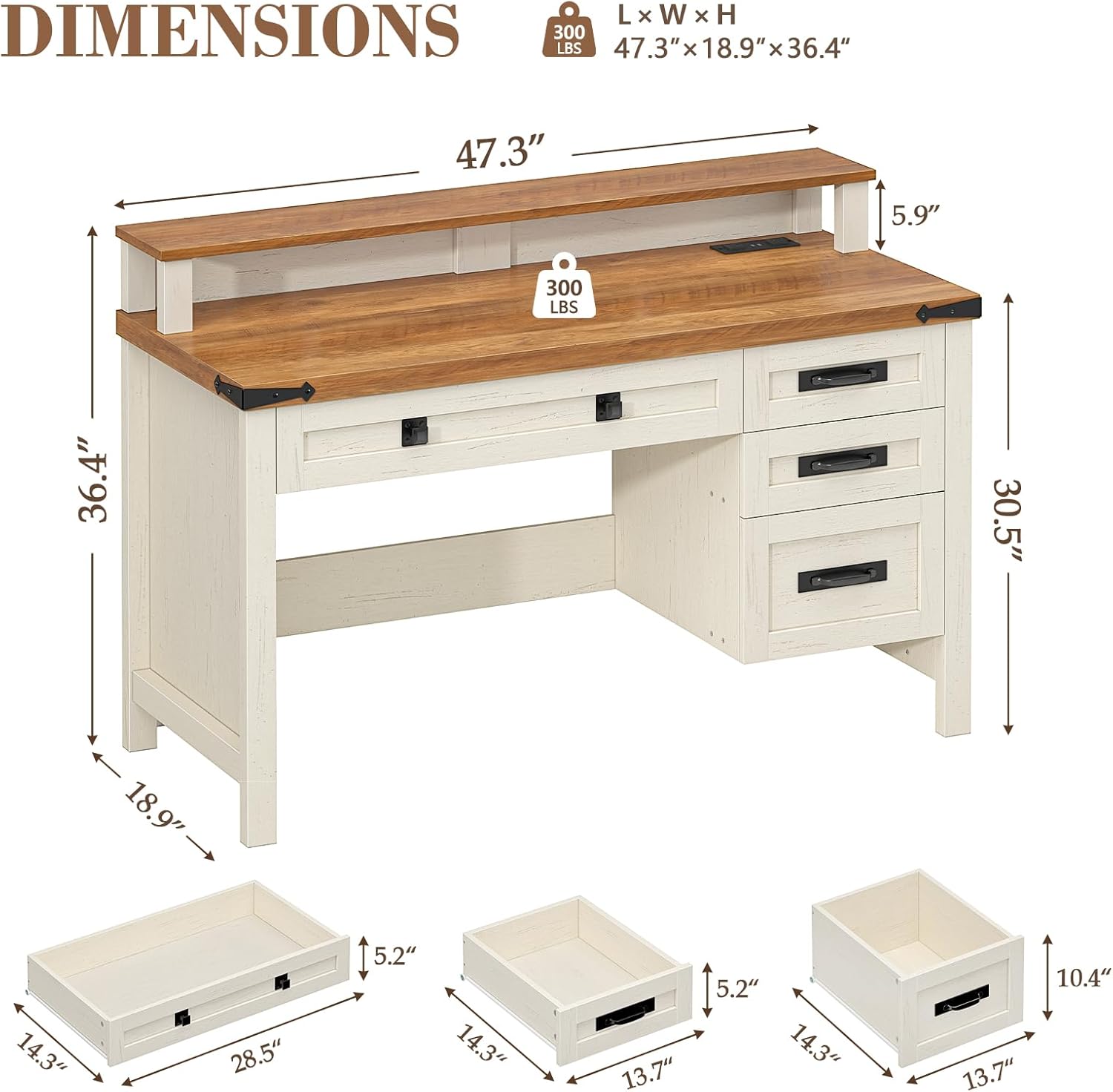
Image: Fully assembled YOMILUVE Farmhouse Executive Desk in Antique White.

Image: Detailed dimensions of the YOMILUVE Farmhouse Executive Desk and its drawers.
5. Operating Instructions
5.1 Using the Built-in Power Strip
The desk features an integrated power strip with 2 AC outlets and 2 USB ports, located on the monitor stand for convenient access.
- Connect the desk's power cord to a standard 120V/12A wall outlet.
- Plug your devices (e.g., computer, tablet, phone) into the AC outlets or USB ports.
- The USB ports provide 5V/2A output for charging compatible devices.

Image: Close-up view of the built-in power strip with 2 AC outlets and 2 USB ports.
5.2 Utilizing Storage Drawers
The desk includes four drawers for organization: one wide drawer (28.5 inches) and three smaller drawers (13.7 inches each). These are suitable for files, books, office supplies, and personal items.
- Pull the metal handles to open and close the drawers smoothly.
- Distribute weight evenly within drawers to prevent strain on the slides.

Image: The four drawers of the desk, including one wide and three smaller ones, shown open to display storage space.
5.3 Monitor Stand
The full-length monitor stand elevates your screen to an ergonomic height, which can help reduce neck and eye strain. It also provides additional storage space underneath for keyboards, mice, or other small items.

Image: Illustration demonstrating the ergonomic benefits of the monitor stand.
6. Maintenance
6.1 Cleaning
- Wipe the desk surfaces with a soft, damp cloth.
- Avoid using harsh chemicals, abrasive cleaners, or polishes that may damage the finish.
- Promptly clean up spills to prevent staining.
6.2 General Care
- Keep the desk away from direct sunlight and extreme temperature changes to prevent warping or fading.
- Avoid dragging the desk when moving it; lift it to prevent damage to the legs and floor.
- Periodically check all hardware connections and tighten if loose.
7. Troubleshooting
7.1 Assembly Difficulties
- Problem: Parts do not align or fit together.
Solution: Double-check the assembly instructions and diagrams. Ensure you are using the correct parts and orientation for each step. Sometimes, loosening adjacent screws slightly can help with alignment before re-tightening. - Problem: Missing hardware or damaged parts.
Solution: Refer to the parts list in your assembly manual. Contact YOMILUVE customer support for replacement parts.
7.2 Power Strip Issues
- Problem: Devices are not charging or receiving power.
Solution: Ensure the desk's power cord is securely plugged into both the desk's power strip and a functional wall outlet. Check if the wall outlet is working by plugging in another device. Verify that the devices you are trying to charge are compatible with the power strip's specifications (120V/12A for AC, 5V/2A for USB).
7.3 Drawer Operation
- Problem: Drawers are stiff or do not slide smoothly.
Solution: Check if the drawer slides are properly installed and aligned. Ensure no objects are obstructing the drawer's path. Verify that the drawer is not overloaded.
8. Specifications
| Feature | Detail |
|---|---|
| Brand | YOMILUVE |
| Model | Farmhouse Executive Desk with Drawers |
| Color | Antique White |
| Overall Dimensions (L x W x H) | 47.3" x 18.9" x 36.4" |
| Material | Engineered Wood (MDF Board) |
| Number of Drawers | 4 (1 wide, 3 medium) |
| Wide Drawer Dimensions | 28.5" L x 14.3" D x 5.2" H |
| Medium Drawer Dimensions | 13.7" L x 14.3" D (5.2" H for top two, 10.4" H for bottom) |
| Power Outlets | 2 AC Outlets (120V/12A) |
| USB Ports | 2 USB Ports (5V/2A) |
| Power Cord Length | 4.9 feet |
| Special Features | Integrated Monitor Stand, Built-In Power Strip, Ergonomic Design |
| Assembly Required | Yes |
| Weight Capacity | 300 lbs (approximate, for desktop) |
9. Warranty and Support
YOMILUVE products are manufactured with quality and customer satisfaction in mind. For specific warranty details, please refer to the documentation included with your purchase or visit the official YOMILUVE website.
If you encounter any issues, require replacement parts, or have questions regarding your desk, please contact YOMILUVE customer support through the retailer where you purchased the product or via the contact information provided on the YOMILUVE brand store page:
YOMILUVE Store: https://www.amazon.com/stores/YomiluveDesign/page/50F7D6EB-9038-478F-AF4C-AD29A5C41094