
ODK SPCB01010801022USDF-1
ODK Computer Desk - 48 Inch Black
Instruction Manual
Welcome
Thank you for choosing the ODK Computer Desk. This manual provides essential information for the assembly, operation, and maintenance of your new desk. Please read through these instructions carefully to ensure proper setup and long-lasting use of your product.
Product Overview
The ODK Computer Desk is a modern and versatile solution for your home office, study area, or gaming setup. It features a durable design, integrated power solutions, and smart storage options to enhance your productivity and organization.

The ODK 48 Inch Black Computer Desk, featuring integrated power outlets and a side storage bag.
Dimensions
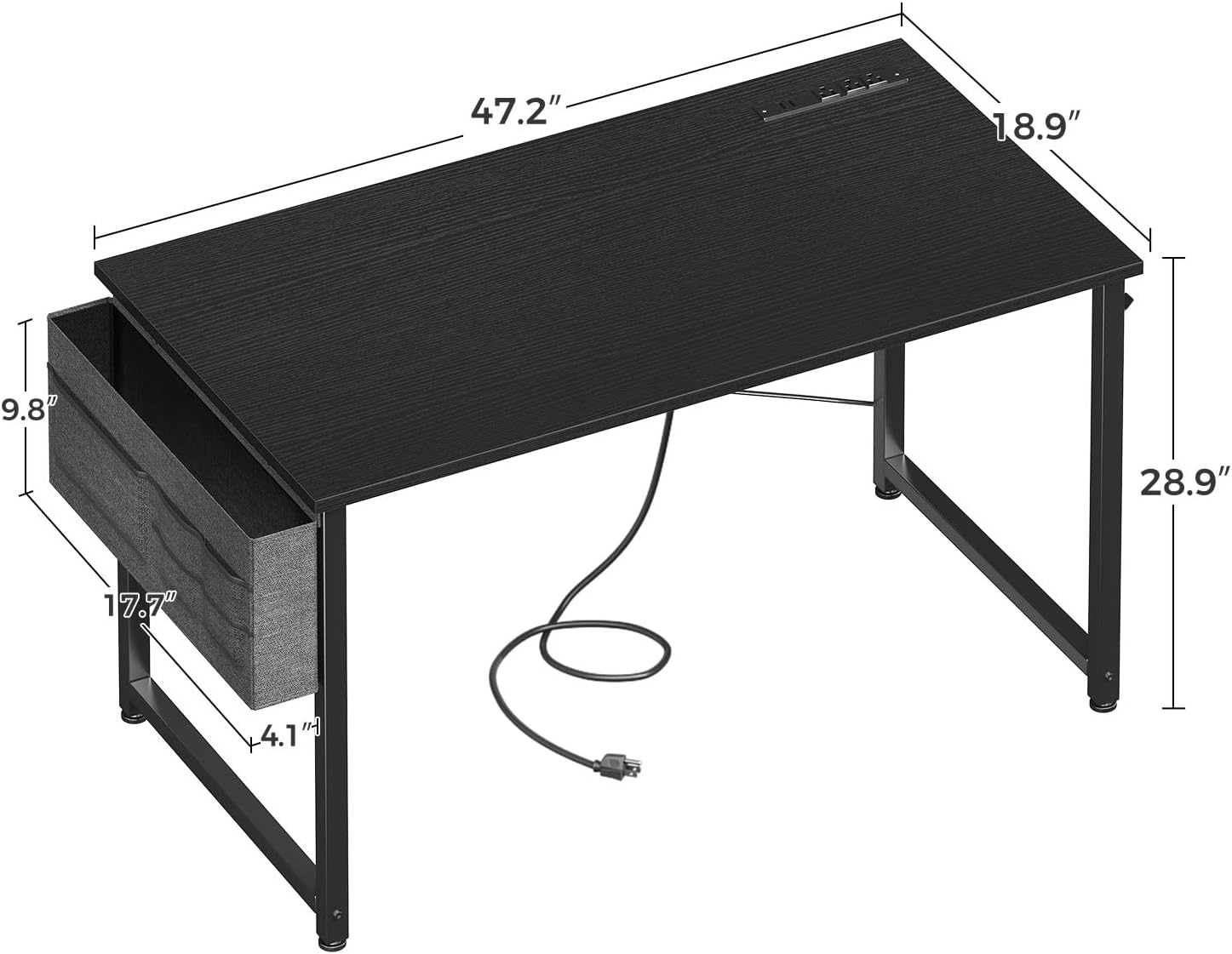
The 48-inch ODK Computer Desk is designed to fit comfortably in various spaces. Its approximate dimensions are 18.9 inches (Depth) x 47.24 inches (Width) x 28.94 inches (Height).

Detailed dimensions of the ODK Computer Desk, including desktop and storage bag measurements.
Built-in Power Outlets & USB Charging Ports
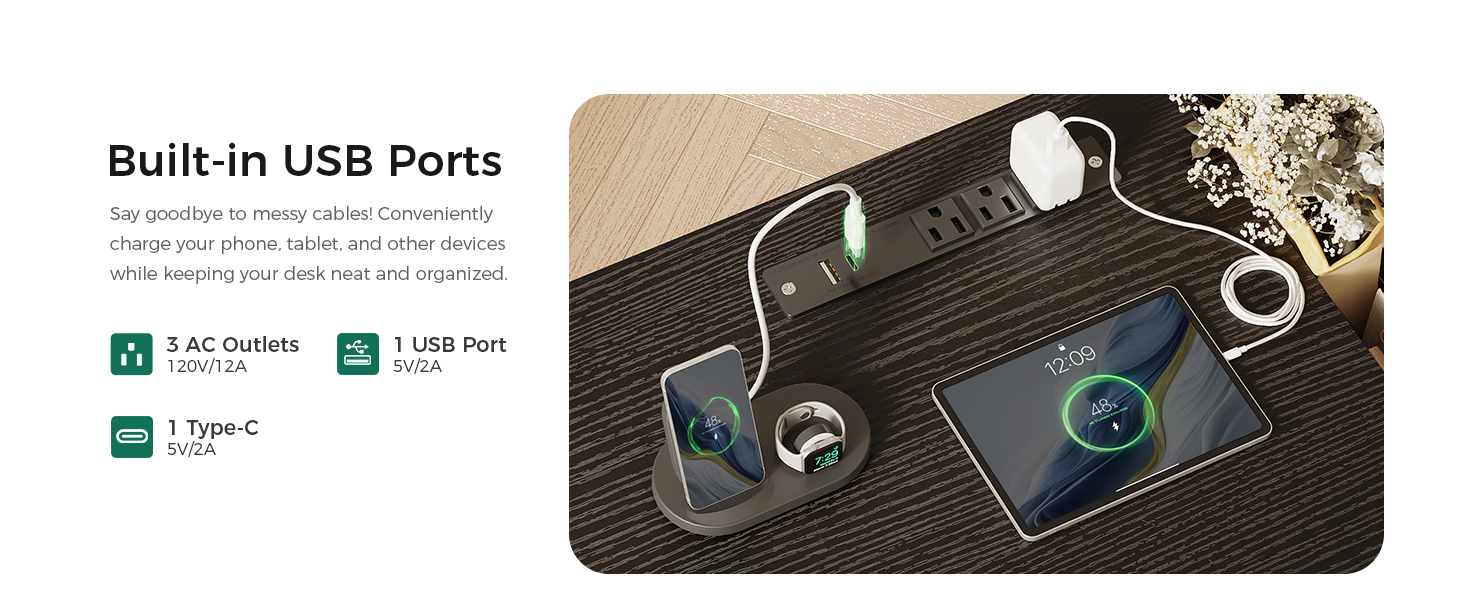
The ODK computer desk features a convenient built-in power strip with 3 AC outlets, 1 USB-A charging port, and 1 Type-C charging port. This allows for easy charging of smartphones, tablets, gaming gear, and other electronic devices, minimizing cable clutter and ensuring a neat workspace.

The integrated power strip provides convenient access to 3 AC outlets, 1 USB-A port, and 1 USB-C port for charging devices.
Smart Storage Solutions
Stay organized with the removable storage bag and headphone hook, keeping essentials within arm’s reach. The hanging storage bag is ideal for books, documents, or office supplies, while the sturdy headphone hook offers a convenient place for your headset, backpack, or charging cables. These thoughtful additions maximize workspace efficiency.

The removable fabric storage bag offers convenient space for books, documents, and office supplies.
A sturdy headphone hook provides a dedicated spot for your headset or other hanging items.
Durable & Sturdy Construction
This office desk is crafted with a high-thickness metal frame and heavy-duty powder-coated steel legs, ensuring stability and long-lasting durability. The scratch-resistant and waterproof desktop is easy to clean, making it perfect for daily use. The reinforced steel structure enhances weight capacity, making it reliable for various work essentials.
Setup & Assembly
The ODK Computer Desk is designed for quick and easy assembly, typically taking around 30 minutes. All necessary tools and step-by-step instructions are included in the package. Please follow the visual guide and written steps carefully.
Visual guide for the simple assembly process of the ODK Computer Desk.
- Unpack all components and verify against the parts list provided in your package.
- Assemble the metal frame by connecting the legs and crossbars using the provided screws and tools. Ensure all connections are secure.
- Carefully place the desktop onto the assembled frame, aligning the pre-drilled holes. Secure the desktop with the appropriate screws.
- Attach the removable fabric storage bag to the designated side of the desk.
- Install the headphone hook on the desired side of the desk.
- Adjust the leg pads at the bottom of each leg to ensure the desk is stable and level on any surface.
Operating Instructions
Using your ODK Computer Desk is straightforward. Here are key operational aspects:
- Power Outlets: To use the integrated power outlets and USB charging ports, ensure the desk's main power cord is securely connected to a functional wall outlet. You can then plug in your electronic devices directly into the desk for convenient power access.
- Storage Bag: The removable fabric storage bag can be used to organize books, documents, and small office supplies. It is designed for easy attachment and detachment, allowing you to customize your storage needs.
- Headphone Hook: Utilize the sturdy headphone hook to hang your headphones, bags, or cables. This helps keep your desktop clear and your essential items easily accessible.
Maintenance
Proper care and maintenance will extend the life of your ODK Computer Desk:
- Cleaning: For the desktop surface, use a soft, damp cloth to wipe away dust and spills. The desktop is scratch-resistant and waterproof, making it easy to clean. Avoid using abrasive cleaners, harsh chemicals, or excessive moisture.
- Frame Care: Periodically inspect the metal frame and all screw connections. Tighten any loose screws to maintain the desk's stability and structural integrity. Clean the metal frame with a dry cloth to prevent dust buildup.
- Storage Bag: The fabric storage bag can be spot cleaned with a mild detergent and water. Gently rub the affected area and allow it to air dry completely before reattaching it to the desk.
Troubleshooting
If you encounter any issues with your ODK Computer Desk, please refer to the following common troubleshooting tips:
- Desk is wobbly after assembly.
- Ensure all screws are securely tightened, especially those connecting the legs and crossbars. Check that the adjustable leg pads are properly adjusted to compensate for any unevenness in your flooring. Verify that the crossbars are installed correctly according to the assembly instructions.
- Power outlets are not working.
- Verify that the desk's main power cord is fully plugged into a functional wall outlet. Check for any tripped circuit breakers in your home. If the issue persists, try plugging another device into the wall outlet to confirm it is working. If the problem continues, contact customer support.
- Storage bag or headphone hook feels loose.
- Ensure the hooks or attachment points for the storage bag and headphone hook are correctly seated and fully secured to the desk frame as shown in the assembly instructions.
Specifications
| Feature | Detail |
|---|---|
| Brand | ODK |
| Product Dimensions | 18.9"D x 47.24"W x 28.94"H |
| Color | Black |
| Style | Modern |
| Base Material | Metal |
| Top Material Type | Engineered Wood |
| Finish Type | Wood |
| Special Feature | Bagged |
| Recommended Uses For Product | Gaming |
| Mounting Type | Tabletop |
| Age Range Description | Adult |
| Included Components | Built-in Outlet |
| Product Grade | new |
| Model Number | SPCB01010801022USDF-1 |
| Model Name | Computer Desk |
| UPC | 850072018362 |
| Manufacturer | ODK |
| Item Type Name | Computer Desk |
| Item Height | 28.94 inches |
| Additional Features | Bagged |
| Base Type | Leg |
| Storage Options | Removable storage bag and headphone hook |
| Is Customizable? | No |
| Shape | Rectangular |
| Desk Design | Computer Desk |
| Style Name | Modern |
| Finish Types | Wood |
| Furniture Finish | Black |
| Top Color | Black |
| Item Dimensions D x W x H | 18.9"D x 47.24"W x 28.94"H |
| Item Weight | 20.72 Pounds |
| Size | 48 inch |
| Tabletop Thickness | 1 Inches |
| Maximum Height | 28.94 Inches |
| Working Surface Diagonal Length | 55.74 Inches |
| Base | Metal |
| Required Assembly | Yes |
| Warranty Type | Limited |
| Includes All Assembly Tools | Yes |
Warranty & Support
The ODK Computer Desk comes with a Limited Warranty. For detailed warranty information, claims, or technical support, please refer to the warranty card included with your product or contact ODK customer service directly.
You can find more information and contact details on the official ODK website or through your purchase platform.
Model Number: SPCB01010801022USDF-1
UPC: 850072018362
Ask a question about this manual
Ask about setup, troubleshooting, compatibility, parts, safety, or missing instructions. Manuals+ will review the question and use this page’s manual context to help answer it.