
1. Introduction
Thank you for choosing the RECCI REP-W88 Wireless Earbuds. This manual provides essential information for setting up, operating, and maintaining your earbuds. Please read it carefully to ensure proper use and to maximize your audio experience.
2. Package Contents
Verify that all items listed below are present in your package:
- RECCI REP-W88 Wireless Earbuds (Left and Right)
- Charging Case
- USB-C Charging Cable
- User Manual
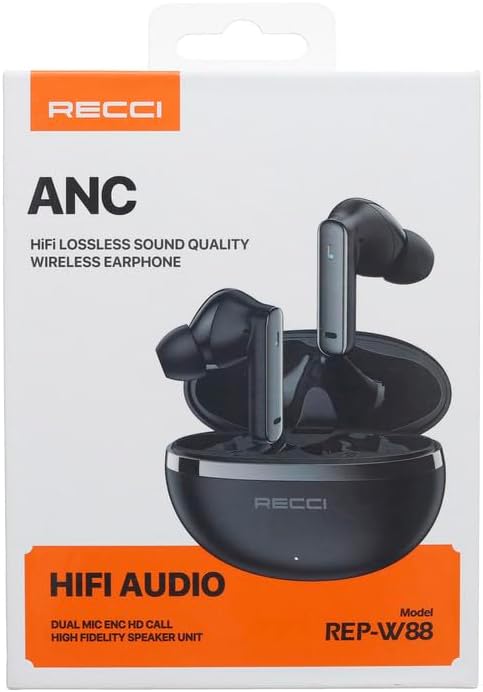
Image: The retail packaging for the RECCI REP-W88 Wireless Earbuds, displaying the earbuds and charging case.
3. Product Overview
Familiarize yourself with the components of your RECCI REP-W88 earbuds and charging case.

Image: The RECCI REP-W88 earbuds resting inside their open charging case, ready for use.
Earbud Components:
- Touch Control Area: For managing music, calls, and ANC.
- Microphone: For calls and voice commands.
- Charging Contacts: Connects to the charging case.
- Ear Tip: Ensures a secure and comfortable fit.

Image: A top-down view of the two RECCI REP-W88 earbuds, highlighting their sleek design and touch control surfaces.
Charging Case Components:
- Charging Port: USB-C port for charging the case.
- LED Indicator: Displays charging status and battery level.
- Earbud Charging Slots: Holds and charges the earbuds.

Image: The RECCI REP-W88 charging case in its closed state, showcasing its compact and portable design.
4. Setup
4.1 Initial Charging
Before first use, fully charge the earbuds and the charging case.
- Place both earbuds into the charging case.
- Connect the USB-C charging cable to the charging port on the case and to a power source (e.g., USB wall adapter, computer USB port).
- The LED indicator on the case will show charging status. A full charge typically takes 1-2 hours.
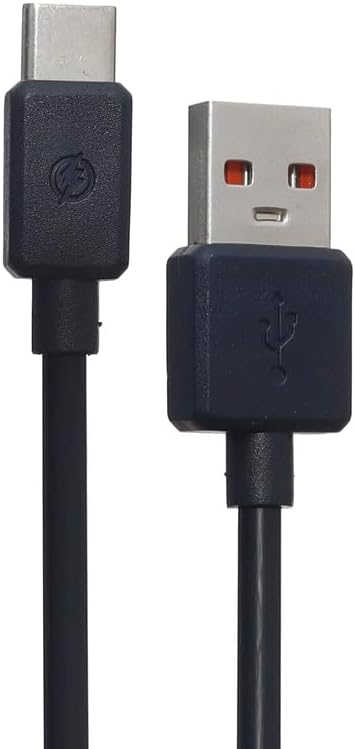
Image: The included USB-C charging cable, used to power the charging case.
4.2 Bluetooth Pairing
To connect your earbuds to a device:
- Ensure the earbuds are charged and inside the charging case.
- Open the charging case lid. The earbuds will automatically enter pairing mode, and their LED indicators will flash.
- On your device (smartphone, tablet, computer), go to Bluetooth settings and enable Bluetooth.
- Search for available devices and select "RECCI REP-W88" from the list.
- Once connected, the earbud LEDs will stop flashing, and you will hear a confirmation tone.
Note: The earbuds will automatically reconnect to the last paired device when removed from the case, if Bluetooth is enabled on the device.
4.3 Wearing the Earbuds
For optimal sound quality and comfort, ensure a proper fit:
- Identify the Left (L) and Right (R) earbuds.
- Gently insert each earbud into your ear canal.
- Rotate the earbud slightly until it feels secure and comfortable.

Image: A side view of the RECCI REP-W88 earbuds, illustrating their ergonomic shape designed for in-ear comfort.
5. Operating Instructions
5.1 Power On/Off
- Power On: Open the charging case lid, or long-press the touch control area on both earbuds for 3 seconds.
- Power Off: Place the earbuds back into the charging case and close the lid, or long-press the touch control area on both earbuds for 5 seconds.
5.2 Music Playback
- Play/Pause: Single tap either earbud.
- Next Track: Double tap the right earbud.
- Previous Track: Double tap the left earbud.
- Volume Up: Triple tap the right earbud.
- Volume Down: Triple tap the left earbud.
5.3 Call Management
- Answer/End Call: Single tap either earbud.
- Reject Call: Long-press either earbud for 2 seconds.
5.4 Active Noise Cancellation (ANC) Control
The RECCI REP-W88 features Active Noise Cancellation to reduce ambient noise.
- Toggle ANC/Transparency Mode: Long-press the touch control area on the left earbud for 2 seconds to cycle between ANC On, Transparency Mode, and ANC Off.
5.5 Voice Assistant
- Activate Voice Assistant: Long-press the touch control area on the right earbud for 2 seconds.
6. Charging
6.1 Charging the Earbuds
Place the earbuds into the charging case. They will automatically begin charging. The LED indicators on the earbuds will show charging status (e.g., solid red while charging, off when fully charged).
6.2 Charging the Case
Connect the USB-C cable to the charging case and a power source. The case's LED indicator will show its charging progress. A fully charged case can recharge the earbuds multiple times.
7. Maintenance
- Cleaning: Use a soft, dry, lint-free cloth to clean the earbuds and charging case. Do not use harsh chemicals or abrasive materials.
- Storage: When not in use, store the earbuds in their charging case to protect them and keep them charged.
- Battery Care: To prolong battery life, avoid fully discharging the earbuds and case frequently. Charge them regularly, even if not used for extended periods.
- Water Resistance: The earbuds are not waterproof. Avoid exposure to water, sweat, or high humidity.
8. Troubleshooting
8.1 Earbuds Not Pairing
- Ensure both earbuds are charged.
- Turn off Bluetooth on your device, then turn it back on.
- Forget/delete "RECCI REP-W88" from your device's Bluetooth list and try pairing again.
- Place earbuds back in the case, close the lid, wait 10 seconds, then open to re-enter pairing mode.
8.2 No Sound from One Earbud
- Ensure both earbuds are charged.
- Try placing both earbuds back in the case, closing the lid, and then taking them out again.
- Perform a factory reset (refer to manufacturer's website if specific instructions are not in this manual).
8.3 Charging Issues
- Check if the charging cable is securely connected to both the case and the power source.
- Ensure the charging contacts on the earbuds and inside the case are clean and free of debris.
- Try using a different USB-C cable and power adapter.
9. Specifications
| Brand | RECCI |
| Model Name | REP-W88 Wireless Earbuds |
| Headphones Form Factor | In-Ear |
| Connectivity Technology | Bluetooth (Wireless), USB (Charging) |
| Special Features | Active Noise Cancellation (ANC) |
| Color | Black |
| Age Range Description | Adult |
| Number of Items | 1 (Pair of earbuds + case) |
| Shipping Dimensions | 16.7 x 11.5 x 4.2 cm |
| Weight | 210 grams (shipping weight) |
10. Warranty and Support
RECCI products are designed for reliability and performance. For information regarding warranty coverage, technical support, or service inquiries, please refer to the warranty card included with your product or visit the official RECCI website. Keep your proof of purchase for warranty claims.