
Jh-anc930plus
Nexbyte JH-ANC930Plus Wireless Headphones User Manual
Model: JH-ANC930Plus
Introduction
Thank you for choosing the Nexbyte JH-ANC930Plus Wireless Headphones. These headphones are designed to provide an immersive audio experience with advanced active noise cancellation, an intuitive LED touch screen, and versatile connectivity options. This manual will guide you through the features and functions of your new headphones to ensure optimal performance and enjoyment.
What's in the Box

Image: The Nexbyte JH-ANC930Plus headphones, a hard-shell carrying case, a USB-C charging cable, and a 3.5mm audio cable, along with a user manual.
- Nexbyte JH-ANC930Plus Headphones
- LCD Screen (integrated)
- Type-C Charging Cable
- AUX Cable (3.5mm)
- Storage Pack / Carrying Case
Product Overview
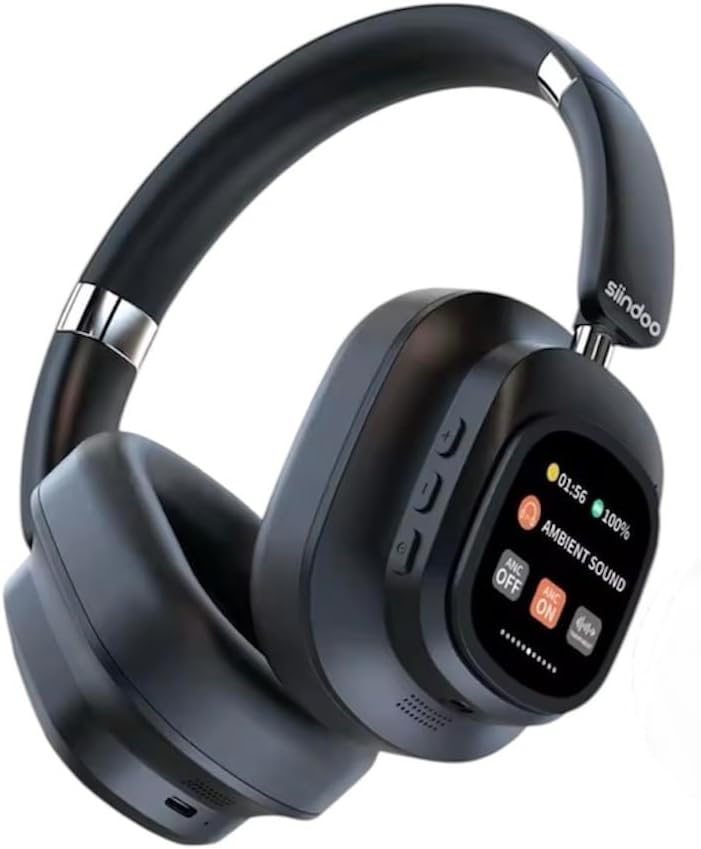
Image: A pair of black Nexbyte JH-ANC930Plus over-ear headphones, showcasing the sleek design and the integrated LED touch screen on the left earcup.
The JH-ANC930Plus headphones feature a robust design with comfortable earcups and an adjustable headband. The left earcup integrates an innovative LED touch screen for easy control of various functions. Physical buttons are also present for essential controls.

Image: A hand holding the magnetic LED touch screen module, detached from the headphone, displaying music playback controls and battery status.
The magnetic touch control LED screen provides a user-friendly interface for managing your audio experience, settings, and more.
Setup
1. Charging the Headphones
Before first use, fully charge your headphones. Connect the supplied Type-C charging cable to the charging port on the headphones and the other end to a USB power adapter (not included) or a computer's USB port.
- Charging Time: Approximately 2-2.5 hours for a full charge.
- Battery Indicator: The LED screen will display the charging status.
2. Powering On/Off
Press and hold the Power button (usually located on one of the earcups) for a few seconds until the LED screen illuminates. To power off, press and hold the Power button again until the screen turns off.
3. Bluetooth Pairing
The JH-ANC930Plus headphones utilize Bluetooth 5.3 for stable wireless connectivity.
- Ensure the headphones are powered on and in pairing mode (indicated by a blinking Bluetooth icon on the LED screen).
- On your device (smartphone, tablet, computer), go to Bluetooth settings and enable Bluetooth.
- Search for available devices. Select "ANC930" or "JH-ANC930Plus" from the list.
- Once connected, the LED screen will show a stable Bluetooth icon.
4. Wired Connection (AUX)
For a wired connection, use the supplied 3.5mm AUX cable. Plug one end into the headphone's audio jack and the other end into your audio source's 3.5mm port. The headphones will automatically switch to wired mode.
Operating Instructions
1. LED Touch Screen Functions

Image: The LED touch screen displaying various icons for functions such as music playback, volume adjustment, ANC mode, equalizer settings, alarm, brightness, language switch, screen lock, date/time, photo capture, and more.
The LED touch screen provides intuitive control over numerous features:
- Music Playback: Play/Pause, Skip Forward/Backward.
- Volume Adjustment: Increase or decrease volume.
- ANC Mode: Toggle between Active Noise Cancellation, Transparency Mode, and ANC Off.
- Equalizer (EQ) Adjustment: Select from various preset audio profiles (Normal, Rock, Pop, Classic, Jazz).
- Language Switch: Choose from 18 language options.
- Alarm Settings: Set alarms directly from the screen.
- Brightness: Adjust screen brightness.
- Date & Time Setting: Configure current date and time.
- Screen Lock: Lock the screen to prevent accidental touches.
- Photo Capture: Control photo capture on a connected device (if supported).
- JJoy Audio QR Code: Scan to download the companion app for additional features. Download JJoy Audio App
2. Active Noise Cancellation (ANC) & Transparency Mode

Image: A visual representation showing how Hybrid Active Noise Cancellation reduces ambient noise, with a waveform comparison of sound before and after ANC activation.
The headphones feature Hybrid Active Noise Cancellation, reducing ambient noise by up to 33dB. Use the ANC mode control on the LED screen to switch between:
- ANC On: Blocks out external noise for an immersive listening experience.
- Transparency Mode: Allows you to hear your surroundings while still enjoying your audio, useful for situational awareness.
- ANC Off: Standard listening mode without noise cancellation.
3. Call Functions
When connected via Bluetooth, you can manage calls directly from your headphones:
- Answer/End Call: Tap the designated area on the touch screen or press the multi-function button.
- Reject Call: Press and hold the designated area or button.
- Voice Assistant: Triple-tap the multi-function button to activate your device's voice assistant (Siri, Google Assistant, etc.).
4. Customisable EQ Settings / Listening Modes

Image: Icons and descriptions for five distinct audio modes: Normal, Rock, Pop, Classic, and Jazz, each with an illustrative background.
Tailor your audio experience with five professional-level EQ presets:
- Normal Mode: Balanced sound profile for general listening.
- Rock Mode: Enhanced bass and treble for rock music.
- Pop Mode: Optimized for vocal clarity and energetic pop tracks.
- Classic Mode: Rich and detailed sound for classical music.
- Jazz Mode: Smooth and mellow tones for jazz.
Select your preferred mode via the EQ adjustment option on the LED touch screen.
5. Comfort and Design Features

Image: Three diagrams illustrating the ergonomic features: earcups that swivel 90 degrees, a foldable design for portability, and an adjustable headband for a custom fit.
The JH-ANC930Plus headphones are designed for extended comfort and portability:
- 90° Swirling Earcups: Earcups can rotate for a comfortable fit and flat storage.
- Foldable Design: Compact folding mechanism for easy storage in the included carrying case.
- Adjustable Headband: Protein leather cushioning on the headband ensures a snug yet comfortable fit for various head sizes.
6. Superior Sound Quality

Image: A man with his eyes closed, wearing the black Nexbyte JH-ANC930Plus headphones, appearing to enjoy the audio, with musical notes overlaid.
Equipped with 40mm drivers, these headphones deliver powerful sound with deep bass and crystal-clear audio across all frequencies, providing a rich and immersive listening experience.
Maintenance
- Cleaning: Use a soft, dry cloth to clean the headphones. Do not use abrasive cleaners or solvents.
- Storage: When not in use, store the headphones in the provided carrying case to protect them from dust and damage.
- Battery Care: To prolong battery life, avoid fully discharging the headphones frequently. Charge them regularly, even if not used for extended periods.
- Avoid Extreme Conditions: Do not expose the headphones to extreme temperatures, humidity, or direct sunlight.
Troubleshooting
| Problem | Possible Cause | Solution |
|---|---|---|
| Headphones won't power on | Low battery | Charge the headphones fully. |
| Cannot pair via Bluetooth | Headphones not in pairing mode; device Bluetooth off; interference | Ensure headphones are in pairing mode. Turn device Bluetooth off/on. Move closer to the device. |
| No sound | Volume too low; incorrect source; loose cable (wired) | Increase volume. Check Bluetooth connection or AUX cable. Ensure correct audio output on device. |
| ANC not working effectively | ANC off; improper fit | Ensure ANC is enabled on the LED screen. Adjust headphones for a snug fit over your ears. |
| LED screen unresponsive | Temporary software glitch; screen lock enabled | Restart the headphones. Check if screen lock is active and disable it. |
Specifications
- Model Name: JH-ANC930Plus
- Brand: Generic (Nexbyte)
- Ear Placement: Over Ear
- Form Factor: Over Ear
- Colour: Black
- Noise Control: Hybrid Noise Cancellation (up to 33dB)
- Driver Size: 40mm
- Impedance: 32 Ohm
- Frequency Response: 20 Hz - 20 kHz (typical range)
- Sensitivity: 108 dB
- Bluetooth Version: 5.3
- Wireless Range: Up to 10 metres
- Battery Capacity: 600mAh
- Playback Time: Up to 70 hours (standard mode), 45 hours (with ANC at 70% volume)
- Charging Time: 2-2.5 hours
- Headphone Jack: 3.5 Millimeter (for wired connection)
- Microphone: Built-in high-definition microphone
- Package Dimensions: 21 x 17.5 x 1 cm
- Item Weight: 300 g
Warranty & Support
For warranty information and customer support, please refer to the documentation provided at the time of purchase or contact your retailer. Keep your proof of purchase for any warranty claims.
Related documentsJh-anc930plus


Ask a question about this manual
Ask about setup, troubleshooting, compatibility, parts, safety, or missing instructions. Manuals+ will review the question and use this page’s manual context to help answer it.