
1. Overview
The DODO MEKIA Automatic Liquid Soap Dispenser (Model P4D) provides a touchless and hygienic solution for dispensing liquid soap. This rechargeable unit features a 17oz (500ml) transparent tank, 4 adjustable output levels, and an IPX5 waterproof rating, making it suitable for various environments such as bathrooms and kitchens. The integrated LED screen displays real-time battery percentage and selected dispensing level for convenient monitoring.
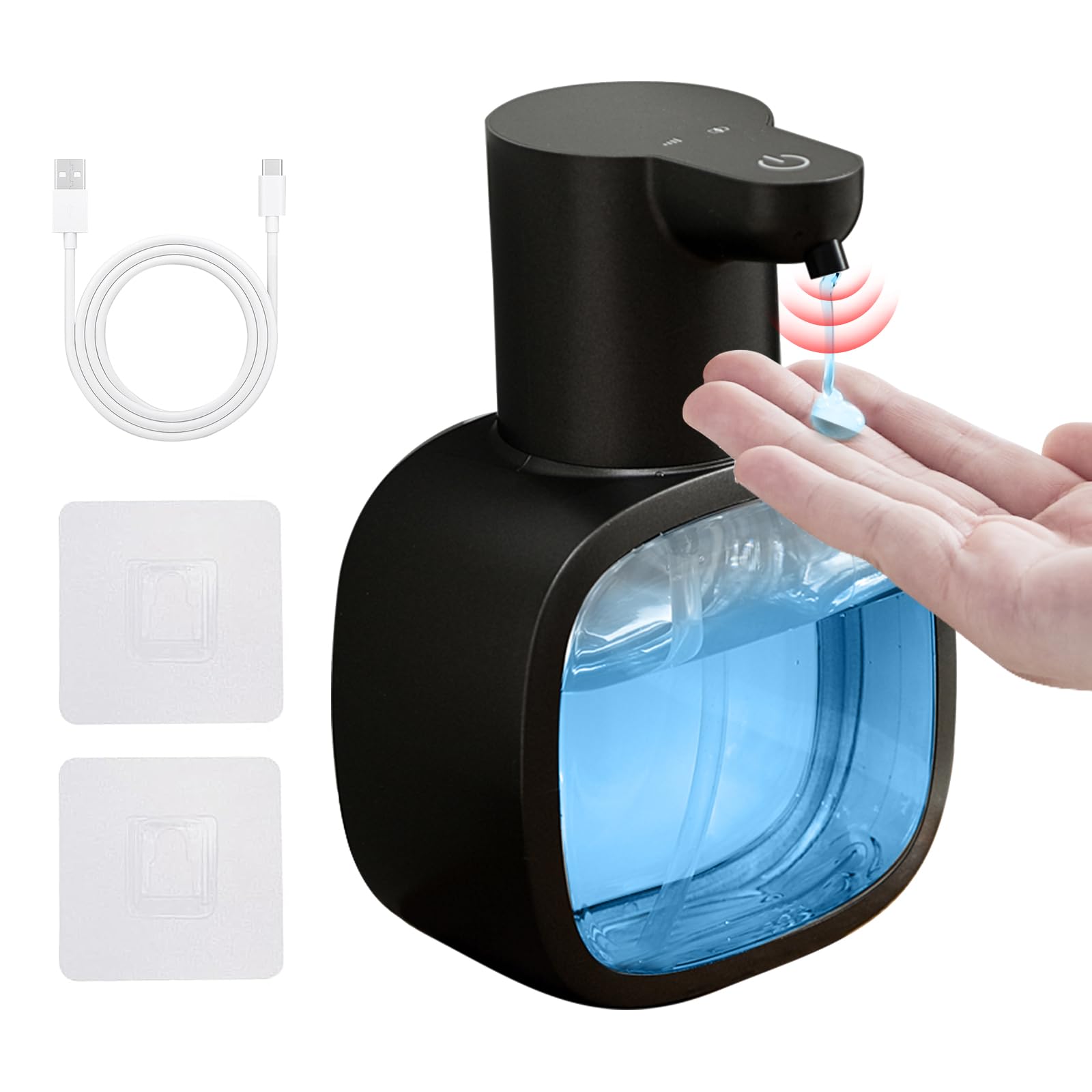
Image 1.1: DODO MEKIA Automatic Liquid Soap Dispenser, Black liquid model.
2. Product Features
- Real-Time Battery & Volume Display: An LED screen shows precise battery percentage (0-100%) and selected output level (1-4 modes), eliminating guesswork.
- 17oz Transparent Tank & Multi-Liquid Compatibility: The 500ml visible container reduces refill frequency and allows instant liquid level monitoring. Compatible with various liquid soaps, shampoos, and dish soaps.
- 4-Level Adjustable Output + Anti-Clog Self-Cleaning: Customize dispensing time (0.3s, 0.8s, 1.5s, 2s) to control soap volume. An automatic self-cleaning function flushes internal pipes weekly to prevent residue buildup.
- 90-Day Rechargeable Battery: Powered by a USB-C rechargeable battery, offering approximately 90 days of use per charge. No disposable batteries are required.
- IPX5 Waterproof & Space-Saving Installation: IPX5-rated body resists splashes and humidity. Can be installed using drill-free wall stickers or placed on countertops.
3. Package Contents
Verify that all items are present in your package:
- 1 x DODO MEKIA Automatic Liquid Soap Dispenser (Model P4D)
- 1 x USB-C Charging Cable
- 2 x Drill-free Wall Stickers (for wall-mounting option)
- 1 x User Manual
4. Setup Instructions
Follow these steps for initial setup of your soap dispenser:
- Charge the Dispenser:
Before first use, fully charge the dispenser using the provided USB-C cable. The battery indicator on the LED screen will show charging progress.

Image 4.1: Connect the USB-C charging cable to the port on the dispenser.
- Fill the Soap Tank:
Twist the top section of the dispenser counter-clockwise to detach it from the transparent liquid tank. Pour your desired liquid soap into the tank. Ensure not to overfill. Reattach the top section by twisting clockwise until secure.

Image 4.2: Open the dispenser and fill with liquid soap. The large opening facilitates easy pouring.
- Power On:
Press and hold the power button on the top of the dispenser for 3 seconds until the display lights up.
- Placement:
Place the dispenser on a flat countertop or use the provided drill-free wall stickers for wall mounting. Ensure the sensor area is clear.

Image 4.3: The dispenser can be used on a countertop or mounted on a wall.
Video 4.1: Official DODO MEKIA video demonstrating the automatic soap dispenser's features and basic operation.
5. Operating Instructions
- Dispensing Soap:
Place your hand under the dispenser's nozzle. The infrared sensor will detect your hand and automatically dispense the set amount of liquid soap.
- Adjusting Soap Volume:
Briefly press the power button to cycle through the 4 dispensing levels (0.3s, 0.8s, 1.5s, 2s). The LED display will indicate the currently selected level (1-4 modes).

Image 5.1: The LED display shows the current dispensing level and battery status.
- Checking Battery Level:
The LED screen continuously displays the battery percentage (0-100%) for easy monitoring.
- Power Off:
To turn off the dispenser, press and hold the power button until the display lights turn off.
6. Maintenance
- Refilling Soap:
When the liquid level is low, refill the tank as described in the Setup section (Step 4.2). The transparent tank allows for easy visual inspection.
- Cleaning the Dispenser:
Wipe the exterior of the dispenser with a damp cloth. Do not submerge the unit in water due to its IPX5 rating, which protects against splashes but not full immersion.
Image 6.1: The IPX5 waterproof rating ensures protection against water splashes.
- Activating Self-Cleaning Function:
To prevent clogging and extend the machine's lifespan, the dispenser has an automatic self-cleaning feature that flushes internal pipes weekly. To manually activate, fill the tank with warm water and press the on/off button three times. The unit will pump water for 10 seconds. Press the button again to exit.
7. Troubleshooting
If you encounter issues with your DODO MEKIA Automatic Liquid Soap Dispenser, refer to the following table:
| Problem | Possible Cause | Solution |
|---|---|---|
| Dispenser does not turn on. | Low battery or not charged. | Charge the dispenser fully using the USB-C cable. |
| No soap dispenses. |
|
|
| Soap dispenses too little/much. | Incorrect dispensing level selected. | Adjust the soap volume by briefly pressing the power button to cycle through levels. |
| Leakage around the tank. | Tank not properly sealed or overfilled. | Ensure the top section is securely twisted onto the tank. Do not overfill the tank. |
8. Specifications
| Feature | Detail |
|---|---|
| Brand | DODO MEKIA |
| Model Number | P4D |
| Color | Black |
| Liquid Volume | 17oz / 500ml |
| Product Dimensions (L x W x H) | 4.53" x 3.66" x 7.09" (11.5cm x 9.3cm x 18cm) |
| Material | ABS, BPA Free |
| Waterproof Rating | IPX5 |
| Charging Type | USB-C Rechargeable |
| Battery Life | Approx. 90 days per charge |
| Dispensing Levels | 4 (0.3s, 0.8s, 1.5s, 2s) |

Image 8.1: Detailed product dimensions.
9. Warranty and Support
DODO MEKIA products are designed for reliability and performance. For specific warranty information, please refer to the documentation included with your purchase or contact DODO MEKIA customer support. Keep your purchase receipt as proof of purchase for any warranty claims.
For technical assistance or customer service inquiries, please visit the official DODO MEKIA website or contact their support team through the retailer where the product was purchased.