
Introduction
This manual provides instructions for the DODO MEKIA P4D Automatic Liquid Soap Dispenser. This touchless, rechargeable dispenser features a 17oz/500ml capacity, 4-level adjustable output, IPX5 waterproofing, and a real-time battery and volume display. It is designed for convenient use in various settings such as bathrooms, kitchens, offices, and more.
Setup
- Charging the Device:
The dispenser is powered by a USB-C rechargeable lithium battery. Connect the provided USB-C charging cable to the charging port located at the back of the device. A full charge typically lasts up to 90 days. The LED screen displays the battery percentage (0-100%).

Image: The Type-C charging port on the top rear of the dispenser, with a charging cable connected.
- Filling the Dispenser:
Turn the top section of the dispenser counterclockwise to remove it from the liquid reservoir. Pour your desired liquid soap (hand soap, dish soap, shampoo, shower gel, etc.) into the 17oz/500ml transparent tank. Ensure not to overfill. Reattach the top section by turning it clockwise until secure.
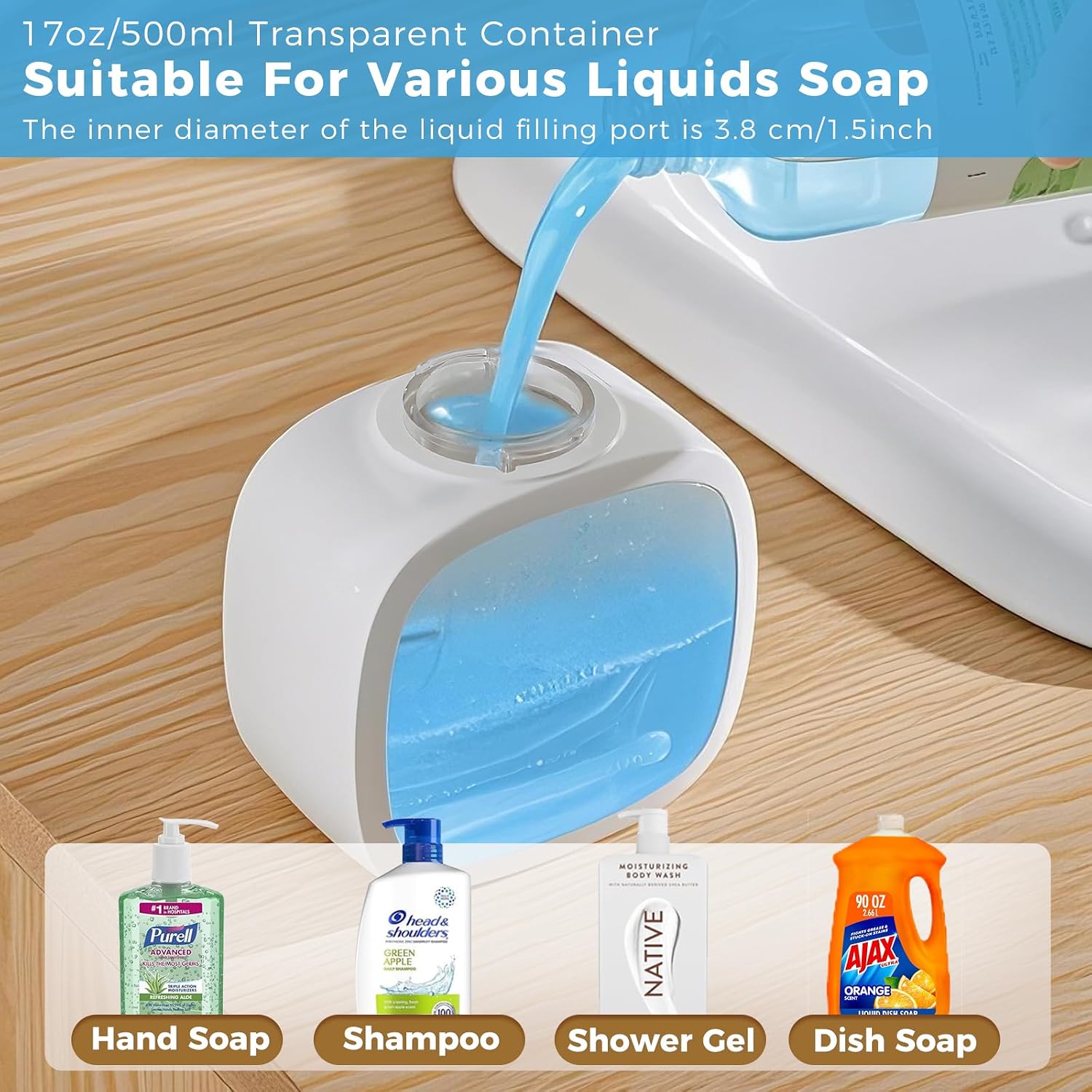
Image: A hand pouring blue liquid soap into the transparent reservoir of the dispenser.

Image: A circular diagram illustrating the steps for charging, removing the reservoir, adding liquid soap, installing the reservoir, touching the switch for 3 seconds, and getting liquid soap.
- Placement and Installation:
The dispenser can be placed on a countertop or mounted on a wall using the provided drill-free adhesive stickers. The IPX5 waterproof rating ensures it can withstand splashes and humidity, making it suitable for various environments.

Image: The dispenser is shown both on a wooden countertop and mounted on a white tiled wall using an adhesive hook.
Operating Instructions
- Power On/Off:
Press and hold the power button (indicated by a power symbol) on the top of the dispenser for 3 seconds to turn it on or off.
- Adjusting Dispensing Volume:
Tap the touch control switch on the top of the dispenser to cycle through 4 adjustable output levels (0.3s, 0.8s, 1.5s, 2s). The LED screen will display the selected level (1-4 modes).

Image: A close-up of the dispenser's top panel, showing the power button, battery indicator, liquid level indicator, and four dispensing levels with corresponding soap amounts.
- Automatic Dispensing:
Place your hand under the sensor area of the dispenser. The touchless sensor will detect your hand and automatically dispense the selected amount of liquid soap.

Image: An adult and child washing hands using the touchless dispenser, with insets showing the real-time display, 17oz capacity, 90-day charge, and IPX5 waterproof rating.
Maintenance
- Self-Cleaning System:
To prevent residue buildup and extend the machine's lifespan, the dispenser features an anti-clog self-cleaning system. If liquid does not appear, fill the reservoir with warm water and press the on/off button three times to enter cleaning mode. The machine will pump liquid for 10 seconds. Press the switch again to exit cleaning mode.

Image: A diagram showing the dispenser's dimensions and instructions for activating the self-cleaning mode by pressing the on/off button three times.
- Regular Cleaning:
Wipe the exterior of the dispenser with a soft, damp cloth. Avoid using abrasive cleaners or submerging the entire unit in water, despite its IPX5 rating, to protect internal components.
Troubleshooting
- Dispenser not working:
Check the battery level on the LED display. If low, recharge the device using the USB-C cable. Ensure the top section is securely twisted onto the reservoir.
- No soap dispensed:
Verify that the reservoir contains enough liquid soap. If the liquid is too thick, it may need to be diluted slightly with water. Activate the self-cleaning mode to clear any potential clogs.
- Inconsistent dispensing volume:
Adjust the dispensing level using the touch control switch on the top of the device. Ensure the sensor area is clear of obstructions.
Specifications
| Feature | Detail |
|---|---|
| Brand | DODO MEKIA |
| Model Number | P4D |
| Color | White |
| Material | Plastic |
| Product Dimensions | 4.53"L x 3.66"W x 7.09"H |
| Liquid Volume | 500 Milliliters (17oz) |
| Item Weight | 13.1 ounces |
| Battery | 1 Nonstandard Battery (included), USB-C rechargeable |
| Waterproof Rating | IPX5 |
Official Product Videos
DODO MEKIA Automatic Soap Dispenser Overview
Video: An official overview of the DODO MEKIA automatic soap dispenser, showcasing its design and functionality.
Classy Automatic Soap Dispenser Demonstration
Video: A demonstration highlighting the aesthetic and functional aspects of the automatic soap dispenser.
Automatic Soap Dispenser in Kitchen Use
Video: A practical demonstration of the automatic soap dispenser's use in a kitchen setting.
Warranty and Support
Specific warranty information is not provided in the product details. For any support inquiries or further information, please visit the official DODO MEKIA store on Amazon: DODO MEKIA Store.