
1. Introduction
This manual provides detailed instructions for the installation, operation, and maintenance of your 36V Throttle with Power Lock and Light Switch. This throttle is specifically designed for use with Gotrax Flex Electric Scooters and Hoverfly Z5 Electric Scooters. Please read this manual thoroughly before installation and use to ensure proper function and safety.
2. Product Overview
The 36V Throttle is an essential component for controlling the speed and power of your compatible electric scooter. It features a robust design with a built-in power lock for security and a light switch for convenient control of your scooter's lighting system. The throttle is equipped with a highly sensitive sensor for quick response and stable power delivery, ensuring effortless cruising and confident climbing.
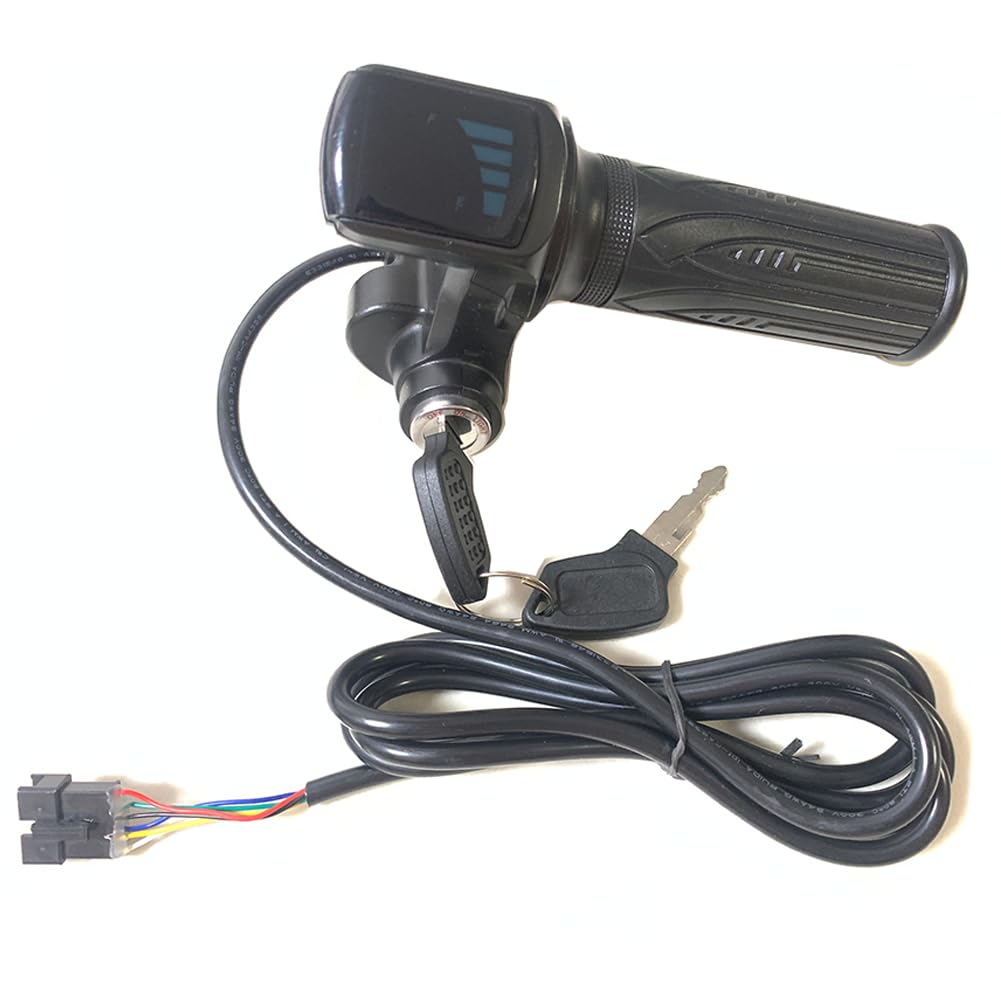
Image: The 36V Throttle with Power Lock and Light Switch, including the main throttle unit and two keys.
3. What's in the Box
- 1 x 36V Throttle with Power Lock and Light Switch
- 2 x Keys for Power Lock
- 1 x Matching Grip
4. Specifications
| Feature | Description |
|---|---|
| Material | ABS Plastic |
| Cable Length | Approximately 160cm (62.9 inches) including connector |
| Connector Type | Black 6-PIN with 6 wires (red, green, black, blue, yellow, white) |
| Key Switch Positions | Three positions: OFF, ON, LIGHT |
| Compatibility | Gotrax Flex Electric Scooter, Hoverfly Z5 Electric Scooter |
| Item Weight | 220 Grams |
5. Setup and Installation
Installation of the 36V Throttle is designed to be straightforward, often referred to as 'plug and play' for compatible models. No need to distinguish the color and sequence of the 6 wires as it is an original factory throttle replacement.
5.1 Identifying Components
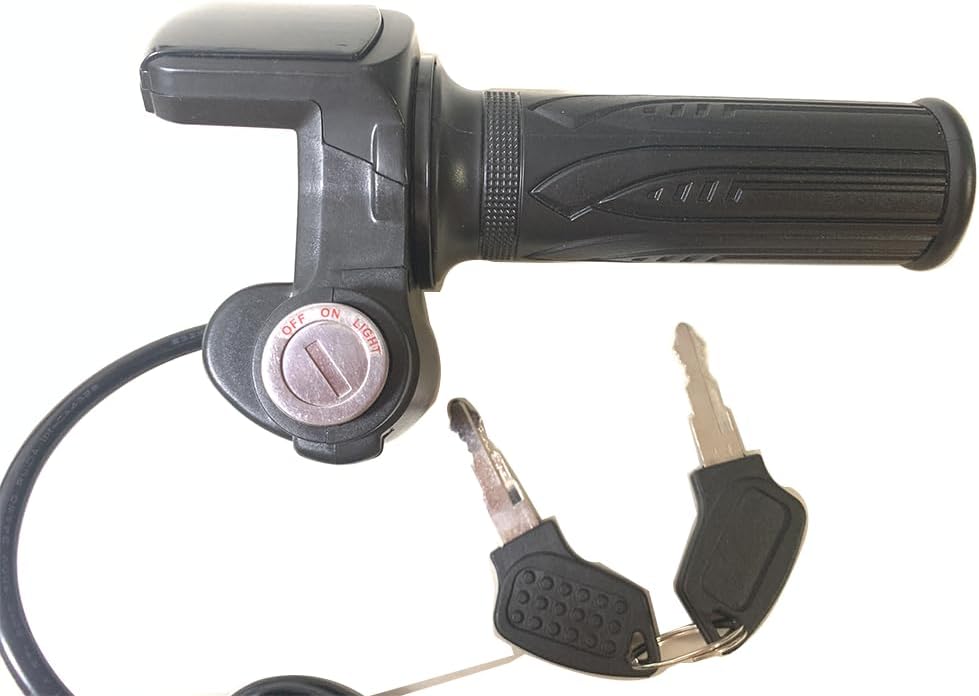
Image: The throttle unit showing the main grip, key switch, and connected cable with the 6-pin connector.

Image: A detailed view of the black 6-pin connector with its colored wires (red, green, black, blue, yellow, white).
5.2 Compatibility Check
Ensure your scooter is a Gotrax Flex Electric Scooter or Hoverfly Z5 Electric Scooter for proper compatibility.

Image: The 36V throttle installed on the handlebars of a Gotrax Flex Electric Scooter.

Image: The 36V throttle installed on the handlebars of a Hoverfly Z5 Electric Scooter.
5.3 Installation Steps
- Carefully remove the old throttle and grip from your scooter's handlebar.
- Slide the new throttle unit onto the right side of the handlebar.
- Connect the 6-pin connector from the new throttle to the corresponding port on your scooter's wiring harness. Ensure a secure connection.
- Slide the matching grip onto the left side of the handlebar.
- Secure both the throttle and grip in place, ensuring they do not rotate freely but allow for smooth throttle operation.
5.4 Installation Video
Video: This video demonstrates the assembly and installation process of a 36V Half-Twist Ebike Throttle, showing how to attach the grips and connect the wiring.
6. Operating Instructions
The throttle features a key switch with three distinct positions to control your scooter's power and lighting.
6.1 Key Switch Positions
- OFF: The scooter's power is completely off. Remove the key to prevent unauthorized use.
- ON: The scooter's power is activated, allowing for throttle operation.
- LIGHT: The scooter's power is activated, and the headlights (if connected and supported by your scooter's system) are turned on.

Image: A close-up view of the key switch, clearly showing the 'OFF', 'ON', and 'LIGHT' positions for power and lighting control.
6.2 Throttle Operation
Once the key switch is in the 'ON' or 'LIGHT' position, gently twist the throttle grip towards you to accelerate. Release the grip to decelerate. The throttle is designed for quick and responsive control, providing a smooth riding experience.
6.3 General Operation Video
Video: This video provides an overview of a 36V E-Scooter Throttle Handle, demonstrating its features such as quick response and stable power delivery, and showing it in use on an electric scooter.
7. Maintenance
To ensure the longevity and optimal performance of your 36V Throttle, follow these maintenance guidelines:
- Cleaning: Regularly wipe down the throttle and grips with a damp cloth to remove dirt and grime. Avoid using harsh chemicals or abrasive cleaners.
- Connection Check: Periodically inspect the 6-pin connector and wiring for any signs of wear, damage, or loose connections. Ensure all connections are secure.
- Key Switch: Keep the key switch free from debris. If the key becomes difficult to turn, apply a small amount of graphite lubricant.
- Storage: If the scooter is stored for an extended period, ensure the throttle is in the 'OFF' position and the key is removed.
8. Troubleshooting
If you encounter issues with your 36V Throttle, consider the following common troubleshooting steps:
- Throttle Not Responding:
- Check if the key is fully inserted and turned to the 'ON' or 'LIGHT' position.
- Inspect the 6-pin connector for a secure connection.
- Ensure your scooter's battery is charged and properly connected.
- Lights Not Turning On:
- Verify the key switch is in the 'LIGHT' position.
- Check the scooter's wiring to the lights for any disconnections or damage.
- Intermittent Power:
- Examine all wiring and connectors for loose contacts or corrosion.
- Ensure the throttle grip moves smoothly without obstruction.
If these steps do not resolve the issue, it may indicate a more complex problem with the throttle or your scooter's electrical system. Professional assistance may be required.
9. Important Safety Information
- Always ensure the scooter is powered off and the key is removed before performing any maintenance or adjustments.
- Do not attempt to modify the throttle or its wiring, as this may void any potential warranty and could lead to malfunction or injury.
- Keep the throttle and electrical connections dry to prevent short circuits and damage.
- Always wear appropriate safety gear when operating an electric scooter.
10. Warranty and Support
No specific warranty information is provided for this product. For any warranty inquiries, technical support, or replacement parts, please contact the seller directly through your purchase platform.