
1. Introduction
The LitONES H-02 Premium LED Desk Lamp is designed to provide soft, eye-friendly illumination for various tasks, including computer work, reading, studying, and video conferencing. Its advanced optical structure minimizes eye strain and offers extensive customization options for brightness and color temperature.
This manual provides detailed instructions for setting up, operating, and maintaining your desk lamp to ensure optimal performance and longevity.
2. What's in the Box
- LED Desk Lamp Unit (with integrated arm and light panel)
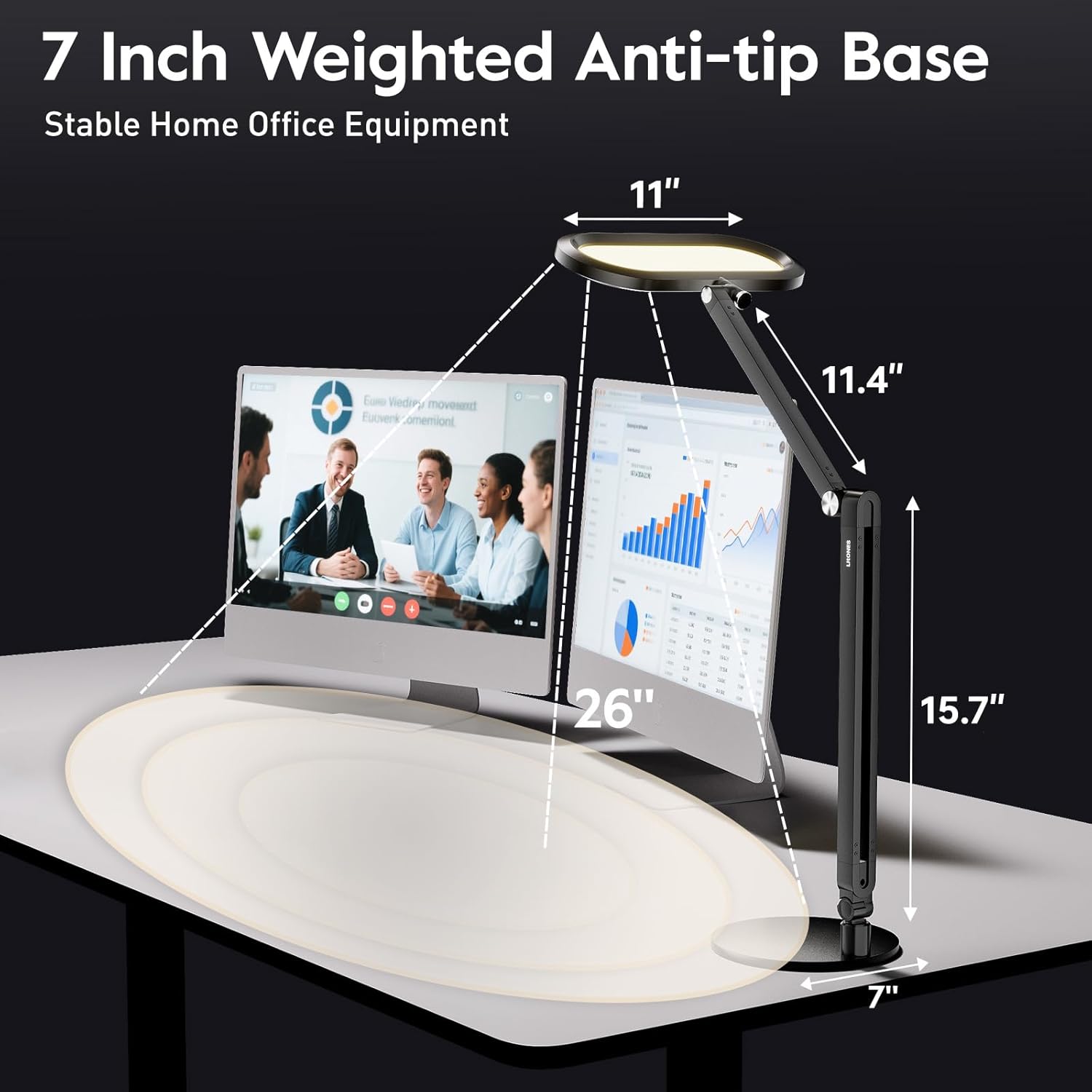
- Weighted Anti-tip Base
- Knob Remote Control
- Power Adapter (12V 1.5A)
- Power Cable
- Assembly Screw
- Hex Key (for assembly)
3. Setup and Assembly
Follow these steps to assemble your LitONES H-02 Desk Lamp:
- Attach the Lamp Arm to the Base: Align the bottom of the lamp arm with the hole in the weighted anti-tip base. Insert the provided screw through the base and into the arm. Use the hex key to tighten the screw securely.
- Connect the Power Adapter: Plug the power cable into the DC input port located at the back of the lamp base. Connect the power adapter to a standard electrical outlet.
- Position the Lamp: Adjust the flexible swing arm and the light panel to your desired height and angle. The lamp features four premium damping joints for smooth and stable positioning.


4. Operating Instructions
4.1. Power On/Off
- Touch Buttons: Long press the power button on the lamp's light panel for 1.5 seconds to turn on or off.
- Knob Remote: Short press the power button on the knob remote to turn the lamp on or off.
4.2. Adjusting Brightness
- Touch Buttons: Use the '+' and '-' buttons on the lamp's light panel to adjust brightness (10 levels, 1%-100%).
- Knob Remote: Rotate the knob to achieve stepless dimming (1%-100%).
4.3. Adjusting Color Temperature
- Touch Buttons: Short press the color temperature button on the lamp's light panel to cycle through 5 color temperatures (2700K–6500K).
- Knob Remote: Press and rotate the knob to adjust the color temperature steplessly (2700K–6500K).
4.4. Meeting Mode & Memory Function
- Meeting Mode: Short press the meeting mode button on the lamp's light panel or knob remote to activate a preset meeting lighting.
- Save Favorite Setting: Long press the meeting mode button for 5 seconds until the indicator blinks 3 times to save your current light setting as the favorite meeting mode. The lamp will remember your last used brightness and color temperature settings when turned off and on.

5. Key Features
- Eye-Caring 3D Ambient Lighting: Features a unique combination of 3D ambient light, diffused light, and edge-lit design to reduce harsh brightness contrasts and minimize eye strain.
- Multi-Mode Lighting: Offers 50 adjustable modes, 5 color temperatures (2700K–6500K), and 10 brightness levels (1%–100%) for versatile use.
- Stylish Knob Remote: Provides seamless, hands-free adjustment of brightness and color temperature without needing to reach the lamp directly.
- Modern Aesthetics & Quality Build: Crafted with a 3.3 lb metal base for stability and an aluminum-zinc alloy body. The 11-inch wide lighting panel uses 126 high-CRI (≥95) LED beads for exceptional light quality.
- Adjustable Arm: Four premium damping joints allow the swing-arm to extend up to 33.3 inches and rotate freely for precise multi-angle lighting.
- Flicker-Free & Glare-Free: Designed to eliminate screen glare and flickering, making it ideal for long hours of use, video calls, and content creation.


6. Specifications
| Feature | Detail |
|---|---|
| Model Number | H-02 |
| Brand Name | LitONES |
| Light Source Type | LED (126 high-CRI beads) |
| Color Temperature | 2700K–6500K (5 levels, stepless adjustment) |
| Brightness Levels | 1%–100% (10 levels, stepless dimming) |
| Control Method | Knob Remote, Touch Buttons |
| Material Type | Aluminum-zinc Alloy, Metal |
| Item Weight | 5.7 Pounds |
| Product Dimensions | 17"D x 8.6"W x 3"H |
| Power Source | Corded Electric (12V 1.5A adapter) |
| Wattage | 18 watts |
| Lifespan | Up to 100,000 hours |
7. Maintenance
To ensure the longevity and optimal performance of your LitONES H-02 Desk Lamp, follow these maintenance guidelines:
- Cleaning: Gently wipe the lamp's surfaces with a soft, dry cloth. Avoid using abrasive cleaners, solvents, or harsh chemicals, as these can damage the finish or electronic components.
- Dust Removal: Regularly dust the light panel and arm to prevent accumulation that could affect light output.
- Power Cord Care: Ensure the power cord is not kinked, pinched, or placed under heavy objects. Always unplug the lamp from the power outlet before cleaning or if it will not be used for an extended period.
- Remote Control Batteries: Replace the AAA batteries in the knob remote control as needed to maintain functionality.
8. Troubleshooting
If you encounter any issues with your LitONES H-02 Desk Lamp, please refer to the following common troubleshooting steps:
- Lamp does not turn on:
- Check if the power adapter is securely plugged into both the lamp and the wall outlet.
- Ensure the wall outlet is functional by testing it with another device.
- Knob remote is unresponsive:
- Check and replace the AAA batteries in the remote control.
- Ensure there are no obstructions between the remote and the lamp.
- Light output is inconsistent or flickering:
- Verify that the power connection is stable.
- If the issue persists, contact customer support.
For further assistance, please refer to the Warranty and Support section.
9. Warranty and Support
The LitONES H-02 Premium LED Desk Lamp comes with a 36-month manufacturer's warranty, ensuring peace of mind regarding product quality and performance.
For any questions, technical support, or warranty claims, please contact LitONES customer service. Our dedicated support team is available 24/7 to assist you.
You can typically find contact information on the product packaging or the official LitONES website.