
1. Introduction
This manual provides essential information for the safe and efficient operation of your LEENON 25L/24h Electric Dehumidifier. Please read it thoroughly before using the appliance and retain it for future reference. This dehumidifier is designed to remove excess moisture from the air, helping to prevent mold, mildew, and unpleasant odors, creating a more comfortable and healthy indoor environment.
2. Safety Instructions
- Ensure the power supply matches the voltage specified on the rating label.
- Do not operate the unit with a damaged power cord or plug.
- Keep the dehumidifier upright during operation and transport.
- Do not block the air inlet or outlet. Maintain at least 20 cm clearance around the unit.
- Do not insert objects into the unit's openings.
- Unplug the unit before cleaning or performing any maintenance.
- This appliance is not intended for use by persons (including children) with reduced physical, sensory or mental capabilities, or lack of experience and knowledge, unless they have been given supervision or instruction concerning use of the appliance by a person responsible for their safety.
- Children should be supervised to ensure that they do not play with the appliance.
3. Product Overview
3.1 Components
The LEENON dehumidifier efficiently removes moisture from your environment. It features a high-efficiency compressor and a digital display for easy monitoring and control.

Image: The LEENON dehumidifier highlighting its high efficiency in moisture removal and coverage area of 125m³/50m².
3.2 Water Tank
The unit includes a 2.5-liter water tank for collecting condensed moisture. The tank is removable and visible for easy monitoring of the water level.

Image: Internal view of the dehumidifier, illustrating the 2.5-liter water tank and the dehumidification process.
3.3 Control Panel
The easy-to-control touch panel allows you to manage all functions of the dehumidifier, including power, mode selection, speed, timer, and child lock.

Image: Close-up of the dehumidifier's control panel, showing the digital display and various function buttons.
4. Setup
- Unpacking: Carefully remove the dehumidifier from its packaging. Retain the packaging for future storage or transport.
- Placement: Place the unit on a firm, level surface in an area where humidity control is desired. Ensure there is at least 20 cm of space around the air inlet and outlet for proper airflow. Avoid placing it near heat sources or in direct sunlight.
- Power Connection: Plug the power cord into a grounded electrical outlet. Ensure the outlet's voltage matches the unit's requirements.
- Initial Operation: Allow the unit to stand upright for at least 2 hours before first use if it has been tilted during transport.
5. Operating Instructions
5.1 Power On/Off
Press the Power button on the control panel to turn the unit on or off.
5.2 Setting Humidity Level
In Dehumidification (DEHU) mode, you can set the desired humidity level between 30% and 80% relative humidity. The unit will automatically operate to maintain this level, turning off when the target is reached and restarting if humidity rises.
5.3 Operating Modes
Press the Mode button to cycle through the available operating modes:
- DEHU (Dehumidification) Mode: The unit operates to reach and maintain your set humidity level.
- DRY (Clothes Drying) Mode: This mode is designed for quickly drying laundry. The unit operates continuously at high fan speed to remove moisture from clothes.
- CONT (Continuous) Mode: The unit operates continuously regardless of the ambient humidity level. This is useful for severe humidity conditions.

Image: The dehumidifier operating in Dry Mode, effectively drying clothes on a rack.
5.4 Fan Speed
Press the Speed button to adjust the fan speed (Low, High). This option may not be available in all operating modes.
5.5 Timer Function
The 24-hour timer allows you to set a specific time for the unit to turn on or off automatically. Press the Timer button and use the adjustment buttons to set the desired duration.
5.6 Child Lock
Activate the child lock feature by pressing and holding the Lock button for a few seconds. This prevents accidental changes to settings.
6. Drainage Options
Your dehumidifier offers two methods for water drainage:
6.1 Manual Drain (Water Tank)
Condensed water collects in the removable 2.5-liter water tank. When the tank is full, the unit will automatically shut off, an alarm will sound, and a full water icon will flash on the display, indicating that the tank needs to be emptied.
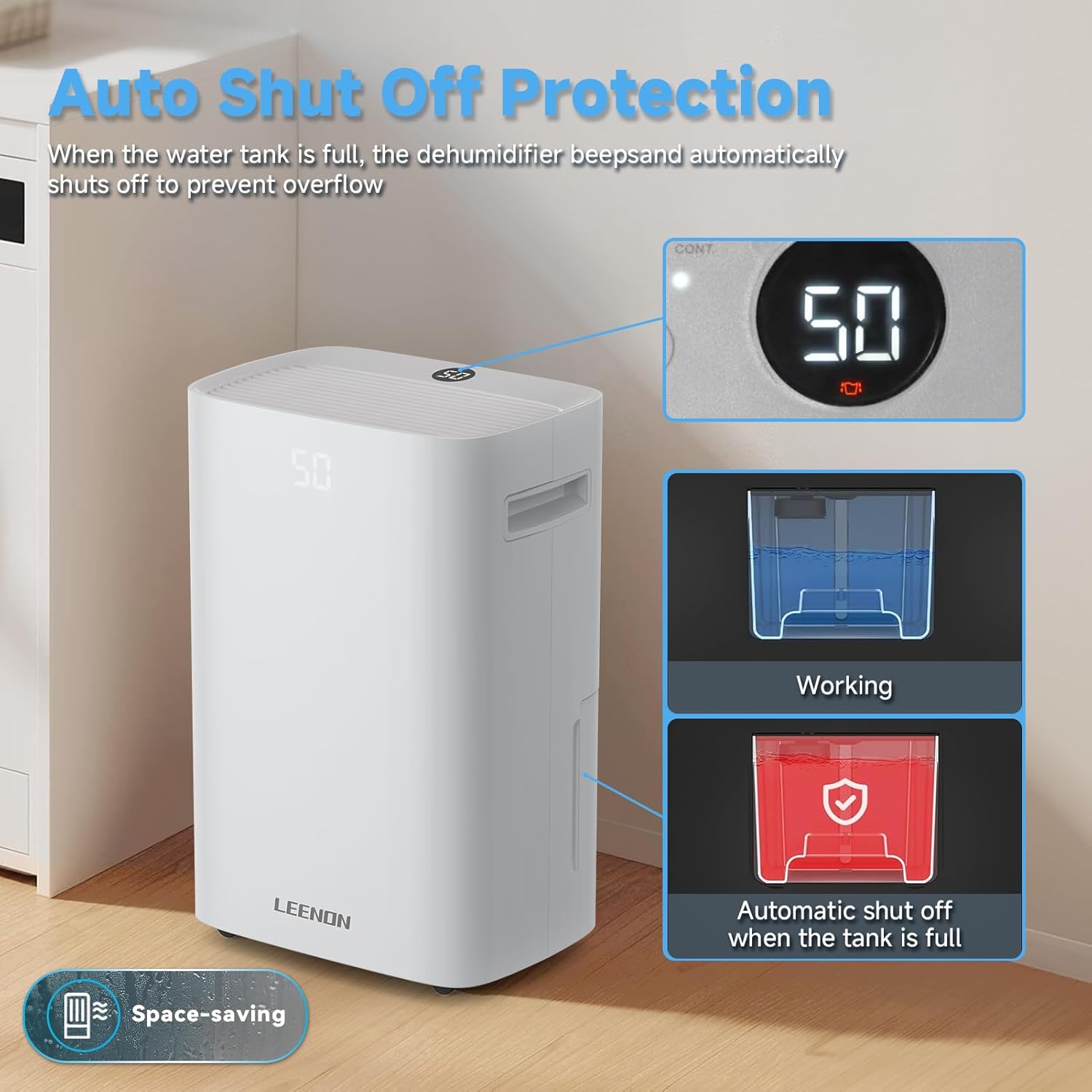
Image: The dehumidifier demonstrating its auto shut-off protection when the water tank is full, showing the display and tank status.
6.2 Continuous Drain
For continuous, hands-free operation, you can connect a drain hose (included) to the continuous drainage outlet. This allows water to drain directly to a floor drain or suitable receptacle, eliminating the need to manually empty the water tank.
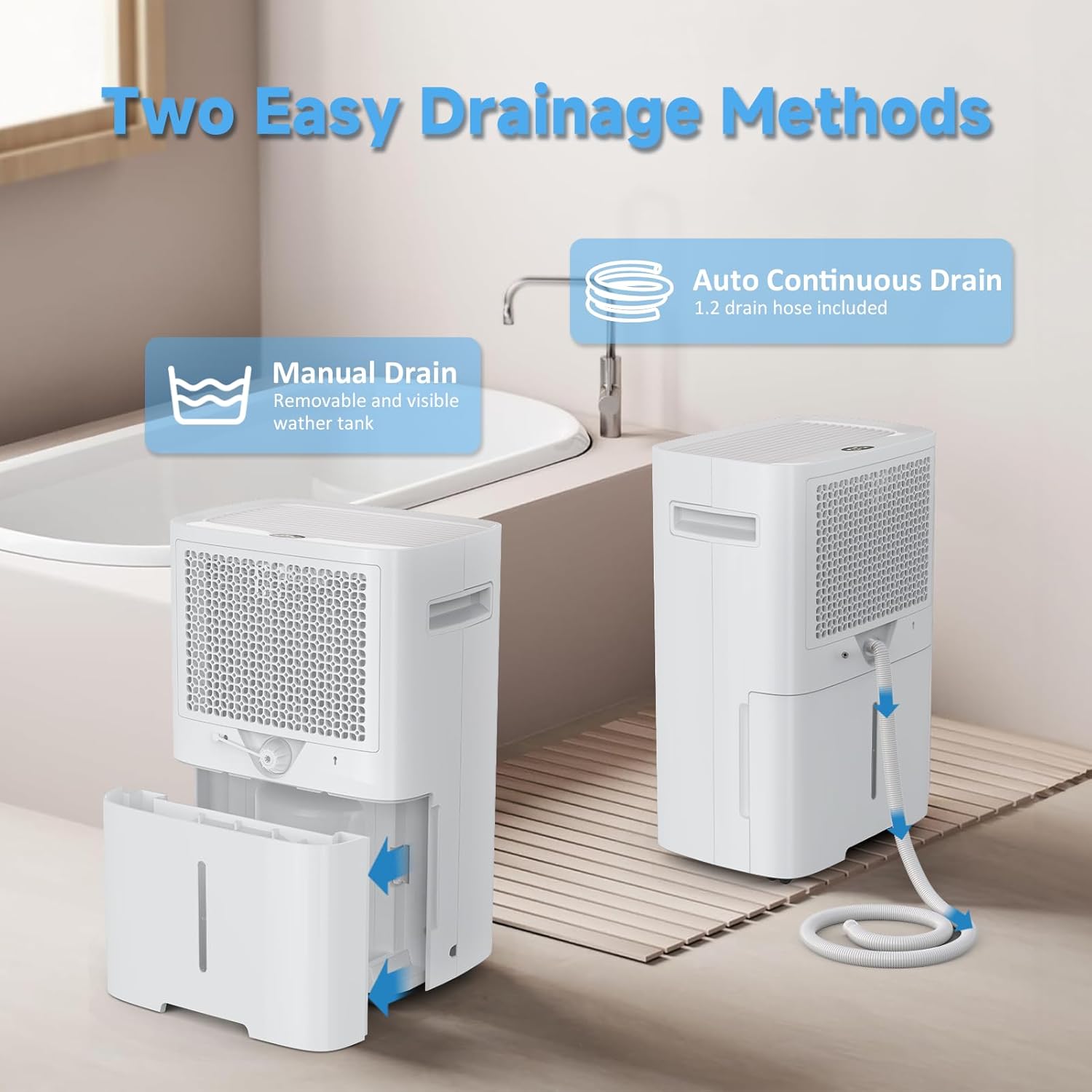
Image: Illustration of the two easy drainage methods: manual removal of the water tank and continuous drainage via a hose.
7. Maintenance
7.1 Cleaning the Air Filter
Regularly clean the air filter to ensure optimal performance. A dirty filter can reduce efficiency and airflow.
- Turn off the unit and unplug it from the power outlet.
- Remove the air filter (refer to the product diagram for location).
- Clean the filter with a vacuum cleaner or wash it with warm, soapy water. Rinse thoroughly and allow it to air dry completely before reinserting.
7.2 Cleaning the Unit Exterior
Wipe the exterior of the dehumidifier with a soft, damp cloth. Do not use harsh chemicals or abrasive cleaners.
7.3 Storage
If storing the unit for an extended period, ensure the water tank is empty and clean. Clean the air filter and store the unit in an upright position in a cool, dry place, away from direct sunlight.
8. Troubleshooting
| Problem | Possible Cause | Solution |
|---|---|---|
| Unit does not turn on | No power supply; Power cord not plugged in; Water tank full or incorrectly placed. | Check power connection; Empty and correctly reinsert water tank. |
| No water collected | Ambient humidity too low; Temperature too low; Air filter clogged; Unit in fan-only mode. | Ensure humidity is above 30%; Clean air filter; Select appropriate dehumidification mode. |
| Unit is noisy | Unit not on a level surface; Air filter clogged; Obstruction in fan. | Place on a flat surface; Clean air filter; Check for obstructions. |
| Poor dehumidification | Doors/windows open; Room size too large; Air filter clogged; Temperature too low. | Close doors/windows; Ensure unit is suitable for room size; Clean air filter. |
If the problem persists after attempting these solutions, please contact customer support.
9. Specifications
| Feature | Specification |
|---|---|
| Brand | LEENON |
| Model Name | PD08A-20 |
| Color | White |
| Product Dimensions (D x W x H) | 32 x 22.5 x 49 cm |
| Item Weight | 13.03 kg |
| Dehumidification Capacity | 25 Liters/24h (at 35°C/90% RH) |
| Water Tank Volume | 2.5 Liters |
| Recommended Floor Area | Up to 50 m² (125 m³) |
| Material | Plastic |
| Number of Speeds | 3 |
| Special Features | Automatic Humidity Control, 3 Operating Modes, Dual Drainage, Digital Display with Timer, Child Lock |
10. Warranty and Support
For warranty information or technical support, please refer to the warranty card included with your product or contact the retailer where the product was purchased. Keep your purchase receipt as proof of purchase.