
Introduction
This manual provides detailed instructions for the installation, operation, and maintenance of your Blaupunkt Orlando 750 6.9" Touchscreen Double DIN Bluetooth AM/FM Receiver and the accompanying Blaupunkt BPS-E683 6x8" 3-Way Car Speakers with speaker wire. Please read this manual thoroughly before using the product to ensure proper functionality and to prevent damage.
Product Overview
Blaupunkt Orlando 750 Receiver
The Orlando 750 is a double DIN car stereo receiver featuring a 6.9-inch touchscreen display. It supports AM/FM radio, Bluetooth for hands-free calling and audio streaming, and offers seamless integration with Wireless Apple CarPlay and Wireless Android Auto. Additional inputs include USB, Aux-in, SD Card, and connections for rearview and front cameras.
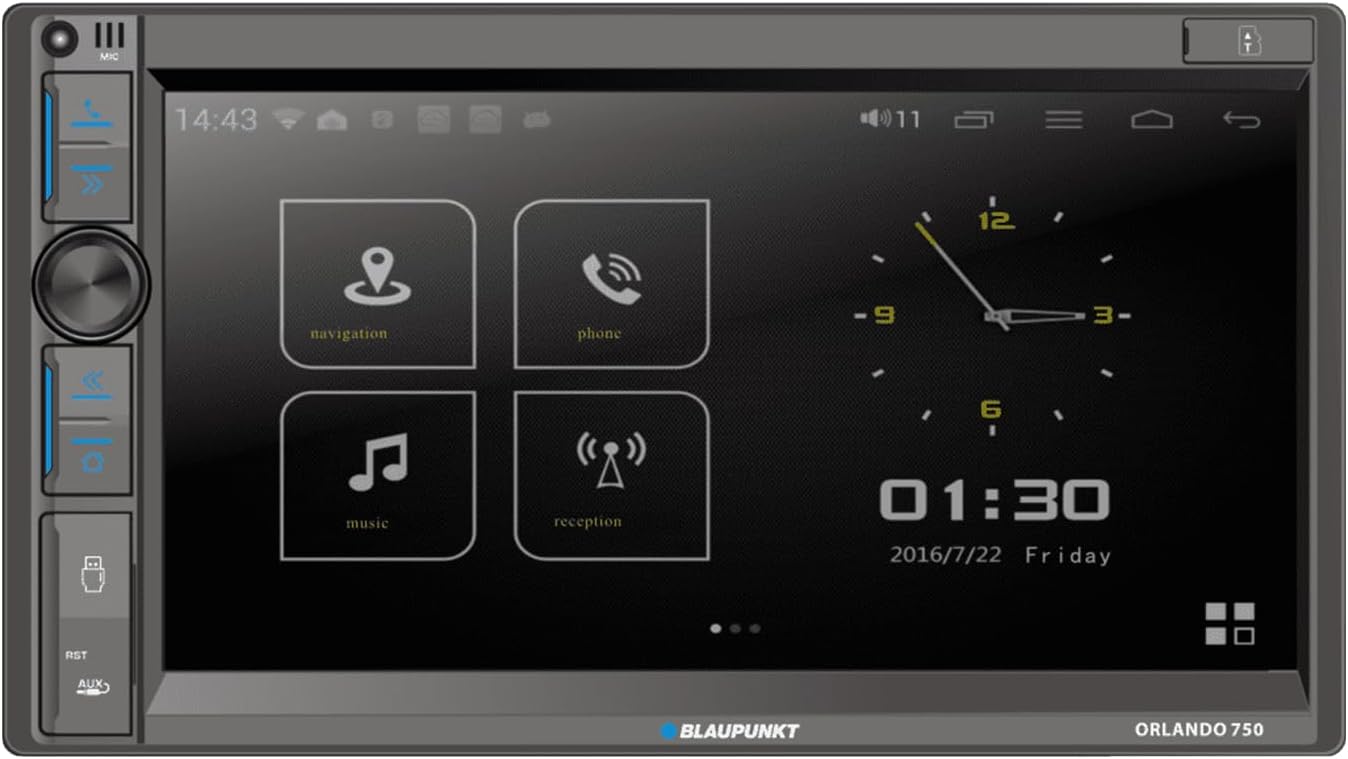
Image: Front view of the Blaupunkt Orlando 750 receiver, showing the 6.9-inch touchscreen display with navigation, phone, music, and reception icons, along with physical buttons and a rotary knob on the left side.
Blaupunkt BPS-E683 Speakers
The BPS-E683 speakers are 6x8 inch, 3-way coaxial speakers designed for clear and detailed audio reproduction. They feature a 6x8" woofer, a 1.2" tweeter, and a 0.5" super tweeter. These speakers have a peak power handling of 120W per pair (60W RMS per pair) and a frequency response range of 45Hz to 20kHz.

Image: Two Blaupunkt BPS-E683 6x8 inch 3-way coaxial car speakers. Each speaker shows a large oval woofer cone with a central tweeter and super tweeter assembly.
Speaker Wire
The package includes 50 feet of 16-gauge speaker wire, suitable for connecting the speakers to the receiver or amplifier.

Image: A spool of 50 feet of 16-gauge copper clad aluminum (CCA) speaker wire, labeled "enrock AUDIO".
Setup and Installation
Professional installation is recommended for car audio systems. Incorrect wiring can cause damage to the unit or your vehicle.
Receiver Installation
- Disconnect Battery: Before starting, disconnect the vehicle's negative battery terminal to prevent electrical shorts.
- Mounting: Install the double DIN receiver into the vehicle's dashboard opening. Secure it using the provided mounting hardware.
- Wiring Connections:
- Connect the main power harness (constant 12V, accessory 12V, ground).
- Connect speaker wires from the receiver to the BPS-E683 speakers. Ensure correct polarity (+ to + and - to -).
- Connect the antenna cable.
- If using, connect rearview camera input, steering wheel control wires, and external microphone.
- Test: Reconnect the battery and perform a basic function test before fully reassembling the dashboard.
Speaker Installation
- Location: Identify suitable 6x8 inch speaker locations in your vehicle (e.g., door panels, rear deck).
- Mounting: Securely mount the BPS-E683 speakers using appropriate screws. Ensure no wires are pinched.
- Wiring: Use the provided 16-gauge speaker wire to connect each speaker to the corresponding output on the Orlando 750 receiver. Pay close attention to positive and negative terminals.
Operating Instructions
Power On/Off
Press the power button (usually a rotary knob or dedicated button) to turn the unit on or off. The unit will power on automatically when the vehicle's ignition is turned to the accessory position.
Touchscreen Interface
The 6.9-inch touchscreen allows for intuitive control of all functions. Tap icons to select modes (Navigation, Phone, Music, Radio, etc.) and swipe to navigate menus.
Radio (AM/FM)
- Select the "Radio" icon from the main menu.
- Use the on-screen controls to scan for stations, manually tune, or select preset stations.
Bluetooth Connectivity
- Pairing:
- On the Orlando 750, select the "Phone" or "Bluetooth" icon.
- Enable Bluetooth on your mobile device and search for available devices.
- Select "Blaupunkt Orlando 750" from your device's list.
- Confirm the pairing code on both devices if prompted.
- Hands-Free Calling: Once paired, you can make and receive calls directly through the receiver. Use the built-in microphone or an external microphone for clear communication.
- Audio Streaming: Stream music from your paired device to the receiver.
Wireless Apple CarPlay & Android Auto
The Orlando 750 supports wireless connection for both Apple CarPlay and Android Auto, allowing you to integrate your smartphone's features directly onto the receiver's display.
- Ensure your smartphone's Wi-Fi and Bluetooth are enabled.
- On the receiver, select the CarPlay or Android Auto icon.
- Follow the on-screen prompts to connect your device. For initial setup, you may need to confirm permissions on your phone.
USB Playback
Insert a USB storage device into the USB input. The receiver will automatically detect and allow playback of compatible audio and video files.
Camera Inputs
The unit supports front and rear camera inputs. When connected, the display will automatically switch to the rearview camera feed when the vehicle is in reverse. The front camera can be accessed manually.
Audio Settings
Access the audio settings menu to adjust equalizer (13-band EQ), balance, fader, and subwoofer levels for optimal sound quality.
Maintenance
- Cleaning the Screen: Use a soft, lint-free cloth to gently wipe the touchscreen. For stubborn smudges, slightly dampen the cloth with water or a screen-safe cleaner. Avoid harsh chemicals.
- General Cleaning: Keep the unit and speakers free from dust and debris. Use a soft brush or compressed air for hard-to-reach areas.
- Software Updates: Periodically check the Blaupunkt website for any available firmware updates for the Orlando 750 receiver. Follow the instructions carefully for any update procedures.
Troubleshooting
| Problem | Possible Cause | Solution |
|---|---|---|
| No power | Incorrect wiring; Blown fuse; Vehicle battery issue. | Check power and ground connections. Inspect vehicle fuses and the fuse on the receiver's wiring harness. Verify vehicle battery charge. |
| No sound from speakers | Incorrect speaker wiring; Mute function active; Volume too low; Faulty speakers. | Verify speaker connections and polarity. Check if the unit is muted or volume is at minimum. Test with known good speakers if possible. |
| Bluetooth not connecting | Bluetooth off on device/receiver; Device not in pairing mode; Interference. | Ensure Bluetooth is enabled on both devices. Put receiver in pairing mode. Delete previous pairings and try again. Move closer to the unit. |
| CarPlay/Android Auto not working | Incorrect phone settings; App not updated; Wireless connection issues. | Ensure Wi-Fi and Bluetooth are on. Check phone settings for CarPlay/Android Auto permissions. Update phone OS and apps. Try restarting both devices. |
| Poor radio reception | Antenna not connected; Damaged antenna; Weak signal area. | Check antenna connection. Inspect antenna for damage. Try a different location or a powered antenna. |
Specifications
Blaupunkt Orlando 750 Receiver

Image: Diagram listing key features and specifications of the Blaupunkt Orlando 750 receiver, including screen size, CarPlay/Android Auto support, Bluetooth, and power output.
- Display: 6.9" Digital TFT Touch Screen (1024 x 600 px)
- Connectivity: Wireless Apple CarPlay, Wireless/USB Android Auto, Bluetooth (HFP, A2DP, PBAP) with built-in Mic
- Tuner: AM/FM
- Inputs: Front USB (Audio & Video, 2A), Front SD Card Slot, Front AUX In, Rearview Camera, Steering Wheel Control
- Outputs: AV-Output, RCA Line-Out x5
- Audio: 13-Band EQ
- Power Output: 4 x 45 Watts Max Power (60 watts x 4 RMS)
- Load Impedance: 4 Ohms
- Other Features: Selectable color keys illumination, SWC compatible
Blaupunkt BPS-E683 Speakers

Image: Diagram detailing the specifications of the Blaupunkt BPS-E683 speakers, including size, power handling, frequency response, and impedance.
- Type: 6x8" 3-Way Coaxial Speaker
- Power Handling: 30W RMS / 60W Max (per speaker)
- Frequency Response: 45Hz - 20kHz
- Impedance: 4 Ohm
- Sensitivity: 88.2dB
- Woofer: PP Cone with Rubber Surround, Steel Basket
- Tweeter: Neodymium Tweeter Magnet, PET Balanced Dome Tweeter
- Super Tweeter: Ceramic w/PET Diaphragm
- Grilles: Not included
- Accessories: Screw Kits and Speaker Wires
Speaker Wire
- Gauge: 16 AWG
- Length: 50 Feet
- Material: Copper Clad Aluminum (CCA)
Warranty and Support
For warranty information and technical support, please refer to the warranty card included with your product or visit the official Blaupunkt website. Keep your purchase receipt as proof of purchase for warranty claims.
Online Resources: www.blaupunkt.com