
1. Introduction
Thank you for choosing the Daewoo DW1109 Portable Mini Radio. This manual provides essential information for the safe and efficient operation of your device. Please read it thoroughly before use and retain it for future reference.
The DW1109 is designed for simplicity and functionality, offering access to AM and FM radio bands. Its compact size makes it ideal for portable use.
2. Safety Information
To ensure safe operation and prevent damage, please observe the following precautions:
- Do not expose the radio to water or excessive moisture.
- Avoid extreme temperatures, direct sunlight, or dusty environments.
- Do not attempt to disassemble or modify the radio. This will void the warranty.
- Use only the specified battery type (refer to battery compartment markings).
- Keep out of reach of children.
- Clean the device with a soft, dry cloth. Do not use abrasive cleaners.
3. Package Contents
Verify that all items are present in the package:
- Daewoo DW1109 Portable Mini Radio
- User Manual (this document)
4. Product Overview
Familiarize yourself with the components of your Daewoo DW1109 radio.
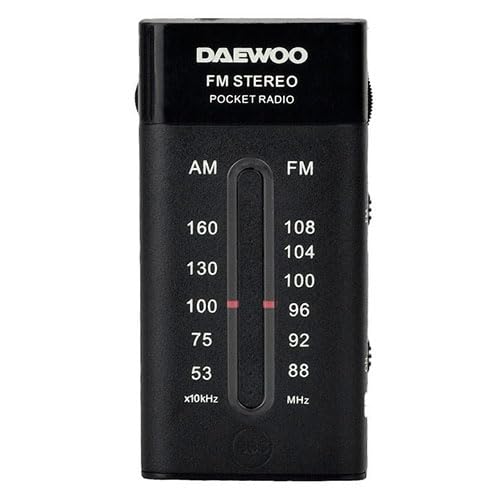
Figure 1: Front view of the Daewoo DW1109 Portable Mini Radio. This image shows the compact design, the tuning dial, volume control, and band selector switch.
Controls and Features:
- Tuning Dial: Used to select radio frequencies.
- Volume Control: Adjusts the audio output level and often serves as the power switch.
- Band Selector Switch: Toggles between AM and FM bands.
- Telescopic Antenna: Extendable antenna for optimal FM reception.
- Battery Compartment: Located on the back or side for battery installation.
5. Setup
5.1. Battery Installation
- Locate the battery compartment cover, typically on the back of the radio.
- Slide or unclip the cover to open it.
- Insert the required batteries (e.g., 2 x AA batteries, not included) according to the polarity indicators (+ and -) inside the compartment.
- Replace the battery compartment cover, ensuring it clicks securely into place.
Note: Remove batteries if the radio will not be used for an extended period to prevent leakage.
6. Operating Instructions
6.1. Turning On/Off
Rotate the volume control knob clockwise until you hear a click to turn the radio on. Rotate it counter-clockwise until it clicks to turn the radio off.
6.2. Selecting a Band (AM/FM)
Use the band selector switch, usually located on the side or top of the radio, to choose between AM (Amplitude Modulation) and FM (Frequency Modulation) bands.
6.3. Tuning to a Station
- Extend the telescopic antenna fully for optimal FM reception. For AM reception, the internal antenna is generally sufficient, but rotating the radio may improve signal.
- Slowly rotate the tuning dial until you hear your desired station clearly.
- Adjust the volume to a comfortable listening level using the volume control knob.
7. Maintenance
7.1. Cleaning
Wipe the exterior of the radio with a soft, dry, lint-free cloth. Do not use liquid cleaners, aerosols, or solvents, as these can damage the finish or internal components.
7.2. Storage
When not in use for extended periods, store the radio in a cool, dry place, away from direct sunlight and extreme temperatures. Remove batteries before storage.
8. Troubleshooting
| Problem | Possible Cause | Solution |
|---|---|---|
| No sound or very low volume. |
|
|
| Poor reception/static. |
|
|
| Radio does not turn on. |
|
|
9. Specifications
| Feature | Detail |
|---|---|
| Model Number | DW1109 |
| Brand | Daewoo |
| Radio Bands | AM/FM Analog |
| Power Source | Battery operated (typically AA/AAA, not included) |
| Item Weight | 3.52 ounces (approximately 100 grams) |
| Dimensions | Not specified |
10. Warranty and Support
10.1. Warranty Information
Daewoo products are manufactured to high-quality standards. For specific warranty terms and conditions, please refer to the warranty card included with your purchase or visit the official Daewoo website. Keep your proof of purchase for warranty claims.
10.2. Customer Support
If you encounter any issues not covered in the troubleshooting section or require further assistance, please contact Daewoo customer support. Contact details can typically be found on the product packaging, the official Daewoo website, or your purchase documentation.
Online Support: www.daewoo.com
