
1. Product Overview
This manual provides instructions for the assembly, operation, and maintenance of your Tangkula 5-Tier L-Shaped Corner Bookshelf. Designed to maximize space utilization, this industrial-style bookshelf fits seamlessly into 90-degree corners, offering ample storage and display space.

Image 1.1: The Tangkula 5-Tier L-Shaped Corner Bookshelf, fully assembled and styled.
2. Safety Information
WARNING: Failure to follow these safety instructions may result in injury or damage to the product.
- Always secure the bookshelf to the wall using the provided anti-tip devices to prevent accidental tipping.
- Do not exceed the maximum weight capacity of 275 lbs (125 kg) for the entire unit. Distribute weight evenly across shelves.
- Use the adjustable foot pads to ensure stability on uneven floors. Adjust until the unit is level and does not wobble.
- Keep small children and pets away from the unit during assembly.
- Do not climb on or hang from the bookshelf.
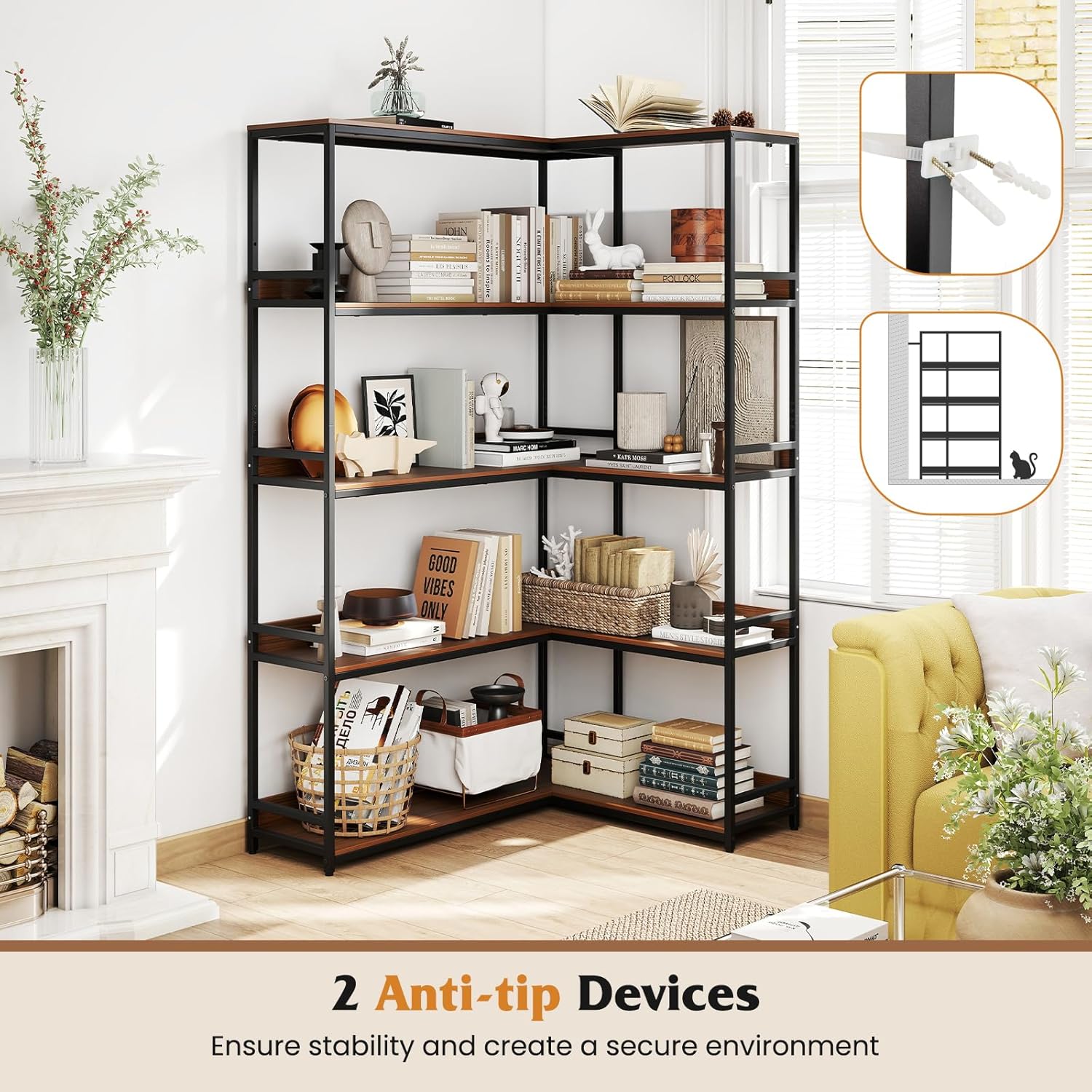
Image 2.1: Illustration of the anti-tip devices for wall mounting.
3. Package Contents
Please verify that all components are present before beginning assembly. If any parts are missing or damaged, please contact customer support.
- 1 x Bookshelf (disassembled components)
- 1 x User Guide (this document)
- Hardware Pack (screws, bolts, anti-tip devices, adjustable foot pads)
4. Setup and Assembly Instructions
Assembly typically requires two adults. No additional tools are provided, so ensure you have a screwdriver and possibly a rubber mallet for gentle tapping.
- Unpack and Identify Parts: Carefully unpack all components and lay them out on a clean, soft surface to prevent scratches. Refer to the included parts list (not provided in JSON, so I'll generalize) to identify each piece.
- Assemble the Metal Frames: Begin by connecting the vertical metal frame sections. Ensure all holes align correctly. Do not fully tighten screws until all components are loosely assembled. This allows for minor adjustments.
- Attach Shelves to Frames: Secure the engineered wood shelves to the metal frames. Pay attention to the orientation of each shelf, ensuring any raised edges or safety guardrails face the correct direction as indicated in the diagrams.
- Connect L-Shaped Sections: Join the two L-shaped sections of the bookshelf to form the complete corner unit. Ensure a snug fit at the 90-degree angle.
- Tighten All Screws: Once all parts are in place and aligned, gradually tighten all screws until secure. Avoid over-tightening.
- Attach Anti-Tip Devices: Position the bookshelf in its desired corner. Attach the anti-tip devices to the top rear of the bookshelf and secure them to a wall stud using appropriate hardware. This step is crucial for safety.
- Adjust Foot Pads: Adjust the leveling foot pads at the bottom of the frame to ensure the bookshelf is stable and level on your floor.

Image 4.1: Key structural features including safety guardrails and adjustable foot pads.
5. Operating Instructions (Usage)
Your Tangkula corner bookshelf is designed for versatile storage and display. Follow these guidelines for optimal use:
- Placement: Position the bookshelf in a 90-degree corner to maximize its space-saving design. Ensure it is secured to the wall using the anti-tip devices.
- Loading: Distribute items evenly across all five tiers. Place heavier items on lower shelves for increased stability.
- Weight Capacity: The total weight capacity for the entire unit is 275 lbs. Avoid concentrating heavy loads on a single shelf.
- Suitable Items: Ideal for books, decorative items, photo frames, plants, and small storage boxes. The raised edges and safety guardrails help prevent items from falling.

Image 5.1: Examples of items suitable for storage and display.

Image 5.2: The bookshelf is suitable for various room types including living rooms, studies, and balconies.
6. Maintenance
To keep your bookshelf in excellent condition, follow these simple maintenance tips:
- Cleaning: Wipe surfaces with a soft, damp cloth. Avoid abrasive cleaners or harsh chemicals that could damage the finish.
- Dusting: Regularly dust the shelves and metal frame to prevent buildup.
- Inspection: Periodically check all screws and connections to ensure they remain tight. Re-tighten if necessary.
- Stability Check: Regularly verify that the bookshelf remains stable and level. Re-adjust foot pads or anti-tip devices if any wobbling occurs.
- Avoid Moisture: Protect the engineered wood from excessive moisture or direct sunlight to prevent warping or fading.
7. Troubleshooting
| Problem | Possible Cause | Solution |
|---|---|---|
| Bookshelf wobbles or is unstable. | Uneven floor; loose connections; anti-tip devices not secured. | Adjust the foot pads until the unit is level. Check and tighten all screws. Ensure anti-tip devices are properly installed and secured to the wall. |
| Parts do not align during assembly. | Screws tightened too early; incorrect part orientation. | Loosen all screws, re-align parts, then gradually tighten. Double-check part numbers and orientations against the assembly diagrams. |
| Missing parts. | Packaging error. | Contact Tangkula customer support with your purchase details and a list of missing parts. |
8. Specifications

Image 8.1: Detailed dimensions and weight capacity.
| Feature | Detail |
|---|---|
| Model Number | bookcase-10940 |
| Overall Dimensions (L x W x H) | 43.5” x 35” x 71” (110.5 cm x 89 cm x 180.3 cm) |
| Shelf on Left Side (L x W) | 42” x 11” (106.7 cm x 27.9 cm) |
| Shelf on Right Side (L x W) | 22.5” x 11” (57.2 cm x 27.9 cm) |
| Height Between Shelves | 16” (40.6 cm) |
| Material | Engineered Wood, Metal |
| Max. Weight Capacity | 275 lbs (125 kg) |
| Net Weight | 40 lbs (18.1 kg) |
| Number of Shelves | 5 |
| Special Features | 90 Degrees Corner Design, Heavy-Duty Metal Frame, Anti-Tip Devices, Adjustable Foot Pads |
9. Warranty and Support
For warranty information or customer support, please refer to the retailer's policy where the product was purchased or visit the official Tangkula website. Please have your model number (bookcase-10940) and purchase date available when contacting support.
Online Support: Visit the Tangkula Store on Amazon