
Introduction
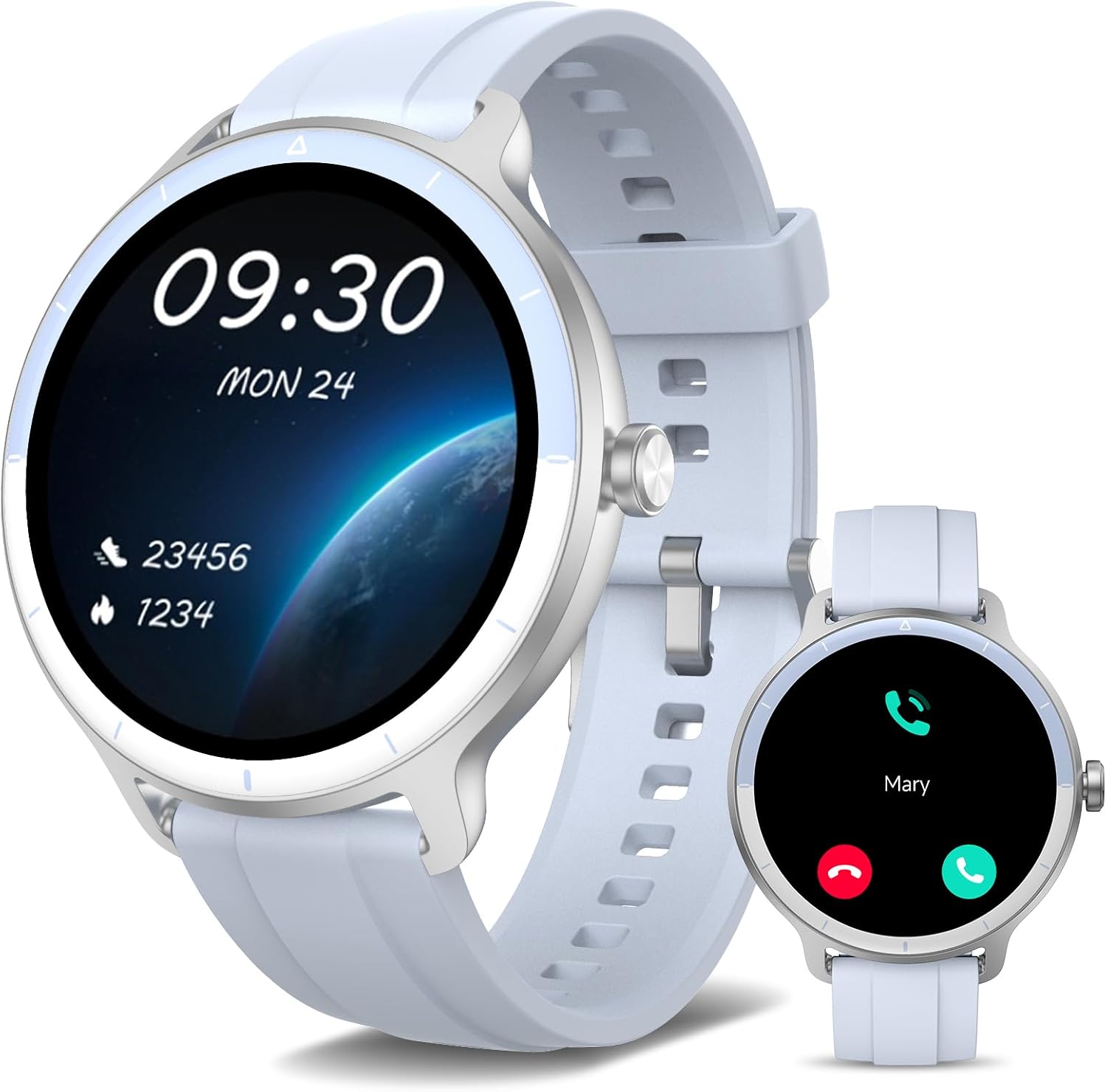
The YMZ Smart Watch DR03 is a versatile fitness tracker and smartwatch designed for both men and women. Featuring a 1.27-inch HD touchscreen, Bluetooth calling capabilities, and over 100 sports modes, it helps you monitor your health and stay connected. This manual provides detailed instructions for setting up, operating, and maintaining your device.
- Bluetooth Call & AI Voice Assistant: Connects via Bluetooth 5.3 for calls, contacts, and notifications. Integrated AI voice assistant for hands-free control.
- 24/7 Health Monitoring: Tracks heart rate, blood oxygen, respiratory rate, and sleep patterns (deep/light sleep, awakening).
- 100+ Sports Modes: Includes running, hiking, cycling, yoga, and more, accurately recording calories burned and distance.
- IP68 Waterproof: Suitable for daily activities like hand washing and sweating.
- Long Battery Life: 290mAh battery provides 5-7 days of active use and 30 days standby time with 2.5 hours of charging.
- Multi-functional: Features include menstrual cycle tracker, breathing exercises, weather forecast, music/camera control, find phone, calculator, calendar, and mini-games.
- Customizable Watch Faces: 1.27-inch HD screen with 100+ cloud watch faces and option to upload personal photos.
What's in the Box
Upon opening your YMZ Smart Watch DR03 package, you should find the following items:
- YMZ Smart Watch DR03 (Light blue)
- Charging Cable
- User Manual (this document)
- Watch Band

An image showing the YMZ Smart Watch DR03, its dimensions, and the included accessories: charging cable, user manual, and watch band.
Setup
1. Charging the Smart Watch
Before initial use, fully charge your YMZ Smart Watch DR03. Connect the provided charging cable to the charging port on the back of the watch and plug the USB end into a standard USB power adapter (not included) or a computer USB port. A full charge takes approximately 2.5 hours.

An image illustrating the battery life of the YMZ Smart Watch DR03, showing 5 days for heavy usage, 7 days for basic usage, and 15 days in low power mode.
2. App Installation and Pairing
To unlock the full features of your smartwatch, download the "VeryFit" app on your smartphone. The app is compatible with iOS 9.0 / Android 6.0 and above.
- Scan the QR code on the product box or search for "VeryFit" in the Google Play Store (for Android) or Apple App Store (for iOS).
- Install and open the "VeryFit" app.
- Ensure your phone's Bluetooth is turned on.
- In the "VeryFit" app, navigate to the device section and search for "DR03".
- Select "DR03" to connect. The app will confirm successful pairing.
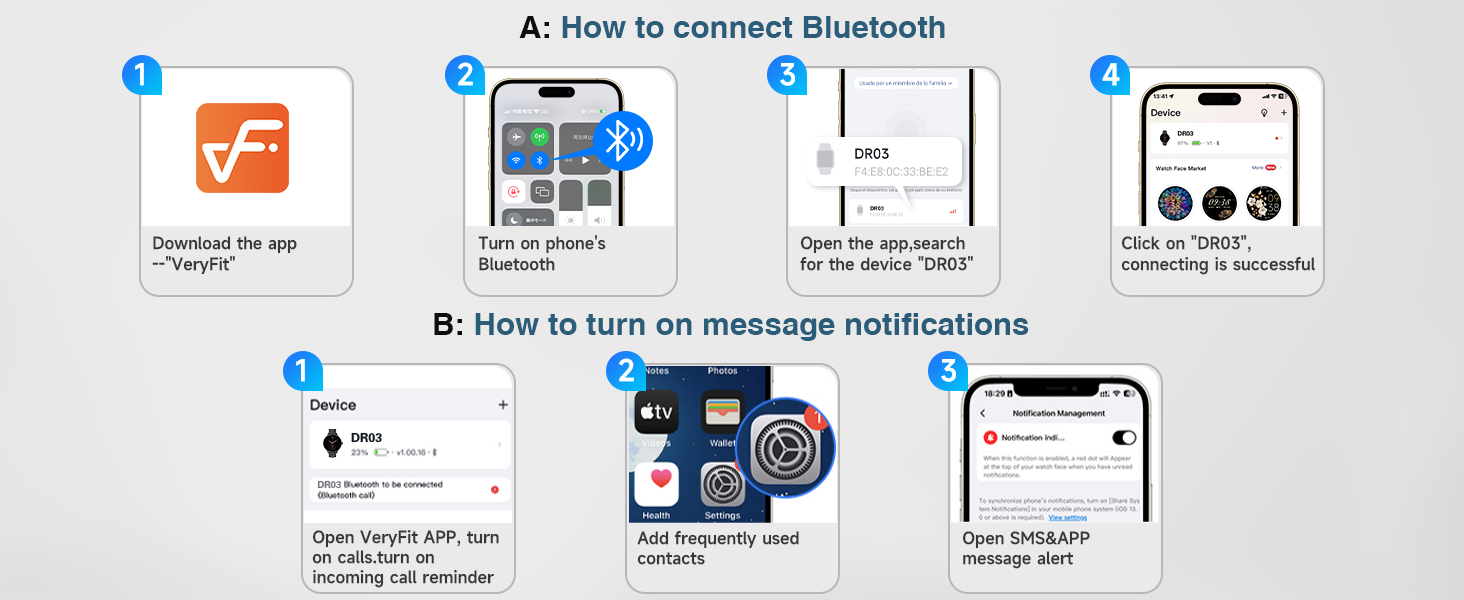
A visual guide demonstrating the steps to connect the smartwatch via Bluetooth using the VeryFit app and how to enable message notifications on your phone.
3. Customizing Watch Faces
Personalize your smartwatch display with various watch faces:
- Via App: Open the "VeryFit" app, go to the watch face settings, and choose from over 100 beautiful cloud watch faces. You can also upload your own photos (e.g., selfies, pet photos) to create a unique look.
- On Watch: Long press the screen directly on the smartwatch to access quick switching options for pre-installed watch faces.

An image showcasing the 1.27-inch LCD display of the YMZ Smart Watch DR03, highlighting its high resolution, rich color display, and fast touch-screen response speed, along with examples of various customizable watch faces.
Operating Your Smart Watch
1. Basic Navigation
The YMZ Smart Watch DR03 features a responsive touchscreen and a rotating crown for easy navigation:
- Swipe: Swipe left, right, up, or down on the screen to access different menus, notifications, and widgets.
- Tap: Tap an icon or option to select it.
- Rotating Crown: Rotate the crown to scroll through lists or adjust settings. Press the crown to return to the home screen or confirm selections.
2. Bluetooth Calling
Once connected to your phone via Bluetooth, you can manage calls directly from your wrist:
- Answer/Make Calls: Use the built-in microphone and speaker to answer incoming calls or dial out from your watch.
- Store Contacts: Store frequently used contacts in the watch for quick dialing.
- Check Call Logs: Review your call history directly on the watch.

An image showing the YMZ Smart Watch DR03 displaying an incoming call, with a smartphone showing the call interface, and various social media and messaging app icons indicating message notification capabilities.
3. Message Notifications
Receive notifications from various applications on your phone directly on your smartwatch. Ensure message alerts are enabled in the "VeryFit" app and your phone's settings.

An image depicting the smartwatch on a wrist, displaying a message notification, surrounded by icons of various messaging and social media applications, indicating real-time message alerts.
4. AI Voice Assistant
Utilize the built-in AI voice assistant for convenient control and information retrieval:
- Ask questions.
- Control music playback.
- Check the weather.
- Set alarms and timers.
- Find your phone.

An image showing a hand wearing the YMZ Smart Watch DR03, with speech bubbles indicating voice commands like "Please set an alarm for 7 PM tonight," "What's the weather today?" and "Please help me find my phone," demonstrating the AI Voice Assistant feature.
5. Health Monitoring
The smartwatch provides comprehensive health tracking features:
- Heart Rate Monitoring: Continuously tracks heart rate patterns and alerts for abnormal rhythms. Health trend analysis is available in the companion app.
- Blood Oxygen Monitoring (SpO2): Measures your SpO2 levels day and night, providing sleep oxygen variation analysis.
- Sleep Monitoring: Tracks sleep stages (light sleep, deep sleep, REM) and provides sleep quality analysis and suggestions.
- Stress Level Monitoring: Real-time stress assessment on a 0-100 scale with a 3-tier classification (High, Medium, Low).

An image displaying the back of the YMZ Smart Watch DR03 with its green light sensors, alongside charts illustrating sleep monitoring, heart rate, blood oxygen, and respiratory rate data, indicating real-time health monitoring capabilities.
6. Sports Modes
The YMZ Smart Watch DR03 offers 12 built-in regular sports modes, expandable to over 100 modes, to meet the needs of most sports enthusiasts. It accurately records calories burned and distance traveled, synchronizing all data to your phone for effective analysis.
- Accessing Modes: Navigate to the sports mode section on your watch to select your desired activity.
- Tracking: The watch will automatically track your workout metrics.
- Data Sync: All recorded data is synchronized to the "VeryFit" app for detailed analysis and progress tracking.

An image showcasing the YMZ Smart Watch DR03 displaying various workout modes, surrounded by smaller images of people engaging in different sports like cycling, yoga, and swimming, highlighting its 100+ sport modes and IP68 waterproof rating.
7. Other Features
The smartwatch is equipped with a variety of additional features to simplify and enrich your daily life:
- Find My Phone: Locate your misplaced phone by triggering an alarm from your watch.
- Alarm Clock: Set alarms directly on your watch.
- Camera Control: Use your watch as a remote shutter for your phone's camera.
- Music Control: Play, pause, skip tracks, and adjust volume for music playing on your phone.
- Calculator: A basic calculator for quick calculations.
- Games: Enjoy mini-games directly on your watch.
- Weather Forecast: Get real-time weather updates.
- Breathing Exercises: Guided breathing exercises for relaxation.
- Menstrual Cycle Tracker: For women, track menstrual cycles and predict periods.
- Smart Quick Timer: Instant timers for workouts, reading, and beauty routines.

An image highlighting various features of the YMZ Smart Watch DR03, including Find Phone, Alarm Clock, Camera Control, Music Control, Calculator, and Games, arranged around the watch face.
Maintenance
1. Waterproof Guidelines (IP68)
The YMZ Smart Watch DR03 is IP68 waterproof, meaning it is resistant to dust and can withstand immersion in water up to 1.5 meters for 30 minutes. This makes it suitable for:
- Washing hands
- Washing face
- Daily sweating
- Shallow swimming (e.g., pool swimming)
Important Limitations: To ensure the longevity of your device, avoid exposing it to:
- Hot showers/saunas (steam and high temperatures can damage seals)
- Ocean swimming (saltwater can corrode components)
- High-pressure water jets (e.g., diving, strong water flow)

An image showing a person's arm with the smartwatch submerged in water, illustrating its IP68 waterproof capability, with a text box listing activities to avoid, such as hot showers/saunas, ocean swimming, and high-pressure water jets.
2. Cleaning and Care
Regular cleaning helps maintain your smartwatch's appearance and functionality:
- Wipe the screen and watch body with a soft, lint-free cloth.
- If necessary, dampen the cloth slightly with water. Avoid using harsh chemicals or abrasive materials.
- Clean the charging contacts periodically to ensure proper charging.
- Ensure the watch is dry before charging.
3. Battery Care
To maximize battery life:
- Avoid extreme temperatures.
- Do not leave the watch fully discharged for extended periods.
- Charge the watch regularly, even if not in constant use.
Troubleshooting
If you encounter issues with your YMZ Smart Watch DR03, try the following solutions:
| Problem | Possible Solution |
|---|---|
| Watch won't turn on | Ensure the watch is fully charged. Connect to the charger and wait a few minutes. |
| Cannot connect to phone/app | Ensure Bluetooth is enabled on your phone. Restart both the watch and your phone. Make sure the "VeryFit" app is updated to the latest version. Forget the device in your phone's Bluetooth settings and try pairing again. |
| Notifications not appearing | Check notification settings in the "VeryFit" app. Ensure app notifications are enabled in your phone's system settings for the "VeryFit" app and the specific apps you want notifications from. Keep the app running in the background. |
| Inaccurate health data | Ensure the watch is worn snugly on your wrist, not too tight or too loose. Clean the sensors on the back of the watch. Consult the app for calibration or troubleshooting tips. |
| Short battery life | Reduce screen brightness. Turn off unnecessary features like continuous heart rate monitoring if not needed. Limit frequent notifications. Ensure the watch is fully charged each time. |
For more detailed troubleshooting or persistent issues, refer to the help section within the "VeryFit" app or contact customer support.
Specifications
| Feature | Detail |
|---|---|
| Model Name | DR03 |
| Screen Size | 1.27 Inches |
| Wireless Communication | Bluetooth 5.3 |
| Battery Capacity | 290mAh (1 AA battery included) |
| Battery Life (Typical) | 5-7 days (active use), 30 days (standby) |
| Charging Time | Approx. 2.5 hours |
| Waterproof Rating | IP68 |
| Compatible OS | iOS 9.0 / Android 6.0 and above |
| Item Weight | 5.6 ounces |
| Package Dimensions | 11.26 x 3.74 x 0.67 inches |
| Manufacturer | YMZ |
| Country of Origin | China |
Warranty and Support
YMZ is committed to providing high-quality products and excellent customer service.
- Return Policy: The YMZ Smart Watch DR03 comes with a 30-day return policy from the date of purchase.
- Maintenance: A 1-year maintenance period is provided for your device.
- Customer Service: For any questions, concerns, or technical assistance, please feel free to contact YMZ customer service. We are always ready to provide you with the most fulfilling solution.
Please retain your proof of purchase for warranty claims.