
DongBlitz AB02
DongBlitz AB02 Bluetooth Mobile Game Controller User Manual
Model: AB02 | Brand: DongBlitz
Introduction
This manual provides comprehensive instructions for the DongBlitz AB02 Bluetooth Mobile Game Controller. Designed for mobile gaming enthusiasts, this versatile wireless telescopic gamepad offers precise control and broad compatibility with iPhone, Android, and Nintendo Switch devices. Please read this manual thoroughly to ensure proper setup, operation, and maintenance of your controller.

Figure 1: DongBlitz AB02 Mobile Game Controller with a smartphone. The controller features ergonomic grips and a central phone mount, enhancing the mobile gaming experience.
Key Features
- Dual Connectivity: Supports Bluetooth wireless modes for versatile connection with iPhone and Android devices.
- Hall Effect Joysticks: Utilizes premium Hall sensor technology for drift-proof, ultra-precise analog control, enhancing gaming accuracy.
- Telescopic Design: Features a universal phone mount with an expandable grip, securely holding your device while maintaining comfortable ergonomics.
- Responsive Controls: Equipped with MicroTactile cross buttons and a SpeedGrip Pro surface for precise input and enhanced grip during extended gaming sessions.
- Gaming Optimization: Seamless lens support design with tap-and-play functionality ensures instant game compatibility and minimal input lag.
- Haptic Sense: Provides true immersion through adjustable haptic feedback.
- Custom Key Combination: Includes programmable back buttons (L4/R4) for personalized control schemes.
Setup Guide
1. Attaching Your Device
The controller features a telescopic design to accommodate various smartphone sizes. Gently extend the controller to fit your device. Ensure your phone's USB-C port aligns with the controller's integrated USB-C connector for a secure physical connection.

Figure 2: The telescopic design allows for a secure fit for devices ranging from 115mm to 193mm, including smartphones and the Nintendo Switch.
2. Initial Connection and Pairing
Once your device is securely connected via the USB-C port, the controller should automatically establish a connection. The indicator lights on the controller will illuminate to confirm the connection status:
- Green Light: Indicates successful connection with an iOS device.
- Blue Light: Indicates successful connection with an Android device.
If the controller does not connect automatically or the indicator lights do not show the correct color, proceed to the calibration steps below.
3. Calibration (If Needed)
If automatic connection fails or controls are unresponsive, calibration may be required:
- Press and hold the View button and the H button simultaneously for 5 seconds.
- The indicator lights on the controller will begin to flash white.
- Move both joysticks through their full range of motion three times.
- Press each trigger (L1, L2, R1, R2) through its full range of motion three times.
- Press the A button to confirm calibration. The indicator lights should then turn green (for iOS) or blue (for Android), signifying successful calibration.
Operating Instructions
1. Basic Controls
The DongBlitz AB02 controller features a standard gamepad layout for intuitive control:
- Left Analog Stick: Movement and navigation.
- D-Pad (MicroTactile Cross): Directional input for menus and specific game actions.
- Right Analog Stick: Camera control and aiming.
- Action Buttons (A, B, X, Y): Primary game actions.
- Shoulder Buttons (L1, R1): Quick actions or secondary functions.
- Triggers (L2, R2 - Hall Effect): Analog input for acceleration, braking, or precise aiming.

Figure 3: Detailed view of the controller's MicroTactile Cross D-pad and SpeedGrip Pro handles, designed for enhanced tactile feedback and comfort.
2. Advanced Features
- Hall Effect Joysticks and Triggers: Experience superior precision and durability with magnetic sensor technology, eliminating drift and ensuring consistent performance.
- Haptic Feedback: The controller provides adjustable haptic feedback for immersive gameplay. Refer to your device's or game's settings for customization options.
- Custom Key Mapping: Utilize the programmable back buttons (L4 and R4) for custom key combinations, allowing for personalized control schemes to suit your gaming style.

Figure 4: Explanation of the drift-proof Hall Effect joystick technology, highlighting its precision and durability.

Figure 5: Illustration of the Hall Triggers, offering both linear and quick response modes for various gaming needs.
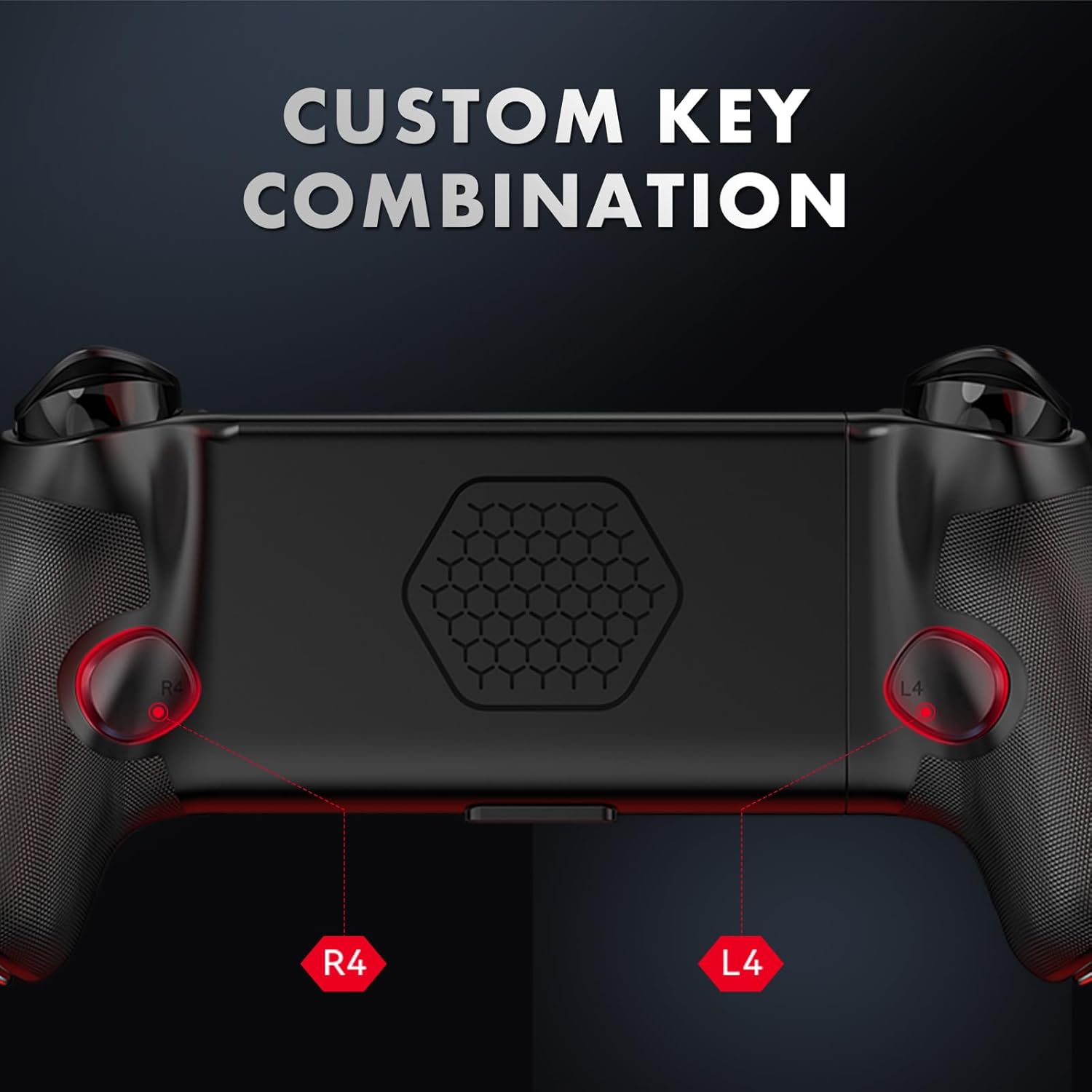
Figure 6: The L4 and R4 buttons on the back of the controller can be customized for specific in-game actions.
3. Charging Your Device
The controller allows for pass-through charging. Connect a USB-C charging cable to the controller's charging port. This will charge both the controller (if it has an internal battery, though the product description mentions AA batteries) and your connected smartphone simultaneously.
Maintenance
- Cleaning: Use a soft, dry cloth to clean the controller. Avoid using harsh chemicals or abrasive materials.
- Storage: Store the controller in a cool, dry place away from direct sunlight and extreme temperatures.
- Battery Replacement: The controller requires 1 AA battery (included). Replace the battery when performance degrades. Refer to the battery compartment for proper insertion.
Troubleshooting
| Problem | Possible Cause | Solution |
|---|---|---|
| Controller not connecting to device. | Loose USB-C connection, incorrect mode, or calibration needed. | Ensure USB-C is fully inserted. Check indicator light color (green for iOS, blue for Android). Perform calibration as described in the Setup Guide. |
| Unresponsive buttons or joysticks. | Calibration issue or software glitch. | Recalibrate the controller. Restart your smartphone and reconnect the controller. |
| Phone not charging while connected. | Charging cable not connected to controller or faulty cable. | Ensure a working USB-C charging cable is connected to the controller's charging port. Verify the power source. |
| Controller disconnects intermittently. | Loose connection or software conflict. | Ensure a stable physical connection. Restart your device and the controller. Check for any conflicting apps. |
Specifications
- Model Number: AB02
- Brand: DongBlitz
- Connectivity: Bluetooth Wireless, USB-C (for direct connection and pass-through charging)
- Compatibility: iPhone, Android, Nintendo Switch
- Joystick Technology: Hall Effect
- Trigger Technology: Hall Effect (LinearTrigger Pro, QuickTrigger Pro)
- Dimensions: 8.3 x 4 x 2.3 inches (21.08 x 10.16 x 5.84 cm)
- Weight: 13.51 ounces (383 grams)
- Telescopic Range: 115mm - 193mm
- Batteries: 1 AA battery (included)
- Release Date: January 23, 2025
Warranty and Support
DongBlitz offers a 30-day return and refund policy for this product. Additionally, a 6-month replacement service is provided for any manufacturing defects or issues encountered during normal use.
For any problems or inquiries after placing an order, please contact DongBlitz customer service. We are committed to resolving your concerns as quickly as possible.
Contact information for customer service can typically be found on the product packaging or the official DongBlitz website.
Related Documents - AB02
 |
Mytrix S3 Game Controller User Manual Explore the Mytrix S3 game controller with this comprehensive user manual. Learn about its features, setup, compatibility, FAQs, safety guidelines, and technical specifications for an enhanced gaming experience. |
 |
Joso Simhon 01 USB-C Game Controller User Manual User manual for the Joso Simhon 01 USB-C Game Controller, detailing setup, connection modes, hardware requirements, and customization options via the MooWii Gaming App. Includes device layout, troubleshooting, and button combinations. |
 |
Installation Guide for DOBE FOMIS ELECTRONICS Hall Effect Joystick for PS5 A guide on installing the V4.0 Hall Effect Electromagnetic Joystick for PS5 controllers, featuring anti-drift technology and long-life components. |
 |
FANTECH NOVA PRO WGP14V2 Wireless Gamepad User Manual Comprehensive user manual for the FANTECH NOVA PRO WGP14V2 wireless multi-platform gamepad, including setup, connection, button assignments, and troubleshooting guide. |
 |
GameSir G8+ MFi Type-C Wired Game Controller: Features, Specs, and User Guide Detailed information about the GameSir G8+ MFi Type-C wired game controller, including key features like MFi certification, Hall Effect sticks, ergonomic design, software customization, technical specifications, packaging contents, instructions, and FAQs. |
 |
EasySMX 9013Pro Wireless Game Controller User Guide Comprehensive user guide for the EasySMX 9013Pro wireless game controller, detailing features like Hall Effect triggers, programmable back buttons, and multiple connection methods for PC, Switch, Android, and iOS. |
Ask a question about this manual
Ask about setup, troubleshooting, compatibility, parts, safety, or missing instructions. Manuals+ will review the question and use this page’s manual context to help answer it.