
1. Important Safety Information
Please read all instructions carefully before assembly and use. Retain this manual for future reference.
- Always use caution when handling heavy objects to avoid injury.
- Keep sharp edges away from children and pets.
- Always unplug the power outlet when not in use.
- Follow assembly instructions carefully to avoid injury from sharp edges or pinch points.
- Do not exceed the weight limit of the vanity.
- Ensure all electrical connections are secure and comply with local regulations.
2. Package Contents
Verify that all components are present before beginning assembly. If any parts are missing or damaged, contact customer support.
- Vanity Desk Frame
- Mirror with Integrated Lights
- Glass Tabletop Panels
- Drawers (7 total: 1 long, 6 side)
- Shelves (4 open shelves)
- Power Outlet Unit
- Assembly Hardware (screws, connectors, crystal knobs)
- Instruction Manual
3. Setup and Assembly
Assembly is required for this vanity. It is recommended to have two people for certain steps, especially when handling the mirror and glass components.
- Unpack Components: Carefully remove all parts from the packaging. Lay them out on a clean, soft surface to prevent scratches. Verify all numbered parts and hardware are present.
- Assemble Base Frame: Follow the numbered instructions provided in the separate assembly guide to construct the main desk frame. Ensure all connections are tightened securely.
- Install Drawers: Insert the 7 drawers into their designated slots. Attach the crystal knob handles to each drawer.
- Place Glass Top: Carefully position the tempered glass tabletop panels onto the designated areas of the vanity. Ensure they are seated properly.
- Attach Mirror Unit: Secure the mirror unit to the back of the vanity desk. Connect the lighting cables as instructed, ensuring they are neatly concealed.
- Install Open Shelves: Attach the 4 open shelves to the mirror frame as indicated in the assembly guide.
- Connect Power Outlet: Integrate the power outlet unit into its designated location on the vanity. Plug the vanity's main power cord into a wall outlet.
For detailed step-by-step visual instructions, please refer to the included assembly diagram.

Image 3.1: Fully assembled IFSEB Makeup Vanity with Lights, showcasing its design and features.
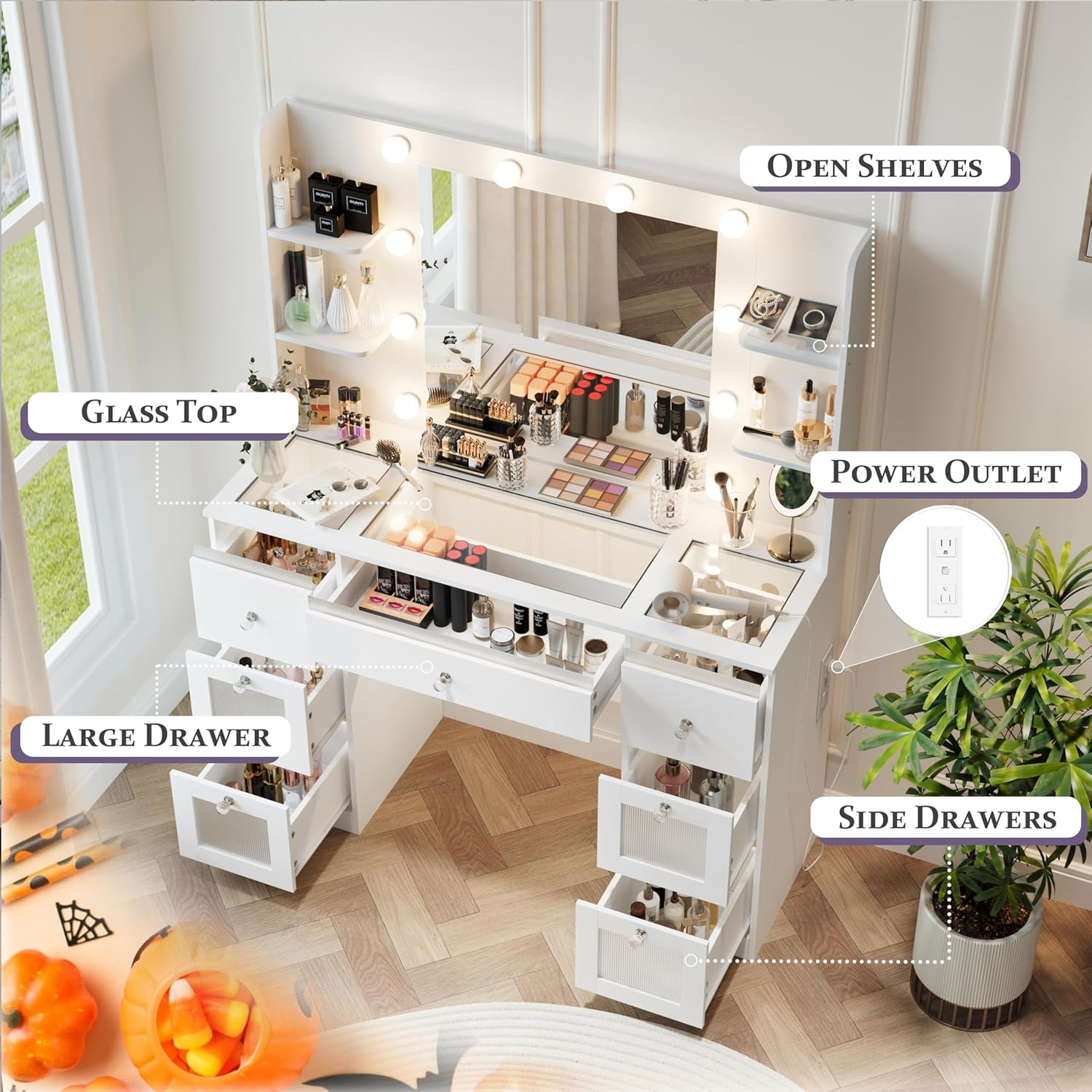
Image 3.2: An overhead view highlighting the glass top, open shelves, power outlet, and various drawers for storage.

Image 3.3: Diagram illustrating the design for invisible light cables, ensuring a clean and organized aesthetic.
4. Operating Instructions
4.1. Lighted Mirror Operation
The vanity mirror features 10 Hollywood-style light bulbs with adjustable settings.
- Power On/Off: Locate the touch sensor or button on the mirror frame to turn the lights on or off.
- Color Temperature Adjustment: Press the designated button to cycle through 3 color temperatures:
- Warm Light (3000K): Suitable for evening makeup or parties.
- Natural Light (4000K): Ideal for outdoor makeup application.
- Cold Light (6000K): Best for daily makeup routines.
- Brightness Adjustment: Hold down the button to adjust the brightness level for each color setting. Release when the desired brightness is achieved.

Image 4.1: The mirror lights can be adjusted to Cold, Natural, or Warm settings to suit different lighting needs.

Image 4.2: Visual guide demonstrating the application of Warm, Natural, and Cold light settings for various makeup scenarios.
4.2. Power Outlet Usage
The vanity includes a built-in power outlet for convenience.
- The power outlet features 2 AC outlets (125V/12A) and 2 USB ports (5V/2A).
- Use these outlets to power hair dryers, curling irons, phone chargers, and other electronic devices.
- Ensure devices are unplugged when not in use to conserve energy and for safety.

Image 4.3: The integrated power outlet provides convenient access to AC and USB charging ports.
4.3. Storage Features
The vanity offers extensive storage solutions to keep your items organized.
- Glass Top: The transparent glass tabletop allows for easy viewing and access to cosmetics stored in the drawers below.
- Lighted Drawers: The 7 drawers feature semi-transparent shelves and LED lights, illuminating contents for easy selection.
- Open Shelves: Utilize the 4 open shelves on either side of the mirror for displaying frequently used items or decorative pieces.

Image 4.4: The vanity provides ample storage with seven drawers and a spacious glass top for organizing cosmetics and accessories.
5. Maintenance and Care
- Cleaning Surfaces: Wipe down all surfaces, including the glass top and mirror, with a soft, damp cloth. For glass, use a non-abrasive glass cleaner. Avoid harsh chemicals that may damage the finish.
- Dusting: Regularly dust the vanity with a dry, soft cloth to prevent buildup.
- Electrical Components: Ensure the power outlet and light bulbs are kept dry. Do not spray liquids directly onto electrical parts.
- Drawer Maintenance: Periodically check drawer slides for smooth operation. If needed, clean any debris and apply a silicone-based lubricant.
- Avoid Overloading: Do not place excessively heavy items on the shelves or inside the drawers to prevent damage to the structure.
6. Troubleshooting
| Problem | Possible Cause | Solution |
|---|---|---|
| Lights not turning on |
|
|
| Power outlet not working |
|
|
| Drawers stick or do not slide smoothly |
|
|
7. Specifications
| Feature | Detail |
|---|---|
| Model Number | NGSZT009 |
| Brand | IFSEB |
| Product Dimensions (L x W x H) | 15.7"D x 43.3"W x 56.6"H (15.7 x 43.3 x 56.6 inches) |
| Item Weight | 105 pounds |
| Frame Material | Tempered Glass Top, Engineered Wood |
| Drawer Count | 7 (with LED lighting) |
| Shelf Count | 4 (open shelves) |
| Lighting | 10 Hollywood-style bulbs, 3 adjustable color temperatures (Warm, Natural, Cold), adjustable brightness |
| Power Outlet | 2 AC outlets (125V/12A), 2 USB ports (5V/2A), 6.0 feet power cord |
| Assembly Required | Yes |
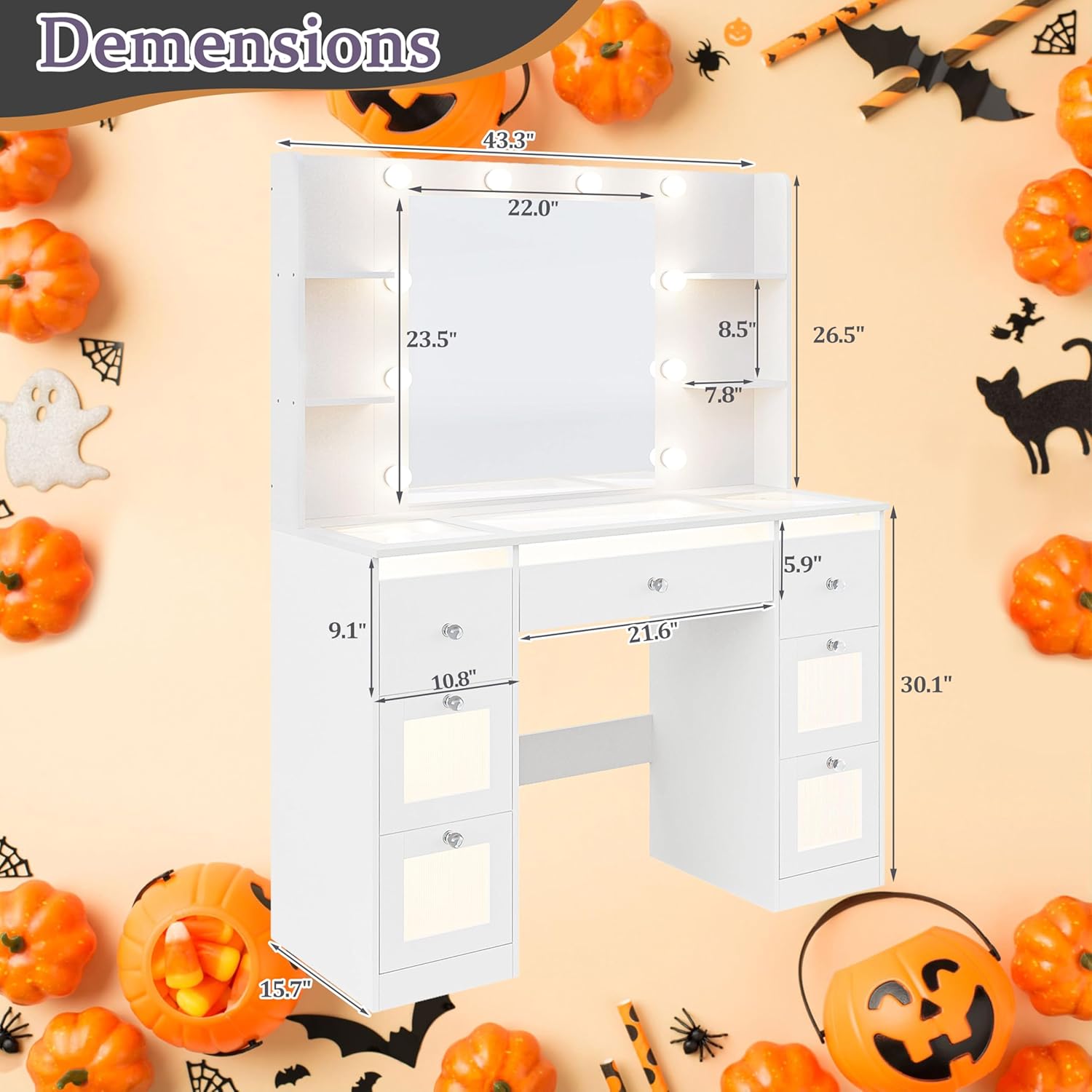
Image 7.1: Detailed dimensions of the vanity, including height, width, and depth measurements.
8. Warranty and Support
For warranty information, product support, or to report missing/damaged parts, please contact IFSEB customer service. Refer to your purchase documentation for specific warranty terms and contact details.
General customer support is available for assistance with product inquiries and troubleshooting.
- Customer Support: Refer to the contact information provided with your purchase or visit the official IFSEB website.
- Returns: This product typically includes a 30-day easy return policy. Please check your retailer's specific return policy.